Travel connectivity guide
Taif eSIM: Mobile Data for Your Saudi Arabia Trip
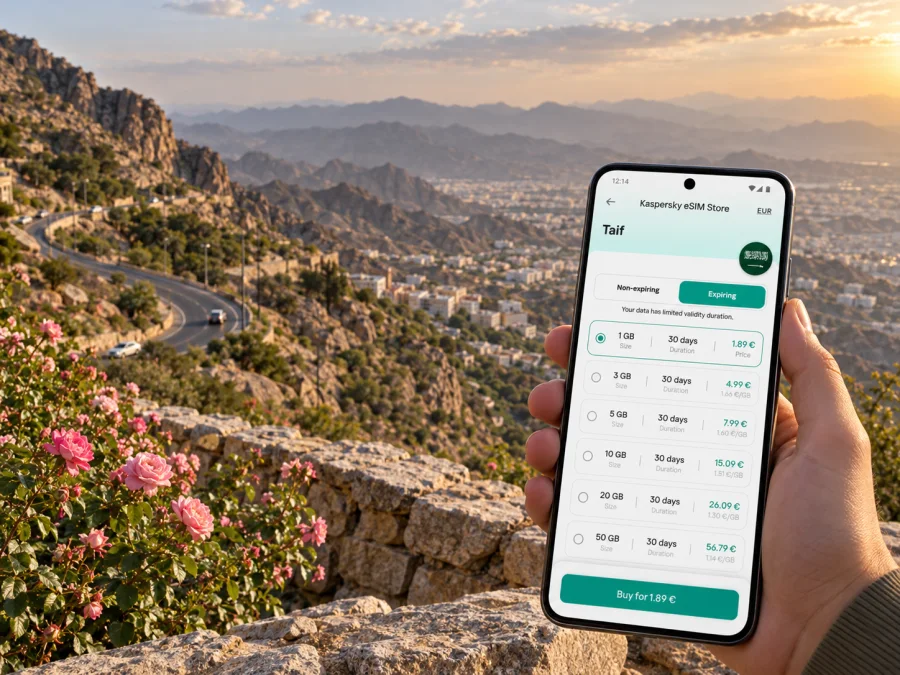
Taif eSIM for mobile connection and internet in the mountain city
Taif is a highland city in western Saudi Arabia, known for mountain scenery, rose farms and routes toward Al Hada and Al Shafa. A visit may combine an airport arrival, a city hotel and drives into the hills. Mobile internet helps with maps, pickup points, reservations and messages along the way.
An eSIM is a digital SIM profile installed on a compatible device. It can help you prepare mobile data before departure or after arrival while keeping a physical SIM in the phone if needed. Setup depends on your route, device and selected plan.
Why mobile data is useful around Taif
Taif is not only a compact city break. Visitors often combine the urban centre with mountain viewpoints, gardens, farms and longer road journeys. A working data connection can help with everyday travel tasks in both settings:
- Arrival and pickup: send your hotel or driver a message, share a location pin, and check the address before leaving the airport.
- Getting around: follow a route to your accommodation or a point of interest, then check the return journey before setting off.
- Mountain outings: keep the destination and route details available as you travel toward Al Hada or Al Shafa. Download an offline map as a backup because mobile reception can vary by place and conditions.
- Rose and farm visits: confirm opening details and directions directly with the venue before making a special trip, especially when the visit is seasonal.
- Work and communication: check messages, join a short online meeting when conditions allow, and send documents from your hotel or another suitable location.
- Daily arrangements: use messaging, online bookings and translation tools without depending on a café or hotel connection.
Plan for the places you will actually visit
Start by mapping the trip, rather than estimating data from the number of days alone. A visitor staying in central Taif and using messaging and maps will have different needs from someone uploading video, working remotely or navigating several long drives.
| Trip pattern | Main data needs | Planning note |
|---|---|---|
| Short city stay | Maps, messages, reservations | Use Wi-Fi for large downloads where practical. |
| Several days in Taif | Navigation, search, photos | Check whether photos sync over mobile data. |
| Work trip | Email, documents, online meetings | Video calls can use data quickly. |
| Road trips from Taif | Navigation and location sharing | Confirm Saudi Arabia is included and save maps offline. |
These examples do not predict a particular tariff’s data use. Video quality, backups and app settings can make a large difference. Pause automatic photo backups or limit them to Wi-Fi before travelling.
Before you choose, check four details in the plan conditions:
- Destination coverage: make sure the plan is for Saudi Arabia, even though Taif is your specific destination. City names are useful for planning, but eSIM plans are usually tied to a country or region rather than one municipality. If plan details identify a local network, use that information to understand the service described; do not assume one plan uses every Saudi operator or gives the same result in each location.
- Validity period: compare the plan’s stated duration with the time you expect to use it. Check when validity begins; the start rule can differ by plan.
- Included data: estimate your needs for maps, messaging, browsing, uploads and any remote-work tasks. Leave room for unexpected route changes.
- Top-up and usage conditions: read whether additional data can be added and what happens when the included amount is used. The available options depend on the selected plan.
For a multi-stop Saudi itinerary, check every leg before purchase. A plan for one country may suit a Taif visit and other domestic stops, but do not assume that its terms include a border crossing or every destination on a wider regional route. Read the destination list and conditions shown for the plan.
Arrival in Taif: prepare the first connection
Taif International Airport is one arrival option for the city. Your onward transport may be pre-arranged, booked after landing or coordinated with a hotel. Having your booking address and the driver’s contact details saved before the flight makes the first few minutes simpler, especially if you need to switch between airport Wi-Fi and mobile data.
A low-stress arrival sequence looks like this:
- Keep your hotel address, reservation and pickup instructions in a note that is available offline.
- If you plan to install the eSIM after landing, use a trusted Wi-Fi connection to complete the setup, then follow the device prompts.
- Select the eSIM for mobile data in the phone’s cellular settings. Keep your regular line configured for calls or texts if you need it and if your home plan allows it.
- Check that data roaming is enabled for the travel eSIM only if the plan’s instructions require it. Roaming settings are not identical across plans and devices.
- Open a map and confirm that your location and destination load before you leave a stable connection.
Do not remove a profile or reset network settings simply because the connection does not appear immediately. First check that the eSIM is switched on, selected for data, and configured according to the plan instructions. A connection may take a few minutes, and activation steps vary between devices and plans. If the phone shows an error, refer to the installation details provided with your eSIM and contact support if you still need help.
Moving between the city and the highlands
The geography is part of what makes Taif distinctive. Al Hada is associated with a steep mountain road and views toward the lower western landscape; official Saudi tourism material describes the winding road linking the Taif area with Makkah. Al Shafa is another highland destination, with mountain scenery and rose-growing areas. These are outings from the city, so plan for the road as carefully as the destination.
A few practical habits help when navigating outside the central districts:
- Enter the full venue name and verify the pin before departure. Similar names or map pins can lead to different entrances or nearby businesses.
- Check the route while you still have reliable connectivity. If the map supports offline areas, download the relevant section in advance.
- Share your destination and expected return time with someone travelling with you, particularly for a longer drive.
- Keep a charger or power bank available. Navigation, camera use and a weak signal can drain a phone faster.
- Avoid trying to read a screen while driving. Set the destination before moving and let a passenger handle changes.
- Confirm seasonal experiences, farm access and opening arrangements directly before setting out. Conditions and schedules can change.
Mobile coverage should not be treated as uniform across the city, mountain roads and remote viewpoints. Buildings, terrain, weather, network availability and congestion may affect the connection. A downloaded map, written address and a charged phone are sensible backups, even when your eSIM is active.
When you are ready to compare options for the country, choose an eSIM plan for your trip to Saudi Arabia. Kaspersky eSIM Store is an app and website that helps you select, arrange and activate an eSIM with a suitable plan for mobile data while travelling abroad. Review the displayed allowance, validity and price before making a choice; the details vary by plan.
Choosing how much data you need
A simple estimate starts with your habits. Messaging and occasional map checks generally use less data than frequent video streaming, video calls or uploading large files. Instead of choosing a plan solely by its headline allowance, think about which tasks will happen on mobile data and which can wait for Wi-Fi.
| If you expect to… | Prepare by… |
|---|---|
| Use maps throughout the day | Download offline map areas and disable unnecessary background refresh. |
| Share photos and short clips | Turn off automatic full-resolution backup over mobile data unless you need it. |
| Work from your phone | Check whether your tools can work with cellular data and keep large file transfers for Wi-Fi. |
| Make online calls | Prefer audio when bandwidth or data use matters; ordinary mobile calls may follow your home SIM’s terms. |
| Use a phone hotspot | Check the selected plan’s terms and device settings before relying on tethering. |
An eSIM plan for travel data does not automatically add a regular phone number, voice minutes or SMS. Those features are included only if the specific plan says so. You can continue to use your usual line for calls and texts if your device supports dual SIM use and your home operator’s charges are acceptable. Internet-based calling and messaging apps use data and depend on the services and contacts you already use.
Device checks before purchase
A phone must support eSIM and be eligible for use with another carrier profile. Support can differ between device families and regional variants of the same device, so the model name alone may not settle the question. Check your exact model in the phone’s settings or manufacturer documentation, and confirm that it is not carrier-locked. Check whether your device supports eSIM before choosing a plan.
If you travel with a tablet, smartwatch or a second phone, do not assume that the same eSIM can be installed on every device. Check compatibility and the plan’s installation rules for the device you intend to use. Some eSIM profiles are intended for one installation, and moving one to another device may not be possible under its terms.
Install before departure or after landing
Installing before departure can let you review the setup calmly while you still have a reliable internet connection. You can usually leave the travel eSIM switched off until you are ready to use it, but follow the plan’s activation conditions: validity may begin at purchase, installation or first connection, depending on the offer. If you prefer to install after arrival, make sure you can access the required QR code or in-app profile and a stable internet connection.
A general setup flow is:
- Confirm that your phone supports eSIM and is unlocked for the travel profile.
- Open the eSIM details in Kaspersky eSIM Store and review the installation instructions for your plan.
- On your phone, choose the option to add a mobile plan or eSIM. The wording depends on the operating system.
- Scan the supplied QR code or use the available in-app installation method. Keep the code accessible on another screen or device if scanning is required.
- Label the new line clearly, for example “Saudi Arabia travel data,” so you can distinguish it from your regular SIM.
- Choose the travel eSIM for mobile data when you are ready to use it. Enable data roaming for that line only when the plan instructions call for it.
- Test a basic page or map, then keep the plan details available in case you need to check settings later.
For step-by-step help, see the Android eSIM installation instructions or the iOS eSIM installation instructions. Menu names vary by operating-system version, manufacturer and device variant, so use the instructions that match your phone. Avoid deleting an installed eSIM unless the support guidance for your plan tells you to do so.
Keep data use predictable
Before arriving in Taif, review which apps can use mobile data in the background. Set photo and file backups to Wi-Fi only, download music or documents in advance, and turn off automatic video playback where possible. During the trip, check your phone’s data-usage screen to see which apps consume the most. If use is higher than expected, reduce video quality, pause cloud backups and use hotel Wi-Fi for large downloads where appropriate.
Taif travel scenarios
- Weekend in the city: save the hotel address, use data for maps and pickup coordination, and check the route before adding an Al Hada or Al Shafa outing.
- Rose-farm visit: confirm seasonal visitor arrangements, save the location and contact details, and verify the entrance before departure.
- Business stay: keep meeting details offline and use a stable hotel or office connection for important video calls or large files.
- Multi-stop itinerary: check that every destination falls within the plan’s stated area; a Saudi Arabia plan does not imply cross-border coverage.
A compact pre-trip checklist
- [ ] Confirm that the plan covers Saudi Arabia and review its validity and data allowance.
- [ ] Check eSIM support and carrier-unlock status for the exact device you will carry.
- [ ] Keep your regular SIM’s roaming and data settings clear so that it is not selected unintentionally.
- [ ] Save accommodation details, airport pickup instructions and key locations offline.
- [ ] Download the map areas you may need on drives toward Al Hada or Al Shafa.
- [ ] Review photo backup, app updates and video settings to manage data use.
- [ ] Carry a charging cable or power bank for long navigation sessions.
- [ ] Keep the QR code and installation guidance available if you have not installed the eSIM yet.
Frequently asked questions
Is an eSIM for Taif a city-only plan?
Usually, travel eSIM plans are described by country or region rather than by city. For Taif, check the Saudi Arabia destination and the terms shown for the selected plan. Coverage and service conditions can still vary by location and local network conditions.
Can I install the eSIM before I fly?
In many cases, installation can be completed before departure, but the activation and validity rules depend on the plan. Check when the validity period begins and follow the instructions shown with the eSIM. If the plan should only connect after arrival, keep the line turned off until then if directed.
Will the eSIM provide a local phone number?
Not necessarily. A travel data eSIM is intended for mobile internet and does not include a regular phone number, voice calls or SMS unless the plan details explicitly say otherwise. You may use internet-based messaging and calling apps over data.
Will I have a signal on every mountain road?
No. Terrain and local network conditions can affect service. Keep route information offline and charge your phone before leaving the city.
What should I do if data does not start?
Confirm that the eSIM is enabled and selected for mobile data, check the plan’s activation conditions, and review whether data roaming is required for that eSIM. Restarting the phone may help in some cases, but do not delete the profile without guidance. If the issue continues, use the plan’s troubleshooting instructions or contact support.
Choose an eSIM plan for your Taif trip
Prepare your mobile connection around your actual itinerary: consider how long you will stay, which destinations you will visit and how you use mobile data. In Kaspersky eSIM Store, you can use the app or website to choose, arrange and activate an eSIM with a plan suited to an overseas trip. Review the current terms and check device compatibility before you proceed.


