Travel connectivity guide
Takamaka eSIM: Mobile Internet in Seychelles
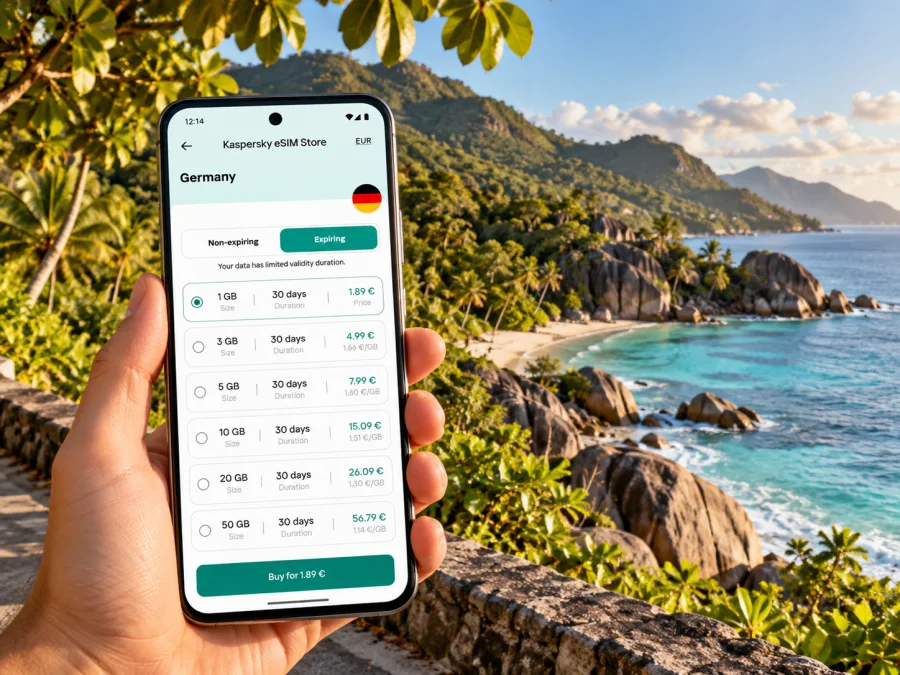
Takamaka eSIM: mobile connection and internet for Mahé’s southern coast
Takamaka is a district at the southern end of Mahé, Seychelles’ main island. It is a coastal, residential area rather than a compact city centre: visitors come for the beaches, guesthouses, quiet roads and access to the island’s south. That geography shapes how you use mobile internet here. You may need it to check the route from the airport, coordinate a taxi or bus, find the right turn to your accommodation, message a host, and keep maps available while moving between the coast and nearby districts.
A travel eSIM can make those everyday tasks simpler because it gives your compatible phone a mobile-data option without changing the physical SIM. It is useful to prepare before leaving home, but it does not remove the need to check the selected plan’s country coverage, data allowance, validity, device support and activation terms. In Takamaka, as anywhere, actual service depends on the plan’s partner network and local conditions at your location.
First, locate Takamaka correctly
The name refers to a district of Mahé, not a separate island or a dense urban destination. The district is the southernmost on Mahé and lies about 26 kilometres from Victoria. It can be approached from Anse Royale on the north-eastern side or from Baie Lazare to the north-west. Its sub-districts include Anse Forbans, Anse Marie Louise, Upper and Lower Takamaka, Intendance and Grand Police, among others.
There is also an Anse Takamaka beach in Baie Sainte Anne on Praslin. That is a different place on a different island. If your booking or itinerary says “Takamaka,” confirm whether it means the Mahé district, Anse Takamaka beach on Mahé, or the beach with the same name on Praslin. This small check helps with ferry and flight planning, accommodation directions and the map pin you save offline.
Why mobile internet matters in a spread-out district
In a city centre, a short walk may connect one landmark to the next. Around Takamaka, your day is more likely to involve separate coastal stops, a ride between accommodation and beach, or a trip through a neighbouring district. A working data connection can help with:
- opening a saved map and checking the final turns to a guesthouse or beach access;
- sharing your location and arrival estimate with a host or driver;
- checking public-transport information before leaving rather than assuming a bus is frequent;
- looking up a return route before the evening, when transport choices may be more limited;
- translating a message, checking a reservation, or contacting someone if a plan changes;
- using messaging and internet calls when the eSIM tariff is data-only.
Arriving from the airport and moving south
International flights arrive at Seychelles International Airport on Mahé. Takamaka is south of Victoria, and the district’s official profile describes it as around 26 kilometres from the capital. For a first arrival, plan the journey as a transfer across the island rather than a quick walk from the airport. Depending on your arrival time and accommodation, you may use a pre-arranged transfer, taxi, rental car or public bus connections.
If you are driving, download the route and confirm the property’s preferred entrance with the host. Save its pin before setting off; a property name alone may point to a similarly named place or a different part of the district.
Buses serve Mahé, and the Seychelles Public Transport Corporation publishes route and timetable information. Takamaka appears on the official Mahé route map. Routes, departure times and operating details can change, so check the current schedule before committing to a connection, especially if you are carrying luggage or arriving late. A route map is helpful for orientation, but it does not guarantee that a service runs at the time you need. Keep a taxi or transfer contact as a fallback for a late arrival or a missed connection.
Plan data around the way you travel
Takamaka works as a base for a southern Mahé itinerary. Your connection needs may include the airport transfer, navigation, messages at your accommodation and a return journey through another district. Signal can vary between a bay, hillside road and building interior; no plan label guarantees service at every point.
| Travel pattern | Likely data tasks | A sensible preparation |
|---|---|---|
| One-night stop | Arrival message, route, check-in details | Save the booking, pin and host number before landing |
| Beach-focused stay | Directions between accommodation and coast, messages, weather checks | Download an offline map and keep mobile data available for updates |
| Self-drive around south Mahé | Navigation, revised stops, contacting the host | Keep the phone charged, save key pins and check the plan’s data allowance |
| Remote-work visit | Email, file transfer, calls and backup connectivity | Estimate work data separately and ask the accommodation about Wi-Fi |
| Short layover or late arrival | Transfer coordination and destination confirmation | Install and test the eSIM before travel; keep the transfer details offline |
If your trip includes Mahé, Praslin and La Digue, select a tariff by the destinations it explicitly covers. A country plan may be appropriate for a trip around Seychelles, while a regional tariff can be worth considering if your route crosses several countries. The coverage list and tariff conditions matter more than a broad regional label. For a Mahé stay in Takamaka, check eSIM tariff options for Seychelles and compare the data volume, validity period and stated destination coverage with your actual travel dates.
The Seychelles network market and your travel eSIM
Check the selected plan’s destination and network details before paying. A listed network does not promise signal at a particular beach or inside a building; terrain and the phone can affect the experience. Keep essential directions and accommodation contacts available offline.
A local operator’s eSIM is a separate product from a travel eSIM. For example, Cable & Wireless Seychelles has its own eSIM information for its customers. That local service may have its own eligibility, registration and number requirements. If you need a local phone number, ordinary voice calls or SMS, review the terms of a local mobile service directly. A data-only travel eSIM generally does not replace your home number, and conventional calls or SMS are not included unless a particular tariff explicitly says otherwise. Internet messaging and calls may work through apps when data is available.
Choosing a plan for Takamaka
Consider these questions before selecting a package:
- Which destinations are included? Confirm Seychelles is named in the plan details. If you will continue to another island or country, check those destinations separately.
- How long will you need data? Match validity to the trip, including arrival and departure days. Check when validity begins; it may be tied to activation or first network use under the plan’s terms.
- What will you do online? Navigation, messages and reservations differ from video calls, social media uploads and streaming. Estimate regular use instead of choosing by the longest possible trip alone.
- Does the plan fit your device? Confirm eSIM support for the exact model and regional variant, and make sure the handset is not locked to another operator.
- What happens when data runs out? Read whether you can top up, buy another package or need a new eSIM. The answer depends on the specific tariff.
- Is the eSIM data-only? If you require a regular telephone number, voice calls or SMS, verify that these are included; do not infer them from the word “eSIM.”
Check the exact device variant
eSIM support can vary by model and regional version. A phone name alone is not enough to confirm compatibility: manufacturer variants, carrier locks and software settings can differ. Check the device’s specifications or settings, verify that it can add an eSIM, and confirm that it is unlocked for use with another service. Check whether your device supports eSIM before you choose a plan.
Check before payment. If you use a work-managed phone, confirm that you may add a travel profile. Keep your regular SIM active for your usual number if needed; menu names vary by device and operating system.
Install before you travel, activate with care
When possible, install the eSIM while you still have a stable internet connection. Installation and first use are separate stages on some devices and tariffs: follow the instructions attached to the plan and avoid deleting an installed profile if you are unsure whether it can be restored. Have your booking details and any QR code accessible on a second screen or printed copy if the phone cannot scan its own display.
- Check the plan and phone. Confirm Seychelles coverage, validity, data allowance, eSIM compatibility and the handset’s unlock status.
- Connect to reliable Wi-Fi. Keep the phone charged and have your account or purchase details ready.
- Add the eSIM profile. Use the app’s flow or the supplied QR code, following the steps for your operating system.
- Label the line. Give it a clear name such as “Seychelles data” so it is easy to identify alongside your home SIM.
- Choose when to use it. Set the travel eSIM as the mobile-data line when the plan should begin, and check whether data roaming must be enabled for that profile under its instructions.
- Test without removing your home line. Once activation is appropriate, confirm that mobile data works and that your usual line remains configured as intended.
For device-specific steps, use the Android eSIM installation guide or the iOS eSIM installation guide. The exact process may differ across operating-system versions. Follow the plan’s own activation instructions, because activation timing and roaming settings are not identical for every eSIM.
Using your phone around the coast
A compact pre-departure checklist:
- [ ] Save your accommodation pin and a written address.
- [ ] Download an offline map of Mahé and mark the airport, Victoria, Takamaka and planned stops.
- [ ] Check current SPTC information if you intend to travel by bus.
- [ ] Save the host, transfer and emergency contacts where you can find them offline.
- [ ] Confirm eSIM compatibility, unlock status, plan validity and Seychelles coverage.
- [ ] Install the eSIM over stable Wi-Fi and keep its installation instructions available.
- [ ] Turn off background downloads that could consume data unexpectedly.
Common questions
Is Takamaka a city?
Takamaka is an administrative district on Mahé, the main island of Seychelles. It is a dispersed southern-coast destination rather than a compact city centre. Use the district name together with your exact accommodation or beach pin when planning a route.
Is Anse Takamaka on Mahé the same as the beach on Praslin?
No. The Takamaka district is on Mahé, while another Anse Takamaka is listed within Baie Sainte Anne on Praslin. Confirm the island on your booking and itinerary before arranging transport.
Will a travel eSIM connect to Cable & Wireless Seychelles or Airtel Seychelles?
That depends on the roaming arrangements for the selected travel tariff. The fact that those operators serve the local market does not identify the network used by every travel eSIM. Check any network details shown with the specific plan, and remember that actual signal varies by location and conditions.
Can I use the eSIM for regular calls and text messages?
Usually a travel data eSIM is for mobile internet and does not provide a standard phone number, voice service or SMS unless the tariff explicitly includes them. You can use internet-based messaging and calling apps when you have data. Keep your usual SIM available if you need your existing number.
Should I install the eSIM before reaching Takamaka?
Installing before departure is often convenient because you can use stable Wi-Fi and take time to follow the steps. Check the tariff’s activation rules first. Some plans begin validity at a particular activation point, so do not assume that installing and starting the data period are always the same event.
What if mobile data is unavailable at my accommodation?
Check that the eSIM is selected for mobile data, the plan is active and the settings match its instructions. Move to a location with a clearer signal and retry after a short wait. If the issue continues, consult the plan’s support channel and use saved offline directions or your accommodation’s Wi-Fi where available. Coverage cannot be guaranteed in every room or at every coastal location.
A connected visit, planned around the place
Takamaka rewards a slower itinerary: a coastal stay, a drive or bus ride between districts, time at the beach, and room to adjust plans as the day unfolds. Mobile data helps with navigation and coordination, but good preparation still matters. Save your key locations, verify bus information, keep essential details offline and check the selected tariff’s terms before you travel.
Kaspersky eSIM Store is an app and website where you can choose, purchase and activate an eSIM with a suitable tariff for mobile internet on an international trip. Review the destination, data allowance, validity and device requirements, then choose an eSIM tariff for your Seychelles trip that fits the way you plan to use your phone in Takamaka.


