Travel connectivity guide
Takayama eSIM: Mobile Internet for Your Japan Trip
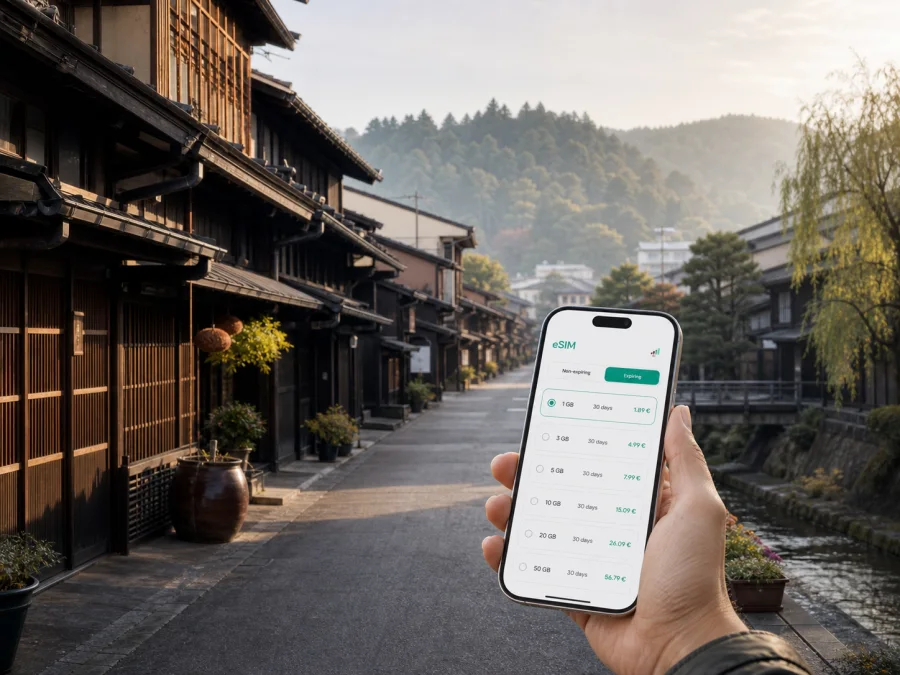
Takayama eSIM: mobile connection and internet for a trip to Japan
Takayama is a mountain city in Gifu Prefecture where a compact historic centre meets the wider Hida region. A visit may include an arrival at Takayama Station, an early walk beside the Miyagawa River, an evening in the preserved streets of Sanmachi Suji, and a day trip beyond the city. For all of those moments, mobile internet is a practical part of the journey: it helps you check a hotel message, read a timetable, open a map, translate a menu, or let someone know that you have arrived.
An eSIM, or digital SIM card, can be prepared before a trip to Japan and used as the mobile-data line on a compatible phone. It does not require you to remove your usual physical SIM card, so you can keep your familiar number available for calls or messages while using the travel eSIM for data. Kaspersky eSIM Store is an app and website that helps you choose, arrange, and activate an eSIM with a suitable plan for mobile internet during an overseas trip.
Why mobile internet matters in Takayama
Takayama is easy to enjoy at a walking pace, but a visitor still moves between the station, old town, markets, accommodation, and transport links beyond the centre.
With a working data connection, you can use your phone for the small decisions that keep a trip flowing:
- checking the name and location of a ryokan or hotel before leaving the station;
- comparing a walking route with a local bus route;
- translating a short message or reading information at a station;
- confirming a restaurant reservation and sharing your arrival time;
- using maps while walking between Takayama Jinya, the old town, and the river;
- keeping a separate route open when a planned regional bus journey changes.
Takayama areas where an eSIM can be useful
Takayama Station and the bus centre
For many visitors, Takayama Station is the practical starting point. The nearby bus centre is important for journeys beyond the central streets. Keep the hotel address, reservation number, and names of important stops available while you are carrying luggage.
Sanmachi Suji and the preserved townscape
The Sanmachi Traditional Buildings Preservation Area is one of Takayama’s defining urban spaces. Its wooden townhouses, shops, cafés, and sake breweries are best explored slowly. Mobile data helps you mark your entry point, find the next stop, check a reservation, or share a pin if your group separates.
Miyagawa River and the morning markets
The Miyagawa Morning Market is held beside the river and is a natural early stop. An early start is worthwhile because market activity is part of the morning rhythm rather than a late-day attraction. If you are meeting someone, agree on a clear point near the river or a bridge instead of relying on a vague message such as “I am nearby.” With an eSIM active, you can send a precise location, check the walking route, and then put the phone away to enjoy the market.
Takayama also has the Jinya-mae Morning Market. Seasonal hours and the range of stalls can differ, so check current local information before setting out.
Takayama Jinya and the Higashiyama area
Takayama Jinya provides a different perspective on the city’s history, while the Higashiyama Walk leads toward temples and quieter streets. Plan the order around opening times, weather, and your energy; maps can keep the route compact and avoid an unnecessary return to the station.
Hotels, ryokans, and stays outside the centre
Takayama accommodation ranges from station-area hotels to traditional stays and properties farther from the busiest streets. If your accommodation is outside the centre, check the last part of the journey before leaving the station and keep the property’s phone number or message thread accessible. For a ryokan stay, send a message if you are delayed.
Choosing an eSIM plan for a Takayama itinerary
There is no single correct data amount for every visit. Choose by the way you will use your phone, not only by the number of nights. A quiet weekend with saved maps and occasional messages has a different profile from a working trip with video calls, cloud documents, and frequent photo uploads.
| Travel pattern in Takayama | Typical phone use | What to consider |
|---|---|---|
| Short stopover | Routes, messages, reservations, occasional searches | A smaller data allowance may be enough if maps and accommodation details are prepared in advance. |
| Two- or three-day city visit | Navigation, translation, photos, restaurant research | Choose enough data for repeated map use and updates throughout the day. |
| Longer Hida itinerary | Takayama plus regional day trips, messaging, travel research | Match the validity period to the complete route, not only the nights in the city. |
| Business visit | Email, documents, calls through internet apps, hotspot use | Check the plan conditions and whether the available allowance suits work traffic. |
| Shared travel planning | One person coordinates routes and bookings for a group | Allow for more frequent map checks and messages, especially when plans change. |
Before selecting, identify the country or region in which the plan is valid. Takayama is in Japan, so a Japan plan is the relevant starting point for a city stay. If your route continues to another country, do not assume that a Japan-only plan covers it; review the plan’s stated destination and validity. If you will travel through several Japanese cities, a single country plan may be easier to manage than arranging a separate profile for each stop, subject to the plan conditions shown at the time of selection.
The second decision is duration. Count validity from the point at which the plan becomes active according to its conditions, and leave room for a delayed train, weather change, or an extra night. Note what happens after the included data is used.
The third decision is data behaviour. Maps and messages are usually lighter than video. Before departure, set updates to Wi-Fi only and review which apps can use mobile data in the background.
When you are ready to compare current options, you can choose an eSIM plan for a trip to Japan. Kaspersky eSIM Store helps you review the destination, validity, and data details before you arrange and activate an eSIM. Read the current options and conditions on the selection screen.
Practical Takayama scenarios
The early-arrival traveller
You reach Takayama before your room is ready and want to make the most of the morning. Activate the travel eSIM when appropriate, confirm the station and accommodation on the map, store your luggage, and walk toward the river or the old town. If the weather changes, you can reorganise the route while staying within the central area. The key preparation is to keep the first address and booking details available before you start walking.
The regional or business traveller
For a regional day trip, check the route from your accommodation to the station or bus centre, save the return details, and allow time for the last connection. For a business visit, test the eSIM before the meeting, keep documents and the route accessible, and confirm plan support if you need a hotspot.
The festival visitor
Takayama Festival consists of the spring Sanno Festival and the autumn Yahata Festival. The official city tourism information lists the recurring dates as April 14–15 for the spring festival and October 9–10 for the autumn festival, with the night festival on the first day of each event. Crowds, temporary restrictions, and transport arrangements can change the experience, so check the current event information close to travel.
For a festival visit, use the phone as a coordination tool: agree on a meeting point, save the accommodation address, and send messages before entering a crowded area. Follow local signs and staff instructions if access changes.
How to install and activate an eSIM
Installation is easiest when you have a stable internet connection, a charged phone, and the QR code or profile information supplied after arranging the eSIM. Do not wait until you are rushing through a station if you can complete the preparation calmly beforehand.
1. Check the phone
Confirm that the phone supports eSIM and is not locked to a mobile operator. Models can differ by market and region, so verify the exact device variant. You can check your device compatibility before arranging a plan.
2. Keep the details ready
Open the confirmation message or account area containing the QR code or installation information. If the QR code is displayed on the same phone, use the manual details or display the code on another screen when the device requires scanning.
3. Open mobile-network settings
Go to the phone’s mobile-network or cellular settings and select the option to add an eSIM or mobile plan. The wording can differ between Android and iOS versions.
4. Add the eSIM profile
Scan the QR code or enter the requested information. Follow the on-screen steps and give the profile a clear label, such as “Japan travel,” so you can distinguish it from your regular line.
5. Select the data line
Choose the travel eSIM for mobile data when you want to use it. Keep your regular line for calls or messages if that matches your plan, and review the phone’s data-switching settings so it does not change lines unexpectedly.
6. Check roaming settings for the eSIM
Some travel eSIMs require data roaming to be enabled for the eSIM profile. Follow the conditions shown for the selected plan. Keep data roaming disabled on your usual line if you want to avoid unintended roaming charges from that line.
7. Test before setting out
Open a lightweight webpage or map, send a message, and confirm the correct line is being used for mobile data. Activation or registration can take a few minutes. If the profile does not connect, check the plan instructions, restart the phone if appropriate, and contact support.
For device-specific steps, read the Android eSIM installation instructions or the iOS eSIM installation instructions. The menus and labels may vary by device version, so use the instructions that match your phone.
What to check before you travel
Use this checklist before leaving for Takayama:
- Device: eSIM support is confirmed for the exact model, and the phone is not operator-locked.
- Plan: Japan is included as the destination, and the validity period covers the full itinerary.
- Data: the allowance suits your use of maps, messaging, work tools, photos, and any hotspot needs.
- Activation: you know when the plan starts counting and have the QR code or profile details available.
- Settings: you know which line is used for mobile data and whether data roaming is required for the travel profile.
- Power: the phone, charger, and backup battery are ready for long walking days and regional travel.
- Offline backup: key addresses, reservations, and the first route are saved in case the signal or battery is temporarily unavailable.
- Support: you know where to find help if installation, activation, or data use does not behave as expected.
Do not judge a plan only by its headline data amount. Look at validity, destination, activation rules, top-up conditions if offered, and limitations shown during selection. A map-and-messaging trip and a work trip may need different allowances.
FAQ about eSIM for Takayama
Is a Japan eSIM suitable for a stay in Takayama?
Yes, if the plan’s destination conditions include Japan and the validity covers your stay. Takayama is a city in Japan, so check the country listed for the plan rather than looking for a separate city-specific profile.
Can I keep my regular SIM in the phone?
Often, a compatible dual-SIM phone can keep the regular SIM and an eSIM together. The exact combinations depend on the device. Select the travel profile for mobile data and review which line handles calls, messages, and data.
Does the travel eSIM include a phone number?
Not usually, unless the conditions explicitly say otherwise. A travel eSIM is generally intended for mobile internet, not a separate number for ordinary calls and SMS. Internet-based messaging and calling apps can be used when their requirements are met.
What if my phone does not connect after installation?
First confirm that the travel profile is enabled and selected for mobile data. Check the plan’s instructions, the required roaming setting, and whether the phone has a signal. Restarting the device may help it register again. If the issue remains, contact support and keep the order or activation details ready.
A calm connection plan for Takayama
The most useful eSIM setup is the one that fits your actual route. Prepare the first address before arrival, keep the regular number available if needed, choose a Japan plan whose validity and data allowance match the itinerary, and test the travel profile before you leave the station. Then use mobile internet for the practical details—maps, messages, reservations, translation, and transport checks—while letting the city’s streets, markets, architecture, and mountain setting take centre stage.
Kaspersky eSIM Store helps you choose, arrange, and activate an eSIM with a suitable plan for mobile internet during an overseas trip. Review the destination, duration, data allowance, and conditions, check your device, and then choose an eSIM plan for your Takayama trip when you are ready.


