Travel connectivity guide
Takoradi eSIM: Mobile Data and City Travel Guide
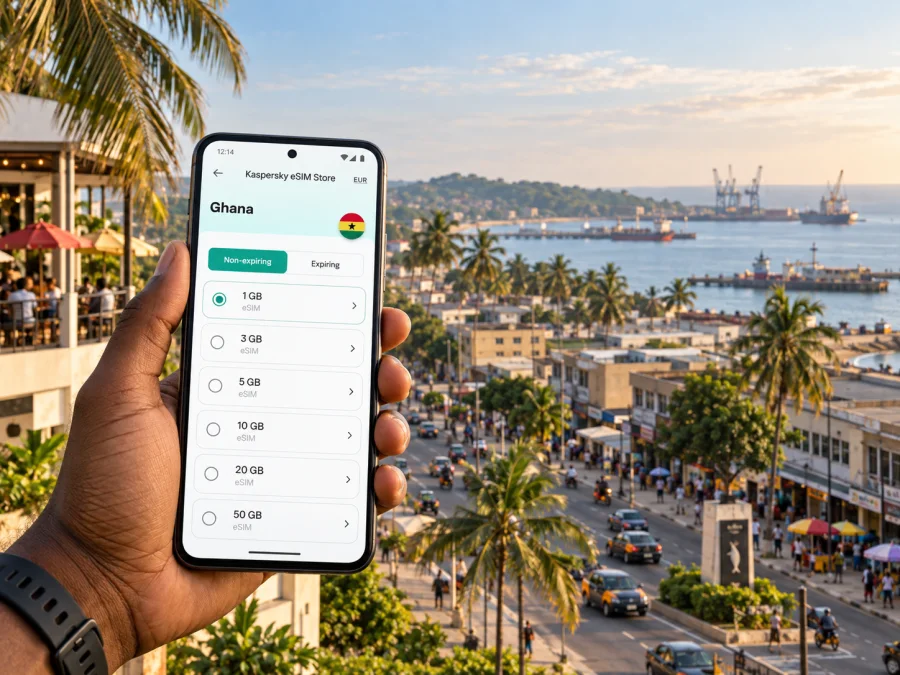
Takoradi eSIM: mobile connection and internet around the city
Takoradi is a useful base for a visit to Ghana’s Western Region, whether you arrive for work, meet friends, explore the coast or continue to another town. It is also part of the larger Sekondi–Takoradi urban area, so an address described as “Takoradi” may be some distance from the centre you have in mind. A mobile data connection can help you check the exact destination, contact your host and follow a route while plans are still taking shape.
An eSIM is a digital SIM profile that you add to a compatible phone. For a trip, it can provide mobile data without taking out your usual physical SIM. Before choosing one, check its destination, data allowance, validity period, activation conditions and supported networks. The service available at a particular address depends on the plan and local network conditions; a phone’s signal can vary indoors, on the road and at busy times.
Getting oriented after arrival
Takoradi has its own airport, and travellers may also reach the city by road from elsewhere in Ghana. Your onward journey will depend on your arrival point and arrangements, so confirm the meeting place and pickup details before setting off. If you have a local driver or hotel transfer, share a map pin as well as a written address: a pin is often easier to follow when street names or landmarks are described differently by different people.
When you land, give your phone a moment to register on a network before relying on directions. If you installed an eSIM in advance, check that its line is enabled and that mobile data is assigned to it. Keep your regular SIM available for calls or messages if you need it, and verify which line is selected for data to avoid using the wrong connection unintentionally.
A simple arrival sequence helps:
- Connect to a trusted Wi-Fi network if you need to download a map or confirm a booking.
- Check your hotel or host’s address and save its location in your map app.
- Ask the driver to confirm the destination before leaving the airport or bus stop.
- Once underway, follow the route and keep the destination visible in case the driver asks for clarification.
- Save the map area for offline use as a backup, especially if you expect to travel beyond the urban centre.
Takoradi Airport is close enough to the city to be a relevant arrival point for some itineraries, but the final travel time depends on traffic, the exact destination and the time of day. Treat a map estimate as a guide, not a guarantee. If you are meeting someone, agree on a recognizable pickup point and a fallback method for reaching them.
Moving around Takoradi
Daily travel is a mix of walking for short distances and road transport for longer ones. Taxis and shared local transport can be useful, but routes, fares and availability may change. Agree on the destination and fare before a taxi journey, and allow extra time when crossing the busy commercial core. If you use a ride-hailing app, confirm the vehicle and pickup point in the app before getting in.
The road network can feel less intuitive when you are new to the city. Instead of entering a broad destination such as “Takoradi centre,” search for the specific hotel, office, market or junction. Keep a second landmark in mind too: if a driver cannot use a pin, a well-known nearby place can make the directions clearer.
| Trip need | A practical approach | How mobile data helps |
|---|---|---|
| Airport to accommodation | Confirm the exact property and pickup point before travel | Open the location pin and message the host if plans change |
| Short visit to the centre | Search for the specific shop, office or meeting place | Check the route and call or message if you are delayed |
| Crossing the wider urban area | Ask locally which transport option suits the destination | Compare route options and share your trip details |
| Day trip beyond the city | Confirm transport and return arrangements in advance | Check maps and keep contact details accessible |
Market Circle is one of Takoradi’s best-known orientation points and a major commercial area. Its roads and surrounding activity can be busy, and redevelopment has affected how the market area is organized over time. Check your destination on the day rather than assuming a familiar entrance, stall or pickup point is unchanged. If you are meeting someone there, agree on a clear landmark at the edge of the area instead of trying to find one another in the middle of the crowd.
The central business district around Market Circle brings shops, services and offices into a compact part of the city. For an appointment, save the exact building or business location and leave room for the final walk from the road. A navigation app can guide you to the general vicinity, but it may not identify the best entrance or account for temporary works, one-way streets or a busy curb. A quick call or message to the person you are meeting can resolve the last few metres.
Takoradi and Sekondi are connected parts of the same urban area, but they are not interchangeable labels for a precise destination. If your itinerary includes the port side, a rail stop or an address toward Sekondi, check the location rather than assuming it is near Takoradi’s centre. The local rail service can be an option on the Sekondi–Takoradi corridor; check the operator’s latest timetable and service notices before building a journey around it. Availability and operating arrangements can change.
Choosing accommodation and planning a work trip
For a short stay, compare accommodation by its relationship to your actual plans. A hotel near the central commercial area may make meetings and errands easier; a property farther away may suit a quieter stay or a particular work site. “Near Takoradi” is not precise enough for planning. Look at the map, confirm the property’s current location with the host, and note how you will travel to your first appointment.
Business visitors often need reliable access to calendars, email, video calls, shared documents and navigation. Those tasks use data at different rates. A video meeting can consume considerably more than checking messages, so consider your work pattern and the plan’s allowance rather than choosing only by trip length. If your schedule includes travel between Takoradi, Sekondi and sites outside town, leave some data for route checks and changes to pickup arrangements.
Before the first meeting, make a compact travel card in your phone:
- the full address and a saved map pin;
- the host’s name and a phone or messaging contact;
- the time you need to arrive, with a buffer for traffic;
- an alternative way to contact the office if mobile data is temporarily unavailable;
- the address of your accommodation for the return journey.
For longer workdays, download key files and meeting details while connected to Wi-Fi. Keep a charger or power bank with you if navigation and calls will be frequent. A phone that is low on battery is a poor substitute for a printed or saved address, so retain essential information in a form you can open offline.
Maps, messaging and everyday use
Mobile internet is most valuable when it solves a small problem at the right moment: confirming the correct branch, sending a live update about a delay, translating a short message or checking a route before leaving. In Takoradi, where your plans may involve markets, offices, accommodation and places in the surrounding urban area, make searches specific and keep your intended destination available offline.
If Ghana is confirmed as your destination, you can compare eSIM plan options for your trip before departure. Check the current data allowance, validity and activation conditions against the time you expect to spend in Takoradi and elsewhere on your route.
Use these habits to reduce unnecessary data use:
- Download a map area before leaving a stable Wi-Fi connection.
- Turn off automatic video playback and large app updates while travelling.
- Use text messages or voice notes when a video call is not needed.
- Keep hotel directions and booking details in an offline note or screenshot.
- Check which SIM is selected for mobile data after you install an eSIM.
If your route goes beyond Takoradi, plan for changes in signal and transport. A map app may show a route even when data coverage is limited along part of the way. Save the route and the destination name in advance, and agree on pickup and return details with your driver or host. Do not depend on a live map as the only copy of an address.
Prepare your eSIM before you travel
Kaspersky eSIM Store is an app and website that helps travellers choose, arrange and activate an eSIM with a suitable data plan for an international trip. The available plan details can change, so review the destination, data amount, validity, price and activation terms displayed when you make your choice. The eSIM is intended for mobile data; check the specific plan conditions if you need voice calls or SMS.
Before purchase, make sure your phone supports eSIM and is not restricted by a carrier lock. Check whether your device supports eSIM. If you are travelling with more than one phone, check each device separately. Also consider when the plan’s validity begins: activation rules differ, so follow the instructions shown for the plan you select.
A useful preparation checklist:
- Confirm Ghana is included as the destination for the plan you are considering.
- Compare the data allowance and validity with the length and purpose of your stay.
- Check device compatibility and make sure the phone can install another eSIM profile.
- Install the profile over a stable internet connection, following the plan instructions.
- Keep your usual number’s SIM settings as you want them for calls and messages.
- Save the accommodation address, airport pickup details and key contacts offline.
If Takoradi is one stop on a wider route, make sure the plan’s geographic coverage matches every destination on your itinerary. A city name is useful for planning the article and your route, but eSIM plans are usually selected for a country or region. Read the plan conditions carefully, especially if you will cross borders or spend time away from the city.
Installing and activating the profile
The exact steps depend on your phone and the plan’s instructions. In general, connect to Wi-Fi, open the installation details, add the eSIM profile in your phone’s mobile-network settings and label it clearly—for example, “Ghana data.” If the plan is activated only after arrival or after a first connection, follow that condition rather than switching settings at random.
Use the relevant guide for your device: eSIM installation instructions for Android or eSIM installation instructions for iOS. After installation, check that the eSIM line is enabled and selected for mobile data when appropriate. Leave your regular number configured for calls and messages if you still need it, and review data-roaming settings according to the plan instructions.
If data does not start working, try this order:
- Confirm the eSIM profile is installed and switched on.
- Check that mobile data is assigned to the eSIM rather than another line.
- Review the plan’s activation and roaming instructions.
- Turn airplane mode on briefly, then off, or restart the phone.
- Move to a place with a clearer signal and wait for the phone to register.
- If the issue remains, use the plan’s support information and provide the device model and the steps already tried.
Avoid deleting an eSIM profile as a first troubleshooting step. Some profiles cannot be installed again without assistance. If your phone offers manual network selection, use it only as described in the plan instructions or support guidance.
Plan for different kinds of visit
A short stopover. Keep the plan simple: save the onward address, transport details and one contact before you arrive. Use mobile data for the journey to your next stop, and avoid relying on a long list of live searches when your time in the city is limited.
A market or shopping visit. Set a clear meeting point outside the busiest part of Market Circle, share it with your companion and agree on a time to check in. The map can help you return to the agreed location, but crowd movement and changes around market facilities may make a pin less useful than a visible landmark.
A business appointment. Save the office pin and the name of the building, then contact your host if the entrance is unclear. Leave time for traffic and the final walk. Keep meeting materials available offline in case a connection drops at an inconvenient moment.
A coastal excursion or trip outside Takoradi. Confirm the transport and return plan before setting out. Save the destination and important contacts, and do not assume the same mobile signal or data performance will continue outside the built-up area. Ask your accommodation or driver about practical local arrangements.
A stay split between Takoradi and Sekondi. Treat each address as a separate destination. Look up the distance and transport options for the actual times you plan to travel, and check the rail operator’s current information if considering the train. A shared urban identity does not mean every stop is close together.
Common questions
Is an eSIM useful if I am staying only in Takoradi?
It can be useful if you want mobile data for maps, messaging, bookings and work while moving around. Whether it suits you depends on your phone, itinerary, expected data use and the plan conditions. Compare those details before choosing.
Will one plan work at every address in the city?
No plan should be treated as a guarantee of identical service everywhere. Signal and speed vary with the local network, buildings, congestion, device and location. Check the plan’s coverage information and keep essential addresses available offline.
Can I use my regular number and an eSIM together?
Many phones that support eSIM can keep more than one line available, but settings and limits vary by device. Check your model’s instructions, select the intended line for data and review any charges that may apply to your regular SIM while abroad.
Does an eSIM replace taxi arrangements or local directions?
No. It can help you look up a route and communicate, but it does not arrange transport or confirm a driver’s identity. Agree on the destination and fare where relevant, confirm the vehicle when using an app and use local guidance for the final part of a journey.
What should I do if I am travelling from Takoradi to another part of Ghana?
Check the destination-specific transport options and timings, save the address and route information, and confirm your return arrangements. Review whether the eSIM plan covers the full route and be prepared for differences in signal away from the city.
A simple connection plan for Takoradi
Before departure, confirm the device, plan conditions and arrival address. On arrival, check the data line and contact your accommodation or driver. Around the city, use specific pins, allow for traffic and keep offline copies of the information you need. For Market Circle, business visits, Sekondi or an excursion beyond town, make transport arrangements around the exact destination rather than a general city label.
When you are ready to prepare mobile data for the trip, choose an eSIM plan for Ghana through Kaspersky eSIM Store. Review the current terms, install the profile as instructed and keep your important Takoradi addresses saved for the journey.


