
Travel connectivity guide
Tamanrasset eSIM Guide for Mobile Internet
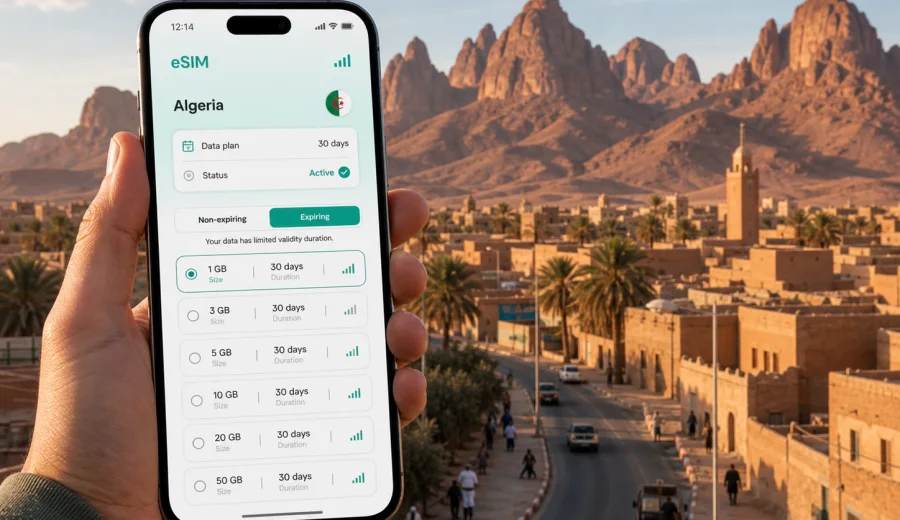
Tamanrasset eSIM guide: mobile connection and internet for a trip to southern Algeria
Tamanrasset is not a city where travelers usually want to improvise their mobile internet. It sits deep in southern Algeria, close to the Hoggar Mountains and the desert routes that lead toward Assekrem, volcanic plateaus, desert camps, airport transfers, and long road sections where planning matters. If you are flying to Tamanrasset for a tour, field project, business visit, family trip, or a short stop before heading into the Sahara, an eSIM can help you prepare mobile data before you start looking for a local SIM card.
This guide focuses on practical use in Tamanrasset: arrival at Aguenar-Hadj Bey Akhamok Airport, movement between hotels and meeting points, messaging your driver, checking maps, confirming bookings, and using data carefully on day trips outside the city. The city creates a specific connectivity problem: you may need internet immediately on arrival, but you may also need to manage data because travel outside the urban area can be long, remote, and highly dependent on local arrangements.
Why eSIM can be useful in Tamanrasset
In a major capital, a traveler can often solve connectivity later: at a shopping center, a hotel desk, or a busy airport kiosk. Tamanrasset is different. Many visitors arrive with a prearranged pickup, a tour contact, or a fixed hotel booking. The first hour may involve finding the right driver, checking whether your luggage has arrived, confirming the hotel address, and sending a message to someone who is waiting for you.
An eSIM gives you a way to prepare mobile internet without replacing your main SIM card. You install a digital SIM profile on a compatible phone, choose it for mobile data, and keep your physical SIM available for your usual number if your device supports that setup. For many trips, this is enough for maps, messaging apps, email, ride coordination, itinerary files, and basic browsing.
The main benefit is control. You can look at the data allowance, validity period, destination, and price before the trip. You can also avoid relying only on public Wi-Fi in the airport, hotel lobby, or cafe. Public Wi-Fi can be useful, but it is not always available at the exact moment when you need to message a driver or open a map.
Tamanrasset also rewards preparation because travel plans often depend on specific local contacts. A desert excursion may start early. A business meeting may be outside the city center. A hotel may be easier to find with a saved map and a working messaging app. Mobile data does not solve every travel issue, but it reduces the number of small delays that happen when you arrive in an unfamiliar city without internet.
Arrival scenarios where mobile data helps
| Moment in the trip | What you may need online | Why it matters in Tamanrasset |
|---|---|---|
| Before departure | Save QR codes, hotel details, guide contacts, offline maps | Some desert routes are easier when key details are ready before arrival |
| At the airport | Message a driver, check flight changes, confirm pickup point | Aguenar-Hadj Bey Akhamok Airport is the main arrival point for many visitors |
| On the transfer | Follow the route, share arrival time, check hotel address | Street names and pickup instructions may be easier to manage with maps |
| At the hotel | Confirm bookings, send documents, contact the next organizer | Tours and work trips often depend on fast coordination |
| Before leaving the city | Download maps, route notes, weather checks, translation packs | Mobile signal and Wi-Fi availability can vary outside urban areas |
The first task is usually small, important data: messages, map pins, booking confirmations, and transport coordination. A modest data plan can be enough for a short city stay, while longer routes around the Hoggar area may need more allowance and more careful offline preparation.
How Tamanrasset changes the way you choose data
When you choose an eSIM for a city such as Tamanrasset, think less about the city name and more about the trip pattern. The eSIM plan should match Algeria as the destination, because Tamanrasset is in Algeria. If your trip continues through other countries, check whether a regional or global option is more suitable, but for a Tamanrasset-only trip the country destination is the practical starting point.
Use these questions before choosing a plan:
- How many days will you spend in Tamanrasset before leaving for a desert route?
- Will your hotel have Wi-Fi that you trust for large uploads or video calls?
- Do you need maps and messaging only, or will you use cloud files and work tools?
- Will you share the connection with a laptop through hotspot mode?
- Are you traveling with a guide who expects WhatsApp, email, or another messenger for coordination?
- Will you download offline maps, tickets, and documents before departure?
A traveler who stays one night in the city before a guided route may need less data than a business visitor working from a hotel for several days. A photographer uploading large files will use more than a traveler sending text messages and occasional location pins. The right plan is the one whose data volume and validity fit your real itinerary.
Tamanrasset travel patterns and data needs
| Traveler profile | Typical internet use | Practical eSIM approach |
|---|---|---|
| Airport stopover | Messaging, map check, hotel confirmation | Short validity and modest data may be enough |
| Guided Hoggar trip | Group coordination, offline map refresh, emergency contact messages | Choose enough data before leaving the city and download heavy files in advance |
| Business visit | Email, calls over apps, document access, hotel Wi-Fi backup | Consider a larger allowance and keep hotspot use under control |
| Independent city stay | Navigation, translation, restaurant searches, transport coordination | Balance daily map use with messaging and light browsing |
| Content creator | Cloud backup, photo sharing, social posts | Use Wi-Fi for heavy uploads where possible and reserve mobile data for movement |
Do not choose only by the lowest price. A plan that expires too soon or has too little data can become inconvenient during a trip with long transfers and limited time to troubleshoot. Look at data size, validity, destination coverage, activation instructions, and whether you understand when the validity period starts.
Using maps and navigation in the city
Tamanrasset is often a base rather than the final destination. Many visitors use the city to meet a guide, buy supplies, rest after a flight, or start a route toward the Hoggar Mountains. That makes mobile navigation useful even if you are not spending days sightseeing in the city.
Before you travel, download an offline map of Tamanrasset and the wider area you expect to visit. Offline maps are not a replacement for mobile data, but they reduce your dependence on live loading. With an eSIM active, you can still search for a hotel, send your location, refresh a route, or check a meeting point while the base map is already saved on your phone.
A practical navigation setup looks like this:
1. Save your hotel, airport, guide office, and first meeting point as map pins.
2. Download the city area for offline use before departure or on hotel Wi-Fi.
3. Keep the address written in English and, if available, in French or Arabic for local communication.
4. Share your expected arrival time with the person meeting you.
5. Use mobile data for updates, not for downloading large map areas on the road.
This approach is useful in Tamanrasset because many travel decisions are time-sensitive. If your pickup point changes or your flight is delayed, a small amount of working data can save a long chain of missed messages.
Choosing an eSIM plan before your Tamanrasset trip
Kaspersky eSIM Store is an app and website where you can choose, arrange, and activate an eSIM with a suitable mobile data plan for an international trip. For Tamanrasset, the relevant destination is Algeria, because the city belongs to Algeria and country-level plans are the normal starting point for city travel.
When you compare options, look at the full conditions rather than one number. Data allowance matters, but validity, destination, activation steps, and device compatibility matter just as much. If your route starts in Algiers and continues to Tamanrasset, one Algeria plan may be simpler than treating each city as a separate connectivity problem.
For a practical starting point, you can view mobile internet options for Algeria and match the plan to your Tamanrasset itinerary. Keep the choice tied to your travel behavior: light city messaging, several days of hotel-based work, or a longer route where you want mobile data available whenever local coverage and device settings allow it.
Before you install: device and trip checks
Before choosing any eSIM, confirm that your phone supports eSIM and is not locked to one mobile operator. This is especially important if your device was bought with a carrier contract. You can check your device before you rely on an eSIM for arrival in Tamanrasset.
Also check these details:
- Your phone model supports eSIM and lets you add a new mobile plan.
- Your device is unlocked for travel use.
- You have internet access during installation, either through home Wi-Fi, hotel Wi-Fi, or another connection.
- You understand which SIM profile will be used for mobile data.
- You know whether data roaming must be enabled for the eSIM profile.
- You have saved the QR code or installation details where you can find them.
- You know that the eSIM plan is mainly for mobile data; voice calls and SMS are not included unless a specific plan says otherwise.
For Tamanrasset, it is better to install and check the setup before you are standing outside the terminal with limited time. You do not always need to activate data before departure, because activation timing depends on the plan conditions, but you should understand the steps before the trip begins.
How to install and activate eSIM for Tamanrasset
The basic sequence is simple, but it should be done carefully. After choosing a suitable plan, follow the instructions for your device and keep your main SIM settings clear. If you use Android, open the Android installation guide. If you use iPhone, use the iOS installation guide.
A reliable setup flow:
1. Connect to stable Wi-Fi before installing the eSIM.
2. Add the eSIM profile using the on-screen instructions or QR code.
3. Give the profile a clear label, such as "Algeria data".
4. Keep your primary SIM for calls if you need your usual number.
5. Select the eSIM profile for mobile data when you are ready to use it.
6. Enable data roaming for the eSIM profile if the plan instructions require it.
7. Test basic browsing and messaging after arrival, where local network conditions allow it.
Do not delete the eSIM profile unless you are sure you no longer need it. Some profiles cannot be reinstalled on another device after activation, and transfer rules depend on the specific plan.
Data management for hotels, tours, and desert routes
Tamanrasset trips often mix three kinds of internet access: hotel Wi-Fi, mobile data in the city, and limited or variable connectivity on roads outside the urban area. The most stable strategy is to use each option for the right job.
Use hotel Wi-Fi for heavier tasks when it is available and secure enough for your needs: app updates, large file downloads, photo backups, and long video calls. Use mobile data for movement: maps, messenger calls, live changes to pickup points, email checks, and transport coordination. Before a desert route, download anything large in advance.
Here is a simple data budget:
| Activity | Data impact | Tamanrasset advice |
|---|---|---|
| Text messaging | Low | Keep it on mobile data when coordinating pickups |
| Maps with offline areas saved | Low to medium | Download map areas before leaving the hotel |
| Voice calls in messengers | Medium | Use when needed, but avoid long calls on small plans |
| Video calls | High | Prefer hotel Wi-Fi if possible |
| Photo and video backup | High | Avoid automatic backup on mobile data |
| App updates | High | Turn off automatic updates before the trip |
The goal is not to avoid using data. The goal is to reserve it for moments when it matters: finding a driver, checking a route, messaging your guide, or confirming plans.
Trips from Tamanrasset to the Hoggar area
Many visitors associate Tamanrasset with the Hoggar, also known as the Ahaggar Mountains, and routes toward Assekrem. These trips are often organized with local guides and vehicles. Mobile data may be useful before departure and at certain points, but you should not assume constant service on remote routes. Treat your eSIM as part of your communication plan, not as the only plan.
Before leaving the city, use your available internet to:
1. Confirm the route and expected return time.
2. Send your itinerary to a trusted contact.
3. Download offline maps and translation packs.
4. Save emergency and hotel contact details.
5. Charge your phone and power bank.
6. Check that automatic cloud backup is paused.
7. Make sure your guide has the phone number or messenger contact you will use.
This is where eSIM preparation and travel preparation overlap. The mobile plan helps when coverage is available, while offline files and local arrangements help when it is not.
What eSIM does not replace
An eSIM is useful, but it is not a complete travel plan. It does not replace a local guide, hotel confirmation, transport arrangements, or offline preparation for desert routes. It also does not automatically include a local phone number, standard voice calls, or SMS unless the selected plan explicitly includes those services.
For ordinary calls and messages, many travelers use internet-based apps over mobile data. That can be enough for hotel coordination, family updates, and guide communication if the other person uses the same app. If you need traditional calls or SMS for a specific reason, check your main SIM roaming terms or confirm whether the chosen eSIM plan includes those features.
It is also worth remembering that network experience depends on the device, selected plan conditions, local coverage, building materials, terrain, and network load. In the Hoggar area, geography can matter. Prepare offline documents and do not leave essential safety or route information only in cloud storage.
Practical checklist before you fly to Tamanrasset
Use this checklist a day or two before departure:
- Confirm that your passport, visa documents, and bookings are saved offline.
- Check your phone supports eSIM and is unlocked.
- Choose a plan for Algeria that fits your trip length and data use.
- Install the eSIM profile while you still have stable internet.
- Label the eSIM profile clearly in your phone settings.
- Keep your primary SIM active if you need your usual number.
- Download Tamanrasset maps and any route areas you expect to need.
- Save hotel, airport, guide, and driver contacts.
- Turn off automatic app updates and cloud uploads on mobile data.
- Pack a charging cable, adapter, and power bank.
If several people are traveling together, do not rely on one phone for everything. At least two travelers should have key contacts and offline documents. This is especially helpful when one phone battery runs low or one person separates from the group during arrival.
FAQ: eSIM and mobile internet in Tamanrasset
Is there a separate eSIM plan just for Tamanrasset?
Usually you choose the country destination, not a separate city plan. For Tamanrasset, look for an Algeria plan and make sure its data allowance and validity match your itinerary.
Can I install eSIM before I travel?
In many cases, you can install the eSIM profile before departure while you have stable Wi-Fi. Check the plan instructions so you understand when validity starts and when to select the eSIM for mobile data.
Do I need to remove my physical SIM card?
No. eSIM is digital, so you do not need to remove a physical SIM card just to add the profile. Your phone settings control which SIM is used for mobile data, calls, and messages.
Will eSIM give me a local phone number in Algeria?
Not necessarily. Many travel eSIM plans are data-only. If regular phone calls or SMS are important, read the plan details and check your main SIM roaming options.
Is eSIM enough for trips outside Tamanrasset?
It can be useful where local coverage and your plan conditions allow data service, but it should not be your only preparation for remote routes. Download maps, save contacts, and coordinate with your guide before leaving the city.
How much data should I choose?
For messaging and maps, a modest allowance may be enough. For business work, hotspot use, video calls, or media uploads, choose more data and use Wi-Fi for heavy tasks when practical.
Final preparation before your trip
Tamanrasset is a destination where a small amount of preparation can make arrival much easier. Install the eSIM profile while you have stable internet, save offline maps, label your phone settings clearly, and keep hotel and guide contacts available without searching through email. Then use mobile data for the moments that matter: airport pickup, city navigation, meeting coordination, and route updates before heading toward the Hoggar Mountains.
If Tamanrasset is on your Algeria itinerary, Kaspersky eSIM Store can help you prepare an eSIM plan for your trip to Algeria before departure, so your mobile internet setup is ready to manage from the site or app when you need it.