
Travel connectivity guide
Tampere eSIM Guide: Mobile Internet in Finland
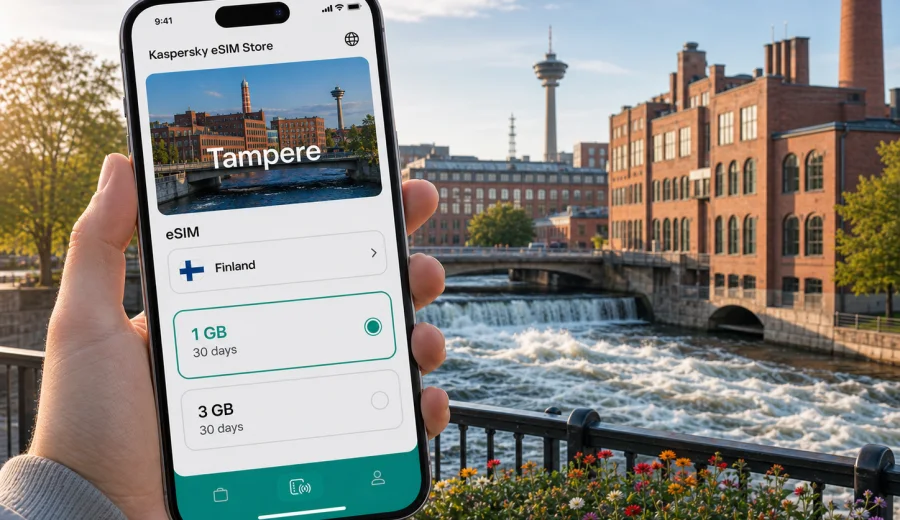
Tampere eSIM: mobile connection and internet for your trip
Tampere is easier when your phone is ready from the first minutes of the trip. The railway station is central, tram lines cross key districts, and many visits combine museums, business meetings, sauna time, lake walks, and day trips across Pirkanmaa. Mobile internet matters when you need maps, an airport ride, a hotel message, a restaurant booking, a work call, or a train ticket for the next leg.
An eSIM can make that routine simpler because it lets you prepare a mobile data plan for Finland without handling a physical SIM card. With Kaspersky eSIM Store, you can choose a destination, review the data allowance and validity period, set up the eSIM on a compatible phone, and use mobile internet according to the selected plan. It is a practical travel tool, not a replacement for every local telecom service: voice calls and SMS are not included unless a specific plan says otherwise, and your device must support eSIM.
Why mobile internet matters in Tampere
Tampere is compact, but the best parts of the city are spread between lakes, ridges, old factory areas, event venues, and transport stops. A working data connection helps you move between them without searching for Wi-Fi.
Typical moments when a travel eSIM is useful in Tampere include:
- checking the route from Tampere-Pirkkala Airport to the city center;
- finding the right tram or bus platform near the railway station;
- opening a hotel reservation in Tammela, Ratina, Kaleva, or by the lakeside;
- using maps around Finlayson, Tammerkoski, Pyynikki, and Hatanpaa;
- messaging colleagues before a meeting at Tampere Hall or an office campus;
- translating menus, signs, and transport updates when needed;
- booking a table, museum ticket, sauna slot, or taxi;
- joining a video call from a serviced apartment or co-working space;
- planning a day trip to Nokia, Kangasala, Hameenlinna, Helsinki, or another Finnish city.
Public Wi-Fi can help in hotels, cafes, and venues, but mobile data gives you more control during arrival, transfers, and outdoor movement.
Arrival scenarios: airport, train station, and first route
Many visitors reach Tampere by train from Helsinki, by coach, by car, or by flights through Tampere-Pirkkala Airport. Each arrival pattern creates a slightly different connectivity need.
| Arrival point | What you may need online for | Why eSIM helps |
|---|---|---|
| Tampere-Pirkkala Airport | Transfer options, taxi apps, hotel address, arrival messages | You can go online before leaving the terminal, once the eSIM is installed and active |
| Tampere railway station | Walking route, tram stop, onward train checks, meeting point | The station is central, but several hotels and offices are still easier to reach with live navigation |
| Coach stop or long-distance bus arrival | Local transport, luggage route, weather check | You can adjust your plan without relying on a nearby hotspot |
| Rental car pickup | Maps, parking rules, charger search, lake-area routes | Mobile data is useful outside the most central streets |
If you arrive late, travel in winter, or carry work equipment, the first hour is not the best time to solve connectivity from scratch. Install the eSIM before departure when possible, keep your primary SIM active if you need it for calls or banking messages, and switch mobile data to the eSIM profile once you are ready to use the travel plan.
Moving around Tampere with maps and transport apps
Tampere is friendly for walking, but weather and distance change the experience. The route from the railway station to Finlayson is simple; the route to Pyynikki, Hervanta, Hatanpaa, or a lakeside apartment may require a tram, bus, taxi, or a longer walk. Mobile internet helps with:
- tram and bus departure checks;
- walking directions across bridges and underpasses;
- indoor navigation around large venues;
- weather updates before lakefront walks;
- ticket confirmations and booking emails;
- map downloads before trips outside the center.
For a weekend visit, a modest data package may be enough if you mostly use maps, messaging, tickets, and browsing. For a business week or remote-work stay, choose more data, especially if you expect video calls, hotspot use, cloud files, or regular navigation between meetings.
How much data to prepare for Tampere
Your data need depends less on the city itself and more on your habits. Tampere is not a place where every traveler needs heavy data, but the trip can become data-intensive if you work from the road, use video, upload photos, or tether a laptop.
| Trip style | Common online tasks | Practical data approach |
|---|---|---|
| One-day stopover | Maps, messenger, train ticket, cafe search | Small data allowance with short validity |
| Weekend city break | Navigation, bookings, social apps, museum info | Moderate allowance for two or three active days |
| Business trip | Email, calendar, ride apps, work calls, document access | More data and a validity period covering the full stay |
| Family visit | Shared navigation, photos, streaming for children, messaging | More generous allowance, especially if several people rely on one phone |
| Multi-city Finland route | Tampere plus Helsinki, Turku, Jyvaskyla, or Lapland transit | Finland-wide or suitable regional plan with enough validity |
Avoid choosing only by price. Check the country or region, data volume, validity period, when the plan starts, whether top-up is available, and whether your device can use eSIM. If you use mobile hotspot for a laptop, review the plan conditions before depending on it.
Choosing a travel eSIM plan for Tampere
For a city trip, the right eSIM plan is usually a Finland plan rather than a city-specific product. The city is the reason for your search, but the mobile data plan needs to match the country where your phone will connect. If your route includes more than Finland, compare a Finland plan with a regional option that covers your actual itinerary.
Use this quick checklist before you choose:
- Destination: the plan should include Finland for a Tampere trip.
- Validity: cover the whole stay, including arrival and departure days.
- Data volume: allow for maps, tickets, messages, browsing, and any work use.
- Activation timing: understand when the validity period starts.
- Device support: make sure your phone or tablet supports eSIM.
- SIM lock: check that the device is not locked to one carrier.
- Main number: keep your usual SIM available if you need voice calls or SMS.
- Support path: know where to find setup instructions before you travel.
For a practical way to prepare before arrival, you can choose a mobile internet plan for Finland in Kaspersky eSIM Store, review the data options, and set up the eSIM on a compatible device before your trip to Tampere.
Installation before departure or after arrival
Install the eSIM while you still have stable internet at home, in the office, or at the hotel. Then select the eSIM for mobile data when you are ready to use it during the trip. The exact steps depend on your device and the selected plan.
A simple preparation sequence:
1. Check that your phone supports eSIM and is not carrier-locked.
2. Choose Finland as the destination for a Tampere trip, unless your route requires a wider regional plan.
3. Review data volume, validity period, price, and plan conditions.
4. Complete the order and open the setup details in your profile, app, or email.
5. Install the eSIM using the on-screen flow or QR code.
6. On arrival, select the eSIM for mobile data and keep your primary SIM available for calls or SMS if needed.
If you need device-specific steps, use the Android installation guide or the iOS installation guide. Read the instructions before you leave if this is your first eSIM, because some setup stages require a stable internet connection.
Check device compatibility before buying
Not every phone supports eSIM, and some supported phones can still be restricted by carrier lock or regional model differences. Before you pay for a plan, check your device, confirm that it supports eSIM, and make sure you can add a new mobile data profile.
This matters because the most inconvenient time to discover a compatibility issue is after landing, during a tight transfer, or before a meeting. If you travel with a work phone, check whether your company manages mobile profiles or blocks new SIM setup.
Local movement: districts and use cases
Tampere has several areas where mobile data is useful in different ways.
| Area | Why you may need data |
|---|---|
| City center and Tammerkoski | Walking routes, museum hours, restaurant bookings, and station access |
| Ratina | Event tickets, mall services, taxi pickup points, and hotel messages |
| Tammela | Apartment check-in details, food searches, and short routes from the station |
| Kaleva and Hervanta | University, office, and longer-stay travel with more work-related usage |
| Pyynikki and Pispala | Hill routes, viewpoints, cafe searches, weather checks, and lake walks |
| Hatanpaa | Park routes, photo sharing, and return navigation after a lakeside visit |
Business trips and remote work in Tampere
Tampere is a practical business destination: meetings may happen around the center, Tampere Hall, university campuses, industrial offices, or technology areas. For business travelers, eSIM planning should be more conservative than for a leisure weekend.
Choose more data if you expect to:
- join video meetings from a hotel, apartment, or quiet cafe;
- use your phone as a backup connection for a laptop;
- access cloud documents during transfers;
- manage maps and ride apps between several meeting locations;
- receive calendar updates while moving;
- stay reachable on messaging apps between sessions.
Most travel eSIM plans focus on mobile internet, so keep your primary SIM active if you need ordinary voice calls or SMS from your usual number.
Stopovers and short stays
Tampere works well as a stop between other Finnish cities, especially if you arrive by train and continue later the same day. Short stays make mobile data valuable because you have less time to solve small problems.
For a stopover, prepare the essentials:
- offline backup of your hotel, ticket, or meeting address;
- eSIM installed before departure if possible;
- enough data for live maps and messages;
- a note of your departure station, platform, or bus stop.
If your Tampere stop is part of a wider Finland route, choose a plan that covers the whole timeline rather than only the first day.
Trips from Tampere to other places in Finland
Many travelers use Tampere as a base. You might continue to Helsinki for international flights, visit Nokia or Kangasala nearby, take a train toward Turku, go north toward Oulu, or combine city time with lake and forest areas. Mobile internet becomes more useful once you leave the central streets because you may need maps, train changes, weather checks, or accommodation messages.
For regional movement, review whether your eSIM plan covers Finland broadly and whether the validity period includes the return journey. If your route crosses borders, for example a wider Nordic or Baltic trip, compare plans by actual destinations rather than assuming one country plan fits every stop.
Practical setup tips for a smoother trip
Before you travel, install the eSIM on reliable Wi-Fi, save setup details, check whether data roaming must be enabled for the eSIM profile, and download an offline map. After arrival, select the eSIM for mobile data, avoid heavy app updates if your data is limited, and monitor remaining data if your trip includes work calls or hotspot use.
Common mistakes to avoid
Travelers usually run into problems because they skip a small check, not because eSIM is difficult.
Avoid these common mistakes:
- buying before checking device support;
- choosing too little data for a work trip;
- installing only after landing with weak Wi-Fi;
- expecting a regular phone number from a data-focused travel plan;
- forgetting that validity should cover arrival and departure days;
- letting large app updates or cloud sync consume limited travel data.
Quick answers
Is eSIM useful for a Tampere weekend?
Yes, if you want mobile internet for maps, transport, bookings, restaurant searches, messaging, and arrival logistics without buying a physical SIM card.
Should I choose a Tampere plan or a Finland plan?
For a Tampere trip, choose a plan that includes Finland. The article is city-focused, but the plan coverage is country or region based.
Can I install the eSIM before I arrive in Finland?
Usually, yes. Installation before departure is often more convenient. Activation and validity rules depend on the selected plan, so check the plan details.
Will eSIM give me calls and SMS in Tampere?
Most travel eSIM plans are for mobile data. Calls and SMS are included only if the specific plan says so. You can use internet-based calling and messaging apps through mobile data.
Final preparation for Tampere
Tampere is straightforward when your phone is ready: you can leave the station, find the tram, confirm a hotel address, meet colleagues, visit Pyynikki, and continue to another Finnish city without pausing to solve basic connectivity. Choose the eSIM plan that fits your route, device, and full stay.
Before you go, check device compatibility, review the plan conditions, and install the eSIM while you have a stable connection. Then use Kaspersky eSIM Store to prepare an eSIM plan for your trip to Tampere and keep mobile internet ready for the moments when maps, messages, bookings, and travel updates matter most.