
Travel connectivity guide
Tangier eSIM: Mobile Internet for Your Trip
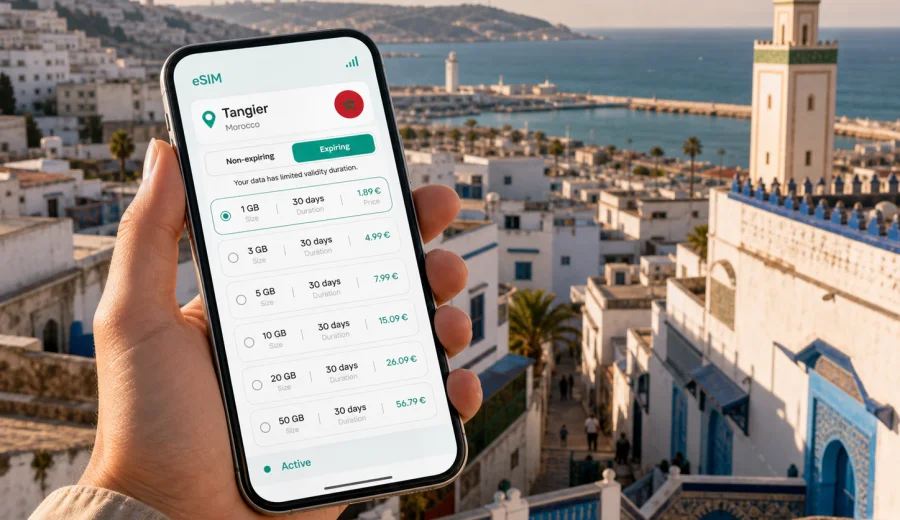
Tangier eSIM: mobile connection and internet for a smooth city trip
Tangier is a practical city for travelers who like to move quickly. You may land at Ibn Battouta Airport, arrive by ferry from Spain, continue by high-speed train, or use the city as a base for the northern coast of Morocco. In all of these scenarios, mobile internet matters from the first minutes: you need maps for the route from the airport, messaging for hotel arrival, ride-hailing or taxi coordination, restaurant searches in the medina, and updates for onward travel.
An eSIM is useful in Tangier because it lets you prepare mobile data before the trip without planning a stop at a physical SIM counter. With Kaspersky eSIM Store, you can choose a destination, review the available data package and validity period, install the eSIM on a compatible device, and use mobile internet for travel tasks once the plan is active. The conditions depend on the selected tariff, so it is worth checking data volume, duration, destination coverage, and activation rules before you pay.
This guide focuses on Tangier itself: airport arrival, the medina, the port, the Corniche, business districts, hotels, transport, day trips, and short stopovers. Morocco is the country context, but the practical question is local: how do you keep a reliable mobile connection while moving through Tangier?
Why mobile internet matters in Tangier
Tangier rewards travelers who can adjust plans on the move. Streets around the medina can feel compact and winding, coastal traffic can change quickly, and many useful decisions happen outside the hotel: whether to walk from the Grand Socco to the Kasbah, which taxi route to take to Malabata, or how much time to leave before a train from Tanger Ville station.
Mobile data helps with everyday travel tasks:
- checking the route from Tangier Ibn Battouta Airport to your hotel;
- sharing your live location with a driver, colleague, or family member;
- using maps in the medina, Kasbah, Corniche, and Marina Bay area;
- confirming ferry, train, or bus details during a connection;
- translating menus, signs, or messages when needed.
Public Wi-Fi can be useful in hotels and cafés, but it is not the same as having data while crossing the city. In Tangier, you may need internet in a taxi, near the port, on a walk to Cape Spartel, or while waiting for a train. An eSIM gives you a separate mobile data option on your device, so you can rely less on Wi-Fi availability and avoid searching for a store immediately after arrival.
Where an eSIM helps most in the city
| Tangier moment | What you usually need internet for | Why eSIM is practical |
|---|---|---|
| Airport arrival | Route planning, driver messages, hotel address | You can prepare the plan before landing |
| Ferry arrival | Maps, onward tickets, meeting point details | You avoid looking for Wi-Fi in a busy terminal |
| Medina walk | Navigation, translation, restaurant search | You can move without stopping to ask for directions every few minutes |
| Business trip | Email, maps, calendar updates, messaging | You keep work tools available between meetings |
The biggest benefit is not only convenience. It is predictability. You can decide your data package before you travel, install the eSIM when you have a stable connection, and keep the instructions ready. That reduces the number of small decisions you need to make in the arrival hall or at the port.
Arrival at Tangier Ibn Battouta Airport
Tangier Ibn Battouta Airport is outside the city center, so most travelers need a road transfer after landing. If your first stop is near the medina, the Kasbah, the Corniche, or Tanger Ville station, mobile data helps you confirm the route and communicate the exact address. Many hotels and riads are easier to find when you can share a pin rather than describe a street name.
Before the flight, prepare three things:
1. Check that your smartphone supports eSIM and is not locked to one mobile carrier.
2. Install the eSIM while you still have a stable home or airport Wi-Fi connection.
3. Save your hotel address, booking confirmation, and one offline map area as backup.
If your plan activates only when it connects in the destination, read the tariff details carefully. The right timing depends on your plan conditions and how much internet you need immediately on arrival.
Ferry and port arrivals
Tangier is also a common entry point by sea, especially for travelers coming from southern Spain. Ferry schedules, port procedures, and onward transport can make the first hour feel compressed. A mobile connection is useful for checking arrival changes, finding the next transfer, or telling your hotel that you are on the way.
If you arrive by ferry and have limited time, eSIM preparation is especially helpful. You can avoid spending your first city minutes comparing physical SIM options or searching for Wi-Fi. Keep a screenshot of your accommodation details, but use live maps when you leave the terminal area because the quickest walking or taxi route can depend on where you exit.
The medina, Kasbah, and old city
Tangier's old city is one of the places where mobile internet feels most useful. The medina is walkable, but its streets are not always intuitive for a first visit. The Kasbah area, Grand Socco, Petit Socco, cafés, galleries, and viewpoints are close enough for walking, yet a wrong turn can add time when you have a lunch booking or a train to catch.
Use mobile data for:
- map orientation before entering narrow streets;
- translation for short questions, signs, and menus;
- checking whether a museum, shop, or restaurant is open;
- calling or messaging a riad if the entrance is hard to identify;
- saving ride pickup points outside pedestrian streets.
A practical habit is to set your destination before you enter the densest part of the medina. Keep the map open, then reduce screen use while walking through crowded areas.
Corniche, Marina Bay, and Malabata
The waterfront side of Tangier is easier to navigate than the old city, but mobile data still helps. Travelers often move between hotels, restaurants, the beach promenade, Tangier City Center, Marina Bay, and Malabata. If you are meeting friends or colleagues, sharing a precise location is simpler than naming a broad district.
For a beach or promenade day, your data use may be moderate: maps, messaging, ride coordination, and occasional searches. For remote work from a hotel lobby or café, data use can rise quickly, especially with video calls or cloud files.
Business trips to Tangier
Tangier can be a business destination as well as a leisure city. Travelers may visit offices, industrial zones, port-related companies, hotels near the center, or meetings connected to northern Morocco logistics. Choose your eSIM plan based on working days, not nights in the hotel: email, maps, calendar changes, document access, taxi coordination, and occasional hotspot use can all affect data needs.
How much data do you need in Tangier?
Data needs vary, but these scenarios can help you choose a plan more realistically.
| Trip style | Typical use | Planning note |
|---|---|---|
| Short stopover | Maps, messaging, transport checks | A smaller package may be enough if you avoid video |
| Weekend city break | Maps, searches, messaging, photos, bookings | Allow extra data for navigation and restaurant discovery |
| Business visit | Email, calendar, maps, document access | Add margin for tethering or video calls if needed |
Video, cloud backups, app updates, and hotspot sharing consume far more data than maps or messaging. If you want to keep usage predictable, disable automatic photo uploads on mobile data, download offline maps before travel, and update apps on Wi-Fi.
Choosing an eSIM plan for Tangier
When you compare eSIM options for Tangier, focus on the country destination, validity period, and data volume. City pages help you plan local use, but the plan itself is usually selected for Morocco. This matters if you plan to continue from Tangier to Rabat, Casablanca, Chefchaouen, Tetouan, Asilah, or other places in the country.
At this stage of planning, you can choose an eSIM plan for your trip to Tangier and compare the available Morocco options by data amount, duration, and price before you leave. Kaspersky eSIM Store helps you choose and activate an eSIM tariff for mobile internet in a foreign trip; it does not replace checking the exact tariff conditions.
Before selecting a plan, ask yourself:
- How many full days will you be in Morocco?
- Will Tangier be your only city, or the start of a wider route?
- Do you need data immediately at the airport or port?
- Will you use video calls, hotspot sharing, or cloud storage on mobile data?
For most city travelers, the safest approach is to choose a plan with a little more data than the minimum estimate. Running out during a transfer or business day is usually more inconvenient than carrying unused allowance at the end.
Device compatibility before you pay
Not every phone supports eSIM, and some devices can be locked by a carrier. Check compatibility before you buy a plan, especially if you are using an older model, a company-managed phone, or a device bought through a mobile operator. You can use the internal compatibility check here: Check your device.
Installing an eSIM before the trip
Installation is easier when you are not rushing. Use a stable Wi-Fi connection, keep your phone charged, and follow the steps for your operating system. If needed, use the Android installation instructions or the iOS installation instructions.
A simple preparation sequence looks like this:
1. Open Kaspersky eSIM Store on the site or in the app.
2. Choose Morocco as the destination for your Tangier trip.
3. Review the data allowance, validity period, price, and activation details.
4. Complete the purchase flow for the selected tariff.
5. Install the eSIM on the compatible device you will carry.
6. Name the line clearly, for example "Morocco travel".
7. Keep your primary SIM settings separate from mobile data settings.
8. Activate data according to the plan instructions.
Do not delete the eSIM profile unless you are sure you no longer need it. Depending on the conditions, an activated profile may not be transferable.
Local movement: taxis, trains, and walking routes
Tangier is a city where you may combine walking, taxis, trains, and occasional intercity travel. Mobile internet supports each type of movement differently.
For walking, use maps but avoid staring at the screen in crowded streets. For taxis, prepare the destination in French, Arabic, or map form if the address is difficult to pronounce. For trains, check the station name carefully: Tanger Ville is the main station for many rail journeys.
Trips from Tangier
Tangier is often the start of a broader northern Morocco itinerary. Mobile internet remains useful outside the city, especially if your day involves timetable checks, hotel messages, or navigation between transport points.
Popular routes from Tangier include:
- Cape Spartel and the Caves of Hercules for a coastal half-day;
- Asilah for a slower seaside town atmosphere;
- Chefchaouen for a longer day trip or overnight stay;
- Rabat or Casablanca by rail for business or onward travel.
If you plan several of these trips, avoid choosing a plan only for the first day in Tangier. Match the eSIM validity period to the full Morocco route, including days when you are between cities.
Practical data-saving checklist
Use this checklist before leaving your hotel or apartment:
- Download offline maps for Tangier and any day-trip destination.
- Save your hotel address in English and in a map app.
- Turn off automatic app updates on mobile data.
- Pause automatic photo and video uploads unless needed.
- Keep transport tickets and booking confirmations available offline.
- Check which SIM line is assigned to mobile data.
- Keep messenger calls on audio when data allowance is limited.
These habits make your plan last longer and reduce stress if you are away from Wi-Fi for most of the day.
FAQ: eSIM and mobile internet in Tangier
Is eSIM useful for a short Tangier stopover?
Yes, especially if you need maps, transport details, hotel communication, or ferry and train updates. A short visit leaves little time to arrange a physical SIM after arrival.
When should I install the eSIM?
Install it before departure if you want a calmer setup process. Activate or start using mobile data according to the plan instructions, because validity rules can differ.
Can I use one eSIM for Tangier and other Moroccan cities?
Check the destination and conditions of the selected tariff. If it is a Morocco plan, it is intended for use within that destination according to the tariff terms.
Final preparation before you travel
Tangier is easiest to enjoy when the basics are ready before you arrive: hotel address saved, maps downloaded, phone charged, and mobile data prepared. An eSIM helps with the parts of the trip that happen between Wi-Fi zones: the airport road, the port exit, medina navigation, business transfers, the train station, and day trips along the northern coast.
Before you leave, check your device compatibility, choose the data volume and validity period that fit your route, and install the eSIM while you have a stable connection. For a city break, business visit, ferry arrival, or longer Morocco itinerary starting in Tangier, you can prepare an eSIM plan for Morocco in Kaspersky eSIM Store and keep mobile internet ready for the moments when the city is already moving around you.