
Travel connectivity guide
Tanzania eSIM and mobile internet for travel
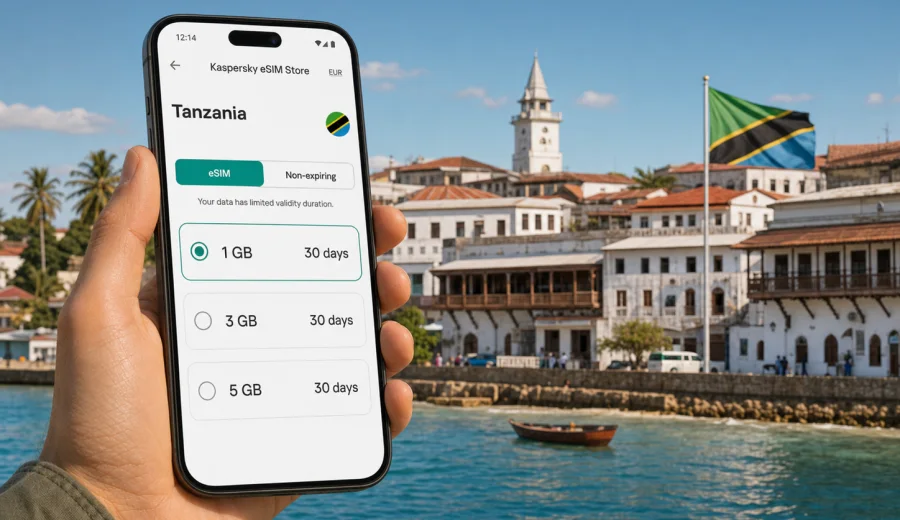
eSIM for the United Republic of Tanzania: mobile connection and internet for your trip
The United Republic of Tanzania is a country where mobile internet can become part of almost every travel decision. You may land in Dar es Salaam, continue to Zanzibar, meet a safari driver in Arusha, check a booking near Stone Town, or share your location before an early transfer to Kilimanjaro.
An eSIM helps you prepare mobile internet before or during the journey without looking for a physical SIM card shop after arrival. With Kaspersky eSIM Store, you can choose a suitable eSIM plan for your destination, check the data allowance and validity period, install the eSIM on a compatible device, and manage the plan through the website or app. It is practical for maps, bookings, messaging, ride apps, translation, work, and trip coordination.
This guide explains how to use an eSIM for a trip to the United Republic of Tanzania, estimate data needs, and avoid common setup mistakes.
Why eSIM is useful in the United Republic of Tanzania
Tanzania trips often combine several types of travel in one itinerary. A traveler may spend one night in Dar es Salaam, take a ferry or flight to Zanzibar, return to the mainland, and then continue to a national park or mountain route. Every change of location creates a familiar need: open maps, contact a driver, confirm timing, check a reservation, or message family.
An eSIM can be useful because it lets you prepare a data plan for the destination without replacing your physical SIM card. You keep your usual SIM in the phone, install a digital SIM profile for mobile internet, and choose which line should use data during the trip. On many modern phones, this is easier than carrying a second plastic SIM or waiting until you find a local point of sale.
The main benefits are practical:
- you can prepare mobile data before departure or soon after arrival;
- you do not need to remove your usual SIM card from the phone;
- you can see the data allowance, validity period, and destination before paying for a selected plan;
- you can use internet-based calls and messages in apps when mobile data is active;
- you depend less on public Wi-Fi in airports, hotels, cafes, and ferry terminals;
- you can keep travel tools available during transfers between cities and regions.
An eSIM is not a magic guarantee of coverage in every remote area. Local network conditions can vary by location, terrain, device, and the selected plan. In cities and tourist routes, mobile data is often central to the travel experience. In remote areas or on long transfers, it is still wise to download offline maps and important documents in advance.
Where mobile internet matters most during the trip
Mobile internet in Tanzania is useful from the first hour of the journey. At the airport, you may need to message your hotel, check the address of your pickup point, or open a booking confirmation. In a city, you may use maps to understand traffic and walking routes. On Zanzibar, you may need ferry tickets, beach transfer details, restaurant reservations, and communication with hosts.
Common travel scenarios include:
| Trip moment | What mobile internet helps with |
|---|---|
| Arrival at the airport | Messaging a driver, opening hotel details, checking maps |
| Dar es Salaam stay | Navigation, ride apps, restaurant searches, business calls |
| Zanzibar visit | Ferry details, hotel check-in messages, beach transfers |
| Safari route | Driver coordination, itinerary updates, sharing location when available |
| Kilimanjaro or Arusha area | Route planning, weather checks, group communication |
| Remote work | Email, cloud documents, video calls when the connection is suitable |
The best approach is to treat mobile data as a travel tool. Use it for time-sensitive tasks, but do not rely on it as the only copy of essential information. Save passport scans, hotel addresses, tickets, insurance contacts, and meeting points offline before you travel.
How much data you may need
There is no universal data allowance for every traveler. A short business trip to Dar es Salaam is different from a two-week route that includes Zanzibar, Arusha, and national parks. The right amount depends on how often you use maps, video, photo uploads, cloud apps, and hotspot sharing.
Use this simple estimate:
| Usage style | Typical behavior | Data planning idea |
|---|---|---|
| Light | Messaging, maps, email, occasional browsing | Choose a smaller package and keep video use low |
| Standard | Maps, social apps, photos, booking apps, daily browsing | Pick a balanced plan for the full trip length |
| Heavy | Video calls, cloud files, frequent uploads, hotspot use | Consider a larger data allowance and track usage often |
Maps, messaging, and travel apps usually use less data than streaming video or automatic cloud backups. Video calls, high-resolution photo sync, app updates, and using your phone as a hotspot can consume data quickly. Before departure, disable automatic media downloads in messengers, pause cloud photo backup, and update apps on home Wi-Fi.
For a multi-stop Tanzania itinerary, match the validity period to your actual travel dates. If your trip lasts ten days, a plan valid for only a few days may be inconvenient even if the data allowance looks attractive. If your trip is short but includes heavy work calls, data volume may matter more than validity.
Choosing an eSIM plan for Tanzania
When you compare eSIM options for the United Republic of Tanzania, look at more than the headline data amount. A plan is useful only if its validity, destination, and device requirements match the way you travel.
Check these points before choosing:
1. Destination: make sure the plan is intended for the United Republic of Tanzania or for a region that includes it.
2. Data allowance: estimate how much you need for maps, messaging, browsing, and work.
3. Validity period: match the plan duration to your itinerary, including arrival and departure days.
4. Activation rules: read when the validity period starts and what action triggers it.
5. Device compatibility: confirm that your phone supports eSIM and is not locked to another carrier.
6. Hotspot rules: if you plan to share data with a laptop or another device, check the plan conditions.
7. Voice and SMS: assume the plan is for mobile data unless the plan terms say otherwise.
For many travelers, the best plan is not the largest one. It is the one that covers the trip dates with enough data for essential tasks and a margin for unexpected changes. If you will spend long hours away from hotel Wi-Fi, choose more data than you use on a normal day at home.
Around the middle of trip planning, once you know your dates and route, it is a good moment to review eSIM options for the United Republic of Tanzania and compare available data allowances and validity periods for your travel style.
Tanzania travel routes and data planning
The country is large, so your route affects data use. In Dar es Salaam, mobile internet is useful for transport, traffic-aware navigation, hotel details, and business communication. On Zanzibar, it helps with ferry information, transfers, guesthouse messages, and maps around Stone Town or coastal villages. Around Arusha, Moshi, Kilimanjaro, and safari routes, it supports driver coordination, itinerary changes, and group messages when local network conditions allow.
For remote areas, prepare offline maps, saved contacts, and screenshots of bookings. Keep a power bank charged and reduce background data on long transfer days.
What to check before buying an eSIM
The most important step is device readiness. eSIM requires a compatible phone, tablet, or other device. Some devices support eSIM only in certain regional versions, and some phones may be locked by a carrier. If the phone cannot install an eSIM profile, the plan will not solve the problem.
Before you choose a plan, check your device and confirm these details:
- your device model supports eSIM;
- your operating system is up to date enough for eSIM installation;
- the device is not carrier-locked;
- you have a stable internet connection for installation;
- you know which SIM line should be used for mobile data after arrival;
- you understand whether data roaming must be enabled for the eSIM profile.
Also check whether you need your usual phone number during the trip. Many eSIM data plans do not include a traditional phone number, voice calls, or SMS unless this is clearly stated in the selected plan terms. For many travelers, this is fine because messaging and calls can happen through internet-based apps. If you need bank SMS codes or calls to your regular number, keep your main SIM active according to your home operator's roaming settings.
How to install and activate eSIM
Installation is usually a short process, but it is worth doing calmly rather than during a rushed airport transfer. After selecting a plan, the eSIM profile appears in your account or app, and you follow the instructions for your device. You may install it using on-screen steps or a QR code, depending on the device and setup flow.
Use the correct guide for your phone: Android installation instructions or iOS installation instructions. The exact labels in phone settings may differ by model and operating system version, but the core idea is the same: add the eSIM profile, name it clearly, and select it for mobile data when you need it.
A practical setup sequence:
1. Connect to reliable Wi-Fi before installing the eSIM.
2. Open the eSIM installation details on the website or in the app.
3. Add the eSIM profile to your compatible device.
4. Give the line a clear label, such as Tanzania data.
5. Keep your primary SIM for calls if you need your usual number.
6. Set the eSIM line as the mobile data line when you are ready to use it.
7. If required by the plan or device, enable data roaming for the eSIM profile.
8. Test mobile data with a simple page or map search.
Do not delete the eSIM profile unless you are sure you no longer need it. In many cases, an activated eSIM cannot simply be moved to another device like a plastic SIM card.
Practical checklist before departure
Use this checklist a few days before the trip:
- Confirm your phone supports eSIM and is unlocked.
- Choose a data allowance that fits your route and trip length.
- Save the eSIM installation details where you can find them.
- Update your phone system and travel apps on Wi-Fi.
- Download offline maps for Dar es Salaam, Zanzibar, Arusha, or your main route.
- Save hotel addresses, tickets, and transfer contacts offline.
- Turn off automatic app updates and cloud photo backup on mobile data.
- Pack a power bank and charging cable for long transfers.
- Decide which SIM line will handle mobile data after arrival.
This preparation is especially useful if your arrival time is late, your transfer is prearranged, or you need to be online quickly after landing.
eSIM, roaming, local SIM, and Wi-Fi
Each internet option has trade-offs. eSIM is useful when you want to prepare mobile data before arrival and avoid changing a plastic SIM card. Home roaming can be simple, but costs and conditions depend on your home plan. A local physical SIM may suit a long stay, but it requires finding a point of sale. Public Wi-Fi is helpful for large downloads, yet availability and privacy conditions vary.
For most short or medium trips, a prepared eSIM works well as the main mobile data option, while hotel Wi-Fi can handle app updates, photo backup, and large files.
Data-saving tips for Tanzania
To make your plan last longer, download offline maps, pause cloud photo backup, disable automatic app updates on mobile data, avoid autoplay video, send compressed photos in messengers, and close hotspot mode when your laptop no longer needs it. If you work while traveling, keep video meetings and large file transfers for reliable Wi-Fi whenever possible.
FAQ
Does an eSIM for Tanzania include phone calls and SMS?
Many travel eSIM plans focus on mobile data. Traditional voice calls and SMS are not included unless the selected plan clearly says so. You can usually use internet-based apps for calls and messages when mobile data is active.
Can I install the eSIM before I leave home?
In many cases, yes. Install it on reliable Wi-Fi and read the activation details carefully, because validity rules depend on the selected plan.
Should I turn on data roaming for the eSIM?
Some eSIM profiles require data roaming for mobile data to work. Apply this setting to the eSIM line, and avoid enabling data roaming on your primary SIM unless you intend to use it abroad.
Will eSIM work in remote safari areas?
Network conditions can vary by location, terrain, device, and selected plan. For remote areas, save maps, documents, and meeting points offline.
Can I share eSIM data with a laptop?
Hotspot use depends on your device and plan conditions. If you need it for work, check whether tethering is allowed and choose enough data.
Choose an eSIM plan for your trip to Tanzania
The United Republic of Tanzania is easier to navigate when your phone is ready for maps, messages, bookings, and travel updates. Before you go, confirm that your device supports eSIM, choose a plan that matches your dates and route, and install it while you have a reliable internet connection.
Kaspersky eSIM Store helps you quickly choose, arrange, and activate an eSIM with a suitable mobile internet plan for an international trip. When your itinerary is clear, choose an eSIM plan for your trip to the United Republic of Tanzania and prepare your mobile connection before the first transfer.