
Travel connectivity guide
Tartu eSIM for Mobile Internet in Estonia
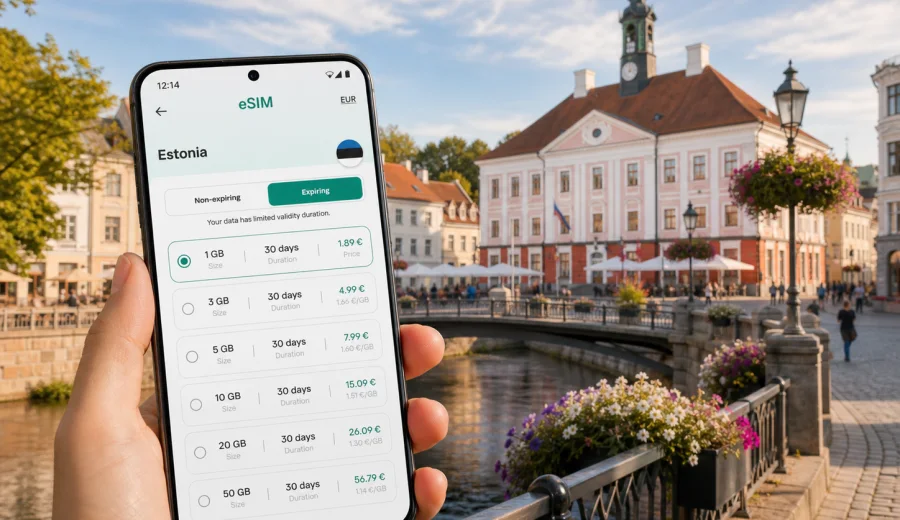
Tartu eSIM: mobile connection and internet for your Estonia trip
Tartu is a compact city, but a trip here still depends on reliable mobile internet. You may need maps from the first minutes after arrival, a taxi app at the coach station, hotel check-in details in your inbox, translation support in a cafe, or messaging during a university visit. An eSIM can make these small travel moments easier because you do not need to look for a physical SIM card before you start moving around the city.
For many visitors, Tartu is not the only stop in Estonia. You might land in Tallinn, take a train or bus south, spend a few days near the Emajogi River, then continue to Viljandi, Otepaa, Lake Peipus, or back to the capital. A travel eSIM for Estonia helps you prepare mobile data for the whole route while keeping the city plan simple.
This guide focuses on Tartu itself: arrival routes, local movement, university and business trips, hotels, short stays, and practical data use. It also explains how to choose an eSIM tariff for Estonia, what to check before buying, and how to install the eSIM on a compatible phone.
Why mobile internet matters in Tartu
Tartu is walkable, but the useful parts of the trip are spread across different daily scenarios. You may walk between Town Hall Square, the University of Tartu buildings, Toome Hill, cafes, museums, hotels, and riverside paths. You may also use buses, taxis, rental cars, or intercity transport. In each case, mobile data helps with decisions that change during the day.
Common moments when internet access is useful in Tartu:
- checking the route from Tartu bus station or train station to your hotel;
- confirming a taxi or ride-hailing pickup point;
- opening a digital boarding pass or train ticket for the next leg;
- using maps on narrow streets around the old town;
- messaging colleagues during a university, conference, or business visit;
- checking restaurant opening hours before walking across the center;
- translating menus, signs, or service messages;
- sharing your location with friends or family;
- using mobile banking or travel apps without looking for Wi-Fi.
Public Wi-Fi can be available in hotels, cafes, libraries, and transport hubs, but it is not a complete travel plan. You may not want to register for every network, wait until you reach a cafe, or depend on a connection that drops when you step outside. An eSIM gives you another option: mobile data on your own device, with a tariff selected before or during the trip.
Arrival in Tartu: where eSIM helps first
Many international travelers reach Tartu through Tallinn Airport and continue by bus, train, car, or arranged transfer. Some arrive from Riga or other Baltic routes. Tartu also has its own airport, but schedules and practical arrival routes can vary, so most travel planning still includes intercity movement.
The first useful task is usually not sightseeing. It is orientation. You need to know where you are, how long the transfer will take, whether the hotel reception is open, and how to contact someone if plans change. Mobile internet is useful before you have time to sit down and connect to a trusted Wi-Fi network.
If you install an eSIM before the trip, you can be ready to use data soon after the phone connects to a local network. If you install it after arrival, use a stable connection for the setup step, such as hotel Wi-Fi or another internet source.
Tartu travel scenarios that use more data than expected
Tartu does not require heavy data use every minute, but small actions add up. Navigation, translation, ticket apps, messaging, document access, and photo backups can use more data than a quick weekend plan suggests.
Useful data planning examples:
- One or two days in Tartu: choose a modest data allowance if you mainly use maps, messaging, and web searches.
- Three to five days: allow more data for navigation, booking apps, photo sharing, and daily route changes.
- A week or longer: consider a larger allowance, especially if you work remotely, use hotspot mode, or travel beyond Tartu.
- Business or university visit: leave a buffer for email attachments, document access, and video meetings.
- Family trip: check whether one device will share data with others through hotspot mode, if the selected tariff and phone settings allow it.
Avoid choosing only by price. A tariff that matches your route, duration, and expected data use is usually more practical than one that runs out before the last day.
How to choose an eSIM tariff for Tartu
For a city article, the correct destination is still the country where the city is located. Tartu is in Estonia, so you should choose an eSIM tariff that covers Estonia, unless your route needs a regional option for several countries.
Before choosing, check four details:
1. Destination coverage. Make sure the tariff is valid for Estonia or for a region that includes Estonia.
2. Trip length. Match the validity period to your arrival and departure dates, including travel days.
3. Data allowance. Estimate maps, messaging, browsing, booking apps, work tasks, and hotspot use.
4. Activation conditions. Read when the validity period starts and what steps are required on your device.
Kaspersky eSIM Store is an app and website where you can choose, arrange, and activate an eSIM with a suitable mobile data tariff for an international trip. You can review the data amount, validity period, destination, and price before selecting an option.
For multi-country Baltic travel, compare the Estonia option with any relevant regional option available for your route. A single-country tariff can be enough for Tartu, Tallinn, and other places inside Estonia. A regional tariff may be more convenient if you also plan to use mobile data in Latvia, Lithuania, Finland, or another nearby country during the same trip.
How much data to plan for Tartu
There is no universal number because travel habits differ. A visitor who checks maps twice a day and uses hotel Wi-Fi will need far less data than a consultant joining video calls from different locations.
Use this practical estimate as a starting point:
| Trip style | Typical mobile data tasks | Planning note |
|---|---|---|
| Weekend city break | Maps, messaging, search, tickets, light social media | A smaller data package may be enough if hotel Wi-Fi covers heavy use |
| Conference or university trip | Email, calendar, documents, messaging, occasional calls through apps | Choose a buffer so work tasks do not compete with navigation |
| Remote work stay | Hotspot, cloud files, video calls, daily browsing | Check hotspot support and consider a larger data allowance |
| Estonia route | Intercity navigation, bookings, weather, maps, photos | Match validity to all travel days, not only nights in Tartu |
| Family visit | Shared maps, messaging, entertainment, photo backup | Separate eSIMs may be simpler than relying on one phone as a hotspot |
To control data use, download offline maps before travel, pause automatic cloud photo uploads on mobile data, and save large app updates for Wi-Fi. Keep mobile data for tasks that matter when you are outside: navigation, messaging, tickets, and changes to the plan.
If your route is focused on Tartu and other places in Estonia, you can prepare an eSIM tariff for your Estonia trip and then install it on a compatible device before departure or after arrival.
Installing an eSIM before the trip or after arrival
Installing an eSIM is usually straightforward, but it is still a device-level action. You should set aside a few minutes and use a stable internet connection during installation. After purchase, the eSIM details are available in your profile or app, and you can follow the setup flow for your device.
General setup steps:
1. Check that your phone supports eSIM and is not locked to one operator.
2. Choose a tariff for Estonia or your wider route.
3. Complete the order and open the installation details.
4. Add the eSIM to your phone using the on-screen instructions or QR code.
5. Set the eSIM as the mobile data line when you are ready to use it.
6. If required by the tariff or device, enable data roaming for the eSIM profile.
7. Keep your primary SIM active only for calls or SMS if you need it, and avoid unintended roaming data on that line.
For device-specific setup, use the official Kaspersky eSIM Store guides: Android installation instructions and iOS installation instructions. Menu names can vary by phone model and operating system version.
Check device compatibility before buying
Not every phone or tablet supports eSIM. Some devices also have regional model differences or operator locks. Before selecting a tariff, check your device and confirm that eSIM can be added and used for mobile data.
Compatibility checks are especially important if:
- you bought the device through a mobile operator;
- you use an older phone model;
- your phone has only one active SIM slot available;
- you plan to keep your regular SIM active for calls while using eSIM for data;
- you need hotspot mode for a laptop or another traveler.
It is also sensible to update your operating system before the trip, keep your phone charged during installation, and save installation details for weak Wi-Fi situations.
Local movement: walking, buses, taxis, and day trips
Tartu’s central area is comfortable for walking, but you may still use buses or taxis when the weather changes, you carry luggage, or your hotel is away from the old town. Mobile data helps you compare options without standing still at a street corner.
For walking, use live maps for route changes and offline maps as backup. For buses, check stops and timing before you leave the hotel. For taxis or ride-hailing, confirm the pickup point carefully because old-town streets, bridges, and riverside paths can make meeting points less obvious.
Tartu also attracts students, academics, technology teams, medical visitors, and conference travelers. At hotels and apartments, mobile internet helps when you need to message reception, open a door code, find the right entrance, or confirm a late arrival. In business settings, it helps with calendar updates, room changes, and document access between meetings.
Day trips from Tartu can increase data use. Routes to Otepaa, Lake Peipus, Viljandi, or nature areas may involve navigation, weather checks, transport searches, and messaging. If your plan includes driving, download offline maps, but keep mobile data available for rerouting and accommodation messages.
Practical checklist before you leave for Tartu
Use this checklist a day or two before departure:
- Confirm your phone supports eSIM and is not operator-locked.
- Choose a tariff that covers Estonia or your wider route.
- Check the data allowance and validity period.
- Read when the tariff validity starts.
- Install the eSIM while you have stable internet, if you prefer to prepare in advance.
- Save your hotel address, booking code, and transport tickets offline.
- Download an offline map of Tartu and Estonia as backup.
- Turn off mobile data roaming on your primary SIM if you want to avoid unintended roaming use.
- Keep the eSIM installation email or profile details available.
- Charge your phone before long transfers from Tallinn, Riga, or another city.
This preparation is simple, but it prevents the most common travel problem: arriving with luggage, a low battery, and no reliable connection for the next step.
FAQ: eSIM and mobile internet in Tartu
Can I use one Estonia eSIM for both Tartu and Tallinn?
Yes, if the selected tariff covers Estonia, it is intended for use in the country rather than only one city. Check the tariff details before purchase.
Should I install the eSIM before arriving in Tartu?
You can install it before the trip if you have a stable internet connection and understand when the validity period starts. Some travelers prefer this because the phone is ready for mobile data after arrival.
Will an eSIM give me a local phone number in Estonia?
Travel eSIM tariffs usually focus on mobile data and may not include a phone number, voice calls, or SMS. Check the specific tariff conditions.
Is public Wi-Fi enough for Tartu?
It may be enough for light use inside hotels or cafes, but it is less convenient for maps, transport, arrivals, and changes while walking around the city.
Can I use hotspot mode with a travel eSIM?
It depends on the tariff and your device settings. If you plan to share data with a laptop or another traveler, check this before relying on it.
What if my phone does not support eSIM?
You will need another connectivity option, such as your regular roaming plan or a physical SIM where available. Check compatibility before choosing an eSIM tariff.
Does a travel eSIM include calls and SMS?
It usually focuses on mobile data. Voice calls, SMS, and a local phone number are not included unless the selected tariff says so.
Choose an eSIM tariff for your Tartu trip
Tartu is easy to enjoy when your phone is ready for the practical parts of travel: arrival, maps, hotel details, transport, messaging, and day trips across Estonia. An eSIM helps you prepare mobile internet without looking for a physical SIM card after you arrive.
Before you go, check your device compatibility, review the tariff details, and choose a data allowance that fits your route and length of stay. When you are ready, you can choose an eSIM tariff for travel in Estonia through Kaspersky eSIM Store and set it up on your compatible device.