Travel connectivity guide
Tatranská Lomnica eSIM: Travel Internet Guide
Tatranská Lomnica eSIM: Mobile Connection and Internet Guide
Tatranská Lomnica is a mountain resort in Slovakia’s High Tatras, where a phone is useful for far more than finding a café. Use it to check a train, contact your host, review an update, or share a meeting point. A travel eSIM can provide mobile internet without replacing your physical SIM, if your device supports it and the plan covers Slovakia.
This guide covers arrival, local transport, mountain excursions, accommodation, work, and preparation for days beyond the resort. It also explains eSIM limits and how to choose a suitable data allowance.
First, place Tatranská Lomnica on the map
Tatranská Lomnica is often entered as a “city” in travel searches, but on the ground it is a resort settlement in the High Tatras and part of the town of Vysoké Tatry. That distinction matters when searching maps, accommodation details, and transport: an address may list Vysoké Tatry as the municipality and Tatranská Lomnica as the local area. The settlement sits below Lomnický štít and works as a base for cable-car trips, walks, winter sports, and journeys to other Tatra centres.
The centre is clustered around the railway and bus stops, main road, hotels, cafés, and lower cable-car station. Lodging may be uphill or outside this cluster, so save its address and pin. An offline map is useful if data drops or the battery runs low.
What mobile data helps with here
A working connection is especially useful for tasks that change during the day:
- checking a live rail or bus departure before you leave your accommodation;
- navigating from the station to a hotel, apartment, restaurant, or cable-car entrance;
- contacting a host about check-in or a late arrival;
- reviewing weather and operating updates before going uphill;
- opening a digital ticket or booking confirmation while travelling;
- translating a short message or looking up a Slovak place name;
- sending a meeting point to friends if your group splits up.
These uses are concentrated around routes and services, while a hike can take you away from buildings and transport corridors. Mobile internet is a convenience for planning and coordination, not a substitute for a route map, suitable equipment, or mountain safety decisions.
Arriving and getting around without guesswork
Poprad-Tatry is the nearest airport serving the region, but flight schedules are seasonal and can change. Since 17 September 2026, Poprad municipal bus 10 has linked the airport with Poprad bus station; the airport says the ride takes about 7–10 minutes and departures are scheduled around selected flights. Confirm the current timetable for your travel date, then plan the onward train or transfer to Tatranská Lomnica. A flight arrival does not guarantee a connection that suits your itinerary.
For many visitors, Poprad-Tatry railway station is the practical interchange. From there, rail services connect into the High Tatras network and onward towards Tatranská Lomnica. Regional Tatra Electric Railway services link Poprad-Tatry, Starý Smokovec, and Štrbské Pleso, while the Poprad-Tatry–Studený Potok–Tatranská Lomnica route serves the resort. The exact train, transfer, and departure time depend on the current timetable. Check the operator’s live schedule on the day, especially if you are arriving late, travelling with skis, or have a tight connection.
Before leaving the airport, save your accommodation address, screenshot transfer details, and confirm the final leg with your host if schedules do not align. Keep your phone charged. Install the eSIM and select its data line before you need directions; this avoids setup delays but does not guarantee reception.
Local rail, buses, and the cable-car base
Tatranská Lomnica is one of the stops on the regional Tatra rail network. Trains are useful for reaching Poprad-Tatry and moving between settlements, but the High Tatras’ lines and seasonal buses are not interchangeable. A bus may be designed for a particular ski season or passenger group, and temporary rail works can affect a route. Check the current notice and ticket conditions rather than relying on an old timetable image saved from a previous visit.
The cable-car system is a separate part of the day’s plan. The route from Tatranská Lomnica towards Skalnaté Pleso has an intermediate change at Štart; from Skalnaté Pleso, further lifts serve Lomnický štít and Lomnické sedlo. Operations depend on the day’s schedule, weather, maintenance, and ticket availability. Check the official operator update before you leave, and download or screenshot the booking details in case you have weak reception at the station.
| Part of the trip | What a connection can help you do | Useful backup |
|---|---|---|
| Poprad-Tatry to the resort | Check the live connection and platform information | Screenshot the departure and transfer details |
| Resort centre to your stay | Navigate the last walk and message your host | Save the address and map pin offline |
| Cable-car departure | Review operating notices or booking information | Keep the ticket confirmation available offline |
| Day trip to another Tatra settlement | Check the return leg before you start | Note the last practical departure in advance |
Treat the table as a planning checklist, not a claim that every service has continuous mobile coverage or that schedules never change.
Choosing an eSIM for a Tatranská Lomnica trip
Tatranská Lomnica is in Slovakia, so select the Slovakia destination rather than assuming a resort has its own separate mobile market. A country plan is generally the relevant starting point for a visit based in the settlement. If your itinerary also crosses borders, compare the plan’s stated destination coverage with every country on the route; a Slovakia-only plan should not be assumed to cover a neighbouring country.
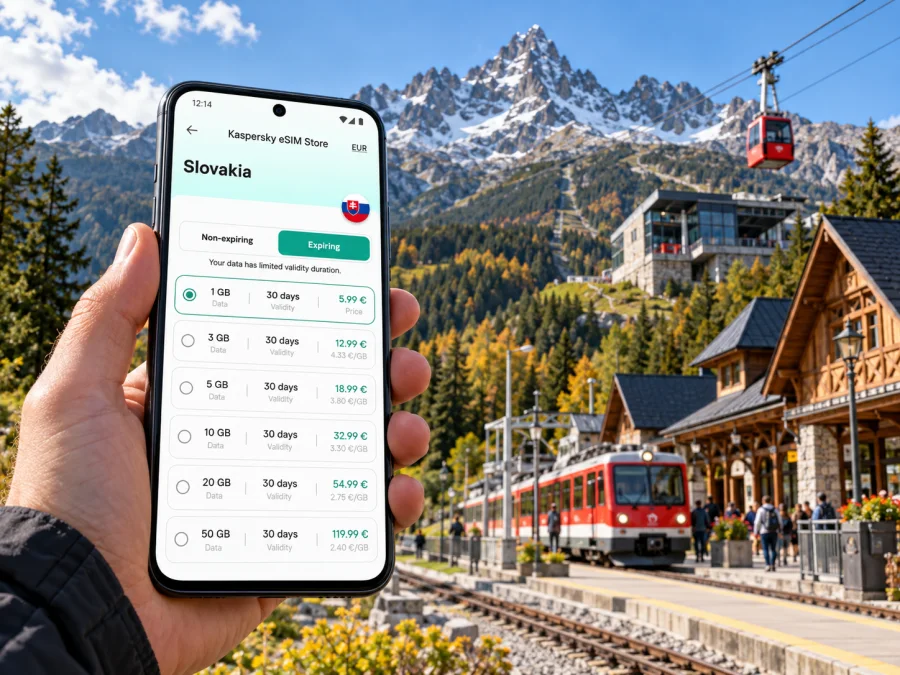
Kaspersky eSIM Store is an app and website where you can choose, arrange, and activate an eSIM with a suitable data plan for an international trip. The plan’s listed allowance, validity, supported destination, and network details are the terms to use when deciding whether it fits. They may change, so check the current offer rather than relying on a screenshot or a figure from an older article. You can review eSIM options for a trip to Slovakia and compare the displayed data amount and validity with your itinerary.
Choose by expected use rather than package size. Offline maps, messaging, and occasional searches need less than photo uploads, video calls, streaming, hotspot use, or work online. Check tethering terms, and remember that unsaved maps, photo backups, and app updates can use data in the background.
A simple way to estimate your data
Before selecting a plan, list the tasks you expect to do on mobile data:
- Light use: messages, checking a departure, occasional map searches, and a few bookings. Save maps and confirmations over Wi-Fi before travel.
- Regular travel use: active navigation, frequent searches, translating, and sharing photos. Leave room for background activity and unexpected route changes.
- Work or high-use days: video meetings, hotspot use, cloud files, or media uploads. Check the plan rules and estimate a larger allowance; a mobile plan may not replace reliable fixed Wi-Fi for sustained work.
These are usage profiles, not fixed data promises. Review validity as well as allowance; unused data does not carry over unless the terms say so.
| Your travel pattern | Plan details to prioritize | Data-saving preparation |
|---|---|---|
| Weekend in the resort | Destination, validity across all travel days, enough data for maps and messages | Download the town map and accommodation details |
| Ski or cable-car focused stay | Validity and the ability to check updates while moving between stops | Save tickets and booking references offline |
| Remote-work trip | Hotspot terms, data volume, validity, and a dependable Wi-Fi fallback | Test meeting tools before travel and sync files on Wi-Fi |
| Multi-country itinerary | Every destination included and the validity across the route | Compare the plan’s stated area with your exact route |
Slovakia’s network market and mountain coverage
A travel eSIM uses a mobile network available under the plan’s arrangements; it does not create a separate network in Tatranská Lomnica. Slovakia has several mobile network operators, and the regulator’s public coverage map presents operator-specific layers, including Slovak Telekom, Orange, O2 Slovakia, and SWAN/4ka. A coverage map is a planning aid, not a guarantee of indoor reception, a particular data speed, or uninterrupted service at a mountain location.
The operator available to a travel eSIM depends on the plan’s own network arrangements. Do not infer the provider from the Kaspersky eSIM Store name, the country alone, or a different user’s experience. Review any network information shown with the plan and compare it with the route you intend to take. For a short visit focused on the settlement, your priorities may differ from a plan for remote hiking or a multi-day drive through rural areas.
The High Tatras add a terrain factor. Buildings, valleys, elevation, forest, weather, and distance from a mast can all affect reception. A phone may work in the resort centre and behave differently higher on a mountain or inside a building. The public coverage map itself notes that modeled information can differ from operator information and that pale areas indicate coverage that may include occasional interruptions. Check the exact place on the regulator’s map when coverage is important, and keep navigation and emergency information available offline.
Use mobile data to plan, then keep the route, meeting point, accommodation number, and return details available offline. Tell someone your plan and follow local guidance if conditions change.
Device compatibility, regional versions, and eSIM limits
A phone model name by itself may not tell you whether the exact device can use eSIM. Hardware and eSIM availability can differ by regional version, carrier lock, and software configuration. Apple’s current support information, for example, documents country-specific eSIM differences for some iPhone variants. Android manufacturers also caution that eSIM support can depend on model, region, and carrier. Check the exact model or product code in your device settings and confirm that the phone is unlocked and eSIM-ready before you choose a plan. Check whether your device is compatible.
Keep your operating system updated and have Wi-Fi available during setup. Do not delete a profile while troubleshooting unless the plan instructions say to. For a work-managed phone, check whether another eSIM profile is allowed.
A data-focused travel eSIM should not be assumed to include an ordinary phone number, standard voice calls, or SMS. Check the specific plan description. You can usually keep your home SIM active for calls or verification messages while selecting the travel eSIM for mobile data, but roaming charges and dual-SIM behaviour depend on your home carrier and device settings. Set the data line deliberately and disable data roaming on the home line if you do not intend to use it.
Install and activate before the journey
If your device is compatible, installing the eSIM before departure can make your first travel day simpler. Follow the plan’s activation timing carefully: some plans start validity when installed, while others start when they first connect in the destination. Do not assume which rule applies. Read the displayed instructions for your chosen plan, and make sure you have a stable Wi-Fi connection while completing setup.
A general preparation sequence is:
- Choose Slovakia as the destination and review the plan’s data allowance, validity, network information, and activation conditions.
- Confirm the exact phone model is eSIM-compatible and unlocked.
- Install the eSIM using the instructions for Android or iOS.
- Label the line clearly, such as “Slovakia data”, so you can identify it in your SIM settings.
- Keep your home line configured for calls or messages if needed, and select the travel eSIM for mobile data when the plan should begin.
- Test the connection when appropriate, following the plan’s activation instructions. Save support details and your booking information offline.
Installation and activation are related but not always the same action. If the plan instructions specify a start condition, follow it exactly. If the eSIM does not connect, check that the travel line is enabled, mobile data is assigned to it, the device has restarted if advised, and the selected network settings match the plan guidance. If the issue remains, contact the relevant support channel with the device model and the message shown on screen.
Before leaving your accommodation each morning
Before a day of trains, lifts, or walking, charge your phone, save maps and bookings offline, check current notices and weather, confirm the data line, and tell someone your approximate plan.
Practical scenarios
A late arrival from Poprad
You land at Poprad-Tatry and need to reach a train or pre-booked ride. Confirm the onward option before your flight, because public buses do not currently serve the airport according to the airport’s transport page. Keep the accommodation address and booking details available offline. If you use a travel eSIM, complete any required installation while you still have Wi-Fi and follow the plan’s validity start rule. Use mobile data for live updates when available, while treating your pre-arranged transfer details as the fallback.
A day around the centre and cable-car stations
Start with your ticket and the day’s operating notice saved on the phone. If you need to change cable cars at Štart or coordinate with someone returning earlier, mobile data may help with messages and updates. Conditions at higher elevations can differ from the resort, so do not make a return-time decision on the assumption that reception will be continuous. Agree on a meeting point and time before separating.
A rail day to another settlement
Check the departure and return connections before leaving Tatranská Lomnica. The regional system links multiple High Tatras centres, but your exact route may need a change. Save the planned return service and allow a buffer for schedule changes. If you use a data-only eSIM, internet messaging apps can be useful when connected, but keep the ticket and essential details accessible offline too.
A few hours of remote work
Accommodation Wi-Fi may suit video calls or large transfers better. Ask about it before booking, and check hotspot terms and data allowance before tethering a laptop.
Common questions
Is Tatranská Lomnica a city?
It is a mountain settlement and resort within the town of Vysoké Tatry. In travel searches, it is often treated like a city destination, but accommodation and postal details may show Vysoké Tatry as the municipality.
Do I need a separate eSIM for Tatranská Lomnica?
Usually, the relevant destination is Slovakia. Check the selected plan’s country and network terms, particularly if your trip continues into another country. There is no reason to assume a city-specific plan exists unless the product page says so.
Will mobile internet work on Lomnický štít or every trail?
No plan can promise reception at every elevation, indoors, or along every trail. Terrain and the network used by the plan affect service. Check operator-specific coverage information and prepare offline navigation and trip details.
Can a travel eSIM receive ordinary calls and SMS?
Do not assume so. A data-focused plan may provide mobile internet only. Check its stated features, and retain your home SIM if you need its number, while checking your home carrier’s roaming terms.
Can I install the eSIM after arriving?
That depends on the plan’s instructions and whether you have Wi-Fi and enough time to complete setup. Preparing in advance can reduce friction, but follow the plan’s activation timing so validity starts when intended.
What if my phone shows an eSIM option but setup fails?
Check the exact regional model, carrier lock, software version, Wi-Fi connection, and plan activation instructions. A device menu alone is not a guarantee that every eSIM plan will work. Use the compatibility checker and contact support if the issue continues.
A connected trip, with an offline backup
For Tatranská Lomnica, prepare connectivity around the shape of your trip: arrival in Poprad, the final transfer, rail journeys between Tatra settlements, time in the resort, and excursions uphill. Select a Slovakia plan with an allowance and validity that fit those dates, verify the exact device variant, and check the listed network details. Keep maps, tickets, addresses, and return plans available offline because mountain reception and transport schedules can vary.
When you are ready, use the Kaspersky eSIM Store app or website to choose and arrange a suitable option for your journey. Choose an eSIM plan for Slovakia, install it on a compatible unlocked device, and follow its activation instructions before relying on it during your stay.


