
Travel connectivity guide
Taveuni eSIM for mobile internet in Fiji
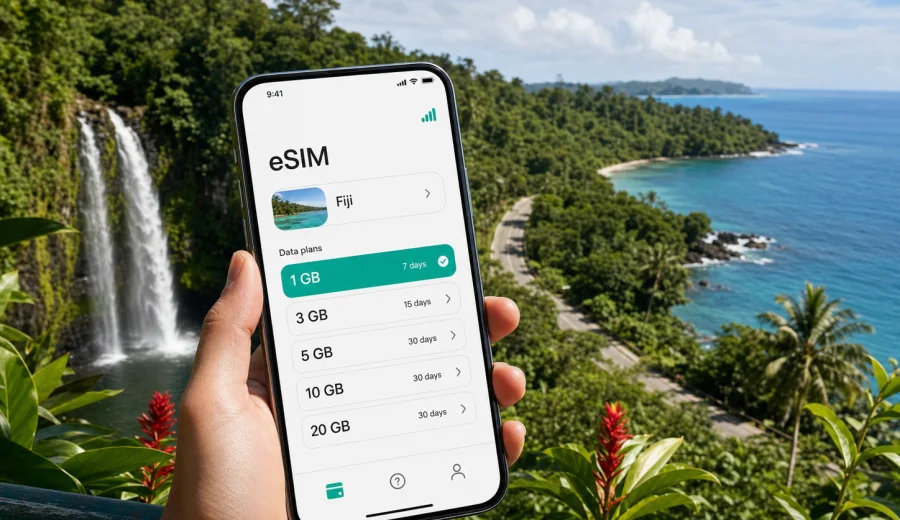
Taveuni eSIM: mobile connection and internet for your Fiji trip
Taveuni is a compact, green, practical travel destination where mobile internet quickly becomes part of the trip. You may need maps after landing at Matei Airport, a message to your hotel in Matei or Somosomo, weather checks before a waterfall walk, or a ride arrangement after a boat crossing. An eSIM helps you prepare mobile data before the journey, so you do not have to start your first hour on the island by looking for a physical SIM card.
This guide explains how to think about eSIM, mobile connection, and internet access for Taveuni. The focus is local: arrival, transfers, villages, resorts, day trips, diving plans, business calls, short stays, and onward travel around Fiji. It is not a general country guide. Fiji matters because the right eSIM tariff should match the country where Taveuni is located, but the practical decisions happen on the island.
Why mobile internet matters in Taveuni
Taveuni is often described as Fiji's Garden Island, and that tells you something useful about connectivity planning. The trip is likely to include small roads, coastal accommodation, national park trails, boat trips, and places where you do not want to depend only on public Wi-Fi. Mobile data helps with routine tasks that feel minor until you are standing outside an airport terminal or waiting for a pickup.
Typical online tasks in Taveuni include:
- confirming a resort transfer after your domestic flight;
- sharing your live location with a driver or host;
- checking weather before visiting Bouma National Heritage Park;
- coordinating a dive, snorkel, or boat departure near the Somosomo Strait;
- using maps for Matei, Somosomo, Waiyevo, Lavena, and nearby coastal roads;
- messaging family when hotel Wi-Fi is slow, busy, or unavailable;
- keeping boarding passes, bookings, and travel documents accessible;
- joining work calls from a lodge, resort, or cafe when your schedule allows it.
An eSIM is not a magic guarantee of coverage in every valley, beach, or trail section. It is a practical way to prepare mobile data for a compatible device without swapping your main SIM card. In a destination like Taveuni, that preparation can make arrival and movement calmer.
Arrival scenarios: from flight to accommodation
Many visitors reach Taveuni by domestic flight to Matei Airport or by ferry connections through other parts of Fiji. Either way, the first useful moment for mobile data usually comes before the sightseeing starts. You may need to tell your hotel you have landed, check whether a pickup is waiting, or confirm the next transfer if weather has affected transport.
For arrivals by air, mobile internet can help with:
1. Opening your booking confirmation without searching through offline screenshots.
2. Calling or messaging the accommodation through an internet-based app.
3. Checking whether the driver is at the terminal, at a nearby road, or delayed.
4. Sharing an updated arrival time if your domestic flight changed.
5. Looking up the route from Matei to your resort, village stay, or dive base.
For arrivals by ferry or boat, the tasks are similar but often more dependent on timing. You may need to coordinate pickup after docking, check a message from the operator, or confirm whether the next leg is still running. Having an eSIM already installed can reduce friction because you are not relying only on a terminal Wi-Fi network or a borrowed hotspot.
Where eSIM helps most on the island
Taveuni travel is built around local movement across a spread-out island. The value of mobile internet is strongest when plans change, when you leave your accommodation, or when you need to manage time between activities.
| Taveuni situation | Why mobile data helps | What to prepare |
|---|---|---|
| Matei Airport arrival | Transfers and hotel messages are easier when you can connect quickly | Install the eSIM before departure and keep instructions offline |
| Resort check-in | You may need booking details, payment confirmations, or messages | Save documents and test the eSIM profile before the trip |
| Waterfall or coastal walks | Weather, route timing, and pickup plans can change | Download maps and keep mobile data for updates |
| Diving and boat trips | Operators may adjust departure times based on conditions | Keep messaging apps ready and check data balance |
| Remote work window | Video calls and file access need more data than maps | Choose a tariff with enough GB and suitable validity |
| Onward Fiji travel | You may continue to Vanua Levu, Viti Levu, or another island | Check that the tariff applies to Fiji, not only one stop |
How to choose an eSIM tariff for Taveuni
For a Taveuni article, the destination tariff should be chosen for Fiji. You do not need a separate city product for Matei, Somosomo, or any individual village. Instead, check the country or regional destination, the data allowance, the validity period, and the conditions of the selected tariff.
Use this decision path:
1. Choose Fiji as the destination for your Taveuni trip.
2. Match the validity period to the full number of travel days, including arrival and departure.
3. Estimate data use by activity, not only by trip length.
4. Check whether tethering is important for a laptop or travel partner.
5. Confirm that your phone supports eSIM and is not locked to another operator.
6. Install the eSIM while you still have a stable internet connection.
For a short resort stay, a smaller data package may be enough if you mostly use maps, messages, bookings, and occasional browsing. For diving trips, photo backups, video calls, social media uploads, and laptop tethering, choose a larger allowance. Streaming and cloud backups can consume data quickly, so disable automatic uploads if you want the package to last.
Data planning by trip style
Your ideal data allowance depends less on the word "Taveuni" and more on how you travel there. A traveler staying at one resort with reliable Wi-Fi has different needs from a photographer, remote worker, or family coordinating several transfers.
| Trip style | Typical mobile data use | Practical eSIM approach |
|---|---|---|
| Short stopover | Maps, messages, pickup coordination, boarding passes | Choose enough data for arrival, transfers, and essential apps |
| Relaxed resort stay | Messaging, bookings, light browsing away from Wi-Fi | Keep mobile data for movement and backup connection |
| Diving or outdoor trip | Operator messages, weather, maps, photo sharing | Consider a larger package and monitor usage daily |
| Business trip | Email, calls, documents, tethering | Prioritize data volume and validity over the smallest package |
| Family travel | Multiple devices, rides, shared plans, entertainment | Decide which device will carry the eSIM and whether hotspot use is allowed |
Before you choose a tariff, check your device. A compatible, unlocked smartphone is essential. If the device does not support eSIM, or if it is restricted by an operator lock, you may need a different connection plan before you travel.
Taveuni transport and local movement
On Taveuni, transport can involve airport pickups, resort shuttles, taxis, private drivers, local buses, boats, and walks between nearby points. You may not be using mobile data every minute, but when you need it, you often need it at a specific moment: to confirm pickup, show a location, check a road, or tell someone you are running late.
A practical connection setup for local movement looks like this:
- download offline maps before the trip, then use mobile data for live checks;
- save the phone number or messaging contact of your accommodation;
- keep ferry, flight, and transfer confirmations in a folder available offline;
- carry a charged power bank for long outdoor days;
- set your primary SIM for calls if you need it, and the eSIM for mobile data;
- turn off background data for apps that do not matter during the trip.
This setup is especially useful if you are moving between Matei, Somosomo, Waiyevo, Lavena, or coastal accommodation. Even when you expect a pickup, mobile data gives you a way to handle small changes without waiting for Wi-Fi.
When to install and activate eSIM
The best time to install an eSIM is usually before you leave home or while you still have a dependable internet connection. Installation requires online access, and it is easier to follow instructions when you are not tired after a flight. Activation timing can depend on the tariff conditions, so read the details before you start using mobile data.
Kaspersky eSIM Store helps you choose, arrange, and activate an eSIM tariff for travel through the site or app. If you are preparing a Taveuni itinerary, you can choose a suitable eSIM tariff for Fiji after checking the data amount, validity period, destination, and device compatibility.
A simple installation sequence:
1. Check that your smartphone supports eSIM and is not operator-locked.
2. Choose Fiji as the destination and select a tariff that matches your trip.
3. Complete the order and open the eSIM details in your account, app, or email.
4. Install the eSIM profile using the on-screen steps or QR code.
5. Set the eSIM as the line for mobile data when you are ready to use it.
6. If required by the tariff or device, enable data roaming for the eSIM line.
7. Keep your primary SIM active only for the services you still need.
For setup details, use the Android installation guide or the iOS installation guide. The exact labels in phone settings can vary by model and operating system version, so follow the instruction path that matches your device.
What to check before buying
The most reliable eSIM experience starts before checkout. Do not choose only by data volume. Read the tariff conditions and confirm the phone setup.
Pre-trip checklist:
- Your device supports eSIM.
- Your device is not locked to one mobile operator.
- The selected destination is Fiji.
- The validity period covers the full Taveuni stay and transit days.
- The data allowance matches maps, messaging, browsing, work, and uploads.
- You understand whether the tariff includes mobile data only or other services.
- You know when the validity period starts according to the tariff conditions.
- You have saved installation instructions somewhere accessible.
- You have a backup way to connect during installation, such as home Wi-Fi or hotel Wi-Fi.
Most travel eSIM tariffs are focused on mobile data. They may not include a local phone number, regular voice calls, or SMS unless the specific tariff says otherwise. For many Taveuni trips, internet-based messaging and calling apps are enough, but check your own needs before relying on that.
Mobile internet for hotels, resorts, and remote work
Many travelers assume hotel Wi-Fi will cover everything. It may be enough for basic browsing, but it is not always available in every room, outdoor area, transfer point, or boat departure location. An eSIM gives you a separate mobile data option when you step away from the property or when the hotel network is busy.
For remote work in Taveuni, plan more conservatively:
- keep video calls short when possible;
- download large files before travel or on trusted Wi-Fi;
- disable automatic photo and video backups over mobile data;
- check whether hotspot use is allowed in the tariff conditions;
- keep a second communication channel for urgent messages;
- avoid scheduling critical calls immediately after flights or boat transfers.
If work is the main reason you need mobile internet, choose a tariff by expected data consumption, not only by price. A larger data allowance may be more practical than trying to stretch a small package across calls, email, maps, and travel apps.
Outdoor trips: waterfalls, coast, and dive plans
Taveuni itineraries often include Bouma waterfalls, coastal walks, beaches, village visits, and diving or snorkeling around nearby reefs. These are exactly the moments when mobile data can be useful but should not be treated as your only safety tool. Save important details offline and use mobile internet for updates, coordination, and route checks where signal is available.
Before an outdoor day:
1. Save your accommodation location and return route.
2. Keep driver, guide, or operator contacts available offline.
3. Download maps for the area you expect to visit.
4. Charge your phone and carry a power bank.
5. Limit background app updates to protect your data allowance.
For dive trips, mobile internet is mainly useful before and after the boat. Operators may send schedule changes, meeting points, or weather-related updates. Once you are on the water, do not assume mobile data will remain consistent. Treat eSIM as a practical travel tool, not as a substitute for local safety instructions.
Short stopovers and multi-island routes
Some travelers pass through Taveuni as part of a wider Fiji route. You might connect from Nadi or Suva to Taveuni, continue to Vanua Levu, or return to Viti Levu before an international flight. In that case, choose an eSIM tariff that fits the whole Fiji journey rather than only the nights spent on the island.
For multi-island travel, mobile internet is useful for:
- domestic flight updates;
- ferry or boat coordination;
- accommodation messages across several stops;
- checking maps and transfer timing;
- managing payment confirmations and digital documents;
- keeping family or colleagues updated during travel days.
If your route includes another country before or after Fiji, check whether a separate country tariff or regional option is more suitable. Do this before travel, because comparing tariffs is easier on a stable connection than during an airport transfer.
Practical data-saving settings
Mobile data lasts longer when your phone is configured for travel. These settings are simple but often overlooked.
| Setting | Why it matters in Taveuni | Suggested action |
|---|---|---|
| App updates | Updates can consume data in the background | Allow updates only on Wi-Fi |
| Cloud photo backup | Resort and outdoor photos can be large | Pause mobile uploads |
| Video quality | Streaming can use data quickly | Lower quality or use Wi-Fi |
| Offline maps | Maps are essential for movement | Download before arrival |
| Messaging media | Group chats may auto-download images | Disable auto-download on mobile data |
| Hotspot | Laptop tethering can consume data fast | Use only when planned |
Check usage daily if your phone shows per-line data statistics. This is especially useful when the eSIM is dedicated to travel data, because you can see whether maps, calls, or background apps are using more than expected.
Common mistakes to avoid
Avoid these issues when preparing internet for Taveuni:
- buying a tariff before confirming device compatibility;
- installing the eSIM only after landing, with no stable Wi-Fi available;
- choosing a package that ends before the return flight;
- leaving photo backup, app updates, and streaming unrestricted;
- assuming mobile data includes a local phone number;
- deleting an eSIM profile before the trip is over;
- forgetting to switch mobile data to the eSIM line;
- expecting the same signal quality in every beach, road, valley, and boat area.
If something does not connect immediately, check the basics first: the eSIM is installed, the correct line is selected for mobile data, airplane mode is off, data roaming for the eSIM is set as required, and the device has restarted if the instructions recommend it.
Quick answers about eSIM in Taveuni
Is eSIM useful for Taveuni?
Yes, if you want mobile data for transfers, maps, accommodation messages, trip updates, and internet-based calls without buying a physical SIM card after arrival.
Should I choose Taveuni or Fiji as the destination?
Choose Fiji. Taveuni is the island destination, but the travel eSIM tariff should match the country where you will use mobile data.
Can I install eSIM before I fly to Fiji?
In most cases, installing before travel is more convenient because you still have stable internet. Check the tariff conditions to understand when validity begins.
Will eSIM replace my regular phone number?
Usually no. Travel eSIM tariffs often focus on mobile data. Voice calls and SMS are included only if the selected tariff states that clearly.
Do I still need offline maps?
Yes. Offline maps are useful on an island trip, especially during outdoor days or transfers. Use mobile data for live updates and messages where signal is available.
Can I use eSIM for a laptop?
Possibly, if your phone and tariff allow hotspot use. Check the conditions before relying on tethering for work.
Final preparation before your Taveuni trip
For Taveuni, good internet planning is not complicated. Choose Fiji as the destination, estimate your data use honestly, install the eSIM before travel if possible, keep offline backups for maps and bookings, and check your device before purchase. This gives you a cleaner arrival at Matei Airport, easier movement around the island, and a practical backup when Wi-Fi is not available.
Kaspersky eSIM Store is a site and app where you can choose, arrange, and activate an eSIM with a suitable mobile data tariff for an international trip. If Taveuni is on your itinerary, prepare an eSIM tariff for your Fiji trip and review the tariff details before you travel.