
Travel connectivity guide
eSIM in The Valley: Mobile Internet for Anguilla
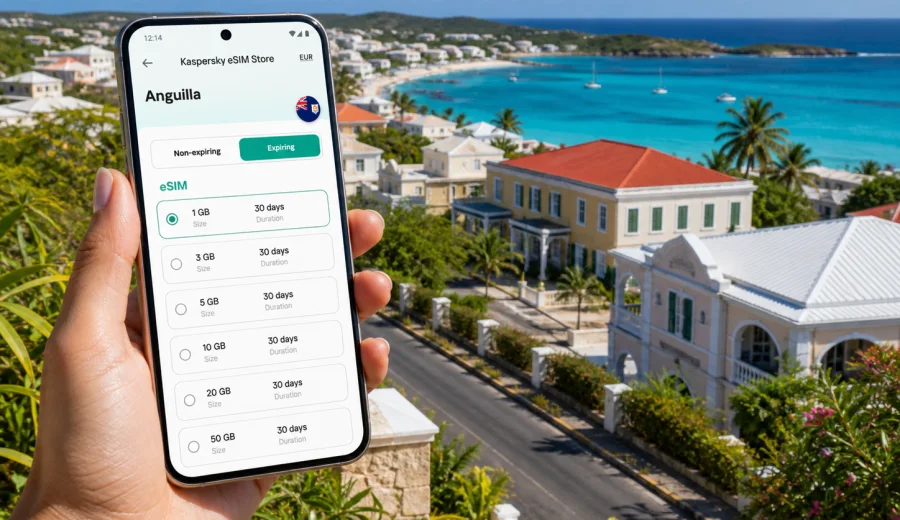
eSIM in The Valley: mobile connection and internet for Anguilla travel
The Valley is a compact capital, but it is not a place where you want to spend your first hour searching for a shop, asking for Wi-Fi passwords, or waiting until your hotel check-in to open maps. If you are flying into Anguilla for meetings, a beach stay, a sailing itinerary, or a short island stop, an eSIM can help you prepare mobile internet before the trip.
This guide focuses on The Valley, not only on Anguilla as a country. The local travel pattern is specific: you may land at Clayton J. Lloyd International Airport, continue to a hotel or villa, take taxis between districts, drive toward Crocus Bay or Sandy Ground, or use The Valley as a base for errands before going to Shoal Bay, Meads Bay, West End, or Blowing Point. In all these moments, mobile data supports the practical details of the trip: navigation, messages, bookings, restaurant searches, taxi coordination, and work calls over internet-based apps.
An eSIM is a digital SIM profile installed on a compatible smartphone or tablet. For many travellers, it is useful because there is no physical SIM card to collect and no need to depend on public Wi-Fi for every small task. With Kaspersky eSIM Store, you can use the app or website to choose a destination and a suitable prepaid data plan for a trip, then install and activate the eSIM on a compatible device.
Why mobile internet matters in The Valley
The Valley is small by global capital-city standards, yet your trip can still involve many short movements. The airport, government offices, local services, churches, historic sites, hotels, beaches, marinas, and ferry routes are spread across the island. Distances may look simple on a map, but you still need live directions, pickup details, and quick updates when plans change.
Mobile internet is especially useful in The Valley for:
- opening maps after landing and checking the route to your accommodation;
- messaging a host, hotel, driver, colleague, or family member;
- confirming restaurant hours or reservation details;
- finding a supermarket, pharmacy, bank, or local service;
- using internet-based calling and messaging apps;
- checking ferry or onward travel details before going to Blowing Point;
- working from a hotel, villa, cafe, or temporary office;
- sharing your location when a pickup point is easier to describe on a map than by street address.
Arrival scenarios: airport, ferry, hotel, and first errands
Your first connection need usually appears before you have settled in. If you arrive by air, you may want to message your driver, check the hotel address, or confirm whether you are going straight to The Valley or onward to a beach resort. If you arrive by sea through Blowing Point, mobile internet can help you coordinate the road transfer into town or across the island.
| Arrival moment | What you may need online for | Why eSIM helps |
|---|---|---|
| Before departure | Install the eSIM, save instructions, check device compatibility | You reduce setup pressure after landing |
| At Clayton J. Lloyd International Airport | Message a driver, open maps, confirm accommodation details | You can start using mobile data without looking for a SIM shop first |
| At Blowing Point ferry terminal | Coordinate pickup, check route, contact your host | You avoid depending only on terminal or cafe Wi-Fi |
| First stop in The Valley | Find local services, confirm opening hours, send arrival updates | You can handle errands from your phone |
| Hotel or villa check-in | Share documents, contact support, manage bookings | You have a backup if Wi-Fi is slow or not ready |
If your phone supports dual SIM, you can usually keep your regular SIM active for your home number while using the eSIM for mobile data. Conditions depend on the device and tariff. Travel eSIM plans are usually data-only unless the selected plan states otherwise, so internet-based calling and messaging apps are often the practical workaround.
Local movement around The Valley
The Valley is a hub for everyday island movement. You may visit offices, meet someone near the capital, stop for groceries, then continue toward beaches or restaurants outside the town centre. Mobile data supports the small decisions that make these short movements easier:
- whether to leave now or wait for a pickup;
- which road to take to a beach or restaurant;
- where to stop for supplies before heading to a villa;
- how to share a location when an address is not enough;
- whether to adjust plans after a meeting or dinner time changes.
How much data you may need in The Valley
There is no single correct data amount for every visitor. A quiet weekend with maps and messages uses much less than a week with laptop tethering, video calls, cloud backups, and social media uploads. Before choosing a data plan, estimate what you will actually do in The Valley and across Anguilla.
| Trip style | Typical data use | Guidance |
|---|---|---|
| Short stopover or one-night stay | Maps, messages, ride coordination, a few searches | A smaller data package may be enough if you avoid heavy video |
| Beach holiday based near The Valley | Navigation, restaurant searches, photos, messaging | Choose enough data for daily movement and sharing |
| Business trip | Email, documents, calls, hotspot use | Pick a larger allowance and check whether tethering is allowed |
| Family trip | Several devices, bookings, maps, entertainment | Consider who actually needs mobile data and who can use hotel Wi-Fi |
| Longer island stay | Daily navigation, work, backups, media | Choose a plan with enough validity and monitor remaining data |
To manage data, download offline maps before departure, turn off automatic cloud backup on mobile data, and keep video streaming for Wi-Fi when possible. If you need hotspot use for a laptop, check the plan conditions first.
Choosing an eSIM plan for The Valley and Anguilla
For a city trip, the destination choice should match the country where the city is located. The Valley is in Anguilla, so you need a plan that covers Anguilla rather than a separate city-only option. The city matters for your use case, but the plan coverage is selected at country or regional level.
When comparing options, look at four details:
1. Coverage destination. Make sure the plan is suitable for Anguilla and your broader route.
2. Data volume. Choose enough traffic for navigation, messaging, work, and media.
3. Validity period. Match the plan duration to your arrival and departure dates.
4. Activation rules. Check when the validity starts and what steps are needed on your device.
If The Valley is one stop in a wider Caribbean itinerary, check whether a country plan or a broader regional option better fits the trip. Do not assume that one plan covers every nearby island.
For a straightforward Anguilla stay, you can view mobile internet options for Anguilla and choose a plan that fits your dates, data needs, and device. This is the country-level landing page to use for a trip to The Valley.
What to check before you buy
Before purchasing a travel eSIM, check your phone first. The most important question is whether the device supports eSIM and is not locked in a way that prevents using another mobile profile. A compatible device is essential; without it, installation will not work as expected.
Use this checklist before your trip to The Valley:
- Check your device for eSIM support.
- Confirm that your phone is not restricted by an operator lock.
- Make sure you have a stable internet connection for installation.
- Read the plan conditions: country, data amount, validity, activation timing, and possible hotspot rules.
- Keep your regular SIM settings clear so you know which line handles mobile data.
- Save the installation instructions before leaving home.
- If you travel with family or colleagues, decide which devices need their own data plan.
The best time to install an eSIM is often before departure, while you still have reliable Wi-Fi and time to check settings. In many cases, you can install first and activate mobile data later, depending on the plan instructions.
How to install and activate eSIM for a The Valley trip
The exact steps depend on your device, but the general flow is simple: choose the destination, select a plan, install the eSIM profile, and set it as the mobile data line when you need it. If you use Kaspersky eSIM Store, the eSIM appears in your profile after purchase, and you can follow the on-screen instructions or use the QR code provided for installation.
For setup details, use the official guides: Android installation instructions and iOS installation instructions.
A practical setup sequence:
1. Connect to Wi-Fi before installation.
2. Confirm that your phone supports eSIM.
3. Choose Anguilla as the destination for your The Valley trip.
4. Select the data amount and validity period.
5. Install the eSIM profile using the provided instructions.
6. Name the line clearly, for example “Anguilla data”.
7. When you are ready to use it, set the eSIM as the mobile data line.
8. Enable data roaming for the eSIM if the instructions for the selected plan require it.
9. Keep your home SIM settings under control to avoid unexpected roaming.
Do not delete an eSIM profile unless you are sure you no longer need it. Some profiles cannot be reinstalled after deletion.
Practical scenarios in The Valley
A business day in the capital
If you are in The Valley for meetings, mobile internet helps you confirm addresses, join calls, send files, check calendar changes, and message contacts between appointments. Hotel Wi-Fi may be available, but mobile data gives you flexibility while moving between offices, cafes, and accommodation.
A beach holiday with The Valley as a base
Many travellers use The Valley for arrival, errands, and local services, then spend much of the trip near beaches such as Crocus Bay, Sandy Ground, Shoal Bay, or Meads Bay. Mobile internet helps with routes, restaurant choices, message updates, and photo sharing.
A longer stay or short stop
For villas and longer stays, eSIM data can work as a backup while you move around the island, especially for errands, service calls, and route checks. For a short stop, the priority is different: install the eSIM before travelling so that maps and messages are ready without spending limited time on setup.
eSIM, roaming, local SIM, and Wi-Fi
Each option has a place. Home roaming keeps familiar settings but depends on your operator's pricing. A local physical SIM may suit a longer stay but can require an extra shop visit. Hotel Wi-Fi is useful indoors but not while moving. A travel eSIM is practical when you want to prepare mobile data before or soon after arrival, provided your device is compatible and the selected plan covers Anguilla.
Data-saving tips for Anguilla travel
Use these settings before and during your stay:
- Download offline map areas before departure.
- Disable automatic photo and video backup on mobile data.
- Set messaging apps to download media only on Wi-Fi.
- Use lower video quality if you must stream on mobile data.
- Close hotspot sharing when you are not using it.
- Check the data balance regularly in your profile or app.
- Keep installation emails or instructions available offline.
Common mistakes to avoid
Most setup issues come from one missed detail. Check compatibility before buying, choose Anguilla as the destination, read the installation steps before landing, do not delete the eSIM profile after setup, and make sure the eSIM is selected for mobile data. Also remember that a data-only eSIM usually does not include calls or SMS, and heavy hotspot use can consume traffic quickly.
FAQ: eSIM for The Valley
Is there a city-specific eSIM for The Valley?
For travel planning, you should choose coverage for Anguilla because The Valley is in Anguilla. City pages help you plan local scenarios, but the plan destination is normally country or regional coverage.
Will the eSIM give me a local phone number?
Travel eSIM plans for mobile internet are usually data-only unless the plan conditions say otherwise. You can use internet-based calling and messaging apps over mobile data.
Is eSIM better than hotel Wi-Fi in The Valley?
They solve different problems. Hotel Wi-Fi can be useful indoors, while eSIM data helps when you are moving around The Valley, heading to beaches, coordinating transport, or handling errands away from your accommodation.
What should I do before buying?
Check eSIM compatibility, read the plan conditions, confirm the destination, and estimate data use. For The Valley, select an Anguilla plan unless your wider route requires a regional option.
Prepare mobile internet before your trip to The Valley
The Valley is an easy place to underestimate because it is compact, but your phone still carries much of the trip: arrival messages, maps, transport details, hotel coordination, business updates, restaurant searches, and contact with people at home. Preparing an eSIM before departure helps you reduce dependence on public Wi-Fi and handle the first hours in Anguilla with fewer interruptions.
Before you travel, check that your device supports eSIM, choose the right destination, read the tariff conditions, and install the profile while you still have reliable Wi-Fi. Then, when you arrive in The Valley or continue across Anguilla, you can use mobile data for the practical moments that keep the trip moving.
You can choose an eSIM plan for your trip to The Valley in Anguilla through Kaspersky eSIM Store and prepare mobile internet for a compatible device before you go.