Travel connectivity guide
Tianjin eSIM: Mobile Internet and Travel Guide
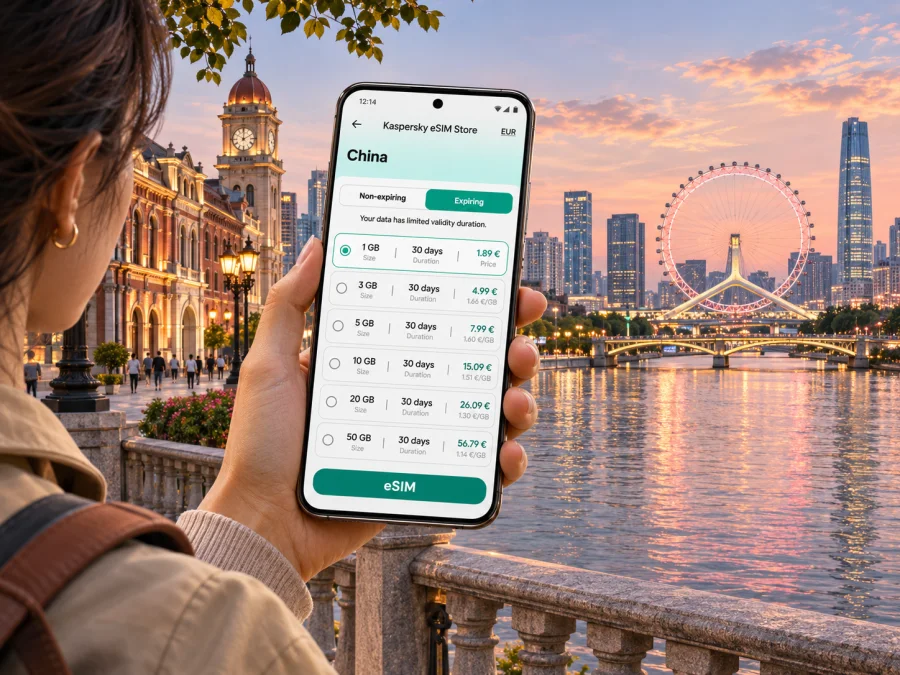
Tianjin eSIM for a reliable mobile connection and internet on your trip
Tianjin is a major northern Chinese city where a day can move from the Haihe River and historic streets to a high-speed rail station, business district or the wide coastal area of Binhai. A working mobile data connection helps you check routes, translate signs, coordinate a hotel arrival and keep tickets or booking details close at hand. Preparing an eSIM can make that part of the trip easier, provided your exact phone variant supports the eSIM you intend to use and you complete any purchase steps before reaching mainland China.
This guide focuses on Tianjin: arrival at Tianjin Binhai International Airport, getting around the central districts, following the river, planning a Binhai excursion and choosing a suitable data setup. Tianjin is a municipality in mainland China. It is not Hong Kong or Macao, which have separate geographic and service contexts. A plan for China should explicitly include mainland China and match the places on your itinerary.
What a travel eSIM can and cannot do
A travel eSIM is a digital SIM profile installed on a compatible, unlocked device. A data-only travel plan can provide mobile internet through a partner network in its covered destination. It is useful for maps, messaging apps, translation, email, ride coordination and online bookings. It does not automatically give you a Chinese phone number, ordinary cellular voice calling or SMS; check the selected plan’s terms for the included service. Keep your usual SIM active if you need its number for calls or verification, and review its roaming settings and charges with your home carrier.
Kaspersky eSIM Store is an app and website where you can choose, purchase and activate an eSIM plan for mobile data on an international trip. The China destination page currently identifies UNICOM as the local provider for the listed service and says eSIMs can be purchased only outside China. If you are travelling to Tianjin, select and purchase a suitable plan before entering mainland China. It says a plan bought before arrival can still be installed, used and topped up in China; read the live terms before travel.
Before you fly: confirm your device and plan
Do not decide based only on a phone family name or the fact that an eSIM menu appears in Settings. Compatibility can depend on exact model number, sales region, carrier lock, software and profile type. Mainland China has device-specific rules for local carrier eSIM activation, separate from compatibility with an international travel eSIM. Apple’s mainland-China guide lists a limited set of iPhone variants for local carrier eSIMs; other iPhones cannot install those local profiles. It also says that non-mainland travel eSIMs cannot be installed on a China-purchased supported iPhone while it is physically in mainland China. Check your exact model and travel-plan requirements instead of extrapolating from another regional variant.
Use this checklist before purchase:
- Find the full model or model number in your phone’s settings, packaging or manufacturer support page.
- Check that the phone is not locked to a carrier and that it supports eSIM in the way required by your chosen travel plan.
- Verify the plan’s destination wording. It should include mainland China for Tianjin, rather than only Hong Kong or Macao.
- Check the data allowance, validity period, activation method, hotspot rules and any restrictions shown at checkout.
- Confirm when validity begins. Some plans start on first connection; other plans may have a schedule or different activation conditions.
- Keep access to Wi-Fi during installation if the provider’s setup flow requires it, and save installation instructions before departure.
If you are unsure about the model, check whether your device is compatible before placing an order. A compatibility tool is a helpful first check, but the final decision should match the exact model and current plan conditions. For a phone that cannot use the selected eSIM, ask your home carrier about roaming or check the current local SIM registration process and requirements through an authorized provider after arrival.
Getting connected at Tianjin Binhai International Airport
Tianjin Binhai International Airport (TBIA) is in Dongli District, east of the central city. Before leaving the terminal, save your hotel’s address in Chinese, confirm the arrival terminal and compare the current airport bus, rail or ride options with your destination. The official city guide lists airport buses, including a route from Terminal 2 that serves Tianjin Railway Station and Tianjinxi Railway Station on its way toward Wuqing. Routes and hours vary, so verify the stop, departure point and schedule for your arrival rather than assuming a bus serves your hotel directly.
A metro journey can work well when the airport station and your final stop connect conveniently. A taxi or app-based ride may be simpler with heavy luggage or a late arrival, subject to availability and payment setup. Save a backup route and keep a screenshot of the hotel address in case you have to switch transport or your data connection is delayed.
Move around by rail and river
The city’s current visitor guide gives Tianjin Rail Transit a general operating window of 6:00 a.m. to 12:09 a.m. the following day, while noting that first and last trains vary by station. Check the particular station and line for early departures or late returns. The guide lists single tickets, transit cards, QR codes, bank cards, mobile payments and virtual tickets as payment methods. Since acceptance can depend on the station and your payment setup, carry a backup and make sure your phone has battery if you rely on a QR ticket.
The Haihe River is a useful orientation line through central Tianjin. The city describes it as a 72-kilometre river flowing through the city toward the Bohai Sea. Bridges connect the neighbourhoods, so a short straight-line distance can mean a longer walk to a crossing. Check pedestrian directions rather than judging only by map distance.
A compact first walk can start near Tianjin Railway Station and Jinwan Plaza, then follow the river toward Jiefang Bridge. In Hebei District, Ancient Culture Street, Tianhou Temple and the Italian-style architecture area make separate stops; Tianjin Eye stands over the river at Yongle Bridge. In Heping District, Five Avenues (Wudadao) and Golden Street are suited to walking, shopping and cafés. Choose one cluster at a time, note the nearest station and save the return route before wandering into smaller streets.
Choose a base for your itinerary
- Heping: convenient for Five Avenues, Golden Street and central shopping. Confirm the closest station and hotel entrance; historic blocks can make a short map radius misleading.
- Hebei or the riverfront: useful for Ancient Culture Street, Tianjin Eye and the north-central river corridor. Include bridge crossings in walking estimates.
- Tianjin Railway Station area: practical for rail arrivals and departures and the central riverfront. Check which station exit is closest to your hotel.
- Dongli or the airport side: can suit an early flight, late arrival or a meeting near TBIA, but means more travel for sightseeing downtown.
- Binhai New Area: choose it when a venue or attraction there is central to your plans. Binhai is a large coastal area, not one compact downtown neighbourhood; verify the precise district and connection before booking.
Save your accommodation’s Chinese address, map pin and a nearby landmark. Keep booking details offline too, so a low battery or temporary loss of data does not leave you without a way to explain where you are going.
Plan a separate day in Binhai
Binhai New Area is on Tianjin’s eastern coast and includes the airport, Tianjin Port, several rail hubs and attractions such as Binhai Library, the National Maritime Museum, Dongjiang Bay Beach and Tianjin Haichang Polar Ocean Park. Distances between sites can be substantial. Select one or two venues, check current opening and booking details, and confirm the exact address and return route before leaving central Tianjin. If you are connecting to a flight, port or cruise, allow a generous transfer buffer and verify the terminal separately.
Select a data allowance for your days in Tianjin
Estimate data from what you will actually do rather than choosing by trip length alone. Map searches, messaging and text translation usually use less data than frequent video calls, cloud photo uploads, streaming or using your phone as a hotspot for a laptop. Hotel and café Wi-Fi may help, but do not assume every network is available, suitable or secure enough for every task.
| Your travel pattern | A sensible way to estimate use |
|---|---|
| One-day stopover | Keep key directions and bookings offline; allow data for arrival updates, messages and route changes. |
| Several sightseeing days | Consider daily map use, translation, attraction research, ride coordination and photo sharing. |
| Work trip | Add video meetings, email attachments and laptop tethering only if the plan permits hotspot use. |
| Tianjin plus other destinations | Check whether the plan covers every stop, including any cross-border or regional legs, and compare one-country with regional options. |
The current China destination page displays different data sizes and validity types, and the available selection and prices can change. Review the live conditions before paying: data amount, term, destination, purchase eligibility, activation rules and whether the allowance suits your usage. Avoid selecting a plan solely because its validity is long or its listed data allowance is large. If you use a lot of video or tethering, calculate that separately and check plan limits.
Once you know your route and estimated use, you can browse current eSIM options for China. Tianjin is in mainland China, so confirm that the displayed plan’s destination and terms cover the city and your full itinerary. The China page currently says purchase is available only outside China; complete the purchase before arrival. This is a destination landing page, not a guarantee of any particular tariff, network performance or coverage at a specific Tianjin address.
Install before departure, activate with care
Install timing depends on the selected plan and device. Read the current provider instructions before installing, and do not delete an eSIM profile just to retry unless support or the installation instructions tell you to do so. Some activation codes are single-use or tied to one device. Keep the primary SIM selected for calls or texts if needed, and choose the travel eSIM for mobile data when the plan is ready to be used. The exact menu labels vary by phone.
- For Android eSIM installation instructions, follow the steps for your device and version.
- For iPhone eSIM installation instructions, review the iOS steps and confirm the profile appears in cellular settings.
- Label the lines clearly, such as “Home” and “Travel,” so you can tell which one is selected for data.
- Turn off data roaming on your home SIM if you want to avoid accidental roaming charges; check your home carrier’s terms.
- Enable roaming for the travel eSIM only if its instructions require it. Follow the selected plan’s setup directions.
- When the travel plan is active, test a simple route or message and check the remaining allowance in your account.
A travel data eSIM is generally for internet access, not a local telephone number. Keep your usual number available for calls and one-time codes if your home plan permits it. Messaging and voice apps may use data, but make sure you can sign in before departure and that people you need to contact know which channel you will use.
Keep maps and essentials available offline
A reliable plan combines mobile data with a few offline backups. Before leaving your hotel or the airport, save the address in Chinese, your next destination, booking confirmations and any ticket QR codes. Download offline map areas if your map app supports them. Keep a portable battery or charging cable for long station transfers and a screenshot of your hotel location in your photo gallery.
Mobile internet can help with route changes, translations and coordination, but it cannot replace checking current transport notices, following station signs or asking staff when a route is unclear. For an important departure, verify the route in advance and allow extra time. If the network connection drops, switch to your saved directions or a trusted Wi-Fi connection and continue from a known landmark.
Practical scenarios
You land late and need to reach a hotel
Before the flight, save the hotel address in Chinese, check the airport’s current transport options and note a backup ride or hotel contact method. Once you land, connect to Wi-Fi if necessary, check the latest route and compare it with your saved plan. Do not assume a scheduled bus or metro connection is still operating at your arrival time.
You have only half a day in the centre
Choose one compact area, such as the central Haihe riverfront and Jinwan Plaza, or a walk through part of Heping. Save a start and end point, note the nearest station and leave room for a bridge crossing. A focused route is easier to adjust than trying to cross the city between every stop.
You are combining Tianjin with another city
Check whether your plan covers each destination and when its validity starts. Keep station details, tickets and hotel addresses accessible offline. A China-only plan may fit a domestic itinerary; a regional plan may be relevant if the route crosses borders, but confirm the included destinations and terms rather than assuming a regional label covers every stop.
You need to work on the move
Estimate video meeting and laptop data separately from ordinary phone use. Check hotspot availability and plan limits before relying on tethering. If an online meeting is important, identify a stable backup location and keep the meeting details available if mobile data is interrupted.
Quick checklist before you go
- [ ] Your exact phone variant is unlocked and eligible for the selected international travel eSIM.
- [ ] The plan explicitly covers mainland China and is purchased while you are outside China.
- [ ] The plan’s allowance, validity, activation timing and hotspot terms fit your itinerary.
- [ ] Installation instructions and account access are available before you travel.
- [ ] You have saved your hotel’s Chinese address, transport options and important bookings.
- [ ] Your home SIM roaming settings and the travel line’s data settings are clear.
- [ ] A payment backup, offline map and battery plan are ready for arrival.
Frequently asked questions
Is Tianjin covered by a China eSIM plan?
Tianjin is a city in mainland China. Check that the live plan terms explicitly include mainland China. Do not assume that a Hong Kong or Macao destination plan also applies in Tianjin.
Can I buy the China plan after landing in Tianjin?
The current China destination page says eSIMs are available for purchase only outside China. Plan and purchase before entering mainland China. Its current page says plans bought beforehand can be installed, used and topped up after arrival, subject to the displayed terms.
Does a phone that supports eSIM abroad necessarily support eSIM in mainland China?
No. The precise answer depends on the device’s model number, sales region, carrier lock and profile type. Local mainland carrier eSIM activation has specific device rules; an international travel eSIM is a separate compatibility question. Verify your exact variant with the manufacturer and the plan instructions.
Will this eSIM give me a local phone number?
A data-only plan does not include an ordinary phone number, calls or SMS unless its terms explicitly say otherwise. Keep another way to receive important calls or verification messages.
Can I use one eSIM across Tianjin and the rest of China?
That depends on the plan’s destination coverage and validity. Check the exact countries or regions listed in the current plan conditions, particularly if your route includes Hong Kong, Macao or another country.
What if I cannot connect after installation?
Confirm that the eSIM line is enabled, selected for mobile data and configured according to the plan instructions. Check whether that plan requires data roaming, restart the phone if appropriate, and review the remaining data and validity in your account. Keep Wi-Fi available for troubleshooting and contact support through the app or website if the issue continues.
Prepare your Tianjin connection before arrival
A little preparation makes it easier to move between Tianjin Binhai International Airport, the central riverfront, Heping and Hebei, and the wider Binhai area. Confirm your phone variant, check the mainland-China destination and current purchase rules, choose data for the way you actually travel, and save essential addresses and routes offline.
When you are outside China, choose an eSIM option for your China trip through Kaspersky eSIM Store, the app and website for selecting, purchasing and activating an eSIM plan for mobile data abroad. Review the live plan details before checkout, then follow the installation instructions for your device so your Tianjin travel setup is ready when you need it.


