
Travel connectivity guide
Timor-Leste eSIM: mobile internet guide
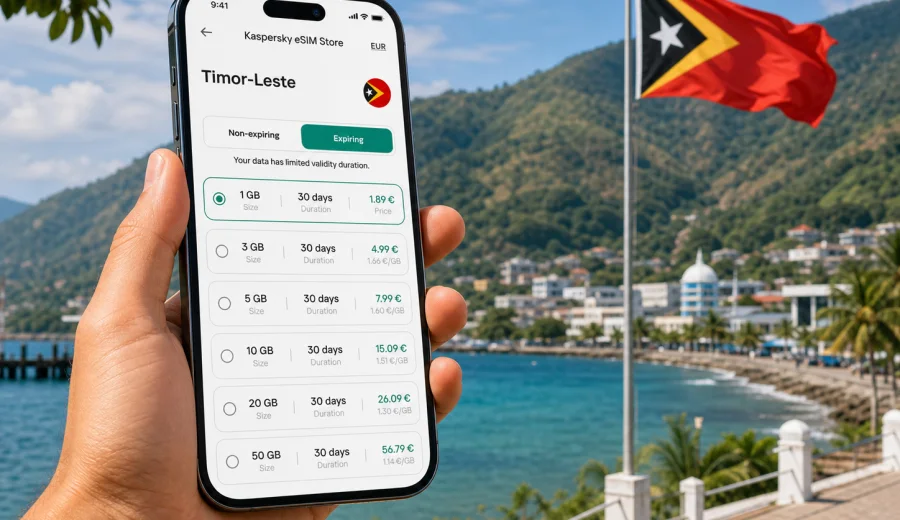
eSIM for Timor-Leste: mobile connection and internet for your trip
Timor-Leste is a compact country where mobile internet can matter from the first hour of the trip. You may land in Dili, head toward the coast, arrange a ferry to Atauro Island, travel through mountain roads, or need maps and messages while moving between guesthouses and local transport. An eSIM helps you prepare mobile data before the trip without looking for a physical SIM card after arrival.
This guide explains how to plan mobile connection and internet in Timor-Leste with an eSIM, what to check before buying a plan, how to install and activate it, and how to estimate the amount of data you may need. The focus is practical: getting online for navigation, hotel details, bookings, translation, ride coordination, work messages, and everyday travel tasks.
Kaspersky eSIM Store is an app and website where you can quickly choose, arrange, and activate an eSIM with a suitable mobile data plan for an international trip. The plan terms, data allowance, validity period, destination, and price should be checked before purchase, because conditions depend on the selected plan.
Why eSIM can be useful in Timor-Leste
Timor-Leste is not a destination where every traveler wants to spend the first day solving connectivity. You may need internet before you understand local transport, opening hours, or the distance between places. With eSIM, you can prepare the mobile data part of the trip in advance and keep your primary SIM card in the phone.
For many travelers, the main advantages are simple:
- no physical SIM card to buy or swap on arrival;
- a plan selected for the destination before the trip or shortly after landing;
- mobile data for maps, messaging, bookings, and translation;
- less dependence on public Wi-Fi in airports, cafes, or hotels;
- a clearer view of data allowance and validity period before payment.
An eSIM is especially convenient if your route includes Dili, coastal areas, mountain towns, diving trips, or a short stay where visiting a local shop would take too much time. It can also be useful for business travel, research trips, NGO work, or regional travel where you need a predictable way to get online while moving.
The important limitation is that an eSIM plan for travel is mainly about mobile data. It usually does not include a regular local phone number, voice calls, or SMS unless this is stated in the plan conditions. For calls and messages, you can use internet-based apps over mobile data.
Typical travel situations where mobile data helps
Timor-Leste is relatively small on the map, but travel days can still be complex. Roads, ferry times, language barriers, weather, and hotel check-in details can all make mobile data useful.
| Situation | Why mobile internet matters | What to prepare |
|---|---|---|
| Arrival in Dili | You may need maps, accommodation details, and messaging immediately after landing. | Install eSIM before departure and know when to activate it. |
| Coastal travel | Routes may include stops where Wi-Fi is not always convenient. | Save offline maps and keep data for updates and messages. |
| Atauro Island trip | Ferry and accommodation coordination can depend on messages. | Choose enough data for the days away from Dili. |
| Mountain route | Navigation and contacts are useful, but signal quality can vary by area. | Do not rely only on live maps; keep key information offline. |
| Remote work | Email, documents, and video calls use different amounts of data. | Estimate data needs by task, not only by trip length. |
eSIM does not remove the need for common travel preparation. Keep important documents, addresses, booking numbers, maps, and emergency contacts available offline. Mobile data is useful, but coverage and speed depend on local network conditions, device settings, terrain, and the selected plan.
How to choose an eSIM plan for Timor-Leste
The best plan is not always the largest plan. A better approach is to match the plan to your trip length, route, and internet habits. A traveler staying in Dili for three days will usually need a different allowance from someone working remotely for two weeks or uploading photos every evening.
Before choosing a plan, check these points:
- Destination: make sure the plan includes Timor-Leste.
- Data allowance: compare expected usage with the number of gigabytes in the plan.
- Validity period: the plan should cover your full stay, including arrival and departure days.
- Activation rules: check when the validity period starts and whether activation requires reaching the destination network.
- Tethering: if you need to share internet with a laptop or another phone, check whether hotspot use is available under the plan conditions.
- Top-up options: check whether you can add more data if your usage is higher than expected.
- Device compatibility: confirm that your phone or tablet supports eSIM and is not locked by a carrier.
Data planning becomes easier when you think by task. Messaging and maps are light. Video calls, cloud backup, streaming, and large app updates can use a lot of data quickly. If you will rely on mobile data for work, leave a buffer.
Data estimates for different trip styles
These estimates are practical planning ranges, not guarantees. Real usage depends on app settings, image quality, automatic updates, cloud backup, map behavior, video resolution, and how often you connect to Wi-Fi.
| Trip style | Typical mobile data use | Suggested planning logic |
|---|---|---|
| Short city stay | Low to moderate | Maps, messages, search, ride coordination, and bookings. |
| Beach or diving trip | Moderate | Add photo sharing, weather checks, and accommodation messages. |
| Business visit | Moderate to high | Email and files are manageable; video calls need more data. |
| Long route across regions | Moderate | Keep offline maps, but reserve data for live updates. |
| Content-heavy travel | High | Uploading photos and videos can consume data fast. |
A cautious traveler may prefer a plan with extra data rather than trying to use the minimum. At the same time, do not buy more than you realistically need if your hotel or workplace has stable Wi-Fi. The goal is to keep essential mobile internet available when Wi-Fi is not practical.
What to check before buying
The most important step is device compatibility. Not every smartphone supports eSIM, and some devices may be locked to a carrier. Before you choose a plan, check your device and confirm that eSIM can be added to it.
Use this checklist before payment:
- your device supports eSIM;
- your device is not carrier-locked;
- your phone has a stable internet connection during installation;
- the plan destination includes Timor-Leste;
- the data allowance and validity period fit your travel dates;
- you understand whether the plan starts immediately or after connection to the destination network;
- you know whether roaming data must be enabled for the eSIM profile;
- you have saved the QR code or installation details in a place you can access.
If you use dual SIM, decide which line will handle mobile data. Many travelers keep their home SIM active for calls or banking messages and set the eSIM as the data line. This can work well, but check your phone settings carefully so mobile data does not switch back to expensive roaming on the home SIM.
How to install and activate eSIM
Installation is usually a short process, but it is better not to do it in a hurry at the airport. After choosing a plan, follow the instructions shown on the site, in the app, or in the email with the QR code. If you need detailed setup steps, use the Android installation guide or the iOS installation guide.
A practical setup flow looks like this:
1. Check that your device supports eSIM and is not locked.
2. Choose Timor-Leste as the destination and review available plan terms.
3. Complete the plan order.
4. Install the eSIM profile using the QR code or manual details.
5. Name the eSIM profile clearly, for example "Timor-Leste data".
6. Keep your primary SIM for calls if needed, and set the eSIM as the mobile data line.
7. After arrival, enable the eSIM line and mobile data for that profile.
8. If required by the plan or device, enable data roaming for the eSIM profile.
Do not delete the eSIM profile unless you are sure it is no longer needed. Some eSIM profiles cannot be reinstalled or moved to another device after activation. If something does not work as expected, check the device settings first and contact support if you need help with installation or activation.
When to prepare your eSIM for Timor-Leste
You can prepare eSIM before the trip or after arrival, but the safer choice is usually before departure while you still have reliable Wi-Fi. That way, you can solve setup questions calmly and avoid depending on airport Wi-Fi or a hotel desk.
For a simple next step, you can choose an eSIM plan for your trip to Timor-Leste in Kaspersky eSIM Store, then install the eSIM on a compatible device before you travel.
If your plan starts only when it connects to a supported destination network, installing before departure can be convenient. If the selected plan has different activation rules, follow the exact terms shown during purchase. The key is to separate installation from actual data use and to understand when the validity period begins.
Planning mobile internet across Timor-Leste
Timor-Leste travel often combines city time, coast, mountains, and island trips. Dili may be your starting point, but you may also travel toward Baucau, Maubisse, Liquica, Same, Atauro Island, or rural areas where Wi-Fi is less predictable.
Before leaving a strong connection, prepare offline backups:
- download offline maps for the areas you will visit;
- save hotel addresses and phone numbers;
- keep ferry, flight, and booking details available without internet;
- download translation packs if you use translation apps;
- save copies of travel insurance and identification documents;
- keep important contacts in your phone, not only in cloud services.
Mobile signal can vary by location, weather, terrain, and local network conditions. An eSIM gives you a prepared data option, but offline files and careful phone settings still matter.
eSIM compared with roaming and local SIM cards
Travelers usually compare home roaming, a local physical SIM card, and travel eSIM. Roaming keeps your usual line active, but international data terms may be less convenient. A local SIM can suit a longer stay, but it requires a point of sale and local terms. Travel eSIM is digital and can be prepared on a compatible device, but it is mainly for mobile data rather than a full local phone number.
Practical settings after arrival
After landing in Timor-Leste, give your phone a few minutes to register on the available network. If mobile data does not work immediately, check settings in order: confirm that the eSIM line is on, set it as the mobile data line, enable data roaming for the eSIM if required, and restart the phone if the profile was just installed.
Keep these settings in mind:
- turn off data switching if you do not want your home SIM to use mobile data;
- label each SIM profile clearly;
- monitor data use during the first day;
- use Wi-Fi for large downloads where possible;
- keep a power bank for long transfers and map-heavy days.
Quick checklist for Timor-Leste
Before you leave, confirm eSIM support, check that your phone is unlocked, choose a plan that includes Timor-Leste, install the profile on stable Wi-Fi, save setup details, download offline maps, and disable heavy app updates over mobile data.
On arrival, turn on the eSIM profile, set it as the data line, enable data roaming for that profile if the plan or device requires it, test maps and messaging, and watch data use during the first day.
Frequently asked questions
Can I install eSIM before flying to Timor-Leste?
In many cases, yes. Installing before departure is often convenient because you can use stable Wi-Fi. Check the selected plan terms to understand when validity starts.
Will eSIM give me a Timor-Leste phone number?
Travel eSIM plans are usually focused on mobile data. A regular local number, voice calls, and SMS are not normally included unless the plan clearly says so.
Do I need to remove my physical SIM card?
Usually no. If your phone supports dual SIM with eSIM, you can keep your physical SIM installed and use the eSIM for mobile data.
Can I use eSIM for hotspot?
Hotspot availability depends on the selected plan and device settings. If you need to share internet with a laptop or another phone, review the plan conditions before relying on it.
Is eSIM enough for remote areas?
It can be useful, but no mobile option should be treated as a guarantee for every road, beach, or mountain area. Keep key information offline and expect performance to depend on local network conditions and terrain.
Choose mobile data for Timor-Leste before you travel
Preparing mobile internet before a trip to Timor-Leste can make arrival, navigation, bookings, and daily communication easier. The practical sequence is simple: check that your device supports eSIM, choose a suitable plan for your dates and data needs, install the eSIM, and activate it according to the plan instructions.
Kaspersky eSIM Store helps you handle this through an app and website where you can review available options for the destination, check plan terms, and prepare eSIM for a compatible device. Before you travel, select an eSIM plan for Timor-Leste and keep the setup ready for the moments when Wi-Fi is not enough.