
Travel connectivity guide
Tipaza eSIM for Mobile Internet in Algeria
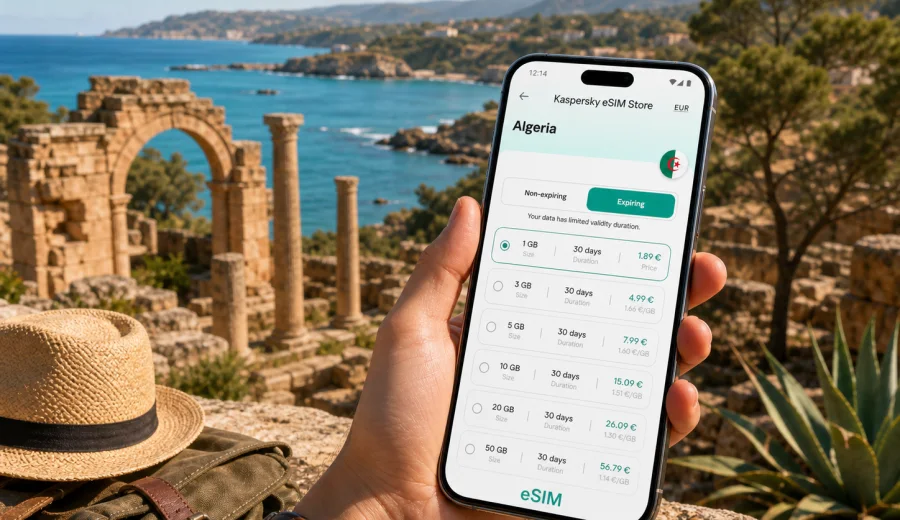
Tipaza eSIM: mobile connection and internet for a coastal trip to Algeria
Tipaza is a compact coastal city where a trip can move quickly from Roman ruins to the harbor, from a hotel near the waterfront to a road journey along the Mediterranean coast. For this kind of itinerary, mobile connection and internet are not just conveniences. They help you find your transfer after arrival, open maps near archaeological sites, check hotel messages, confirm a restaurant booking, use ride-hailing or messaging apps, and stay in touch while moving between Tipaza, Algiers, Cherchell, and nearby beach areas.
An eSIM can make that preparation simpler because you do not need to look for a physical SIM card as soon as you arrive. With a compatible device, you can install a digital SIM profile before the trip or after reaching Algeria, then use mobile data for navigation, bookings, calls through messengers, and everyday travel tasks. Kaspersky eSIM Store is an app and website where you can choose, arrange, and activate an eSIM with a suitable data plan for a trip abroad.
This guide focuses on Tipaza as a city destination: arriving through the region, getting around locally, planning hotel and business days, taking short trips from the city, and choosing a data plan that matches how you will actually use mobile internet.
Why mobile internet matters in Tipaza
Tipaza is easier to enjoy when you can move without waiting for hotel Wi-Fi or asking for directions at every step. The city is known for its seafront, archaeological remains, hillside views, and relaxed local rhythm, but many useful travel actions still happen on your phone.
Typical moments when mobile data helps:
- finding the right route from Algiers or another arrival point;
- sharing your live location with a driver, colleague, or host;
- opening offline and online maps around the Roman ruins and port area;
- checking hotel check-in details or apartment access instructions;
- translating menus, signs, and short messages;
- confirming opening times and meeting points;
- sending photos and updates without relying on cafe Wi-Fi;
- joining a video call or sending documents during a business trip.
The city is not built like a huge transit hub, so the most important connection moments often happen before you reach your room: the drive from the airport or Algiers, the first walk to the waterfront, the search for a specific hotel entrance, or a meeting with a local contact. Having mobile internet ready reduces that first-day friction.
Arrival scenarios: from Algiers to Tipaza
Many international travelers reach Tipaza after arriving in Algiers, then continue west by car, organized transfer, taxi, or intercity transport. That means your connectivity plan should cover more than the final city center. You may need data while leaving the airport area, crossing urban roads around Algiers, checking the route toward the coast, and coordinating the last part of the trip.
| Travel moment | What you may need online | Why eSIM can help |
|---|---|---|
| Airport or first arrival point | Messages, transfer details, maps | You can connect before looking for public Wi-Fi |
| Road to Tipaza | Route checks, location sharing, delays | Data helps if plans change during the drive |
| Hotel arrival | Booking confirmation, entrance codes, calls through apps | You have details available without waiting at reception |
| First evening | Maps, restaurant search, messaging | You can move around the waterfront with more confidence |
| Day trips | Navigation, weather, transport updates | One data plan can support movement beyond the city |
If your flight lands late, a ready eSIM can be especially useful. You may not want to compare local SIM options after a long journey, and some shops may not be convenient for your arrival time. With eSIM, the practical work is done on your phone: check compatibility, choose a plan, install the profile, and make sure mobile data is assigned to the eSIM when you are ready to use it.
Local movement in Tipaza
Tipaza is often explored through short movements rather than long commutes. A traveler may walk near the seafront, take a taxi between a hotel and the archaeological zone, arrange a pickup for dinner, or travel onward to Cherchell or Algiers. Even if the distances feel manageable, the phone becomes the control point for the day.
Mobile internet is useful for:
1. Saving pinned locations before leaving the hotel.
2. Checking walking directions between the port, ruins, restaurants, and accommodation.
3. Sharing a meeting point in a messenger when street names or landmarks are easier than formal addresses.
4. Confirming a driver or pickup location.
5. Translating short messages when arranging transport.
6. Checking whether a route is better by road, on foot, or as part of a booked excursion.
The city focus also matters for data use. A traveler spending most of the day walking, taking photos, and checking maps may need less data than someone working from a hotel, uploading media, or using video calls. The best eSIM plan is not automatically the largest one; it is the plan that matches the length and style of your Tipaza stay.
Practical data use by trip type
Different Tipaza trips create different mobile internet patterns. Use this table as a planning shortcut before choosing a data allowance.
| Trip style | Likely data use | What to prioritize |
|---|---|---|
| Weekend from Algiers | Maps, messaging, restaurant search | A short validity period and enough data for navigation |
| Coastal holiday | Photos, social apps, route checks, bookings | More data if you upload media often |
| Archaeology-focused visit | Maps, translation, guide notes, ticket details | Reliable access during walks and transfers |
| Business stop | Email, documents, calls through apps | Higher allowance and careful hotspot planning |
| Family trip | Shared locations, messaging, entertainment for children | Enough data for multiple daily tasks |
| Multi-city Algeria route | Navigation between cities, hotel changes, transport updates | Validity that covers the whole route, not only Tipaza |
If you plan to use your phone as a hotspot for a laptop, check whether tethering is allowed under the selected plan conditions. Hotspot use can consume data quickly, especially with cloud documents, automatic backups, and video meetings.
Choosing an eSIM data plan for Tipaza
For a city article, the right destination is the country plan because the mobile data plan must match the country where the city belongs. Tipaza is in Algeria, so you should choose a plan for Algeria rather than searching for a separate city-only option. If your route includes several countries, compare country, regional, or broader options according to the actual itinerary.
When you are ready to prepare mobile internet for the trip, you can choose an eSIM data plan for Algeria and then match the plan to your Tipaza schedule.
Use four checks before paying:
- Destination: the plan should include Algeria for a Tipaza trip.
- Validity: the active period should cover arrival, the stay in Tipaza, and the return or onward travel day.
- Data allowance: choose enough data for maps, messaging, browsing, and any work or media use.
- Plan conditions: review activation rules, possible roaming-data settings, top-up options, and hotspot availability if you need it.
For a short leisure visit, map use and messaging may be the main data drivers. For a business stay, cloud files and calls through apps can change the calculation. For a coastal road trip, navigation and location sharing may matter more than streaming.
How much data to prepare
Exact usage depends on your apps and habits, but these practical ranges help avoid choosing blindly.
| Daily activity in Tipaza | Light use | Heavier use |
|---|---|---|
| Maps and navigation | Low to moderate | Higher if maps stay open all day |
| Messaging and email | Low | Moderate with many attachments |
| Web search and bookings | Low to moderate | Moderate with image-heavy pages |
| Photo sharing | Moderate | High with frequent uploads |
| Video calls | High | Very high for long meetings |
| Streaming | High | Very high and usually avoidable on mobile data |
To control usage, download offline maps before the trip, pause automatic cloud backup on mobile data, use hotel Wi-Fi for large updates when it is trustworthy and stable, and keep video streaming for fixed Wi-Fi connections. eSIM data is best reserved for tasks that need mobility: navigation, communication, bookings, translation, and travel coordination.
Before you buy: device and account checks
Not every phone or tablet supports eSIM, and some devices may be locked by an operator. Before arranging an eSIM for Tipaza, check your device and make sure it can add an eSIM profile. You should also confirm that your device has a stable internet connection during installation, because the phone needs to download the eSIM profile before it can use it.
Pre-trip checklist:
- Your phone supports eSIM.
- The device is not locked to one carrier.
- You know which SIM or eSIM will be used for mobile data.
- You understand when the plan validity starts.
- You have saved the QR code or installation details if the plan provides them.
- You have reviewed whether data roaming must be enabled for the eSIM profile.
- You know whether calls and SMS are included; many travel eSIM plans are data-only unless plan conditions state otherwise.
For most travelers, voice calls and SMS are not the main reason to use an eSIM in Tipaza. Messaging apps, map apps, email, hotel chats, and ride coordination usually cover the daily need. If you require a local phone number or traditional SMS, read the plan conditions carefully before purchase.
Installing eSIM before the trip or after arrival
You can usually install an eSIM before travel while you still have a stable home connection. This is often the calmest option: you can follow the steps without rushing, check that the profile is visible on the phone, and keep it inactive for mobile data until you need it. Some travelers prefer to install after arrival; that can also work, but you need Wi-Fi or another data connection to complete the setup.
General installation flow:
1. Check that your phone supports eSIM and is not carrier-locked.
2. Choose the Algeria plan that fits your Tipaza itinerary.
3. Complete the purchase and open the eSIM details in your profile or app.
4. Install the eSIM using the on-screen instructions or QR code.
5. Name the profile clearly, for example "Algeria travel".
6. On arrival, select the eSIM for mobile data.
7. If the plan instructions require it, enable data roaming for that eSIM profile.
8. Test maps or a website before leaving your arrival point.
For device-specific setup, use the Android installation guide or the iOS installation guide. The exact menus can vary by phone model and operating-system version, so follow the instructions shown on your device as well.
Hotel, apartment, and work scenarios
In Tipaza, accommodation may be close to the coast, near local roads, or outside the most walkable part of the city. Mobile internet helps bridge the small gaps that can make arrival stressful: messaging the host, sending your location, finding the entrance, or checking whether the hotel restaurant is still open.
For business travelers, the main issue is continuity. A meeting day can include a transfer from Algiers, a hotel check-in, a presentation, and a dinner with local partners. If you depend only on fixed Wi-Fi, every change of place becomes a connection check. An eSIM gives you a mobile data option for email, calendars, messenger calls, and quick file access while moving between locations.
Good habits for a work trip:
- Keep large software updates disabled on mobile data.
- Download key files before leaving the hotel.
- Use mobile data for urgent access, not heavy background syncing.
- Check hotspot rules before using a laptop.
- Keep your primary SIM active only if you need calls or SMS from your home number.
- Save support and booking details in more than one place.
This approach keeps eSIM data focused on mobility and avoids wasting allowance on tasks that can wait for a fixed connection.
Visiting the ruins, port, and coastal viewpoints
Tipaza is a city where the route itself is part of the experience. You may move from ancient stone remains to sea views, from a cafe to a small harbor, or from the city to a nearby beach. Mobile data helps with practical details without turning the trip into screen time.
Before you leave the hotel, save:
- the location of your accommodation;
- the main archaeological area or meeting point;
- a few restaurant or cafe options;
- the pickup point for a driver or tour;
- a backup route back to the hotel;
- the contact details for your host, guide, or colleague.
During the day, use mobile internet for small, high-value actions: checking the route, sending a photo, translating a phrase, confirming a pickup time, or finding your next stop.
Short trips from Tipaza
Many travelers pair Tipaza with Algiers, Cherchell, coastal viewpoints, or a wider Algeria route. That is another reason to think in country-plan terms. Your eSIM should support the full movement pattern, not only the minutes you spend inside the city.
For a one-day route, plan data around navigation and coordination. For a longer trip, add hotel changes, transport messages, restaurant searches, and possible work calls. If several people are traveling together, each person with an eSIM-capable phone may prefer their own plan rather than relying on one hotspot all day. A single shared hotspot can drain battery and data quickly, and it leaves the group less flexible if people split up.
eSIM versus local SIM and roaming in Tipaza
There is no single best option for every traveler. The right choice depends on arrival time, device compatibility, trip length, and how much you value preparation.
| Option | Practical advantage | Possible limitation |
|---|---|---|
| Travel eSIM | Can be prepared without a physical SIM card; useful for arrival and movement | Requires eSIM-compatible, unlocked device |
| Local physical SIM | May suit longer stays or users who need a local number | Requires finding a point of sale and handling setup locally |
| Home roaming | Uses your existing SIM and number | Costs and data limits depend on your home operator |
| Public Wi-Fi | Useful for large downloads at hotels or cafes | Not available everywhere and not ideal as the only connection |
For many Tipaza visitors, eSIM is attractive because it reduces the number of tasks on arrival. You still need to review conditions, but you do not need to change a physical card or spend the first hour of the trip looking for a mobile shop.
Common mistakes to avoid
- Buying a plan for the wrong destination instead of Algeria.
- Waiting until the transfer starts before installing the eSIM.
- Forgetting to switch mobile data to the travel eSIM.
- Leaving background photo backup enabled on mobile data.
- Assuming every plan includes voice calls or SMS.
- Ignoring device compatibility until after payment.
- Choosing a very small data allowance for a work-heavy trip.
- Relying only on one phone as a hotspot for the whole group.
The safest routine is simple: prepare early, test the setup, save key information offline, and keep mobile data for the moments when being connected actually matters.
FAQ
Is there a special eSIM just for Tipaza?
For a city trip, choose the plan for the country where the city is located. Tipaza is in Algeria, so an Algeria plan is the relevant starting point.
Can I install the eSIM before flying to Algeria?
Often yes. Installing before departure can be convenient because you can use a stable connection and avoid setup pressure after arrival. Check the activation rules for the selected plan so you know when validity begins.
Will an eSIM give me a local phone number in Tipaza?
Many travel eSIM plans are data-only unless the plan details say otherwise. For calls and messages, you can usually use internet-based apps over mobile data.
Do I need to turn on data roaming?
Some eSIM profiles require data roaming to be enabled for the travel eSIM. Follow the instructions for your selected plan and make sure roaming is enabled only for the profile that needs it.
Can I use eSIM data for my laptop?
Possibly, if your device and selected plan allow hotspot use. Check the plan conditions first, because laptop traffic can consume data much faster than normal phone use.
What should I do if the eSIM does not connect after arrival?
Check that the eSIM profile is installed, mobile data is assigned to that profile, data roaming is set according to the plan instructions, and airplane mode is off. If the issue continues, contact support with your device model and plan details.
Prepare mobile internet for Tipaza
A good Tipaza trip is easier when the practical details are already handled: maps work during the transfer, hotel messages are available, meeting points can be shared, and you are not dependent on the next Wi-Fi sign. Before traveling, check that your device supports eSIM, choose the data allowance and validity period that match your itinerary, and install the eSIM while you still have time to review the settings.
Kaspersky eSIM Store helps you choose, arrange, and activate an eSIM with a suitable data plan for a trip abroad. For a visit to Tipaza, start with the Algeria destination and prepare an eSIM data plan for your trip before you need mobile internet on the road.