Travel connectivity guide
Tivat eSIM: Mobile Internet in Montenegro
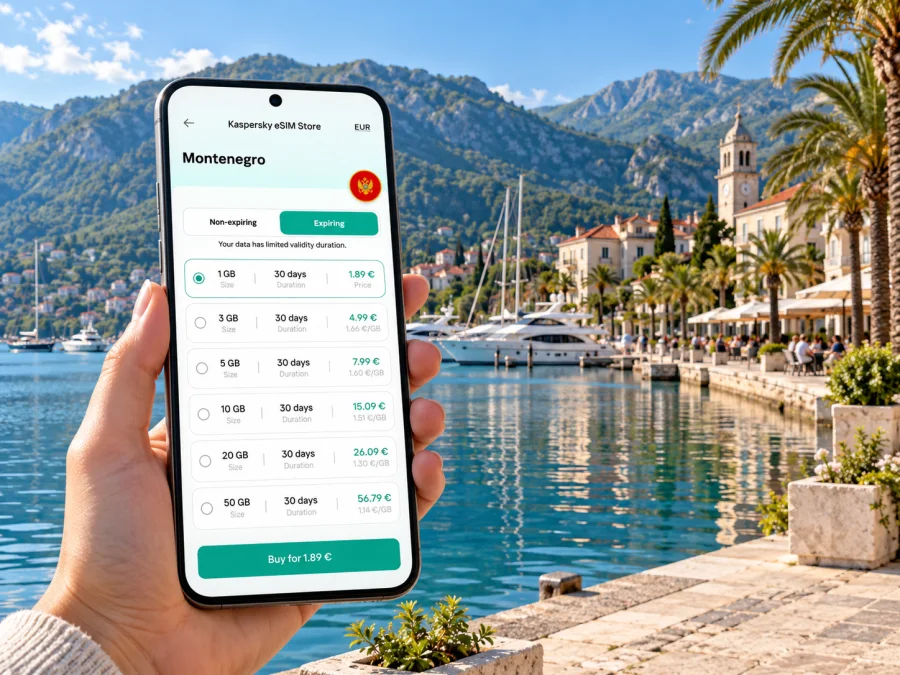
Tivat eSIM: Mobile Connection and Internet for Your Trip
Tivat is a compact coastal town in the Republic of Montenegro, on the Bay of Kotor. It is also a practical arrival point: Tivat Airport is close to the town centre, while marinas, waterfront promenades, hotels and day-trip routes spread around the bay and the Luštica peninsula. A working mobile connection helps you find your accommodation, check a transfer, navigate unfamiliar streets and keep plans flexible when you move between the coast and the hills.
An eSIM can make that preparation simpler if your phone supports it and the exact plan covers Montenegro. You install a digital SIM profile on your device instead of inserting another plastic card. The plan you select determines the destination coverage, data allowance, validity, price and activation rules. Those details matter in Tivat because a stay may include the town centre, the airport, a marina, a beach on the peninsula and a drive toward Kotor or Herceg Novi.
This guide focuses on the practical questions: where mobile data is useful around Tivat, what to check in a plan, how to prepare a compatible phone and what to do if the connection does not start as expected. It does not assume that every travel eSIM uses the same local network or that one plan covers every country on a wider itinerary.
Why mobile internet is useful in Tivat
A connection is useful for the practical transitions of a coastal stay: locating an apartment entrance, messaging a host, checking a pickup point, navigating between the centre and waterfront, or sharing a changed plan with your group. Save addresses and reservations offline as well, so you can still find them if reception or battery becomes an issue.
Arriving through Tivat Airport
Tivat Airport is about 4 km from the town centre, according to Montenegro’s national tourism information. The short distance does not guarantee a quick journey at every hour: traffic, queues, flight schedules and the exact address can affect the time it takes to reach your accommodation. The airport’s official information lists transportation and parking services, but travellers should confirm their chosen transfer or route for their arrival date.
Before boarding, save your booking confirmation, host’s phone number, address and any transfer instructions. If you have arranged a pickup, agree on a clear meeting point and how the driver will identify you. When you land, mobile data can help you send a quick message if baggage or passport control takes longer than expected. If you rely on a taxi or a rental car, check the fare or booking details before setting off and keep the destination visible offline too.
The airport is close enough to make Tivat convenient for a short stay, but it is not a guarantee that an eSIM will connect the moment you step off the aircraft. An eSIM may be installed before travel, while its data plan may only begin under the activation conditions shown for that plan. Read those conditions before you install it. Some plans start when first used in the destination; others can follow different rules. Keep the confirmation and QR code accessible, and avoid deleting the installed profile if setup takes longer than expected.
Arrival checklist
- Confirm the plan lists Montenegro as a covered destination.
- Check whether validity begins at purchase, installation or first network use.
- Save the address, transfer details and host contact offline.
- Keep access to the email or account containing the activation information.
- Leave your regular SIM enabled if you need its number for calls or verification messages.
- Check which SIM is selected for mobile data after landing.
Getting around town and along the bay
Tivat’s waterfront is a useful orientation point. Porto Montenegro, the town centre and the residential stretches toward Seljanovo and Donja Lastva form different parts of a coastal visit, and walking distances depend on where you are staying and which route you choose. A map is especially useful when a hotel or apartment uses a local building name rather than a widely recognised landmark. Pin the entrance itself where possible, not only the neighbourhood.
For trips beyond the centre, plan for road conditions and seasonal demand. The Bay of Kotor is enclosed by steep terrain, so routes follow the shoreline and can take longer than a straight-line map distance suggests. A drive to Kotor, Herceg Novi or a beach on the Luštica side is a different journey from a walk along Tivat’s promenade. Check the current transport option, departure point and return plan before leaving; timetables and availability can change by season and service provider.
If you are travelling by car, download an offline map of the area and use mobile data for live changes when available. Do not rely on the phone alone for turn-by-turn instructions: note the road name, parking arrangement and a nearby landmark before you start. A passenger can manage navigation while the driver concentrates on the road. For a boat excursion, confirm where it departs and returns; several waterfront locations can appear close together on a small map.
Choosing an eSIM plan for Tivat
Start with your route. If you stay in Tivat, look for a plan that explicitly includes Montenegro. If you cross a border or travel around the Western Balkans, check every country in the coverage list. A regional label does not prove that every nearby destination is included.
Kaspersky eSIM Store is an app and website where you can choose, arrange and activate an eSIM with a suitable data plan for an international trip. The plan’s conditions determine its destinations, allowance, validity, price and activation rules. To review current options for the correct country, browse eSIM plans for the Republic of Montenegro. Check the destination and plan details shown before purchase; this page is for reviewing current options and does not promise a particular network or offer.
Before choosing, check:
- Coverage: Montenegro and every other country on your itinerary are named.
- Data and validity: The allowance fits maps, messaging, browsing and your trip dates; streaming, uploads and hotspot use can consume more.
- Activation: Confirm what starts validity and whether pre-installation is allowed.
- Network terms: Check for a named roaming partner or automatic network selection. If none is shown, do not assume which Montenegrin operator the plan will use.
- Calls and SMS: A travel data plan may not include a local number, calls or texts. Check its terms and keep your regular line if needed.
Montenegro’s mobile market includes One Crna Gora, Crnogorski Telekom and Mtel. Their local and tourist products can have different allowances, registration steps and regional terms. An international travel eSIM may follow separate roaming arrangements, so local operator names alone do not identify the network a particular plan will use or predict reception in a building, marina or road section. For a longer stay or a need for a local number, compare current local options and registration requirements; do not rely on old screenshots or seasonal promotions.
Device compatibility and regional variants
An eSIM is built into a compatible device, but support depends on the exact model and sometimes the market for which it was manufactured. Product names can be nearly identical while the hardware or carrier restrictions differ. A phone bought in one region may not have the same eSIM capability as a similarly named model sold elsewhere. Tablets and smartwatches also have their own cellular and plan requirements, so do not infer their compatibility from a phone in the same product family.
Before buying, check the full model or part number in the device settings or on the manufacturer’s support page. Confirm that eSIM is supported in your device’s sales region and that the phone is not carrier-locked. The operating system should be up to date, and the phone should be able to connect to Wi-Fi during setup if required. You can check whether your device supports eSIM before selecting a plan.
Keep your primary SIM if you still need its phone number. Many phones allow more than one SIM profile to be stored, but the number of profiles that can be active at once and the available dual-SIM behaviour vary by device. Decide which line handles calls and SMS, which line uses mobile data, and whether data switching is enabled. Review the settings before travel so that your home SIM does not unexpectedly use roaming data.
Install and activate before the trip
If the plan allows pre-installation, set it up over reliable Wi-Fi. Installation and activation can be separate: adding the profile may not start validity, while some plans may start at installation or first use. Follow the selected plan’s instructions and keep its QR code or activation details until the connection works.
- Check the exact phone model, regional version and carrier-lock status.
- Review coverage, allowance, validity and the activation trigger.
- Add the eSIM in device settings or with the supplied QR code.
- Label the new line so it is easy to identify.
- After arrival, select it for mobile data and enable data roaming only if the plan requires it.
- Open a webpage or map to confirm the connection before relying on it for a longer trip.
Menu wording varies across Android manufacturers and iOS versions. Follow the relevant eSIM installation instructions for Android or eSIM installation instructions for iOS. Avoid scanning the same QR code repeatedly unless the instructions allow it; some profiles are intended for one installation, and deleting one may make it difficult to reinstall.
Practical Tivat scenarios
- Late arrival: Keep the host’s number and address offline. Install the eSIM beforehand if its terms permit, select it for data after landing and use the agreed pickup plan if activation is delayed.
- Work trip: Check accommodation Wi-Fi before a video call. Use mobile data as backup only if hotspot use and the allowance fit your needs; download files in advance and pause automatic backups.
- Trip across a border: Confirm the next country appears in the plan’s coverage list. A Montenegro-only plan may not continue elsewhere, so save the next route offline and check whether a regional option is more suitable.
If mobile data does not connect
A delay can mean the activation trigger has not occurred, the wrong line is selected, roaming is off when required, or reception is weak in that location. Check the eSIM is enabled and selected for data, verify Montenegro and the validity period, then follow the plan’s roaming instructions. If needed, briefly toggle airplane mode or restart once. Try a different spot; buildings and terrain can affect reception.
If it still does not connect, check the remaining allowance and contact the plan provider with your order details. Avoid deleting the eSIM as a first step. If you need data urgently, use another available option such as your regular line under its roaming terms, accommodation Wi-Fi or a current local offer.
Frequently asked questions
Is Tivat in Montenegro or Croatia?
Tivat is in Montenegro, on the Bay of Kotor. Check Montenegro for a stay in Tivat and verify each additional country on a cross-border route.
Will an eSIM work everywhere in Tivat?
No plan can promise reception at every point. Availability depends on the roaming partner, local network, device and surroundings such as buildings or terrain.
Can I install the eSIM before flying?
Often, yes, but the plan’s rules determine when validity begins. Keep the QR code and follow its activation instructions; installation does not always mean the plan is active.
Can I keep my usual number?
Usually, an existing SIM can remain in the phone, subject to dual-SIM capabilities. Select the travel eSIM for data and keep your usual line for calls or messages only if its roaming terms suit you.
Does an eSIM include a Montenegrin number?
Not necessarily. Many international travel plans are data-only. Check the selected plan for voice, SMS and a local number.
What if my phone does not support eSIM?
Use your regular SIM under its roaming terms, Wi-Fi where appropriate, or ask a local provider about a physical prepaid SIM. Verify the exact model and region first, since similarly named variants can differ.
A practical final check
Before leaving for Tivat, make sure your plan names Montenegro, the dates and activation trigger suit your itinerary, and the phone is compatible and unlocked. Save your arrival details and maps offline, then set the right SIM for data when you reach the destination. If you travel beyond the bay or across a border, check coverage again rather than assuming a local plan follows you.
Kaspersky eSIM Store helps you choose, arrange and activate an eSIM with a suitable plan for international travel through its app and website. Review the current terms and choose an eSIM plan for your trip to the Republic of Montenegro before departure, then follow the installation guidance for your device. A few minutes spent checking destination, validity and data settings can make arrival and day-to-day navigation around Tivat easier to manage.


