
Travel connectivity guide
Tlemcen eSIM: Mobile Internet for Your Trip
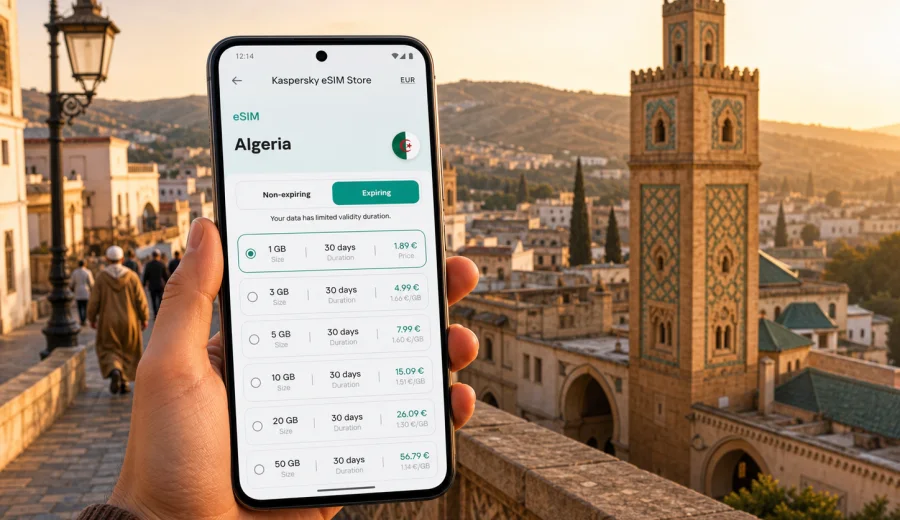
Tlemcen eSIM: mobile connection and internet for your trip
Tlemcen is a practical city to visit with mobile internet already prepared. You may arrive for a family stay, a business meeting, a university visit, a stop on the way to Oran, or a few days around the old center, Sidi Boumediene, Mansourah, and Lalla Setti. In each case, the useful part of being online is simple: maps open when you need them, hotel details are easy to find, taxi routes are clearer, and messages reach the people waiting for you.
An eSIM can help you handle those first travel tasks without looking for a physical SIM card as soon as you arrive. You choose a prepaid data plan for Algeria, install the eSIM on a compatible phone, and use mobile data for navigation, messaging, bookings, email, and travel apps. Kaspersky eSIM Store is an app and website where you can choose, arrange, and activate an eSIM with a suitable data plan for mobile internet during an international trip.
This guide focuses on Tlemcen rather than Algeria in general. It covers arrival, local movement, hotel check-in, business trips, stopovers, and trips from the city to nearby places. It also explains how to choose a plan, what to check before purchase, and how to avoid common setup mistakes.
Why mobile internet is useful in Tlemcen
Tlemcen is not only one compact tourist zone. A normal day can involve the city center, traditional streets, El Mechouar, the Grand Mosque area, Mansourah, Sidi Boumediene, a university district, a family home, and a viewpoint above the city. Even if you travel with someone local, you still need your own connection for timing, messages, maps, and documents.
Mobile internet can help in Tlemcen when you need to:
- find the route from the airport, bus station, or hotel;
- share your location with relatives, colleagues, or a driver;
- confirm an apartment address or hotel booking;
- translate messages, signs, or menu details;
- check meeting changes during a business visit;
- use maps while moving between districts;
- keep digital tickets, boarding passes, and travel documents available;
- use internet-based calls and messaging apps.
Public Wi-Fi can be useful at a hotel or cafe, but it is not always available during transfers or walks. The moments when you most need a connection often happen outside: after landing, on the way to the hotel, while looking for a landmark, or when a meeting point changes. Preparing an eSIM gives you a mobile data option without depending only on local Wi-Fi.
Arrival in Tlemcen
Many visitors arrive through Tlemcen International Airport, also known as Zenata - Messali El Hadj Airport. Others come by road from Oran, Sidi Bel Abbes, Maghnia, or towns around the northwest. The first hour is usually about practical details: where exactly is the hotel, who is meeting you, which route is best, and how long the transfer may take.
If you already have mobile data ready, you can open your saved hotel address, message your host, follow the route into the city, and keep a backup map visible if the driver uses landmarks instead of a street number. This is especially useful when your destination is outside the central streets or when you are going straight to a family home, campus, clinic, office, or event venue.
Before leaving the airport or station area, take a minute to test the connection. Open a map, send one message, and check that mobile data is assigned to the eSIM line. This small step is easier while you still have time and battery.
City scenarios where eSIM helps
Different travelers use mobile data in different ways. The same Tlemcen trip can be light on data for one person and heavy for another.
| Scenario in Tlemcen | What mobile data helps with | Planning tip |
|---|---|---|
| Weekend visit | Maps, restaurants, messages, ride coordination | Use hotel Wi-Fi for large uploads |
| Family visit | Group chats, internet calls, shared locations | Choose more data if daily calls are likely |
| Business trip | Email, documents, meeting updates, maps | Keep a data buffer for unexpected work |
| University or conference visit | Campus navigation, schedules, files | Install before arrival if possible |
| Road trip from Tlemcen | Routes, fuel stops, hotel searches | Check that the plan covers Algeria |
| Short stopover | Tickets, transfer details, messages | A shorter-validity plan may be enough |
For many city trips, maps and messaging are the core use cases. They do not usually need huge amounts of data, but they need to be available at the right time. Video calls, hotspot use, cloud backups, and streaming are what make a plan run out faster.
How much data to prepare
Start with your actual behavior. Light users mostly need maps, messages, email checks, boarding passes, and web searches. Medium users add social media, regular browsing, voice messages, and photo sharing. Heavy users may need video calls, hotspot for a laptop, frequent navigation, large uploads, or streaming.
To keep data use under control in Tlemcen:
- download offline maps before the trip;
- turn off automatic cloud photo backup on mobile data;
- update apps before departure;
- use hotel Wi-Fi for large files when it is reliable;
- keep hotspot off unless you really need it;
- check which SIM profile is assigned for mobile data.
If you are staying only two or three days, a modest plan may be enough if you avoid video and large uploads. If you work remotely, travel with children, share data with another device, or plan several road segments, choose a plan with more room.
Choosing an eSIM plan for Tlemcen
For a city trip, the country still matters because eSIM plans are usually selected by destination. Tlemcen is in Algeria, so the plan should cover Algeria. If your route continues to another country or a wider region, check the included destinations carefully instead of assuming border areas are covered.
When comparing plans, review:
1. Destination coverage: the plan should include Algeria for a Tlemcen trip.
2. Data volume: match it to maps, messaging, work, and media use.
3. Validity period: include arrival and departure days, not only full days in the city.
4. Activation rules: check when the plan starts and what action triggers use.
5. Device requirements: your phone must support eSIM and should not be carrier-locked.
6. Hotspot needs: if you plan to share data, check whether the selected plan allows it.
If you want to prepare before your flight or road journey, you can choose a mobile internet plan for Algeria through Kaspersky eSIM Store and install the eSIM on a compatible device before or during the trip. Review the plan conditions before payment so the destination, data amount, and validity period match your route.
Moving around Tlemcen
Tlemcen is manageable, but many useful places are not all within one short walk. You may stay near the center and still need transport to Mansourah, Sidi Boumediene, Lalla Setti, Imama, Kiffane, a university site, or a business address. A mobile connection helps you keep the route visible and respond when plans change.
For taxis or private pickups, save the destination in both map and text form. Some locations are easier to explain with a nearby mosque, school, hotel, market, or main road. If a host sends a pin, open it while you have internet and keep a screenshot as backup.
For walking routes in historic areas, use maps for orientation but stay aware of the street itself. Older lanes and market edges can be confusing if you follow navigation too literally. It is often better to use the map to stay generally oriented and then confirm details with visible landmarks.
For Lalla Setti or other viewpoints, plan the return before your battery is low. Mobile data, camera use, screen brightness, and navigation can drain a phone quickly. A power bank is useful if you expect a long day across several districts.
Business trips and remote work
Business travel in Tlemcen can involve airport pickup, hotel work, meetings across the city, campus visits, administrative stops, and last-minute schedule changes. Hotel Wi-Fi may be enough in the evening, but it will not help while you are between appointments.
An eSIM data plan can support:
- email and calendar updates during transfers;
- access to documents or meeting addresses;
- messenger calls when a location changes;
- navigation to offices, campuses, and hotels;
- hotspot use for a laptop if the selected plan allows it;
- quick communication after a meeting ends later than expected.
If you travel for work, choose a plan with a sensible buffer. One unexpected video call or hotspot session can use more data than a day of maps and messages. Also check whether your company-managed phone allows adding eSIM profiles, because some device policies restrict mobile plan changes.
Stopovers and trips from Tlemcen
Tlemcen is often part of a wider northwest Algeria route. You may continue to Oran, visit Maghnia, go toward the coast, or use Tlemcen as a base for family visits in surrounding towns. A prepared data connection is useful because road travel depends on timing, pickup points, and quick decisions.
Before leaving the city for a day trip or onward route:
- save the next address and contact details offline;
- keep booking, ticket, or pickup information available on your phone;
- charge the device before a long road segment;
- confirm that data is assigned to the eSIM line;
- keep your primary SIM available if you need banking or account SMS;
- avoid large downloads before or during the trip.
If all travel stays within Algeria, an Algeria-focused plan is usually the straightforward choice. If your route includes several countries, compare regional or global options and read the included destination list carefully.
Installing and activating eSIM
The easiest time to install an eSIM is before the trip, when you have stable Wi-Fi and time to follow the instructions. You can then activate and use it according to the selected plan's conditions. Installing after arrival is also possible, but it makes you dependent on airport, hotel, or cafe Wi-Fi for the setup step.
Before buying, check your device to confirm that it supports eSIM and is not restricted by carrier lock. eSIM support depends on the exact phone model, region, and carrier configuration.
Basic preparation steps:
1. Confirm eSIM support on your phone or tablet.
2. Check that the device is not locked to one carrier.
3. Choose an Algeria plan with suitable data and validity.
4. Install the eSIM using the instructions provided after purchase.
5. Label the profile clearly, for example "Algeria data".
6. Set mobile data to the eSIM line when you are ready to use it.
7. Keep your main SIM available if you need calls or SMS.
For setup guidance, use the Android eSIM setup instructions or the iOS eSIM setup instructions. The exact menu names can vary by device and operating system version, so follow the prompts on your phone as well.
What eSIM does and does not replace
An eSIM travel data plan is mainly for mobile internet. It helps with maps, apps, messages, browsing, and internet-based calls. It does not automatically replace every part of a local mobile subscription.
Keep these points clear before your Tlemcen trip:
- a travel eSIM plan may not include a local phone number;
- voice calls and SMS are not included unless the plan says so;
- messaging apps can work through mobile data if already set up;
- some services may still send verification SMS to your primary SIM;
- some devices require data roaming to be enabled for the eSIM profile;
- an activated eSIM cannot always be moved to another device.
Many travelers keep their primary SIM active for essential calls or SMS and use eSIM for mobile data. If your phone supports dual SIM settings, review them before departure so you know which line handles data, calls, and messages.
Quick checklist before you go
Use this list a few days before your Tlemcen trip:
- confirm your hotel, apartment, office, or family address;
- save offline maps for Tlemcen and any planned road routes;
- check eSIM compatibility and carrier lock status;
- choose an Algeria data plan with suitable volume and validity;
- install the eSIM while you have stable Wi-Fi;
- save setup details and support information;
- disable automatic app and photo updates on mobile data;
- pack a charger or power bank for long city days.
Once you arrive, test mobile data before leaving the airport, station, or hotel Wi-Fi area. Open a map, send a message, and confirm that the eSIM line is being used for data. This short check can prevent confusion later when you are already moving through the city.
FAQ: eSIM for Tlemcen
Can I use eSIM for mobile internet in Tlemcen?
Yes, if your device supports eSIM, is not carrier-locked, and you choose a data plan that covers Algeria. Check the plan conditions before purchase and follow the installation steps for your device.
Should I install the eSIM before arriving in Algeria?
Installing before departure is often more convenient because you can use stable Wi-Fi. Activation and validity rules depend on the selected plan, so read the conditions before you travel.
Will eSIM replace my normal phone number?
Usually no. Travel eSIM plans are mainly for mobile data. Voice calls and SMS are not included unless the selected plan says so. Keep your primary SIM available for important verification messages.
Is eSIM useful if my hotel has Wi-Fi?
Yes. Hotel Wi-Fi helps inside the building, but mobile data helps during transfers, taxi rides, walks, meetings, sightseeing, and road trips outside the hotel area.
Can I use hotspot with an eSIM plan?
It depends on the selected plan and device settings. If hotspot is important for a laptop or another phone, check the plan conditions before purchase and monitor data use carefully.
What if the eSIM does not connect immediately?
Check that the eSIM is installed, mobile data is assigned to the eSIM line, data roaming is enabled for that line if required, and airplane mode is off. Restarting the device can also help. If questions remain, contact support with your device model and plan details.
Choose an eSIM plan for your Tlemcen trip
Tlemcen is a city where mobile internet supports the practical parts of travel: arrival, taxis, navigation, hotel check-in, family coordination, business schedules, and trips to nearby places. Preparing an eSIM before the trip can reduce your dependence on public Wi-Fi and make the first hours in Algeria easier to manage.
Before you go, check that your phone supports eSIM, review the plan conditions, and choose a data volume that matches how you will use the internet in Tlemcen. When you are ready, you can prepare an eSIM plan for your trip to Algeria through Kaspersky eSIM Store and keep your mobile data setup ready for the city.