Travel connectivity guide
Toamasina eSIM: Mobile Internet for Madagascar
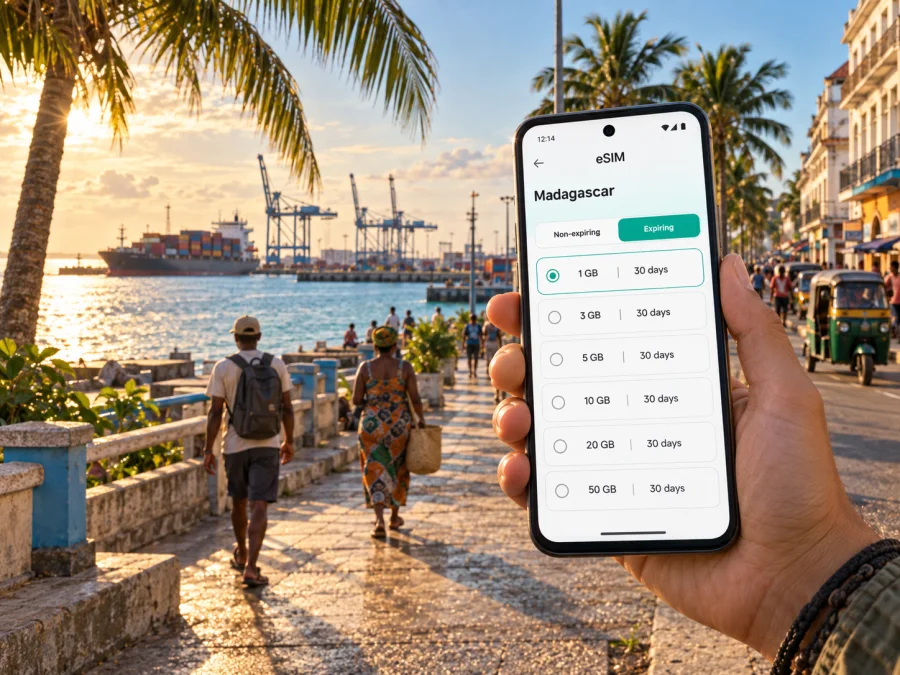
Toamasina eSIM: mobile connection and internet for your Madagascar trip
Toamasina is a practical arrival point on Madagascar’s east coast: a port city, a base for coastal journeys and a starting point for routes along the Pangalanes Canal. Whether you are staying near the centre, meeting someone on business, or changing from a flight to a road or boat journey, a reliable way to use mobile data makes the first hours easier. An eSIM can let you prepare a digital SIM profile for Madagascar without waiting to find a physical SIM card after landing.
Kaspersky eSIM Store is an app and website where you can choose, arrange and activate an eSIM with a suitable mobile-data plan for an overseas trip. In this article, the focus is Toamasina: getting from the airport, finding accommodation, moving around the port city, arranging a short work visit, and continuing towards the east-coast destinations beyond it.
Why mobile data matters when you arrive in Toamasina
Toamasina’s role as a gateway means that your itinerary may begin before you reach your hotel. You may need to show a booking, message a driver, check a map, confirm a meeting point or tell family that you have arrived. Airport Wi-Fi or hotel Wi-Fi can be useful, but it is not always available at the exact moment you need directions. Mobile data gives you a second option for the transition from Ambalamanasy airport into the city.
The most useful tasks are often small and immediate:
- open a map while leaving the airport area;
- send a message to a hotel, driver, guide or colleague;
- check a reservation and save a confirmation on your phone;
- translate a short message or search for opening information;
- order or coordinate local transport where that option is available;
- share your arrival time without looking for a public network.
Toamasina is also a useful base for journeys that do not end in the city. If your plan includes the Pangalanes Canal, the beaches north of the city, Ivoloina or a longer route on the RN2, you will use mobile data for more than sightseeing. You may need to coordinate a pickup, check a departure change, download a map area before leaving a stronger signal, or keep a small group aligned when the next stop is outside the urban centre.
An eSIM is not a replacement for every communication method. It is primarily a way to use mobile internet on a compatible device. A chosen eSIM plan may not include a regular local phone number, voice calls or SMS unless its conditions say otherwise. For calls and messages, you can use internet-based apps, while keeping your usual SIM available for services that depend on your home number.
Toamasina arrival: plan the first connection before the first ride
Ambalamanasy is the airport serving Toamasina, and it is close enough to the city that your next step is usually an onward transfer. Flight schedules and ground-transport arrangements can change, so save essential booking details offline and agree on a meeting point in advance when possible. Mobile data helps with delays, map pins and changes of vehicle.
Before you leave for Madagascar, prepare a short arrival checklist:
- Confirm that your phone is unlocked and supports eSIM.
- Choose an eSIM plan for Madagascar that matches the length and purpose of the trip.
- Install the eSIM while you have stable Wi-Fi, if the plan instructions allow installation before travel.
- Keep the QR code or activation details available in your account and in a secure offline note.
- Decide which line will handle mobile data after landing.
- Keep your main SIM enabled only for the services you still need, and review its roaming settings.
- Save the hotel address, airport transfer details and first meeting point before departure.
Know which profile is used for data and where to look if the phone asks you to select a line. Some devices require data roaming to be enabled for the eSIM profile; that depends on the device and the plan, so check the conditions rather than assuming every model uses the same configuration.
Moving around the city: use mobile data as a navigation tool
Divide a day in Toamasina into short movements: accommodation, central streets or waterfront, a port-related meeting, then the next leg. Mobile data helps you coordinate each stage without trying to solve the whole day at once.
For a first walk or short transfer, keep the following information on the screen or saved offline:
| Situation in Toamasina | Information worth preparing | Why a live connection helps |
|---|---|---|
| Airport to accommodation | Hotel name, address and meeting point | You can communicate a delay or clarify the final approach |
| Port or business meeting | Contact, company name and agreed entrance | You can coordinate arrival without relying on a shared Wi-Fi network |
| Departure from Toamasina | Transport confirmation and pickup contact | You can receive last-minute updates |
Use the city centre, the port area and the waterfront as broad orientation points, but do not treat them as interchangeable meeting locations. Send a recognizable landmark, a map pin or the accommodation name. If you are travelling with others, agree on one primary meeting point and one fallback point before splitting up. Protect the phone from rain and humidity, and carry a charged power bank on longer outings.
Choosing an eSIM plan for a Toamasina itinerary
Choose the plan around what you will do in Toamasina, not an abstract number of gigabytes. Messages and maps use data differently from remote work, video calls, media uploads or a multi-day coastal route.
Consider four questions:
- How long will the profile be needed? Include the arrival day, the time in Toamasina and any onward travel in Madagascar that falls within the same trip.
- Where will you use data? Confirm that Madagascar is the relevant destination and check whether the plan conditions cover the route you intend to take beyond the city.
- What will consume data? Navigation, messaging and occasional searches are lighter activities than video meetings, cloud backups or repeated media uploads.
- When should the plan begin? Review the activation and validity conditions. Installing a profile is not always the same as starting its period of use.
For a short stopover, a smaller package may be enough for maps, messages and reservations if you use Wi-Fi for larger downloads. For a business stay or a route including the Pangalanes Canal and coastal stops, allow more room for navigation and work tasks. The choice depends on your itinerary and the selected plan’s terms; do not assume that a larger package is automatically better or that an eSIM is always cheaper than roaming.
Once you know the dates and expected usage, you can choose an eSIM plan for a trip to Madagascar and compare the available data volume, validity and conditions before arranging it.
A practical plan for visitors staying in Toamasina
A one-day stopover
Arrange the airport transfer and accommodation details before boarding. After arrival, use mobile data to confirm the next movement, then keep the phone available for navigation and messages while you explore the centre or waterfront. Save the onward ticket and pickup contact offline. Disable automatic photo backup and use Wi-Fi for larger downloads when practical.
A city break with a coastal excursion
Toamasina can be a base for the Pangalanes Canal, Ivoloina or coastal destinations such as Foulpointe and Mahambo. Before setting out, confirm the guide or operator, save the meeting location, ask where signal may be limited and download the information you need. Leave a clear itinerary with someone in your group: mobile data supports coordination but cannot guarantee continuous coverage on every road or waterway.
A business trip
Save the meeting address as text, a contact name and a map pin, and ask your host which entrance or landmark is easiest to identify. Use the eSIM for mobile data while keeping your home number active only if you understand the roaming implications. Video meetings use more data than email, so check the plan volume and use a suitable hotel connection for large files when possible.
How to install and activate an eSIM for Toamasina
The exact menu names vary by phone and operating-system version, but the process normally follows the same sequence. First, check the device and plan conditions. Then install the profile, choose it for mobile data and test a simple connection. If you need detailed steps, follow the Android installation instructions or the iOS installation instructions.
Before installation
- Make sure the phone is not locked to a different operator.
- Check that eSIM support is available for your exact model and market. You can check your device compatibility before selecting a plan.
- Charge the phone and connect it to stable Wi-Fi.
- Keep the QR code or activation information ready on another screen if the phone cannot scan its own display.
- Read whether the plan should be installed before travel or activated after arrival.
After the profile is installed
Name the new line clearly, such as “Madagascar data”, so you do not select the wrong profile later. Set the eSIM as the line for mobile data when you want to use it. If your phone offers a setting for data roaming on that line, follow the plan instructions. Turn off automatic switching between lines if it could unexpectedly move data to your home SIM.
Test with a small task: open a map, send a text through an internet messaging app, or load a lightweight page. If the connection does not start, check the selected data line, mobile-data switch, roaming setting and signal before reinstalling anything. The QR code or eSIM profile may have limits on how many times it can be installed, so do not delete the profile as a first troubleshooting step.
What to check before buying or activating
An eSIM can simplify the Toamasina part of a trip, but preparation still matters. Use this compact check before you leave the airport or hotel:
- Destination: Madagascar is the country destination for Toamasina.
- Device: eSIM support and the absence of an operator lock are confirmed.
- Validity: the plan period matches the actual travel dates and any onward route.
- Data: the allowance is appropriate for maps, messages, work and media use.
- Activation: you understand when the plan starts and whether any action is needed after installation.
- Dual-SIM settings: you know which line is used for data.
- Backup access: important addresses, reservations and contacts are available offline.
- Support: you know where to find help if the profile does not activate as expected.
Remember the limits as well as the convenience. Mobile data does not guarantee service in every location away from the city. A regular phone number is not automatically included; voice calls and SMS depend on the selected plan, while messaging apps use data. Return conditions can depend on whether the eSIM has been installed or used.
FAQ: eSIM and mobile internet in Toamasina
Is an eSIM useful for a short Toamasina stopover?
It can be useful when you need maps, messages, a booking confirmation or a way to coordinate an airport transfer immediately after arrival. Select the data volume and validity for the actual stopover, and keep essential information available offline.
Can I use the same eSIM while travelling beyond Toamasina?
That depends on the selected plan’s destination and conditions. Check the Madagascar coverage or destination information before leaving the city. Do not assume that an urban itinerary and a remote coastal route have identical service conditions.
Should I install the eSIM before flying?
Installing before departure can make the arrival routine easier if the plan allows it and you have stable Wi-Fi. Activation and the start of validity may follow different rules, so read the plan information and follow the installation instructions.
Will an eSIM give me a Malagasy phone number?
Not automatically. eSIM plans for travel are commonly intended for mobile data. Check the specific conditions if voice calls or SMS are important, and use internet messaging apps when appropriate.
What if the phone shows no data after landing?
Check that the Madagascar eSIM is enabled and selected for mobile data, then review the data-roaming setting required by the plan. Confirm that the phone is unlocked, restart the device if needed and follow the relevant Android or iOS instructions. If the problem remains, use the available support channel and keep the activation details ready.
Can I rely only on a phone for a trip from Toamasina?
No. A phone is helpful for live coordination, but it should be supported by offline maps, saved reservations, a charged battery and a clear meeting plan. Signal and electricity can vary during longer road or boat journeys, so prepare for periods without mobile data.
Prepare your Toamasina connection before departure
Toamasina rewards a flexible plan: arrive with the airport and hotel details ready, keep mobile data available for the first transfer, and use the city as a well-organised base for the coast, the port and routes inland. Choose a plan that reflects your dates and activities, check the device and activation conditions, and keep important information offline.
When you are ready, choose an eSIM plan for your Madagascar journey through Kaspersky eSIM Store. The app and website help you select, arrange and activate an eSIM for mobile internet abroad; the right plan, compatible device and careful preparation remain your responsibility.


