
Travel connectivity guide
eSIM for Tonga: mobile internet and connection
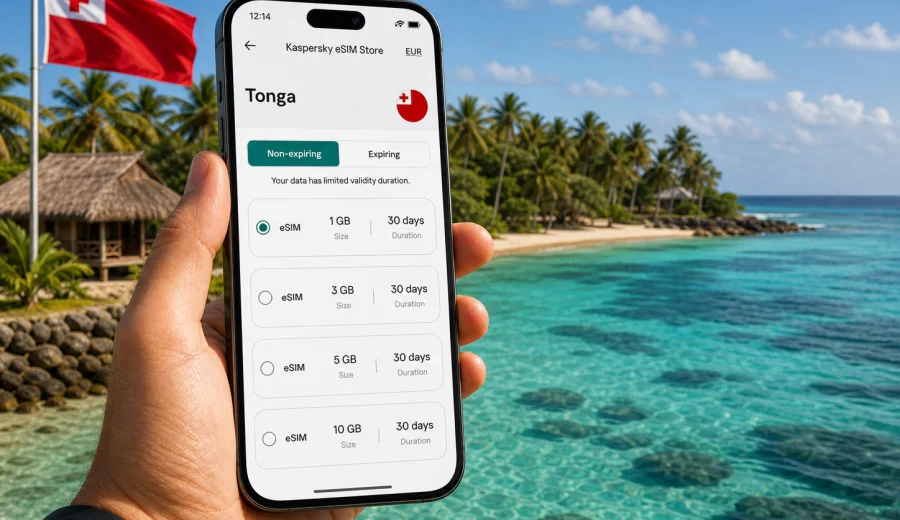
eSIM for Tonga: mobile connection and internet for your trip
Tonga is a destination where mobile internet can become useful as soon as the trip starts: checking hotel messages after landing, following maps around Tongatapu, confirming ferry times, sharing photos from the beach or staying in touch with family while moving between islands. An eSIM can make this part of the journey simpler because you do not need to look for a physical SIM card after arrival or depend only on public Wi-Fi.
This guide explains how to prepare mobile connection and internet for Tonga with an eSIM, how to choose a data package for your route, what to check before purchase and how to install the eSIM on a compatible device. The focus is practical: enough detail to help you plan, without treating eSIM as a complete replacement for every local mobile service.
Kaspersky eSIM Store is an app and website where you can choose, arrange and activate an eSIM with a suitable data plan for mobile internet in an international trip. It helps you compare the conditions of available options for your destination, such as data volume, validity period and country coverage, then follow a clear setup flow on your device.
Why an eSIM is useful for travel in Tonga
Tonga is spread across island groups, and many travel tasks depend on being online at the right moment. Even if your hotel, guesthouse or cafe offers Wi-Fi, it may not help when you are on the road, waiting for a transfer, coordinating a boat trip or trying to reach someone after a schedule change.
An eSIM can be useful in Tonga when you want to:
- open maps and saved locations without looking for Wi-Fi first;
- message your accommodation, driver, guide or travel companions;
- check flight, ferry and domestic transfer updates;
- use banking apps, booking confirmations and travel documents;
- translate short messages or menus when needed;
- share a mobile hotspot with another device if your selected plan and phone settings allow it;
- avoid changing the physical SIM card that you use for your regular phone number.
The key benefit is not magic coverage or guaranteed speed everywhere. It is preparation. You can choose a data plan before the trip, install the eSIM on a compatible device and know which mobile data profile to use when you arrive.
What eSIM means for mobile internet in Tonga
An eSIM is a digital SIM profile built into a compatible smartphone or tablet. Instead of inserting a plastic SIM card, you add the eSIM profile through your device settings, usually with a QR code or an in-app installation flow. After activation, the device can use the selected profile for mobile data in the country or region covered by the plan.
For most travelers, the practical meaning is simple:
| Travel need | How an eSIM can help |
|---|---|
| You arrive and need maps | Use mobile data without buying a local SIM first |
| You want to keep your main number | Keep the physical SIM installed and use eSIM for data |
| You need predictable spending | Check the data volume, validity and price before purchase |
| You move between hotels or islands | Stay less dependent on public Wi-Fi |
| You use messengers for calls | Use internet-based calling apps when data is available |
An eSIM data plan is usually focused on mobile internet. It may not include a separate phone number, regular voice calls or SMS unless that is clearly stated in the plan conditions. If you need ordinary mobile calls in Tonga, check the conditions before relying on an eSIM data plan for that purpose.
How much data do you need in Tonga?
Data use depends less on the country and more on your habits. Maps, messaging and email use far less data than video calls, cloud backups and streaming. Tonga trips often include outdoor days, water activities and transfers, so many travelers need data in short practical bursts rather than constant heavy use.
Use this planning table as a starting point:
| Trip style | Typical online tasks | Data approach |
|---|---|---|
| Short stop or weekend | Maps, messages, bookings, light browsing | A small data package may be enough |
| One-week holiday | Navigation, photos, social apps, restaurant searches | Choose a medium package with a validity period that covers the stay |
| Remote work trip | Email, cloud documents, calls, hotspot use | Pick a larger package and reduce background data use |
| Multi-island route | Transfers, maps, messaging, schedule checks | Prioritize validity period and keep a reserve of data |
| Family trip | Several devices, shared planning, entertainment | Consider whether hotspot use is allowed by the plan and device |
Before choosing, estimate your daily baseline. Messaging and maps may use only a modest amount. Video calls, short-form video, automatic photo sync and app updates can use data quickly. If your phone supports data usage limits or low-data mode, enable them before the trip.
What to check before buying an eSIM plan
The most important check is device compatibility. eSIM support depends on the device model, region of sale and sometimes carrier lock status. Two phones with similar names can differ, especially when they were sold in different markets.
Before buying, review this checklist:
- confirm that your phone or tablet supports eSIM;
- make sure the device is not locked to a single carrier;
- check that the selected plan includes Tonga as the destination;
- compare data volume and validity period with your actual itinerary;
- read when the validity period starts and how activation works;
- check whether hotspot or tethering is allowed if you plan to share data;
- keep access to Wi-Fi or another internet connection for the installation step;
- save the QR code or installation instructions where you can reach them.
If you are not sure about compatibility, use the internal compatibility check before purchase: check your device. This is especially important when you are close to departure and do not have time to resolve a device limitation later.
Choosing a data plan for Tonga
The best eSIM plan for Tonga is the one that fits your route, length of stay and data habits. A larger data package is not always necessary, but a package that expires too early or runs out during a transfer can become inconvenient. Look at both the data amount and the validity period, not only the price.
When comparing options, ask yourself:
1. How many days will I need mobile internet in Tonga?
2. Will I stay mainly in one place or move between islands?
3. Do I need data for work calls, hotspot use or only travel basics?
4. Will I have reliable Wi-Fi at my accommodation?
5. Do I need a regional plan for a wider Pacific route, or a Tonga-focused option?
6. Am I comfortable topping up later if the selected plan allows it?
For a simple holiday, a moderate data plan may cover maps, messaging, browsing and booking apps. For remote work, uploading photos, video calls or repeated hotspot use, choose more data and manage background activity carefully.
If Tonga is part of a wider trip, compare a country plan with any relevant regional option available for your route. A country plan can be convenient for a focused Tonga stay; a regional plan may be more practical if you are traveling through several destinations and want one data setup for more than one country.
For a Tonga trip, you can choose an eSIM plan for mobile internet in Tonga once you know your travel dates, expected data use and device compatibility. Review the plan conditions carefully, then keep the installation details available until the eSIM is working on your device.
When to prepare your eSIM
Many travelers prefer to prepare the eSIM before departure. This gives you time to check device compatibility, install the profile while you have stable Wi-Fi and review the instructions without airport pressure. In many cases, you can install an eSIM before the trip and activate the data profile when you are ready to use it, depending on the plan conditions.
A sensible timeline looks like this:
| Time | What to do |
|---|---|
| 1-2 weeks before travel | Check whether your device supports eSIM and is unlocked |
| Several days before travel | Choose the destination and compare data plan conditions |
| Before leaving home | Install the eSIM profile while connected to stable internet |
| On arrival or when needed | Select the eSIM profile for mobile data |
| During the trip | Monitor data use and top up if the selected plan supports it |
If your trip is soon, focus on the essentials: compatibility, destination coverage, validity period and installation instructions. Do not leave the first installation attempt for a moment when you have no Wi-Fi and limited time.
How to install and activate an eSIM
The exact setup flow depends on your device and the installation method available after purchase. In general, you need a compatible device, access to the internet during setup and the eSIM profile details provided after you arrange the plan.
Typical steps:
1. Check that your smartphone or tablet supports eSIM and is not carrier-locked.
2. Choose Tonga or the relevant region and select a suitable data plan.
3. Open the eSIM installation details in your profile, app or email.
4. Add the eSIM profile to your device using the available method.
5. Set the eSIM as the mobile data line when you are ready to use it.
6. If needed by the selected plan or device, enable data roaming for that eSIM profile.
7. Wait a few minutes for the device to connect to a local network.
For detailed setup steps, use the official device instructions: Android installation guide or iOS installation guide. Follow the sequence carefully and avoid deleting the eSIM profile unless the support team or instructions tell you to do so.
How to keep data use under control
Tonga is a place where many travelers take photos, navigate between beaches and use messaging often. These tasks are manageable, but data can disappear faster than expected if your phone uploads media automatically or updates apps in the background.
Use these settings before and during the trip:
- turn off automatic app updates on mobile data;
- disable automatic cloud photo and video backup until you are on Wi-Fi;
- download offline maps for the areas you expect to visit;
- use low-data mode for mobile data if your phone supports it;
- reduce video streaming quality;
- close hotspot sharing when you no longer need it;
- check mobile data usage by app in your phone settings;
- keep essential travel documents saved offline.
A useful rule: use mobile data for movement, communication and urgent tasks; use Wi-Fi for heavy downloads, backups and long streaming sessions. This keeps your eSIM data plan available for moments when Wi-Fi is not nearby.
eSIM, roaming and local SIM cards: what is different?
Travelers usually compare three options for mobile internet abroad: roaming from their home operator, a physical local SIM card or an eSIM data plan for the destination. Each can be reasonable depending on the trip.
| Option | Strengths | What to consider |
|---|---|---|
| Home roaming | Familiar number, no new setup in some cases | Costs and conditions vary by operator and package |
| Local physical SIM | May include local services in some cases | Requires a physical card, local purchase flow and SIM slot |
| eSIM data plan | Digital setup, keeps physical SIM in place, useful before arrival | Requires eSIM-compatible unlocked device and careful plan selection |
An eSIM can be a practical alternative to standard roaming, especially when you want to know the data volume, validity and destination before the trip. It does not guarantee that it will be cheaper in every situation, and it does not turn your device into a local phone service with ordinary calls and SMS unless the plan states that.
FAQ: eSIM and mobile internet in Tonga
Can I use an eSIM for internet in Tonga?
Yes, if you choose a plan that includes Tonga and use a compatible, unlocked device. The eSIM profile lets your device use mobile data according to the selected plan conditions.
Does an eSIM give me a Tongan phone number?
Usually no. eSIM plans for travel are commonly focused on mobile data. Regular voice calls, SMS and a local phone number are not included unless the specific plan conditions say otherwise. You can use messengers and internet calling apps when mobile data is available.
Should I install the eSIM before I leave?
In many cases, yes. Installing before departure gives you time to complete setup over stable Wi-Fi. Check the plan conditions so you understand when validity starts and when you should activate the data profile.
Do I need to keep my physical SIM card?
You can usually keep your physical SIM in the phone and use the eSIM for mobile data. This is useful if you want to keep access to your regular number while using a separate data profile for the trip.
Can I share eSIM data by hotspot?
It depends on the selected plan and your device settings. If you plan to use a laptop or share data with another traveler, check whether tethering is allowed and monitor usage carefully.
What happens if I run out of data?
Your mobile internet through that plan may slow down or stop depending on the conditions. If top-up is available for the selected plan, you can add more data through the relevant product flow. Otherwise, you may need another suitable plan.
Is eSIM the same as public Wi-Fi?
No. eSIM uses mobile data through a digital SIM profile, while public Wi-Fi depends on a local network in a hotel, cafe, airport or other place. An eSIM can reduce your dependence on public Wi-Fi, but it is still smart to keep offline backups.
Final advice before your Tonga trip
For Tonga, the best mobile internet setup is the one you understand before you arrive. Check compatibility, choose a plan that covers your dates, install the eSIM while you have stable internet and keep your data use under control. This gives you a clearer first day and fewer connection tasks during the trip.
Kaspersky eSIM Store helps you prepare this flow through an app and website where you can choose, arrange and activate an eSIM with a suitable data plan for travel. When you are ready, select an eSIM plan for your Tonga trip and review the data volume, validity period and setup instructions before you travel.