
Travel connectivity guide
Toronto eSIM Guide for Mobile Internet
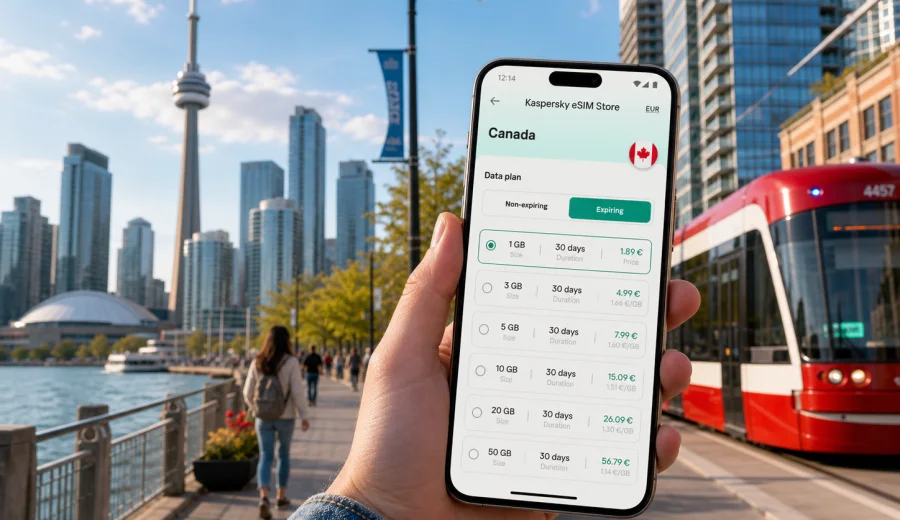
Toronto eSIM guide: mobile connection and internet for your city trip
Toronto is a city where mobile internet quickly becomes part of the travel plan. You may need a map before you leave Toronto Pearson, a ride-share app after a late arrival, real-time transit updates on the TTC, restaurant bookings in Queen West, or work messages between meetings in the Financial District. A practical eSIM setup helps you keep these tasks simple without looking for a physical SIM card after a long flight.
This guide focuses on Toronto, not Canada in general. It explains how eSIM fits into arrival, local transport, neighborhoods, hotels, business travel, stopovers, and short trips from the city. It also shows what to check before you choose a data plan, how to estimate traffic needs, and how to prepare your phone so you can use mobile internet more confidently during the trip.
Why eSIM is useful in Toronto
Toronto is large, spread out, and highly app-driven. Even a short visit can involve several transport modes: UP Express from the airport, TTC subway and streetcars, GO Transit for regional trips, ride-hailing, bike share, and walking routes between waterfront, downtown, and neighborhood areas. Public Wi-Fi can help in some places, but it is not a complete plan for moving around the city.
An eSIM is a digital SIM profile installed on a compatible phone or tablet. In a travel context, it is usually used for mobile data. It can help you stay online for navigation, messaging, bookings, mobile tickets, maps, and travel research without swapping your physical SIM card. Voice calls and SMS are not usually included unless a specific plan says so, so many travelers use internet-based calling and messaging apps.
For Toronto, eSIM is especially useful when you want to:
- check the route from Pearson Airport to Union Station;
- compare TTC, walking, and ride-share options in real time;
- use maps around downtown towers, PATH entrances, and waterfront routes;
- stay reachable during meetings, events, or a conference;
- manage hotel check-in, restaurant reservations, and attraction tickets;
- travel onward to Niagara Falls, Ottawa, Montreal, or other Canadian cities;
- avoid depending only on hotel, cafe, or airport Wi-Fi.
Arrival in Toronto: where mobile data matters first
Most international visitors arrive at Toronto Pearson International Airport. The airport is connected to downtown by the UP Express train, taxis, ride-share services, car rentals, and buses. Your first hour in the city often includes small decisions that are easier with mobile internet: which terminal exit to use, whether the train schedule works for your arrival time, whether your hotel check-in is ready, and how long a road transfer may take.
If you arrive at Billy Bishop Toronto City Airport, mobile data is still useful, but the scenario is different. You are already close to downtown and may need walking directions, a short ride-share trip, or transit planning from the waterfront. In both cases, an eSIM prepared before the trip reduces the need to connect to public Wi-Fi before you can move.
Practical arrival checklist:
- install the eSIM profile before departure if the plan instructions allow it;
- keep your primary SIM active if you need bank SMS or calls from home;
- download the hotel address and booking confirmation offline;
- save the airport-to-hotel route before takeoff;
- check when the data plan validity starts;
- confirm whether data roaming must be enabled for the eSIM line;
- keep the QR code or installation details available somewhere secure.
Toronto areas where navigation can be confusing
Toronto looks straightforward on a map, but visitors can still lose time without reliable data. Downtown streets are dense, the waterfront has changing pedestrian routes, and the PATH underground walkway network can be difficult to follow if you are new to the city. In winter or during heavy rain, you may move between street level, subway stations, malls, and office towers, which makes navigation more layered than it first appears.
Areas where mobile internet helps most:
| Area | Why data helps | Typical travel task |
|---|---|---|
| Pearson Airport | Large terminals and multiple transfer options | Compare train, taxi, and ride-share routes |
| Union Station | Transit hub with many exits and connections | Find the right TTC, GO, UP Express, or walking exit |
| Financial District | Office towers, indoor walkways, meeting locations | Navigate to appointments and manage schedule changes |
| Waterfront | Long walking routes and event venues | Check directions, tickets, and transit back downtown |
| Queen West and King West | Restaurants, nightlife, hotels, and streetcars | Book tables, call rides, and monitor transit |
| Yorkville | Hotels, shopping, galleries, and business dinners | Find venues and manage reservations |
| Exhibition Place | Events and conferences | Use mobile tickets and check crowd-related transport changes |
The most reliable approach is to combine offline preparation with active mobile data. Download maps for the main city area, but keep data available for live traffic, platform changes, service alerts, weather, and updated opening times.
How much data do you need for Toronto?
The right data volume depends on your habits, not only on trip length. Toronto can be data-light if you use hotel Wi-Fi and offline maps, but it can become data-heavy if you stream video, use cloud work tools, upload media, or stay online throughout business days.
Use this planning table as a practical starting point:
| Trip style | Typical use | Possible data range |
|---|---|---|
| Stopover or 1-2 days | Maps, messaging, ride apps, bookings | 1-3 GB |
| Long weekend | Navigation, restaurant search, tickets, social media | 3-5 GB |
| One week city break | Daily maps, photos, messaging, web search | 5-10 GB |
| Business trip | Email, maps, calls over internet, documents | 5-15 GB |
| Remote work or content-heavy trip | Video calls, cloud files, uploads, tethering | 10 GB or more |
These are planning estimates, not guarantees. Video calls, streaming, cloud backups, and automatic photo uploads can use much more data than maps or messaging. Before your trip, turn off background updates for apps you do not need, set video apps to lower quality on mobile data, and pause automatic cloud sync if your plan is limited.
eSIM and Toronto public transport
Toronto’s transit network is useful but easier to manage with live information. The TTC includes subway, buses, and streetcars. GO Transit connects Toronto with the Greater Toronto and Hamilton Area and other regional destinations. The UP Express connects Pearson Airport and Union Station. Mobile data helps you check routes, service changes, station exits, and transfer options while moving.
For transit-heavy days, keep these habits:
- check live route updates before leaving the hotel;
- use mobile data for walking directions from transit stops to the final address;
- save the hotel address in your map app;
- keep a screenshot of important tickets or passes in case signal is weak indoors;
- avoid starting a video stream or cloud backup while relying on a limited data plan;
- keep a power bank if you plan long days outside.
Streetcars are part of the Toronto experience, but they can be affected by traffic, events, construction, or weather. A data connection lets you decide whether to wait, walk, change route, or use a ride-share app. Around Union Station, Scotiabank Arena, Rogers Centre, and major event areas, live updates can save time when crowds change normal movement patterns.
Choosing an eSIM plan for a Toronto trip
When you choose an eSIM plan for Toronto, the destination should match Canada because the city belongs to Canada and travel data plans are normally country or regional based. Look at the plan’s data volume, validity period, price, activation rules, and whether top-ups are available. Also check whether your device supports eSIM and whether it is locked to a specific carrier.
For most city trips, the best plan is not simply the largest or smallest one. It is the plan that matches your schedule. A two-day stopover, a five-day conference, and a two-week family visit have different needs. If you expect to travel outside Toronto, consider whether your plan remains suitable for the rest of Canada.
Before you decide, you can use Kaspersky eSIM Store to choose a data plan for your Toronto trip in Canada. The site and app help you select a destination, compare available data amounts and validity periods, and prepare an eSIM for mobile internet in a compatible device.
What to check before you buy
The most important technical check is device compatibility. eSIM support depends on the phone model, market version, and sometimes carrier lock status. Do not assume that every recent phone supports eSIM in every configuration. Before you choose a plan, check your device and confirm that your phone can add an eSIM profile.
Also check these details:
- your phone is unlocked if required for travel eSIM use;
- the eSIM plan covers Canada;
- the validity period matches your arrival and departure dates;
- the data volume fits your expected use;
- the plan terms explain when the validity period begins;
- you know whether to enable data roaming for the eSIM line;
- your primary line settings will not accidentally use roaming data;
- you have stable Wi-Fi available for installation if the instructions require it.
If you use dual SIM, name the lines clearly. For example, keep your home SIM for calls or SMS if needed and set the eSIM as the mobile data line. After activation, check that maps and messaging apps use the eSIM data connection, not roaming from your home carrier.
Installing eSIM before or after arrival
Many travelers prefer to install the eSIM before departure and activate it according to the plan instructions. This is useful when you want mobile data soon after landing. Others wait until arrival because they want to avoid starting validity too early. The correct approach depends on the plan rules, so read the activation details before you travel.
General setup flow:
1. Choose Canada as the destination for your Toronto trip.
2. Select a plan by data volume and validity period.
3. Complete the order and open the installation details.
4. Install the eSIM on a compatible device.
5. Set the eSIM as the mobile data line when you are ready to use it.
6. Enable data roaming for the eSIM line if the plan instructions require it.
7. Test the connection and keep your main SIM settings under control.
For step-by-step setup, use the official installation pages: Android installation guide and iOS installation guide. Follow the instructions for your device and keep the eSIM details available until the setup is complete.
Hotels, apartments, and business travel
Hotels in Toronto usually provide Wi-Fi, but mobile data still matters outside the room and sometimes inside large buildings. If you stay in the Financial District, Yorkville, the Entertainment District, or near Pearson Airport, you may move between meetings, restaurants, venues, and transport hubs several times a day.
For business travel, eSIM data can support maps between offices, internet calls when venue Wi-Fi is unstable, calendar changes, document access, and ride-share coordination after late meetings. For a family trip, it helps with restaurant searches, attraction tickets, location sharing, and navigation between the hotel, waterfront, parks, and shopping areas.
If your accommodation is outside downtown, such as North York, Scarborough, Mississauga, Vaughan, or Etobicoke, mobile data becomes more important because travel routes are longer and may involve more transfers.
Stopovers and short stays in Toronto
Toronto is a common stopover city for transatlantic and North American routes. If you have only a few hours or one night, you do not want connectivity setup to consume the trip. An eSIM can be useful because you can prepare it before departure and use mobile internet for the exact window when you need it.
A short-stay plan should prioritize:
- simple installation;
- enough data for navigation and messaging;
- validity that covers the stopover window;
- a clear activation moment;
- no unnecessary high data volume if you will not stream or work.
For a one-night layover near Pearson, mobile data helps with hotel shuttles, ride apps, food delivery, and flight updates. For a daytime visit downtown, it helps with the UP Express route, walking directions from Union Station, and checking return time to the airport. Keep a buffer for security, traffic, and weather, especially in winter.
Trips from Toronto
Many travelers use Toronto as a base for day trips or onward travel. Niagara Falls is the classic option, but visitors may also go to Hamilton, Ottawa, Montreal, Blue Mountain, Prince Edward County, or towns around Lake Ontario. If your eSIM plan covers Canada, it can remain useful beyond Toronto, subject to the selected plan’s terms and local network conditions.
For day trips, mobile internet helps with regional train or bus updates, driving navigation, parking information, attraction tickets, weather changes, and group messaging. Do not plan a tight regional route only around Wi-Fi; stations, parking areas, and roadside stops may not provide a connection when you need it.
Data-saving settings for Toronto travel
Toronto trips can generate a lot of phone use because the city encourages constant map checks, transit updates, photo sharing, and restaurant searches. A few settings can make a limited plan last longer:
Use this quick checklist:
- turn off automatic app updates on mobile data;
- disable automatic video playback in social apps;
- pause cloud photo and video uploads until Wi-Fi;
- download offline maps for Toronto before arrival;
- save hotel, airport, and meeting addresses;
- reduce video call quality when possible;
- close navigation when you no longer need active routing;
- monitor data use in your phone settings.
If you travel with a laptop, be careful with tethering. A laptop can use mobile data quickly through system updates, cloud sync, email attachments, and background services. If you need hotspot mode, check whether the selected plan allows it.
Common mistakes to avoid
The most common eSIM mistakes are simple and preventable. Travelers often buy too little data, install the eSIM too late, leave the wrong SIM selected for mobile data, or forget to check compatibility.
Avoid these errors:
- buying a plan without checking whether it covers Canada;
- assuming your phone supports eSIM without verifying it;
- deleting the eSIM profile after activation unless instructions say it is safe;
- letting your home SIM use roaming data by mistake;
- starting heavy cloud backups on mobile data;
- relying only on public Wi-Fi for airport transfer and first-day navigation;
- forgetting that travel eSIM plans are often data-focused and may not include a phone number.
If something does not work immediately, check the selected data line, roaming setting for the eSIM line, airplane mode, APN instructions if provided, and whether the plan has started.
FAQ: eSIM, mobile connection, and internet in Toronto
Is eSIM useful for a Toronto city break?
Yes. It is useful for maps, messaging, transit updates, bookings, ride apps, and travel research, especially if you arrive late or move between several neighborhoods.
Should I choose a Toronto plan or a Canada plan?
Toronto is the travel focus, but the eSIM destination should be Canada because Toronto is in Canada and plans are normally organized by country or region.
Can I use eSIM for calls and SMS in Toronto?
Many travel eSIM plans focus on mobile data and may not include a regular phone number, calls, or SMS. Check the terms of the specific plan.
Is public Wi-Fi enough in Toronto?
Public and hotel Wi-Fi can help, but it is not reliable as your only connection strategy. You may need mobile internet while walking, using transit, ordering a ride, or navigating from a station exit.
When should I install the eSIM?
Install it when the plan instructions make sense for your trip. The key is to understand when validity starts and when the eSIM should become your mobile data line.
Final preparation before you go
Toronto rewards good preparation. Save your hotel address, airport route, key bookings, and first-day plan before departure. Check device compatibility, choose a Canada data plan that matches your trip length, and understand how activation works. Then use mobile internet for the tasks that matter most: navigation, transport, bookings, messaging, and schedule changes.
If you want to prepare mobile internet before your Toronto trip, Kaspersky eSIM Store can help you select an eSIM data plan for Canada and set it up on a compatible device. Choose the data volume and validity period that fit your route, install the eSIM according to your device instructions, and arrive in Toronto with a clearer connection plan.