
Travel connectivity guide
Torshavn eSIM for mobile internet
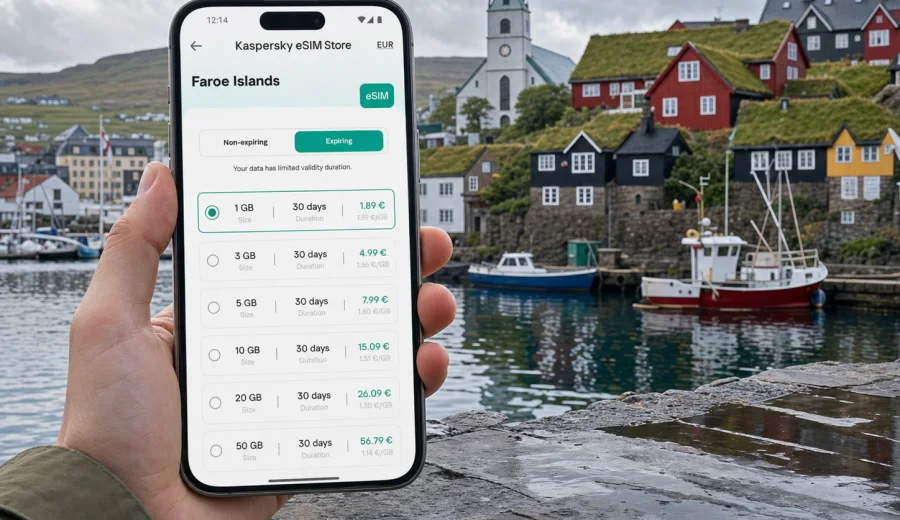
Torshavn eSIM: mobile connection and internet for your trip
Torshavn is a small capital with a practical travel challenge: you may need mobile internet from the first few minutes, with maps, ferry times, hotel messages, and taxi details close at hand. An eSIM can help you prepare that connection before you arrive in the Faroe Islands, without looking for a physical SIM card after landing.
This guide focuses on Torshavn itself: arrival through Vagar Airport, movement around the harbor and Tinganes, hotels, offices, viewpoints, and short trips from the city. The country matters for choosing the right plan, but the practical focus stays on mobile connection and internet in the capital.
Kaspersky eSIM Store is an app and website where you can quickly choose, arrange, and activate an eSIM with a suitable data plan for mobile internet in an overseas trip. Before you choose a plan, check the destination, data amount, validity period, device compatibility, and the moment when the plan starts using its validity or traffic.
Why mobile internet matters in Torshavn
Torshavn is compact, but weather, hills, bus timing, and harbor-side streets can still change your route. Many useful moments are spread across the old town, waterfront, hotels, cultural venues, restaurants, offices, and nearby road-trip routes.
With mobile internet on your phone, you can:
- confirm the route from Vagar Airport to Torshavn before you leave the terminal;
- check bus information, taxi pickup points, and hotel messages;
- use maps while walking around Tinganes, Vestaravag, and the harbor area;
- keep bookings, boarding passes, and ferry details accessible;
- share your location with colleagues, family, or a travel companion;
- adjust day trips when fog, wind, or rain changes the plan.
The city center is walkable, but that does not remove the need for data. If you are arriving late, moving with luggage, meeting a host, or continuing to another village, mobile internet can be the difference between a calm first hour and a long search for Wi-Fi.
Arrival: from Vagar Airport to the capital
Most international visitors reach Torshavn through Vagar Airport, then continue by bus, taxi, rental car, or arranged transfer. In the first hour, mobile internet is mainly practical. You may need to:
1. Check whether your transfer is waiting at a specific meeting point.
2. Confirm the next bus departure and expected arrival time.
3. Open the hotel address or apartment check-in message.
4. Message the reception if your flight arrives late.
5. Save a map for the final walk from the drop-off point.
If your phone supports eSIM, installing the profile before departure can make arrival easier. You can keep your primary SIM in the device and use eSIM for mobile data, then switch the correct data line at the right moment according to the plan conditions.
City scenarios where eSIM is useful
Torshavn has several travel modes. A weekend visitor may focus on the harbor, Tinganes, cafes, and viewpoints. A business traveler may move between a hotel, meeting venue, and restaurant. A road-trip traveler may sleep in the capital and leave early for villages, viewpoints, or ferry connections.
| Scenario in Torshavn | What you may need data for | Practical eSIM note |
|---|---|---|
| First evening in the city | Hotel access, restaurant booking, walking route | Choose enough data for maps and messaging from arrival day |
| Business trip | Email, calendar changes, taxi coordination, hotspot for laptop | Check whether your device and plan support tethering if you need it |
| Harbor and old town walk | Maps, photo backup, translations, opening hours | Keep battery and data usage under control on long walks |
| Day trip from Torshavn | Navigation, weather checks, ferry or tunnel information | Pick a plan that covers the full country destination, not only the city |
| Stopover or short stay | Transfer updates, boarding pass, quick route search | A smaller data amount may be enough if the visit is short |
Match the plan to the way you will use the city. Maps and messages need less data than laptop hotspot use, photo uploads, or video calls from a hotel.
Local movement: walking, buses, taxis, and rental cars
The central part of Torshavn is easy to explore on foot, but narrow streets, weather, and luggage can make navigation useful. For buses and taxis, data helps with times, stops, pickup addresses, and messages to drivers or hosts. If you rent a car, download essential maps in advance and keep the hotel address available offline; mobile internet supports navigation beyond the capital, but remote routes still need preparation.
How much data to plan for Torshavn
Data use depends on habits, not only trip length. Faroe Islands trips often include photos, weather checks, navigation, messaging, and day-trip planning. Use the table below as a starting point, then adjust for your own routine.
| Trip style | Typical use | Data planning approach |
|---|---|---|
| 1-2 day stopover | Maps, messages, check-in details, light browsing | A smaller plan may be enough if you avoid video and cloud backups |
| Long weekend | Maps, restaurants, weather, photo sharing, local research | Choose a plan with room for daily navigation and messaging |
| Road-trip base in Torshavn | Navigation, weather, ferry planning, hotel communication | Choose a plan for the full Faroe Islands trip, not just city walks |
| Heavy media use | Video calls, photo upload, streaming | Select a higher data amount and monitor usage regularly |
If you are unsure, look at your normal daily mobile data use before travel. Then reduce or increase that estimate based on how much hotel Wi-Fi you expect to use. Remember that cloud photo backups, video calls, social video, and laptop tethering can use data quickly.
Choosing an eSIM plan for a trip to Torshavn
For a city article, the correct plan destination is the country where the city belongs. Torshavn is in the Faroe Islands, so your eSIM selection should match the Faroe Islands destination or a suitable regional option if your wider route requires it.
When comparing plans, check:
- Destination: the plan should include the Faroe Islands for a Torshavn trip.
- Data amount: match it to maps, messaging, work, photo upload, and hotspot use.
- Validity period: make sure it covers arrival day, full stay, and departure day.
- Activation rules: understand when the validity period starts.
- Device compatibility: confirm that your phone supports eSIM and is not locked by an operator.
- Calls and SMS: many travel eSIM data plans focus on mobile internet and may not include a regular phone number, voice calls, or SMS unless the plan says so.
After you have estimated your data needs, you can choose an eSIM plan for your Torshavn trip through Kaspersky eSIM Store and review the available options for the Faroe Islands. The store helps you select the destination, check plan conditions, and prepare the eSIM profile for a compatible device.
City areas where data is especially useful
Torshavn is small enough to feel manageable, but a connected phone still helps in local zones where plans change quickly. Around Tinganes and the old harbor, it supports orientation, meeting points, and restaurant details. Near Vestaravag and the marina, it helps with boat or tour messages and routes back to the hotel. For guesthouses, offices, cultural venues, viewpoints, and coastal paths, it is useful for check-in instructions, calendar changes, taxi coordination, maps, and weather checks.
Install eSIM before departure or after arrival
The most convenient approach is usually to install the eSIM profile before you fly, while you still have stable home internet. Then, depending on the plan conditions, you can activate it or switch mobile data to the eSIM at the appropriate time. Always read the specific activation rules before you travel.
A simple preparation flow:
1. Check that your phone supports eSIM and is not operator-locked.
2. Choose the Faroe Islands as the destination for a Torshavn trip.
3. Select the data amount and validity period.
4. Complete the order and open the eSIM details in the app, site profile, or email.
5. Install the eSIM profile using the on-screen steps or QR code.
6. Before or after arrival, select the eSIM as your mobile data line according to the plan conditions.
7. Monitor data use during the trip.
For setup help, use the Android eSIM installation guide or the iOS eSIM installation guide. The exact menu names can vary by phone model and operating system version, so follow the instructions shown on your device as well.
Check device compatibility before you choose a plan
Not every phone supports eSIM, and some devices can be locked by an operator. Before you arrange a plan for Torshavn, check your device and confirm that it can add an eSIM profile. This is especially important if you are using an older phone, a device bought through a carrier, or a model sold in a market where eSIM availability may differ.
Also check these points:
- Your device should have enough battery before installation.
- You need internet access to install the eSIM profile.
- The eSIM is usually tied to the device where it is installed.
- You should keep the QR code or installation details available until setup is complete.
- If your primary SIM stays in the phone, make sure the correct line is selected for mobile data.
If something does not work immediately, avoid deleting the eSIM profile unless the instructions or support team tells you to do so. In many cases, the issue is a setting: selected data line, data roaming for the eSIM profile, airplane mode, or local network registration time.
Torshavn trip checklist
Use this checklist before leaving for the Faroe Islands:
- Confirm your accommodation address and save it offline.
- Install the eSIM profile while you have stable internet.
- Save airport transfer, bus, rental car, or taxi information.
- Download offline maps for Torshavn and any day-trip routes.
- Check whether your plan validity covers arrival and departure days.
- Pack a charger or power bank for long weather-dependent days.
- Turn off automatic cloud backups on mobile data if you want to save traffic.
- Decide which SIM line handles calls, messages, and mobile data.
For the city itself, keep the first day simple. Once your mobile connection is working and your route is clear, it is easier to plan longer movements from Torshavn.
Business trips, stopovers, and short stays
For business travelers, the main value of eSIM is continuity. You may need to open a calendar invite at the airport, message a colleague from a taxi, join a call from a hotel lobby, or use a laptop hotspot if venue Wi-Fi is unstable. Check data allowance, tethering rules, device support, and offline access to important documents.
For a short stay, prioritize transfer information, hotel messages, one saved walking route, restaurant details, and departure reminders. You may not need a large data amount, but you do need mobile internet when a schedule changes or you need to find the next address without delay.
Day trips and data-saving habits
Many visitors use Torshavn as a base for trips toward nearby villages, historic sites, viewpoints, tunnels, ferry points, and coastal landscapes. Mobile internet helps with navigation and updates, but remote travel still needs preparation. Before leaving the city, check the weather close to departure time, save your route and return plan, keep ferry or tunnel details available, bring a charged phone, and do not depend on mobile data as your only safety tool in remote areas.
To make a moderate plan last longer, download offline maps before departure, disable automatic app updates on mobile data, pause cloud photo backups until hotel Wi-Fi, use lower quality for video calls if needed, and monitor data use in your phone settings. These habits are useful in the Faroe Islands because travel days can be long, weather-dependent, and photo-heavy.
Quick answers about eSIM in Torshavn
Is eSIM useful if Torshavn is small?
Yes. The city is compact, but mobile internet is useful for arrival, navigation, weather checks, bookings, transport, and day trips from the capital.
Should I choose a city or country plan?
For Torshavn, choose a plan for the Faroe Islands or another suitable option that clearly includes the Faroe Islands. City articles use the country destination because mobile data plans are normally organized by country or region.
Does a travel eSIM include calls and SMS?
Many travel eSIM plans are focused on mobile internet and may not include a regular phone number, voice calls, or SMS unless the plan details say so. You can often use messaging and calling apps over data.
When should I install the eSIM?
Install it before departure if possible, while you have stable internet. Activate it or switch mobile data according to the plan conditions.
Choose mobile internet for your Torshavn trip
Torshavn is a calm, compact capital, but your trip can depend on small pieces of online information: a transfer message, a weather update, a map, a booking confirmation, or a route change before a day trip. Preparing an eSIM before you arrive helps you handle those moments without searching for a physical SIM card or relying only on public Wi-Fi.
Before you travel, check that your device supports eSIM, choose the Faroe Islands as the destination, review the data amount and validity period, and keep the installation instructions available. When you are ready, you can prepare an eSIM plan for a trip to Torshavn in Kaspersky eSIM Store and use it to stay online during your visit to the Faroe Islands.