Travel connectivity guide
Toruń eSIM for Mobile Internet | Poland Travel Guide
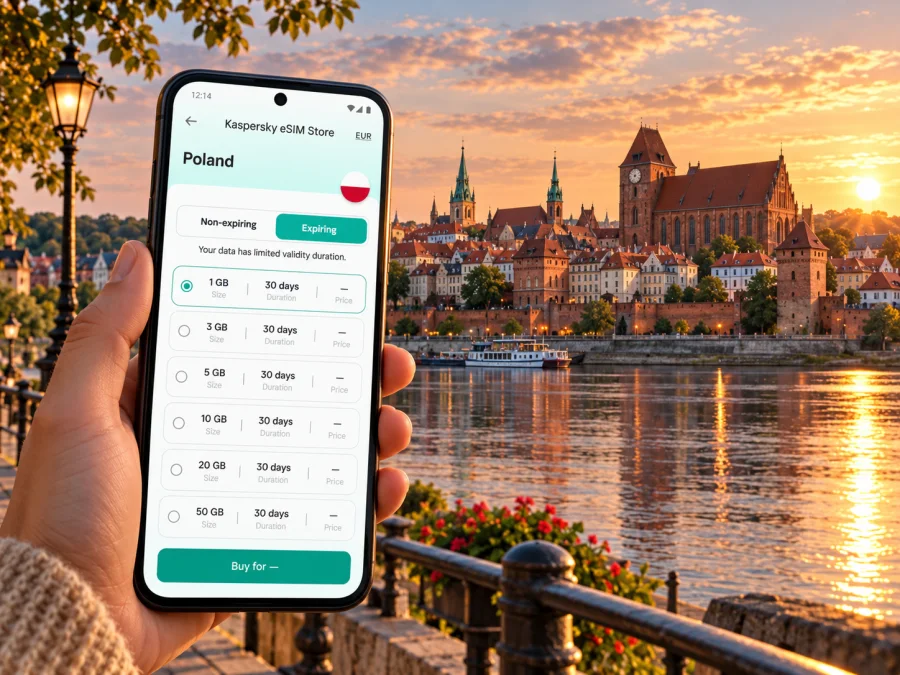
Toruń eSIM: mobile connection and internet for your city trip
Toruń is a compact city break with a very particular rhythm: you may arrive by train, cross the Vistula to a hotel, spend much of the day walking among Gothic brick buildings, then use a tram or bus to reach a campus, a venue or a district beyond the historic core. Mobile data helps with practical transitions: checking a platform, following a map, confirming a booking or messaging your host.
An eSIM is a digital SIM profile installed on a compatible device. For a visit to Toruń, it can be a convenient way to prepare mobile internet for Poland while keeping your regular SIM available for calls or messages, depending on your phone’s dual-SIM settings. Service, network, data allowance, validity and activation rules depend on the plan and device. Check the details before purchase.
Start with the shape of the city
The name “Old Town” is often used loosely for Toruń’s historic centre, but the medieval complex has three parts: the Old Town, the New Town and the Teutonic Castle area. The city’s official tourist service describes them as historically distinct areas, now experienced as one connected heritage district. That distinction is useful when planning a walk: a route that starts at the Old Town Market Square may continue east through the New Town and toward the castle ruins, while a riverside viewpoint lies south of the centre.
The UNESCO-listed medieval ensemble is the main focus for many first-time visitors. The Town Hall, churches, gates, fragments of the defensive walls, Copernicus-related sites and the castle ruins are close enough to combine on foot, but narrow streets and courtyards can make map orientation less obvious than a straight-line distance suggests. Download or save your accommodation address and a city map before you set out. Keep mobile data available for live directions, opening-hour checks and changes to the day’s plan.
Toruń also extends well beyond the postcard centre. The Bydgoskie Przedmieście area is known for nineteenth-century streets and green space; the university, event venues, shopping and residential districts may require a tram, bus, taxi or a longer walk. If you are staying outside the medieval centre, check the route back to your lodging before an evening visit. A map with a saved destination is especially helpful when street names are unfamiliar or when you return after dark.
What mobile data is useful for
- Finding the correct railway station exit, hotel entrance or meeting point.
- Comparing walking and public-transport options as your plans change.
- Checking current tram and bus departures and service notices.
- Using a translation app, digital tickets, booking confirmations and messaging.
- Sharing your location with a travel companion or contacting accommodation.
Indoor reception, congestion, building materials and the plan’s network can affect the experience. Keep essential details available offline.
Arriving in Toruń: airport, train or coach
Toruń has a local airfield, but it does not operate scheduled passenger flights. Visitors arriving by air normally land elsewhere in Poland and continue by rail, coach, road transfer or a combination. Bydgoszcz Airport is the closest airport commonly discussed for Toruń; the journey onward involves getting from the airport to Bydgoszcz’s railway or bus station and then continuing to Toruń. Routes, operating times and connections change, so check the live journey options for your travel date rather than relying on a remembered timetable.
Other itineraries may use Gdańsk, Poznań or a Warsaw airport. The best choice depends on the flight you can book and the full door-to-door journey, not just the distance shown on a map. A rail connection can be straightforward, but it may include a transfer and a wait. Before departure, save the airport-to-station route, the onward ticket and the name of your destination station. At the airport, mobile data can help you compare a train, coach or licensed taxi, but use official ticket and transport channels and confirm the final destination before boarding.
Toruń’s principal railway station is Toruń Główny, south of the Vistula and across the river from much of the historic centre. A second station, Toruń Miasto, is nearer to the Old Town. Which one is more convenient depends on the train and where you are staying, so check the stop printed on your ticket. If you arrive at Główny, use the current city transport map or a route planner to choose a bus, taxi or walk to your accommodation; do not assume that every train calls at both stations.
Long-distance coaches may arrive at a central bus station, but the exact stop depends on the operator. Keep the address and booking confirmation accessible even if your phone loses data. If your train or coach is delayed, check the carrier’s current notices and your next connection. For a short transfer, avoid planning a tight connection around a route that requires an unfamiliar station exit or a last-minute ticket purchase.
A simple arrival checklist
- Confirm the name of the station or coach stop on your ticket.
- Save your accommodation address in Polish and in a map app.
- Check whether your first local leg is walkable or needs a bus, tram or taxi.
- Keep a payment option and a screenshot of key tickets accessible offline.
- Once settled, check the return route and the latest departure for your evening plans.
Getting around: walk first, then check transit
For the historic core, walking is often the easiest way to move between sights. Streets can be cobbled, busy or temporarily affected by events and works, so allow time for slower progress and follow local signs where a pedestrian route differs from a car route. Crossing the river is a meaningful part of many trips: if your hotel, station or activity is on the other bank, include the bridge crossing in your plan instead of judging the route by the map’s straight-line distance.
For longer distances, Toruń’s public transport includes daytime and night tram and bus services. The city maintains route information, timetables and service updates; the network and stop arrangements can change. Check the live timetable shortly before travel, especially late in the evening, on weekends or during construction. A saved screenshot of a route can be a useful backup, but it will not reflect a new disruption.
Mobile tickets are available through city-supported and other ticketing channels, alongside paper tickets and ticket machines. The purchase process and validation instructions vary by ticket and app. Read the on-screen directions, buy the correct time or fare type, and make sure a mobile ticket is active or validated as required before a ticket inspection. Do not assume that simply opening a ticket app or having internet access counts as validation.
| Journey | A useful starting point | What to check |
|---|---|---|
| Old Town sights | Walk from your lodging or the nearest stop | Pedestrian access, walking time and any event or works notice |
| Toruń Główny to the centre | Check the current bus or taxi route across the river | Stop name, direction and arrival point near your lodging |
| Evening return | Look up the last suitable tram or bus before going out | Today’s timetable, night service and walking alternative |
| A district outside the centre | Combine a tram or bus with a short walk | Exact stop, service frequency and the final street segment |
| A day trip from Toruń | Compare train and coach departures | Return connection, station and any transfer time |
A data connection helps you read live information, but do not make it your only source. Note the stop name, route number and destination before boarding; station displays and vehicle signs remain useful if an app is slow to load. If you need help, show the destination on a map or write the street name down. For taxis, confirm the drop-off point in advance, particularly if your address is inside a pedestrianised or restricted street.
Choosing an eSIM plan for Poland
A city article cannot identify a guaranteed Toruń-specific mobile network or promise a particular signal level. An eSIM plan is generally selected for the country or region it covers, and the available partner network and terms depend on that plan. For this trip, confirm that Poland is included, then check the plan’s coverage wording, data amount, validity period, activation conditions, top-up options and any fair-use limits. If your itinerary crosses borders, verify each country on the route rather than assuming a Poland plan will continue abroad.
To estimate data, think in terms of activities, not a generic daily number. Turn-by-turn maps, messages and checking schedules usually use less data than video calls, high-resolution photo uploads, streaming or tethering a laptop. Your habits and app settings matter. If you expect to work remotely from Toruń, plan for video meetings and file transfers, and confirm whether hotspot use is allowed. If your stay is short and mostly involves maps and messaging, compare the smallest suitable allowance with a larger plan that gives you more room for unexpected use.
Kaspersky eSIM Store is an app and website where you can choose, arrange and activate an eSIM with a suitable plan for mobile internet on an international trip. It is an interface for preparing travel connectivity; it is not a mobile network operator. Before checkout, review the plan’s own terms and the provider/network information shown for that offer. You can browse eSIM options for Poland and compare the current details for your dates and expected use.
A plan-selection comparison
| Your trip pattern | Priorities to compare | Practical reminder |
|---|---|---|
| One or two nights in the centre | Validity that covers the whole visit; enough data for maps and messages | Check when validity begins and whether installation starts it |
| Several days with day trips | A suitable data allowance and a plan that covers every destination | List border crossings and towns outside Poland before buying |
| Business meetings | Hotspot rules, data allowance and a backup connection | Keep meeting links, addresses and key files available offline |
| Family or group travel | Whether each person needs a separate profile or can use permitted tethering | Check device limits and tethering terms; do not assume sharing is included |
| A long rail transfer | Coverage and plan validity along the route | Save tickets and transfer details before leaving Wi-Fi |
The cheapest-looking amount is not automatically the best fit. Compare the total data, validity and conditions, not just the headline price or price per gigabyte. A plan with more data can still be unsuitable if its validity is too short, if its supported region does not match your route or if your device cannot install it. Prices and offers can change, so confirm the current terms at the time of purchase.
Check your device before you travel
eSIM support varies by device, model variant, country of sale and software configuration. Some phones that share a product family name do not have identical SIM capabilities in every market. Before buying, confirm that your exact device variant supports eSIM and is not locked in a way that prevents adding another profile. The device manufacturer’s specifications and your mobile provider’s unlocking information are more reliable than a model-family list copied from another region. You can check your device’s eSIM compatibility before choosing a plan.
Also check that the operating system is up to date, the device has enough battery and you can access the email or account used for purchase. If you rely on a work-managed phone, your organisation may restrict adding eSIM profiles. Do not delete an existing travel profile or reset the device until you understand what that action will do; profile transfer and reinstallation depend on the plan’s rules.
Before checkout
- [ ] Confirm the exact device model and regional variant support eSIM.
- [ ] Confirm the phone is unlocked or otherwise able to use the intended profile.
- [ ] Check that Poland is included in the selected plan’s coverage terms.
- [ ] Compare data, validity, activation timing, tethering and top-up conditions.
- [ ] Review whether the plan is data-only; a normal phone number, voice calls and SMS are not included unless explicitly stated.
- [ ] Make sure you can install the profile using a stable internet connection before departure.
Install before you leave, activate at the right time
If the plan allows, installing the eSIM before travelling can reduce setup work after arrival. Installation and activation are not always the same action: an eSIM profile may be added to the device before its data validity begins, while a particular plan may start its validity at installation or at first connection. Read the plan’s instructions carefully and follow the stated timing. Do not turn on a travel line early unless you have checked when its validity starts.
Use a reliable Wi-Fi connection, keep the purchase instructions open on another screen if possible, and follow the device prompts step by step. Label the new line clearly, for example “Poland data,” so that it is easy to distinguish from your regular SIM. Keep your home line configured for the calls or messages you still need, and review default-line settings before changing them. Menu names vary between phone manufacturers and operating-system versions.
For detailed setup steps, follow the Android eSIM installation instructions or the iPhone eSIM installation instructions. When you reach Poland, select the travel eSIM for mobile data if the plan’s instructions say to do so. Enable data roaming for that eSIM only if required by its instructions. Keep data roaming settings for your home SIM in mind to avoid unexpected charges from your regular provider.
If the connection does not start
- Check that the eSIM profile is installed and switched on.
- Confirm the travel line is selected for mobile data and the plan is within its validity period.
- Review the plan’s instructions for data roaming and network selection settings.
- Toggle airplane mode briefly or restart the phone if the instructions allow, then wait for registration.
- Check whether the location, device or plan has a limitation; try again outdoors if you are inside a thick-walled building.
- If it remains offline, use Wi-Fi to contact the relevant support channel and keep your order details available.
Avoid deleting and reinstalling the profile as a first troubleshooting step. Some eSIM profiles are single-install or cannot be moved freely between devices. If you need to contact support, include the device model variant, operating-system version, the step where setup stopped and any error message. Never share passwords or one-time verification codes in a public place.
Keeping your trip practical and resilient
Connectivity matters in small moments: finding a station exit, checking a tram diversion, locating a reservation or telling someone you are delayed. Before leaving your accommodation, charge your phone, save the next destination and screenshot tickets or bookings you may need. Download an offline map area if your app supports it. For a day trip, check the return timetable and save the station name in both places. Photo backups and streaming can wait for Wi-Fi if you want to conserve mobile data.
Historic masonry, basements and crowded venues can affect reception. If a map stops loading, move to an open area, check street signs and use a saved map. For a meeting point, share a specific square, gate or street corner rather than “near the Old Town.” Keep an offline copy of your first destination in case you arrive without data.
Common questions
Is there a Toruń-specific eSIM plan?
Travel eSIMs are commonly arranged by country or region. Check the live offer and its stated coverage for Poland; do not infer a particular Toruń network or signal level from the city name. The plan’s current terms determine what is included.
Will mobile internet work inside every building in the Old Town?
No specific indoor result can be guaranteed. Reception can vary by location, structure, network and demand. Save key details offline and use Wi-Fi or move to an open area if a signal is weak.
Can I use a phone hotspot for a laptop?
That depends on the plan and device. Check the plan terms for tethering or hotspot use, and estimate the additional data required for calls, updates and file transfers.
Should I install the eSIM before reaching Poland?
Often it is convenient to install before departure if the plan permits, but check when validity begins. Some plans start their clock during installation or activation; others use a different trigger. Follow the specific instructions shown for your chosen offer.
What if I arrive without mobile data?
Use station Wi-Fi where available, consult saved addresses and screenshots, or ask staff for directions. Once you have a stable connection, check the eSIM profile, data-line settings and plan instructions. Keep a paper or offline copy of your first destination as a simple backup.
Prepare your eSIM for a trip to Toruń
Before departure, check device compatibility, compare the current data amount and validity for Poland, and read the activation details for the plan that fits your itinerary. Kaspersky eSIM Store helps you choose, arrange and activate an eSIM for mobile internet during an international trip. Browse current eSIM options for Poland and complete setup while you have a reliable connection.


