
Travel connectivity guide
Trafalgar eSIM for Mobile Internet
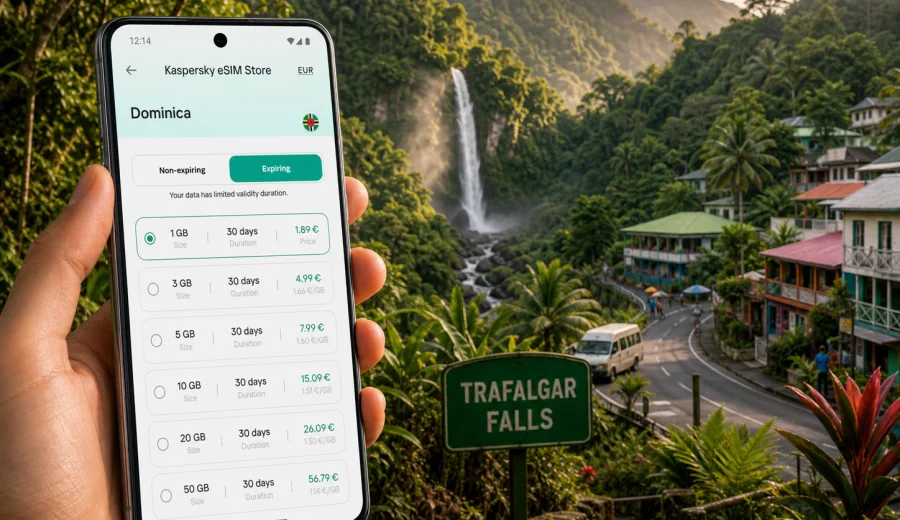
Trafalgar eSIM: mobile connection and internet for your Dominica trip
Trafalgar is one of Dominica's most practical places to plan mobile internet before you arrive. The village sits in the green hills above Roseau and is closely associated with Trafalgar Falls, rainforest walks, hot springs, and guesthouses. A trip here can feel simple on paper, yet your phone often becomes useful when public Wi-Fi is not nearby: confirming a driver, checking a route, messaging a lodge, or watching the weather before a waterfall visit.
An eSIM helps you prepare that connection without looking for a physical SIM card after arrival. With a compatible phone, you can install an eSIM profile, choose a tariff for mobile data in Dominica, and keep maps, messages, bookings, and travel apps available.
This guide focuses on Trafalgar as a city and village destination, not only on Dominica in general. It covers arrival, local movement, hotels, business tasks, stopovers, nearby trips, device checks, installation, and data planning.
Why mobile internet matters in Trafalgar
Trafalgar is close to Roseau, but the travel experience is not the same as staying in the capital. You may arrive by taxi, rental car, hotel pickup, tour transfer, or local transport, then move between a guesthouse, the waterfall area, hot springs, viewpoints, and restaurants.
Mobile data is useful for simple, repeated tasks:
- checking maps when the road narrows or signage is limited;
- confirming a pickup point with a driver or guide;
- messaging a guesthouse about arrival time;
- checking weather before a rainforest walk;
- saving booking confirmations and ferry or flight updates;
- sharing your location with trusted travel companions;
- using banking, translation, ride, and messaging apps;
- staying less dependent on public Wi-Fi in ports, cafes, or hotel lobbies.
The goal is not to stay online every minute. Trafalgar is a place for waterfalls and green valleys. The value of an eSIM is that mobile internet is ready when a travel decision depends on it.
Arrival: getting online before the hills
Many visitors reach Trafalgar through Roseau, the ferry terminal, a cruise stop, Douglas-Charles Airport, or a cross-island road route. The first stage is often when you most need live information: a driver may ask for a location pin, a hotel may need an arrival update, or your map may need to guide you into Roseau Valley.
| Arrival situation | Why data helps | Practical tip |
|---|---|---|
| Airport transfer | Long road movement and arrival messaging | Install the eSIM before travel, then use mobile data when you are ready in Dominica. |
| Ferry or cruise arrival in Roseau | Quick movement from port to the hills | Save your pickup point and accommodation address before leaving the port area. |
| Day trip from Roseau | Short route with flexible timing | Use mobile data for coordination, but download offline maps too. |
| Rental car route | Navigation, parking, and return timing | Save the route to Trafalgar Falls and your hotel before starting. |
| Guided tour | Meeting points and schedule changes | Keep messaging apps available for updates from the guide. |
If you start in Roseau, hotel Wi-Fi may be enough before you leave. It will not follow you through every bend in the road, so a prepared eSIM is useful as a travel layer.
Where eSIM helps around Trafalgar
Waterfalls and nature stops
Trafalgar Falls is the main attraction, and mobile internet helps before and after the visit: directions, driver messages, weather checks, ticket or tour details, and quick updates to people traveling with you. Around natural sites, use data conservatively. Maps and messages are more important than streaming or large uploads.
Hotels, guesthouses, and eco-lodges
Accommodation near Trafalgar is often smaller than a large urban hotel. Mobile data helps when you need to message a host, confirm dinner, arrange a taxi, or share an arrival time. Wi-Fi may work well indoors, but an eSIM is useful when you step outside.
Local movement and transport
Roads in the hills can make a short distance feel longer than it looks on a map. Keep your accommodation address saved offline, confirm pickup points clearly, and avoid large app updates before a transfer. If you drive, download offline maps for Roseau, Trafalgar, Wotten Waven, Laudat, and your return route.
Business tasks and remote work
Trafalgar is not a business district, but travelers sometimes add it before or after meetings in Roseau. Use mobile data for email, chat, authentication apps, calendars, maps, and urgent messages. Use stable Wi-Fi for large files or long calls when available, and treat the eSIM as a controlled backup while moving.
Stopovers and day trips
For a half-day stop, cruise excursion, or guided island route, data is concentrated into moments: finding the driver, confirming return time, checking a route, and messaging if plans change.
How to choose an eSIM tariff for Trafalgar
For a city article, the eSIM destination should match the country where the city belongs. Trafalgar is in Dominica, so choose a Dominica tariff or another available option that explicitly covers your route. Do not search for a separate tariff for every village, waterfall, or district.
Start with four questions:
1. How many days will you be in Dominica?
2. Will Trafalgar be your base or a short stop from Roseau?
3. Will you use data only for maps and messages, or also for calls, hotspot, and uploads?
4. Will your trip continue to other Caribbean destinations?
| Trip style | Typical mobile data use | What to watch |
|---|---|---|
| One-day visit | Maps, taxi messages, attraction checks | Download maps and avoid video uploads on mobile data. |
| Two or three nights | Navigation, weather, bookings, light social use | Pick a validity period that covers arrival and departure. |
| Nature route across Dominica | Maps, trail planning, accommodation messages | Choose enough data for several travel days away from hotel Wi-Fi. |
| Remote-work break | Email, chat, authentication, occasional calls | Keep large files and long video calls for stable Wi-Fi if possible. |
| Family trip | Shared location, transport, restaurant searches | Decide whether each key traveler needs their own data setup. |
Avoid choosing only by the largest package. In Trafalgar, careful use is often better than excessive data. Download offline maps, save travel documents, and keep automatic cloud backup for Wi-Fi.
Check your device before buying
Before you buy any eSIM tariff, confirm that your phone or tablet supports eSIM and is not locked to another carrier. This is especially important if your device is older or was bought through a mobile operator.
Use this checklist:
- your device supports eSIM;
- your device is unlocked for mobile network use;
- your operating system is up to date enough for eSIM installation;
- you can access your email or account during setup;
- you know which SIM profile will handle mobile data;
- you understand whether your primary SIM should remain active for calls or SMS.
If you are unsure, check your device before purchase. It is better to verify compatibility at home or at your hotel than to discover a limitation on the road to Trafalgar.
How to install and activate an eSIM
Kaspersky eSIM Store is an app and website where you can choose, arrange, and activate an eSIM with a suitable tariff for mobile internet in an international trip. The setup is usually straightforward, but it helps to separate installation from the moment you start using data.
1. Choose Dominica as the destination for your Trafalgar trip.
2. Select a tariff by data allowance, validity period, coverage, and price.
3. Complete the order and open the eSIM details in your profile or app.
4. Install the eSIM on your compatible device by following the on-screen steps or QR-code flow.
5. Set the eSIM as the mobile data line when you are ready to use data in Dominica.
6. Check whether data roaming needs to be enabled for the eSIM profile.
For device-specific setup, use the Android installation guide or the iOS installation guide. Install while you have a stable internet connection. Activation timing and validity depend on the selected tariff conditions, so read the details before the trip.
When to activate mobile data
Many travelers prefer to install the eSIM before departure and activate mobile data after arrival. That approach works well for Trafalgar because you may want internet ready before the drive into the hills. However, the exact timing should follow the conditions of the selected tariff.
Install before departure if you want setup handled over reliable Wi-Fi. Activate data after arrival if the tariff validity starts when it connects to the local network. Keep the QR code or account access available until you know the eSIM is working, and label your SIM profiles clearly.
When you are ready to compare options for the village, Roseau Valley, waterfall visits, and wider island movement, use the Dominica destination page to choose an eSIM tariff for travel to Trafalgar and Dominica.
Practical local scenarios
A relaxed two-night stay
Install the eSIM before travel, save the map area around Roseau and Trafalgar, and use mobile data for arrival messages, weather, restaurant checks, and the return transfer. Keep photo uploads for Wi-Fi unless your data allowance is generous.
A waterfall day from Roseau
Charge your phone, save the meeting point, confirm the pickup time, and keep a screenshot of the driver or tour contact. Use mobile data for maps and messages, not background updates.
A work-and-nature break
Use accommodation Wi-Fi for calls and file transfers. Keep the eSIM ready for authentication apps, urgent messages, route changes, and transport coordination. If you need hotspot, check the tariff conditions first.
A wider Dominica route
Trafalgar can connect naturally with Roseau, Wotten Waven, Laudat, Freshwater Lake, coastal viewpoints, and other inland stops. The more you move, the more valuable live maps and messaging become. For remote walks, save offline information and tell someone your route.
What eSIM does and does not cover
An eSIM tariff for travel is mainly about mobile data. It may not include a local phone number, voice calls, or SMS unless that is stated in the selected tariff conditions. Many travelers use internet-based apps for calls and messages over mobile data.
Before purchase, check:
- destination coverage;
- data allowance;
- validity period;
- when the validity period starts;
- whether top-up is available;
- whether hotspot use is allowed;
- whether the eSIM can be reinstalled if removed;
- support options if setup questions appear.
Kaspersky eSIM Store helps you choose, arrange, and activate an eSIM tariff for mobile internet in a trip. Mobile network availability and exact connection behavior depend on the selected tariff, local network, device, location, and settings.
Trafalgar internet checklist
Use this checklist before arrival or before your day trip:
- Device supports eSIM and is unlocked.
- eSIM is installed, or you know where to find the QR code and instructions.
- Dominica destination tariff matches your dates and data needs.
- Offline maps are saved for Roseau, Trafalgar, and nearby stops.
- Hotel, driver, and tour contacts are saved outside messaging apps too.
- Battery pack is charged for a long outdoor day.
- Background app updates and cloud backup are limited on mobile data.
- Primary SIM and eSIM data settings are clearly labeled.
- Travel documents and booking confirmations are saved offline.
This preparation matters in Trafalgar because the trip often moves between town, valley roads, natural sites, and small accommodation.
FAQ: eSIM and internet in Trafalgar
Is Trafalgar a separate eSIM destination?
Usually, no. For Trafalgar, choose Dominica as the destination because Trafalgar is in Dominica. Check the selected tariff details to confirm coverage.
Can I install the eSIM before I arrive?
In many cases, yes. Installing before departure can make arrival easier, but activation timing and validity rules depend on the selected tariff.
Will eSIM replace my regular SIM?
Not necessarily. Many phones let you keep your primary SIM active while using the eSIM for mobile data. You can decide which line handles data, calls, and messages in device settings.
Do I need Wi-Fi to install an eSIM?
You generally need an internet connection during setup, so it is practical to install the eSIM while you have stable Wi-Fi at home, at your hotel, or another trusted connection.
Is eSIM enough for remote nature trips?
Use eSIM as a helpful travel data option, but do not rely on live mobile data as your only safety plan in remote areas. Save maps offline, check weather, tell someone your route, and follow local guidance.
Can I use hotspot with an eSIM?
It depends on the selected tariff and your device settings. Check the conditions before planning to share data with a laptop or another traveler.
Prepare your mobile internet for Trafalgar
Trafalgar is a destination where a little preparation makes the trip smoother. If your phone is compatible with eSIM, you can set up mobile data before the journey, keep maps and messages available on the road, and reduce dependence on public Wi-Fi while moving between Roseau, the village, waterfalls, lodges, and nearby nature routes.
Before you travel, review your dates, expected data use, and device compatibility. Then use Kaspersky eSIM Store to prepare an eSIM tariff for your trip to Trafalgar and Dominica and keep the setup ready for the moments when mobile internet matters most.