Travel connectivity guide
Trakai eSIM: Mobile Internet for Your Visit
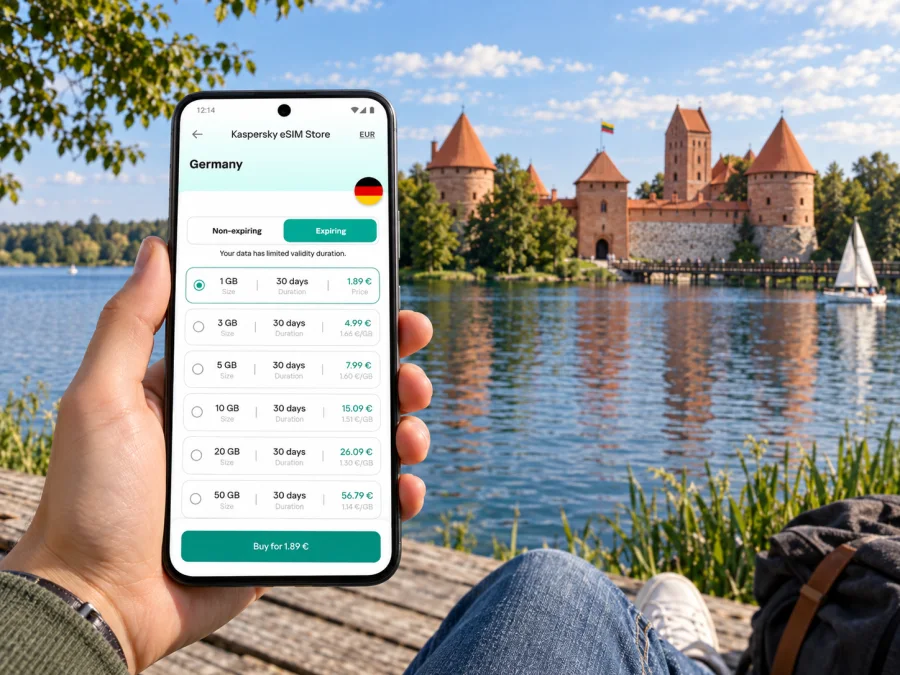
Trakai eSIM: mobile connection and internet for a lakeside visit
Trakai is a small Lithuanian town best known for its island castle, lakes and Karaim heritage. A visit often combines a train or bus journey from Vilnius with walking between the station, Karaimų Street, Lake Galvė and the castle. Mobile internet can make that day easier: check a live route, confirm opening information, message your host or look up a return connection without relying on a café’s Wi-Fi.
A useful plan begins before departure. Trakai is not a separate country or a separate mobile-market destination: it is in Lithuania, so a travel eSIM choice should be checked for Lithuania and for the specific plan’s terms. The network available at a particular place depends on the plan’s local network arrangements, coverage and conditions. A map pin or a general statement about Lithuania cannot guarantee reception inside every building, on every shore or at every moment.
What mobile internet helps with in Trakai
The town is compact, but a day trip can include several kinds of movement. You may arrive at Trakai station, walk or take local transport toward the historic centre, cross bridges toward Trakai Island Castle, follow the lakeside and then continue to another stop or viewpoint. Online access is useful at transition points: when a train is delayed, when you need to locate a guesthouse, or when you want to check whether a museum or boat service is operating that day.
| Part of the visit | What you may need on your phone |
|---|---|
| Vilnius Airport or central Vilnius | A route to the railway or bus station, ticket details, and a message to your accommodation |
| Arrival in Trakai | A walking route from the station, a meeting point, or a local transport update |
| Old town and Karaimų Street | Map directions, translation, opening details, and restaurant contact information |
| Lake Galvė and the castle | A saved map, current visitor information, and a way to coordinate with companions |
| Return journey | The latest departure information and a backup route if plans change |
This is practical connectivity, not a substitute for checking transport and attraction information with the relevant provider. Schedules, seasonal opening times, ticket rules, lake activities and local services can change. Save the essentials before leaving Vilnius, then use mobile data for updates when you have a signal.
Understand the geography before setting out
Trakai is a town in Lithuania’s Trakai District, southwest of Vilnius. It is often described casually as a “city break,” but its scale and layout are closer to a compact lakeside town. The best-known landmark, Trakai Island Castle, stands on an island in Lake Galvė. Bridges connect the castle approach with the town, while Karaimų Street runs through the historic area toward the lake and castle.
The castle is not the only point worth locating. Trakai Peninsula Castle and its grounds sit on a different part of the historic settlement. The old and new town, the railway and bus station, lakeside paths, and the Užutrakis Manor area are separate points rather than one continuous attraction. On a phone map, check the exact destination name and walking distance before setting out; two places with “Trakai” in the label may be several kilometres apart.
Karaimų Street is a useful orientation line as well as a place to learn about the town’s Karaim history. The local tourism information describes traditional wooden houses and the kenesa, a Karaim house of worship, along the street. Visit respectfully: this is a lived-in neighbourhood, not simply a backdrop. Avoid photographing residents or private property without permission, and follow any posted access rules at religious or cultural sites.
Užutrakis Manor and Park are across the wider lakeside landscape and are usually a separate excursion from a brief castle visit. If you want to include it, check the route, walking time and current visitor information before committing. A map can help compare a walk with a taxi or other local transport, but don’t assume that a short straight-line distance means an easy lakeside path.
Getting from Vilnius to Trakai
Most international visitors begin in Vilnius. Vilnius Airport lists several ways to reach the city, including city buses, a train, a minibus, taxi and car. Airport buses serve locations in Vilnius; they do not take you directly to Trakai. From the capital, continue by train, intercity bus, car or an arranged transfer, checking the current departure point and timetable for your travel date.
A straightforward public-transport sequence is:
- From the airport, travel into Vilnius or to the appropriate station using the current airport transport information.
- Check the live rail or bus timetable for a Vilnius–Trakai departure. Confirm the departure station, platform, ticket rules and any service changes.
- On arrival in Trakai, check the walking route from the station to your accommodation or the historic centre. If carrying luggage or travelling with limited mobility, compare local transport options in advance.
- Before returning, confirm the last practical departure and allow time to reach the station. A screenshot of the ticket and route is useful if data is temporarily unavailable.
Vilnius Airport’s passenger information lists routes including 1, 2, 3G and 88, with a night service also shown on the airport’s current transport pages. Route details, service hours, payment options and fares can change, so use the airport and local transport information current on your travel day. The same principle applies to the Vilnius–Trakai leg: use a rail or bus operator’s current timetable rather than relying on an old screenshot or a search result cached months earlier.
Mobile data is most useful for the connection between legs. If a flight arrives late, check whether a planned train or bus is still realistic before crossing town. If you have a tight onward schedule, choose a route with a margin rather than aiming for the last possible departure. Keep the accommodation address and any pickup instructions available offline as well as in your messages.
Choosing data for a day trip or a longer stay
Think about how you will use the phone, not only how many days you will be in Lithuania. A one-day visit focused on maps and messaging usually has a different data pattern from a week that includes video calls, cloud backups, photo uploads and navigation in several towns. The right amount depends on your habits and the plan’s validity period, destination coverage and other conditions.
Use this quick estimate as a planning aid, not a promise about consumption:
- Light use: maps, text messages, transport checks and occasional browsing. Download offline maps and disable automatic photo backups over mobile data.
- Regular use: frequent route searches, translation, social updates and some photo sharing. Review which apps refresh in the background and upload large files only when convenient.
- Heavy use: video, hotspot sharing, remote work or repeated video calls. Check the package size and validity carefully; these activities can use data much faster than maps and messages.
Before choosing a plan, compare the destination, included data, validity, price and any restrictions shown in its terms. If your itinerary continues beyond Trakai, check whether the plan covers the whole route in Lithuania, not just one town. A national destination plan is the relevant starting point for Trakai, while actual service availability still depends on the particular plan and its local network conditions.
When you are ready to review an option for the country, choose an eSIM plan for your trip to Lithuania. Kaspersky eSIM Store is an app and website that helps you select, arrange and activate an eSIM with a suitable plan for mobile internet abroad. The plan’s conditions identify the destination and data allowance; check those details before purchase instead of assuming all eSIM plans work in the same way.
Prepare the phone before travel
First, check whether your device supports eSIM and confirm that it is not locked to a mobile operator in a way that prevents another eSIM from being used. Support varies by device model, regional variant and carrier configuration. A phone name alone may not be enough: two versions of the same model can have different SIM capabilities depending on the market where they were made or sold. Check the exact model and the manufacturer’s specifications for your particular device.
Keep your home SIM active if you need its number for calls, texts or account verification, but review its roaming settings and charges before travel. A travel eSIM is commonly intended for data. It does not automatically provide a regular phone number, voice calls or SMS unless the selected plan explicitly says so. Internet-based calling and messaging apps can work over data, subject to their own requirements and the service’s availability.
Before installing, make sure you can access the purchase instructions and have a stable internet connection. Some plans start their validity at installation, activation or first connection; the trigger depends on the selected plan. Read its terms so that you do not activate earlier than intended. If the eSIM is installed before departure, leave it available in the phone’s SIM settings and follow the plan’s instructions for when to turn it on or select it for mobile data.
Install and activate your eSIM
The exact menu names differ between Android devices and iPhones, and the sequence can vary by model and software version. Follow the instructions shown for your purchase and your phone. Keep the QR code or manual activation details accessible on another screen or in a saved document if you are using the same phone to install the eSIM.
A general preparation sequence is:
- Connect to Wi-Fi or another working internet connection for setup.
- Open the eSIM installation instructions and add the mobile plan in your device settings, using the QR code or the manual details provided for that plan.
- Label the new line clearly, for example “Lithuania travel data,” so you can distinguish it from your home SIM.
- Set the travel eSIM as the mobile-data line when the plan’s instructions say to do so. Keep calls and messages on your usual number if that suits your needs and your home provider’s charges.
- If the plan instructions require data roaming for the travel eSIM, enable it for that line only. Check the selected line carefully to avoid unexpected roaming charges on your home SIM.
- After arrival, allow the phone to register on a supported local network. If data does not start, check the plan status, selected data line, signal, roaming setting and any APN instructions supplied with the plan.
For device-specific steps, use the Android eSIM installation guide or the iOS eSIM installation guide. Do not delete an installed eSIM while troubleshooting unless the plan’s instructions or support team tells you to; some profiles cannot be installed again after removal.
Use maps and data thoughtfully around the lakes
Lake views and wooded paths are part of the appeal of Trakai, but mobile coverage can vary with the exact location, network and surroundings. A phone may have a strong signal on a main street and a weaker one in a building, along a quiet shore or during a busy event. Do not plan a critical transfer on the assumption that data will be available at every point.
A simple offline backup takes only a few minutes:
- Save an offline map of central Trakai and the area around your accommodation.
- Keep the castle address, accommodation address and meeting point in a note.
- Download any tickets, QR codes, reservation details or essential travel documents.
- Save the planned return departure and the address of the relevant station.
- Share your meeting point with companions before splitting up.
If your map position looks wrong, check that location services are enabled and that the destination pin is the intended entrance, station or visitor area. A pin placed on the castle island may lead you to a bridge approach rather than an entrance, so allow time to orient yourself on arrival. At the castle, follow signs and staff directions; a map is a navigation aid, not an authority on visitor access.
The same measured approach helps with photos. Uploading a large batch of pictures or video can consume a substantial share of a small plan. You can keep the camera working offline, review your data use in phone settings and postpone full-resolution uploads until you have Wi-Fi or have checked your remaining allowance.
Practical visit scenarios
A Vilnius day trip
You land in Vilnius, spend some time in the capital and travel to Trakai for the day. Before leaving the airport, check the route into Vilnius and the current onward timetable. Keep a buffer between connections, download the map and confirm how you will return. In Trakai, use mobile data for route changes and messages, then check the return departure before beginning a long walk or sitting down for dinner.
A route that includes Užutrakis
Treat Užutrakis Manor and Park as a separate stop. Verify opening details and the route before walking there, and check how you will return to the centre or station. Download a map of both areas and do not rely on a single lakeside route without confirming that it is open and suitable for your group.
Troubleshooting when mobile data does not work
If you have no connection after arrival, work through the simple checks before changing several settings at once:
- Confirm that the eSIM is installed and enabled in the phone’s SIM or mobile-network settings.
- Check that the eSIM, rather than your home SIM, is selected for mobile data.
- Confirm that the plan is active and that its validity period has begun.
- Check whether the plan requires data roaming or a particular APN setting, and apply only the instructions provided for that plan.
- Toggle airplane mode off and on, then give the phone a short time to reconnect. If necessary, restart the device.
- Move to an open area and check again; a weak signal in one spot does not establish that the plan has failed.
- If the problem remains, use Wi-Fi where available and contact support with your device model, plan details and the steps you have already tried.
Avoid deleting the eSIM profile as a first troubleshooting step. Also avoid selecting an unfamiliar network manually unless the plan instructions recommend it. Available local networks and permitted selection depend on the plan; the eSIM’s actual partner network is not determined by Trakai’s town name alone.
Frequently asked questions
Is Trakai a separate eSIM destination from Lithuania?
Trakai is a town in Lithuania, so check a plan for Lithuania. The specific plan’s coverage terms and local network arrangements determine where it can be used; no town-level label by itself guarantees service at every point.
Will an eSIM give me a Lithuanian phone number?
Not necessarily. Travel eSIM plans are often data-focused and do not include a regular voice number or SMS. Check the selected plan’s terms if you need calls or messages through a mobile number. Messaging and voice apps may use mobile data, but they require an internet connection and their own accounts.
Can I rely on mobile data inside Trakai Island Castle?
Do not assume that coverage is identical indoors and outdoors. Signal depends on the plan’s supported network, local conditions, building materials and network load. Save tickets and key details in advance, then use data when a connection is available.
Should I install the eSIM before travelling?
You can prepare it in advance if the plan allows, but check when its validity begins. Some plans start on installation, while others start when the eSIM connects to a supported network. Follow the instructions for the plan you selected.
How much data will a day in Trakai use?
It depends on how you use your phone. Maps and messaging usually use less than video calls, streaming or automatic photo uploads. Download maps, limit background refresh and check your device’s data-usage screen during the trip.
What if I travel onward from Trakai?
Check whether the same plan covers the other places on your route and whether its remaining data and validity are sufficient. A plan selected for Lithuania may be suitable for a route within the country, but verify the listed destination and conditions rather than assuming.
Plan a connected visit
For a relaxed day in Trakai, prepare the route from Vilnius, keep transport and attraction details current, and download the essentials in case you are temporarily offline. Choose a Lithuania plan according to your actual data use and dates, check device compatibility and follow the activation instructions for that plan.
When you are ready, review eSIM options for Lithuania, then select a plan whose destination, data allowance and validity fit your trip. Kaspersky eSIM Store’s app and website help you choose, arrange and activate an eSIM for mobile internet abroad. Install it using the Android guide or iOS guide, and keep an offline map as a practical backup for your time by Lake Galvė.


