
Travel connectivity guide
Trashigang eSIM for mobile internet in Bhutan
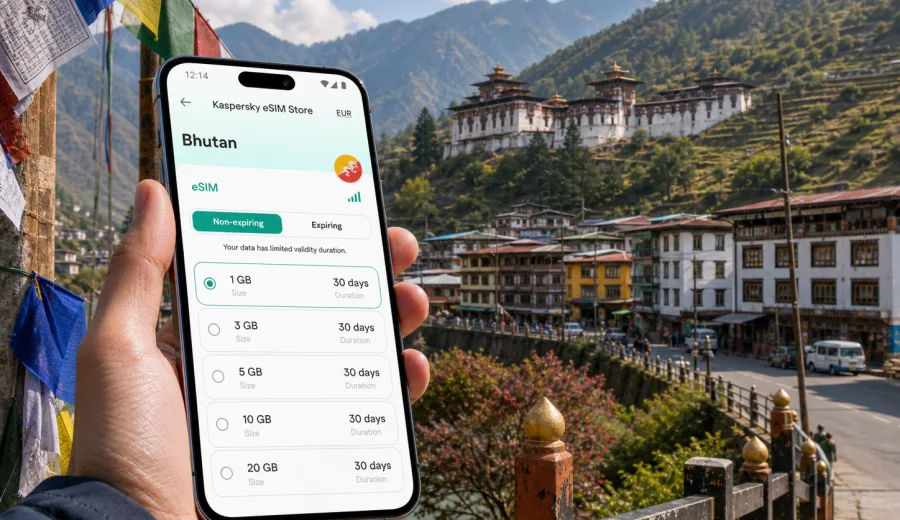
Trashigang eSIM: mobile connection and internet for a trip to eastern Bhutan
Trashigang is a different kind of travel destination from a large airport city. It sits in eastern Bhutan, with steep roads, compact town streets, monastery visits, hillside hotels, and road connections that make mobile internet useful before you even reach your room. If you are going to Trashigang for sightseeing, work, a university visit in nearby Kanglung, or a longer route through eastern Bhutan, an eSIM can help you prepare mobile data without looking for a physical SIM card after arrival.
This guide focuses on the practical side of staying online in Trashigang: navigation, transport coordination, hotel check-ins, messaging, maps, travel documents, short business trips, and day trips from town. It also explains how to choose an eSIM data plan for Bhutan through Kaspersky eSIM Store, how to install it, and what to check before you travel.
Why mobile internet matters in Trashigang
Trashigang is small, but the travel scenario is not always simple. Visitors often arrive by road after several hours of mountain driving, move between the town, nearby settlements, religious sites, guesthouses, and regional offices, and rely on messaging rather than walk-in services. A stable way to access mobile data can make the trip easier from the first stop.
Mobile internet is useful in Trashigang when you need to:
- confirm your hotel location before the final stretch of the road;
- message a driver or host when the bus or car arrives later than planned;
- use maps around the town, dzong area, viewpoints, and nearby valleys;
- check weather before a drive toward Kanglung, Rangjung, Mongar, or Samdrup Jongkhar;
- translate short phrases, menus, signs, or travel instructions;
- access booking confirmations, permits, email, banking apps, and cloud documents;
- share your location with colleagues, family, or a travel group;
- use messenger calls when regular voice calls are not included in your data plan.
The value of an eSIM in Trashigang is not only speed. It is preparation. You can set up mobile data before the trip, check the plan details, and avoid spending your first hours asking where to buy a SIM card, whether a shop is open, or which documents are needed locally.
Arrival scenarios: getting online before you reach town
Many travelers do not arrive in Trashigang through a large international airport. The city is usually part of a wider Bhutan route. You may fly into Bhutan first, continue by domestic flight or road, or reach the east after visiting western or central districts. That makes mobile internet useful across several stages of the journey.
Typical arrival scenarios include:
| Scenario | Why data helps | What to prepare |
|---|---|---|
| Long road transfer | Mountain roads, changing arrival times, driver coordination | Offline map backup, hotel address, messenger access |
| Domestic travel connection | Schedule checks and onward transport planning | Booking details, weather checks, data plan validity |
| Work or institutional visit | Calls, email, documents, map links | Calendar, cloud files, messenger groups |
| Regional route through eastern Bhutan | Stops outside the town and changing overnight plans | Route notes, saved locations, extra data buffer |
If you are arriving late, mobile data is especially useful for final directions. Trashigang’s roads and hillside layout can make a short distance feel less obvious than it looks on a map. A saved hotel pin, a working messenger, and access to your booking details can remove a lot of friction.
Using eSIM for local movement around Trashigang
Trashigang is not a city where you usually move by metro or dense urban transit. Movement is more often based on walking, taxis, hired cars, buses, hotel transfers, and arranged pickups. That makes mobile connection important for coordination rather than for scanning transport gates.
Use mobile data in Trashigang for:
- sending a live location to a driver before a pickup;
- checking whether a short walk involves a steep climb;
- comparing the town center, dzong area, and hotel location before choosing where to stay;
- keeping group members aligned when people split for errands, meals, or meetings;
- checking if a planned excursion still makes sense in changing weather.
A practical approach is to download offline maps before the trip and use eSIM data for live updates, messaging, search, and route changes. This reduces data use and gives you a fallback if signal quality changes in valleys or on remote road sections.
How much data might you need in Trashigang?
Your data needs depend on the trip style. Trashigang is not a place where most visitors spend the day streaming video from transport networks, but maps, photos, calls, and work tasks can still add up.
| Trip type | Typical online behavior | Data planning tip |
|---|---|---|
| 1-2 day stopover | Maps, messenger, hotel confirmations, light browsing | Choose a compact plan if you will mainly use Wi-Fi at the hotel |
| 3-5 day visit | Navigation, calls, uploads, day trips, translation | Add a buffer for road days and photo sharing |
| Business visit | Email, documents, messenger calls, tethering in short sessions | Prioritize plan duration and enough data for work tasks |
| Eastern Bhutan route | Multiple towns, changing hotels, long transfers | Choose a plan that covers the full Bhutan portion of the route |
Video calls, cloud backups, automatic photo uploads, and app updates can use more data than maps or messaging. Before you travel, turn off automatic updates on mobile data and set cloud photo backup to Wi-Fi only. If you plan to use your phone as a hotspot, remember that tethering can spend data quickly, especially with laptops.
What to check before choosing an eSIM plan for Bhutan
For a city trip to Trashigang, you still need a country plan that covers Bhutan. City pages help with travel context, but eSIM plan selection is normally based on the country or region where the data plan is valid.
Before choosing a plan, check:
1. Whether the plan covers Bhutan for the dates of your trip.
2. The amount of data and validity period.
3. When validity starts: at installation, activation, or first network connection, depending on plan conditions.
4. Whether your phone supports eSIM and is not locked to a specific mobile operator.
5. Whether you need data only, or whether you also need regular voice calls and SMS through another line.
6. Whether your route stays inside Bhutan or continues to another country.
Kaspersky eSIM Store is an app and website where you can choose, set up, and activate an eSIM with a suitable data plan for mobile internet in international travel. It is not a mobile operator and does not replace the local network. The conditions you see for a selected plan, including data allowance, duration, and destination, are the details that should guide your choice.
A practical setup timeline for a Trashigang trip
The easiest time to prepare mobile internet is before you are tired from a long road journey. Use this timeline as a practical checklist.
| Time | What to do | Why it helps |
|---|---|---|
| A few days before travel | Check phone compatibility and operator lock status | Avoid buying a plan for a device that cannot use eSIM |
| Before departure | Choose a Bhutan data plan and install the eSIM profile | Reduce setup work after arrival |
| Before the long transfer | Save hotel address, offline maps, driver contacts, and documents | Keep essentials available if coverage changes |
| On arrival in Bhutan | Activate the eSIM according to plan instructions | Start using mobile data when the plan is ready |
| In Trashigang | Monitor data use and turn off unnecessary background traffic | Keep enough data for maps, messages, and bookings |
If you want to prepare mobile internet before the route east, you can choose a data plan for Bhutan in Kaspersky eSIM Store and review the plan details before installation. This is especially useful when Trashigang is one stop in a longer itinerary and you do not want to solve connectivity during the transfer.
How to install and activate eSIM before or after arrival
The exact setup flow depends on your device and the selected plan, but the process is usually straightforward: choose the destination, select a plan, complete the order, install the eSIM profile, and activate mobile data for that line when you are ready to use it.
General steps:
1. Open Kaspersky eSIM Store on the website or in the app.
2. Select Bhutan as the destination.
3. Compare data allowance, validity, and price shown for the available plan options.
4. Complete the order and open the installation details.
5. Install the eSIM profile on your compatible phone.
6. Set the eSIM line for mobile data when the plan should be used.
7. Enable data roaming for the eSIM line if the setup instructions or device settings require it.
For device-specific setup, use the Android installation guide or the iOS installation guide. Keep another internet connection available during installation, because your phone may need to download and add the eSIM profile before it can use mobile data.
Check device compatibility before you pay
Not every smartphone supports eSIM, and some compatible phones can still be locked by a mobile operator. Before buying a plan, check your device and confirm that it can add an eSIM profile.
Also check these details:
- your phone model supports eSIM in the country where it was purchased;
- the device is not locked to a carrier that blocks other mobile profiles;
- your operating system is up to date enough for eSIM setup;
- you know which line will handle mobile data and which line will handle calls or SMS;
- you will not delete the eSIM profile unless you are sure it can be reinstalled under the plan conditions.
This step matters for Trashigang because travel time can be long. It is much easier to confirm compatibility while you still have stable home internet and time to read instructions.
Trashigang travel scenarios where eSIM is especially useful
Hotel check-in and local directions
Hotels and guesthouses around Trashigang may provide map pins, phone numbers, or written directions. Mobile data helps you open those details, message your host, and confirm your arrival time. If your accommodation is outside the immediate town center, having a working map and messenger can be more useful than relying on a street address alone.
Visiting Trashigang Dzong and viewpoints
Trashigang Dzong is one of the area’s defining landmarks, and many visitors plan walks or short drives around viewpoints and the town. Mobile internet helps with route checks, photography backups when Wi-Fi is available later, and sharing location with travel companions. Keep in mind that respectful behavior and local rules at religious or administrative sites matter more than posting in real time.
Trips to Kanglung, Rangjung, or nearby valleys
Trashigang often works as a base for nearby places in eastern Bhutan. A data plan can help you check road conditions, confirm pickup times, and adjust your route. For a day trip, save the return location and driver contact before leaving town. If signal quality changes outside the urban area, offline maps and saved messages become important.
Business and institutional visits
For meetings, project visits, education-related travel, or NGO work, mobile data helps with calendar updates, messenger groups, email, cloud files, and last-minute schedule changes. If you expect to use a laptop, avoid assuming hotel Wi-Fi will cover every task. Keep essential documents available offline and use mobile data for urgent access.
Short stopovers
Even a short stay can require online access: booking confirmation, route planning, meal search, weather checks, and transport coordination. For a stopover, choose a plan based on the whole Bhutan trip, not only the hours spent in Trashigang.
eSIM, hotel Wi-Fi, and local SIM cards: what works best?
There is no single perfect option for every traveler. The best setup depends on your time, route, and device.
| Option | Best for | Limits to consider |
|---|---|---|
| eSIM data plan | Prepared mobile internet, navigation, messages, route changes | Requires eSIM-compatible unlocked device |
| Hotel Wi-Fi | Larger downloads, video calls from the room, backups | Available only at the property and quality can vary |
| Physical local SIM | Travelers who want a local number or long stay setup | Requires finding a shop and checking local purchase conditions |
| Home roaming | Keeping the same number and carrier billing | Costs and data limits depend on your home operator |
For many visitors, eSIM and hotel Wi-Fi work well together. Use eSIM for movement, maps, transport, and urgent messages. Use Wi-Fi for large downloads, system updates, and long video calls when the connection is reliable.
Data-saving checklist for Trashigang
Use these settings before the road journey:
- download offline maps for Trashigang and the wider route;
- save hotel, meeting, and pickup locations;
- turn off automatic app updates over mobile data;
- pause cloud photo and video backup on mobile data;
- download tickets, booking confirmations, and permits;
- set messenger apps to reduce automatic media downloads;
- keep one browser tab with essential travel details, not many heavy pages;
- monitor data use in your phone settings during the trip.
These small steps can help a compact data plan last longer, especially if your trip includes several hours on the road and multiple accommodation changes.
Common mistakes to avoid
Avoid installing or activating your eSIM in a hurry while boarding transport, unless you already understand the setup steps. Installation may need a stable internet connection, and activation timing can depend on the plan. Read the details first.
Do not delete the eSIM profile to “refresh” it unless the plan instructions say you can reinstall it. Some eSIM profiles are intended for one installation only.
Do not assume that a data-only eSIM includes a regular phone number, SMS, or traditional voice calls. If those are important, keep your primary SIM active or use internet-based calling apps when allowed by the app and local conditions.
Do not rely only on live maps in mountain regions. Save offline maps and written addresses as backup.
Do not wait until the last minute to check compatibility. If your phone does not support eSIM, you will need another connectivity option.
Quick planning table for different travelers
| Traveler | Main need in Trashigang | Suggested preparation |
|---|---|---|
| First-time visitor | Navigation, hotel check-in, messenger access | Install eSIM before arrival and save offline maps |
| Photographer | Maps, cloud previews, photo sharing | Use eSIM for movement and Wi-Fi for large uploads |
| Business traveler | Email, files, calendar updates | Keep documents offline and choose enough data for work sessions |
| Family traveler | Group coordination, location sharing | Make sure one phone has reliable mobile data at all times |
| Regional traveler | Several towns and long transfers | Choose a Bhutan plan that covers the full route duration |
FAQ: eSIM and internet in Trashigang
Is eSIM useful if my hotel has Wi-Fi?
Yes. Hotel Wi-Fi can help in the room, but eSIM is useful when you are moving around Trashigang, coordinating transport, checking maps, or arriving before check-in. The two options work best together.
Can I use eSIM for normal calls and SMS?
Many travel eSIM plans focus on mobile data. A regular phone number, voice calls, and SMS are not included unless the selected plan states otherwise. You can often use internet-based messaging and calling apps over mobile data.
Should I install eSIM before traveling to Bhutan?
It is usually more convenient to install the eSIM profile before the trip while you have a stable connection. Activate it according to the plan instructions when you are ready to use mobile data.
Will eSIM replace offline preparation?
No. eSIM helps with mobile internet, but you should still save offline maps, hotel details, documents, and emergency contacts. This is practical for road travel in eastern Bhutan.
Is Trashigang the right destination to select in the store?
For a city article, Trashigang is the travel focus. For plan selection, choose Bhutan as the destination because the data plan is country-based.
Final preparation before you go
Before you leave for Trashigang, make sure your phone supports eSIM, your route details are saved, and your data plan covers the full Bhutan portion of the trip. Keep your primary SIM available if you need regular calls or SMS, and use the eSIM line for mobile data when it is active.
For a smoother arrival and fewer connectivity decisions on the road, prepare an eSIM data plan for Bhutan through Kaspersky eSIM Store before your trip to Trashigang. Review the data allowance, validity period, and setup instructions, then install the eSIM on a compatible device so mobile internet is ready when you need maps, messages, bookings, and travel updates in eastern Bhutan.