
Travel connectivity guide
Treasure Cay eSIM for Mobile Internet
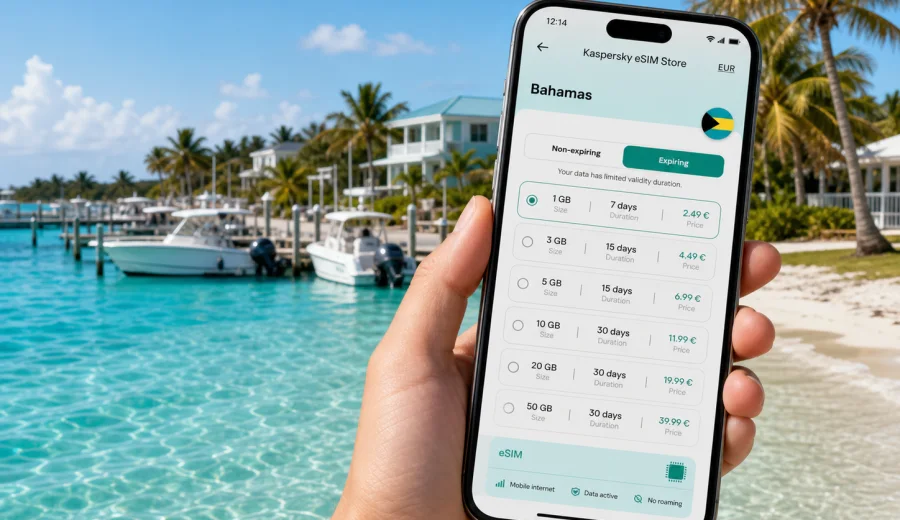
Treasure Cay eSIM: mobile connection and internet for a practical Bahamas trip
Treasure Cay is a quiet Abaco base: beach time, marina plans, villa check-ins, boat days, golf-cart distances, and drives between small settlements. It is not a dense city where every service is a few steps away. That is exactly why mobile internet becomes important before it becomes urgent. You may need a map after landing, a message from your host, a weather update before a boat trip, or a quick check of opening hours before leaving for groceries.
An eSIM helps you prepare mobile data before you depend on local Wi-Fi or a physical SIM card shop. With Kaspersky eSIM Store, you can use the website or app to choose, arrange, and activate an eSIM with a suitable data plan for a trip abroad. For Treasure Cay, the practical goal is simple: arrive with a clear internet plan, keep your usual SIM available for important calls or banking messages if needed, and use mobile data for maps, travel coordination, and everyday online tasks around Abaco.
This guide is about Treasure Cay, not a general Bahamas overview. The country matters because your eSIM destination should be the Bahamas, but the real connectivity moments happen locally: at the airport, on the road from Marsh Harbour, near the marina, around accommodation, during beach days, and on short trips across Great Abaco.
Why mobile internet matters in Treasure Cay
Treasure Cay rewards travelers who plan ahead. Distances are not overwhelming, yet services can be spread out. A short drive may still require knowing where to turn, whether a shop is open, or whether your host has sent updated check-in details. If you are staying in a villa, marina property, rental home, or smaller guest accommodation, you may not have the same always-on front desk support you would expect in a large resort district.
Mobile data helps in common Treasure Cay situations:
- checking the route from Leonard M. Thompson International Airport near Marsh Harbour, or from the local Treasure Cay airstrip if your itinerary uses it;
- messaging a host, captain, rental manager, or transfer contact after landing;
- loading maps before driving to a marina, beach access point, grocery stop, or nearby settlement;
- checking weather and wind before a boat day;
- using messenger calls when your travel eSIM plan is data-only;
- sharing your location with family or colleagues during a relaxed but spread-out island stay.
Public Wi-Fi can be useful at accommodation or restaurants, but it is not the same as having mobile internet while moving between places. In Treasure Cay, the gap between "I will connect when I arrive" and "I need the address now" can appear during the first hour of the trip.
Arrival scenarios: when you first need data
Many visitors reach Treasure Cay through Marsh Harbour and continue by road. Others use smaller aircraft, private arrangements, or boat connections. The exact route can vary, but the first connectivity needs are similar.
| Arrival moment | Why data helps | Practical tip |
|---|---|---|
| After landing | You may need transfer messages, address details, or maps | Install the eSIM before departure and read the activation rules |
| Pickup point | Contacts may update timing after delays | Keep messenger apps and battery ready |
| Drive toward Treasure Cay | Roads are manageable, but live maps help | Save accommodation details offline |
| Check-in | Villa or marina stays may use digital instructions | Keep screenshots of access codes and directions |
| First grocery or dinner run | Opening hours and routes matter in a smaller destination | Check details before leaving accommodation |
If you arrive late, mobile internet is even more useful. A delayed flight, a missed message, or an address copied incorrectly can take longer to fix when fewer local services are open. An eSIM will not replace good travel planning, but it reduces the number of tasks that depend on finding Wi-Fi first.
eSIM basics for a Treasure Cay stay
An eSIM is a digital SIM profile installed on a compatible smartphone or tablet. For travel, it is typically used for mobile internet in the destination country. Many travel eSIM data plans do not include a regular local phone number, voice calls, or SMS unless this is stated in the selected plan terms. That makes internet-based apps important: maps, email, messengers, airline apps, cloud documents, and booking platforms.
Think about data in four layers:
1. Arrival data: maps, messages, travel documents, and check-in instructions.
2. Daily data: navigation, restaurant searches, beach plans, weather, and email.
3. Movement data: drives to Marsh Harbour, nearby settlements, and marina meetings.
4. Backup data: mobile internet when accommodation Wi-Fi is weak, busy, or unavailable.
Before buying any travel eSIM plan, check your device. Your phone should support eSIM, should not be locked to one operator, and should allow the settings needed for a travel data profile. It is also worth checking whether you can keep your primary SIM active for important SMS from your bank, airline, or home operator.
How much data should you plan?
Data use depends on your habits, but Treasure Cay trips often involve maps, messaging, weather checks, photo sharing, and occasional remote work. Video streaming, cloud backups, and laptop hotspot use are the biggest variables. If your accommodation has reliable Wi-Fi, you may use the eSIM mostly outside. If you are moving between villas, marinas, beaches, and day trips, mobile data becomes part of the daily travel toolkit.
| Trip style | Typical data need | What to watch |
|---|---|---|
| Weekend beach stay | Low to moderate | Maps, messaging, restaurant searches |
| One-week villa stay | Moderate | Photo uploads, route planning, group chats |
| Boat-focused itinerary | Moderate to high | Weather checks, captain messages, marina maps |
| Remote-work stay | High | Email attachments, video calls, hotspot use |
| Family trip | High | Several devices may compete for Wi-Fi and data |
For a calm vacation, a modest package may be enough if you use Wi-Fi for streaming and large uploads. For remote work, a longer stay, or a group trip where you may share a hotspot, choose more data and check whether tethering is allowed by the selected plan. Conditions can differ by plan, so read the data amount, validity period, destination, and activation rules before payment.
Choosing a Bahamas eSIM plan for Treasure Cay
For a city article, the correct destination plan is the country that includes the city. Treasure Cay is in the Bahamas, so your main plan search should focus on the Bahamas rather than a separate Treasure Cay page. Once you know your dates and expected data use, you can prepare an eSIM plan for your Treasure Cay trip and compare the available options for the Bahamas.
Use this checklist when comparing plans:
- Destination: the plan should cover the Bahamas.
- Validity: the duration should include arrival and departure days.
- Data amount: choose enough for maps, messaging, weather, and any work tasks.
- Activation timing: understand when the validity period starts.
- Device support: confirm that your phone or tablet can install and use eSIM.
- Hotspot needs: check the plan terms if you expect to share data with a laptop or another device.
Avoid choosing only by the smallest data package if your itinerary includes remote work, daily route planning, or boating logistics. Treasure Cay is a place where mobile internet is less about constant browsing and more about having the right information at the right moment.
Local movement: beach, marina, villas, and Abaco roads
Treasure Cay is often experienced through a few practical zones: the beach area, marina surroundings, residential streets, accommodation clusters, and roads leading toward other Abaco communities. You may walk short sections, use a golf cart where appropriate, rent a car, arrange a local transfer, or coordinate boat-related plans.
For beach days, mobile internet helps with weather, group coordination, and photo backup. Around the marina, it helps with messages from captains, boat timing, restaurant details, and map pins. On drives, it helps with route confidence, fuel or grocery stops, and estimated arrival times. At accommodation, it helps if check-in instructions are digital or if the property manager sends updates by messenger.
Local movement is not complicated, but it is easier when you do not have to ask for Wi-Fi every time plans change. This is especially true if you are new to Abaco, arriving after dark, or staying somewhere peaceful but not directly beside every service.
Navigation tips for Treasure Cay
Use mobile data as your live layer and offline preparation as your backup. Before travel, save the address of your accommodation, your arrival point, and any marina or meeting point you expect to use. Keep screenshots of check-in instructions and reservation details. Then use mobile internet for live updates after arrival.
Practical navigation steps:
1. Save your first destination in a maps app before the flight.
2. Download an offline map area covering Treasure Cay and Marsh Harbour.
3. Pin your accommodation, marina meeting point, and first grocery stop.
4. Keep your transfer contact in a messenger app and in your phone contacts.
5. After landing, turn on the eSIM data line and confirm that mobile data is assigned to it.
6. Use offline maps if signal is weak, then refresh the route when data is available again.
This layered approach is useful because island travel can include quiet roads, changing plans, and accommodation instructions that are easier to follow with a live map. The eSIM gives you flexibility; offline preparation gives you resilience.
Hotels, villas, marina stays, and Wi-Fi expectations
Treasure Cay accommodation can include villas, rental homes, marina-oriented stays, and smaller hospitality options. Wi-Fi quality may vary by property, router setup, and the number of guests using it. Even when Wi-Fi is available, you may still need mobile internet away from the property: on the road, at the marina, on the beach, or while coordinating check-in.
For a rental home, save lockbox details offline and keep the property manager contact ready. For a marina-area stay, confirm meeting points and boat timing before you leave Wi-Fi. For a family trip, decide which phones need mobile data and which can rely mostly on accommodation Wi-Fi.
Business trips and remote work
Treasure Cay is not a classic business district, but remote workers, consultants, property owners, yacht crews, and travelers combining work with a Bahamas stay may still need dependable mobile data. Prioritize email, calendars, downloaded documents, messaging, maps, and short hotspot sessions if the plan allows it. Avoid using mobile data for large updates, automatic photo backup, and long video streams.
Any mobile connection can be affected by local conditions, building materials, congestion, device settings, or weather. For work, keep critical files available offline and avoid scheduling your first important call immediately after arrival.
Short stopovers and one-day visits
Some travelers pass through Treasure Cay briefly: a boat day, a property visit, a lunch stop, a beach afternoon, or a connection within Abaco. For short visits, the eSIM use case is simple. You need maps, messages, weather checks, and flexibility without spending time looking for a physical SIM or Wi-Fi password. Install before travel and read the activation rules, because validity timing depends on the selected plan.
Installing and activating your eSIM
The safest time to install a travel eSIM is usually before departure, while you have stable Wi-Fi and time to read the instructions. Activation timing depends on the selected plan, so do not rush through the setup screens. If you need step-by-step help, use the Android installation guide or the iOS installation guide.
General setup flow:
1. Check that your device supports eSIM and is not operator-locked.
2. Choose the Bahamas plan that fits your Treasure Cay trip.
3. Complete the plan arrangement through the website or app.
4. Install the eSIM profile using the provided instructions.
5. Label the line clearly, for example "Bahamas travel".
6. On arrival, set mobile data to the eSIM line and turn on data roaming for that line if the instructions require it.
After activation, test with a lightweight page or messenger message. If it does not connect, check that the eSIM is turned on, mobile data is assigned to it, airplane mode is off, and the required data roaming setting is enabled.
Smart data habits around Treasure Cay
Good data habits make any plan more predictable. Use mobile data for maps, messenger updates, weather checks, essential email, airline apps, banking apps, and documents you need while moving. Use Wi-Fi for streaming, large photo backups, app updates, software downloads, and long video calls. You can also pause automatic updates and limit cloud sync before the trip.
Trips from Treasure Cay
Treasure Cay can be a base for wider Abaco plans. You might drive toward Marsh Harbour, visit nearby settlements, coordinate a boat day, or follow a relaxed route along the island. Before leaving, check that your eSIM line is active, your phone is charged, key destinations are saved offline, and booking confirmations are downloaded.
For boat days, do not treat mobile data as your only safety tool. Follow local operator guidance, confirm plans in advance, and keep essential details offline. Mobile internet helps with coordination, but marine conditions, coverage, and battery life can affect how useful your phone is on the water.
Common mistakes to avoid
Most eSIM problems come from small setup details. Avoid these mistakes:
- buying a plan for the wrong country or region;
- installing the eSIM on a device that does not support it;
- deleting the eSIM profile after activation without checking whether it can be reinstalled;
- assuming the travel data plan includes a phone number, calls, or SMS;
- waiting until arrival to read installation instructions;
- forgetting to switch mobile data from the home SIM to the travel eSIM.
Quick checklist before you fly
- Your passport, booking details, and arrival instructions are saved offline.
- Your accommodation address and first meeting point are pinned in maps.
- Your phone supports eSIM and is not locked to one operator.
- You have chosen a Bahamas data plan that matches your stay length.
- You understand when the plan validity starts.
- A charger or power bank is packed for travel days.
This preparation matters in Treasure Cay because you may move between airports, roads, beaches, marina areas, and private accommodation with fewer public connection points.
FAQ: eSIM and mobile internet in Treasure Cay
Do I need an eSIM for Treasure Cay if my accommodation has Wi-Fi?
Not always, but it is useful when you are away from the property. Wi-Fi does not help much on the road from the airport, at the marina, during beach plans, or when check-in details change before you arrive.
Should I choose a Treasure Cay plan or a Bahamas plan?
Choose the destination that covers the country. For Treasure Cay, that means a Bahamas plan, because Treasure Cay is in the Bahamas.
Can I make normal calls with a travel eSIM?
Many travel eSIM data plans are for mobile internet only. Use internet-based calls and messages unless the selected plan clearly states that voice or SMS are included.
Can I install the eSIM before leaving home?
Usually yes, and it is often more convenient. Read the activation rules for the selected plan so you know when the validity period begins.
Choose mobile internet for your Treasure Cay trip
Treasure Cay is easiest when your phone is ready for the small practical moments: the first route after arrival, the message from a host, the marina meeting point, the weather check before a beach day, and the map back after dinner. With Kaspersky eSIM Store, you can use the website or app to choose, arrange, and activate an eSIM with a suitable data plan for your Bahamas trip.
If Treasure Cay is your main base in Abaco, choose a Bahamas eSIM plan for your trip before departure and arrive with your mobile data plan already organized.