
Travel connectivity guide
Trongsa eSIM: Mobile Internet for Bhutan Travel
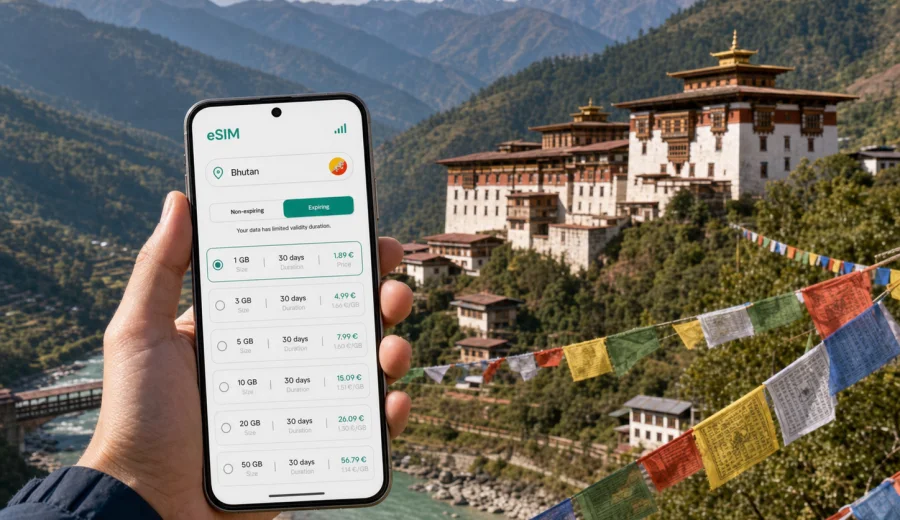
Trongsa eSIM: mobile connection and internet for a Bhutan trip
Trongsa is one of the most memorable stops on a journey through central Bhutan. The town is compact, the valley is steep, and many travel plans revolve around the great Trongsa Dzong, the watchtower museum, viewpoints above the Mangde Chhu valley, and the mountain road that links western Bhutan with Bumthang and the east. For travelers, this also means that mobile internet is not just a convenience. It helps with arrival timing, hotel coordination, route changes, translation, digital payments where accepted, and staying in touch on long road sections.
An eSIM can make the trip easier because you can prepare mobile data before you reach Trongsa instead of depending only on public Wi-Fi or trying to solve connectivity after a long drive. In Bhutan, where many journeys include valleys, passes, road works, and early starts, having data ready on a compatible phone is useful for navigation, messaging, and checking the next part of the route.
This guide focuses on Trongsa itself: how you arrive, how you move around the town, where mobile data is useful, what to check before buying an eSIM plan, and how to choose a practical amount of data for a stopover, a cultural visit, or a longer central Bhutan itinerary.
Why mobile internet matters in Trongsa
Trongsa is not a large city with a dense grid of streets. It is a mountain town stretched along slopes and roads, with important sights, hotels, viewpoints, and local services sitting at different elevations. A short distance on the map can still mean a winding drive or a walk with a steep climb.
Mobile internet is especially helpful for:
- confirming pickup times with your guide, driver, hotel, or tour operator;
- checking the road route toward Bumthang, Punakha, Phobjikha Valley, or Thimphu;
- using offline maps together with live location sharing;
- translating short messages or signs when English is not enough;
- sending photos and updates without waiting for hotel Wi-Fi;
- checking weather before visiting viewpoints or starting a long drive;
- keeping a backup channel if your main SIM has expensive roaming.
In Trongsa, the most common traveler mistake is treating mobile data as something to solve later. The town is calm and manageable, but the journey there can be long. If you land in Paro, pass through Thimphu and central Bhutan by road, and arrive late in the day, you may not want to spend your first evening looking for connectivity options.
Arrival routes and when to activate data
Most international travelers enter Bhutan through Paro International Airport and continue by road as part of a guided itinerary. Reaching Trongsa from western Bhutan usually takes a full travel day or fits into a multi-day route with stops in Thimphu, Punakha, Wangdue Phodrang, or Phobjikha Valley. Some itineraries connect Trongsa with Bumthang, which is often used as a base for central Bhutan.
Because arrival is usually road-based, timing matters. You may want mobile data before you reach Trongsa, not only after you check in.
| Travel moment | Why internet helps | Practical tip |
|---|---|---|
| Before leaving Paro or Thimphu | Confirm route, departure time, and hotel details | Install the eSIM while you still have stable Wi-Fi |
| On the road to central Bhutan | Share live updates and handle itinerary changes | Keep offline maps downloaded as a backup |
| Entering Trongsa valley | Coordinate hotel arrival and viewpoint stops | Avoid heavy uploads if signal varies on mountain roads |
| First evening in town | Message family, check next-day plans, use maps | Connect to hotel Wi-Fi for large backups |
| Leaving for Bumthang or western Bhutan | Recheck travel time and weather | Make sure your plan remains valid for the next leg |
An eSIM normally works best as a travel data layer. Keep your primary SIM active if you need your regular phone number for banking verification, calls, or SMS. Use the eSIM for mobile data, and route messaging, maps, ride coordination, and travel apps through it.
How Trongsa travel differs from a big-city trip
In a large city, you might use mobile internet mainly for ride-hailing, restaurant searches, public transport, and shopping. Trongsa has a different rhythm. Your data use is more likely to come from navigation, coordination, messaging, photo sharing, and route planning. The right eSIM plan should match that pace.
Typical scenarios in Trongsa:
- A one-night stop on the way to Bumthang: you need maps, messaging, hotel coordination, and light browsing.
- A cultural visit focused on Trongsa Dzong and Ta Dzong: you may use more data for photos, guide notes, translation, and research.
- A business or official trip in central Bhutan: you may need dependable access to email, calendar, video calls on Wi-Fi, and mobile data between meetings.
- A longer Bhutan itinerary crossing several valleys: you need enough validity, not just enough gigabytes.
The practical goal is simple: keep mobile internet available when the town, road, and itinerary require it.
Choosing an eSIM data plan for Trongsa
Before choosing a plan, estimate how you will use data in Bhutan. In Trongsa, the larger data drains usually come from cloud photo backup, social video uploads, video calls, and map re-downloads. Messaging, email, translation, and navigation use less.
Use this quick guide:
| Trip style | Suggested data approach | What to avoid |
|---|---|---|
| Short stopover, 1-2 days | Small data package with enough validity for arrival and departure | Uploading full photo albums over mobile data |
| Cultural route, 2-4 days in central Bhutan | Moderate package for maps, messaging, browsing, and photo sharing | Assuming every hotel Wi-Fi connection is fast |
| Cross-country route, 7-14 days | Plan by validity first, then data volume | Buying a plan that expires before the eastbound or return leg |
| Business trip | Keep data for email, documents, and messaging; use Wi-Fi for calls | Running long video meetings on mobile data unless necessary |
If your phone supports eSIM, the main advantage is preparation. You can choose a plan before the journey, install it while connected to Wi-Fi, and switch mobile data to the eSIM when you need it. Before buying, check your device and confirm that it supports eSIM and is not locked to a carrier.
Where eSIM helps most around Trongsa
Trongsa is small enough to explore at a measured pace, but mobile data still helps in specific places and moments.
Trongsa Dzong and the old town area
The dzong dominates the valley and is often the main reason travelers stop in town. Internet helps with timing your visit, confirming opening arrangements through your guide or hotel, and checking your next stop after the visit. Because religious and administrative sites require respectful behavior, keep phone use discreet and follow local guidance on photography.
Ta Dzong and viewpoints
Ta Dzong, the watchtower above the town, is a natural place to use maps and photo apps. Viewpoints around Trongsa can be windy, cloudy, or misty depending on the season. Data helps you check weather windows and coordinate with a driver, but it is still wise to download key maps in advance.
Hotels and guesthouses
Hotel Wi-Fi can be helpful, but speed and reliability may vary by property and time of day. Mobile data is useful when you need to confirm an early breakfast, message a driver, or check tomorrow's route without waiting for a stronger Wi-Fi signal.
Road sections toward Bumthang or western Bhutan
The road experience is part of the trip. Signal can vary in mountain terrain, so eSIM is not a replacement for offline preparation. Download maps, keep important addresses saved, and use mobile data when available for updates.
For travelers who want to prepare before arrival, Kaspersky eSIM Store helps you choose and activate a suitable eSIM plan for mobile internet in Bhutan. You can view mobile data options for a trip to Trongsa and Bhutan before your route begins, then install the eSIM on a compatible device while you still have Wi-Fi.
A practical data checklist before you leave for Trongsa
Use this checklist before the road journey to central Bhutan:
- Check that your phone supports eSIM and is unlocked.
- Install the eSIM while you have reliable Wi-Fi.
- Save your hotel address, guide contact, driver contact, and next destination.
- Download offline maps for Paro, Thimphu, Punakha, Trongsa, and Bumthang if they are on your route.
- Keep your primary SIM available if you need calls or SMS on your regular number.
- Read the plan validity rules before activation.
- Confirm whether hotspot use is allowed if you want to share data with a laptop or another phone.
- Turn off automatic cloud backup on mobile data if your data package is small.
The most important point is validity. Choose based on the whole journey, not just the night you spend in Trongsa.
How to install and use an eSIM for a Trongsa trip
The exact flow varies by phone model and operating system, but the general process is straightforward:
1. Choose Bhutan as your destination and select a suitable data plan.
2. Make sure your device supports eSIM and has no carrier lock.
3. Complete the order and open the installation details.
4. Install the eSIM using the provided QR code or in-app steps.
5. Keep your primary SIM for calls and SMS if you need your regular number.
6. Set the eSIM as the mobile data line when you are ready to use it.
7. Check whether data roaming must be enabled for the eSIM profile.
8. Monitor data use during the trip, especially before long road sections.
For setup details, use the official Android installation instructions or iOS installation instructions. Install the eSIM before leaving a stable Wi-Fi connection whenever possible.
Data use in Trongsa: realistic examples
Data needs vary, but these examples help you plan without overbuying.
| Activity | Typical impact on data | Advice |
|---|---|---|
| Messaging and email | Low | Good for small plans |
| Maps and navigation | Low to moderate | Download offline maps first |
| Web search and translation | Low to moderate | Useful for cultural visits |
| Social photo posting | Moderate | Compress images or wait for Wi-Fi |
| Short video clips | Moderate to high | Upload selectively |
| Video calls | High | Prefer hotel Wi-Fi when available |
| Cloud photo backup | Very high | Disable on mobile data |
For a one-night stop, a light user may need only a small package. For a longer itinerary that includes Trongsa, Bumthang, Phobjikha Valley, Punakha, and Thimphu, choose a plan that covers the full route duration.
Local movement: walking, drivers, and short transfers
Trongsa is walkable in parts, but it is not flat. Many travelers move between the hotel, dzong, museum, viewpoints, and restaurants by vehicle, especially if the itinerary is arranged through a guide or driver.
Use mobile internet for:
- sending your live location to a driver at a viewpoint;
- confirming when to return from the dzong or museum;
- checking walking distance and elevation before setting out;
- finding your hotel after dark on winding roads;
- translating simple messages if there is a language gap;
- checking whether the next road section has changed due to weather or works.
Do not depend only on live maps. Save important places in your map app and keep the hotel name written down in English. If you are traveling with a guide, ask which stops have the best signal.
Business trips and official travel in Trongsa
Trongsa may appear on itineraries for government, development, education, conservation, cultural, or infrastructure-related visits. For business travelers, mobile internet supports calendar changes, email, document review, messaging, hotel coordination, and calls through internet apps.
Before a work trip:
- keep documents available offline;
- download meeting addresses and contact names;
- check whether your data plan allows tethering if you need laptop access;
- schedule heavy uploads for hotel Wi-Fi.
An eSIM does not usually include a local phone number, voice calls, or SMS unless this is stated in the selected plan conditions. Use your primary SIM or internet-based calling apps where appropriate.
Stopovers, short stays, and trips from Trongsa
Many travelers see Trongsa as a strategic stop between western Bhutan and Bumthang. A short stay still benefits from mobile data because the most important moments happen around movement: arrival, check-in, sightseeing timing, and departure.
For a short stopover, your priority should be:
1. Install before arrival.
2. Keep maps available offline.
3. Use mobile data for messaging and navigation.
4. Avoid video uploads until Wi-Fi.
5. Make sure the plan is valid through the next road day.
If your itinerary is tight, do not wait until the morning departure to solve connectivity. Early starts are common on mountain routes. Depending on the route, travelers may continue toward Bumthang, return west toward Wangdue Phodrang and Punakha, or include Phobjikha Valley and other central Bhutan stops.
Good preparation for trips from Trongsa:
- save the route while connected;
- tell your contacts when you expect to be offline;
- carry a power bank for long drives;
- check plan validity before leaving town;
- avoid spending the last part of your data package on nonessential uploads.
Quick answer block
For a trip to Trongsa, an eSIM is useful because the town is usually reached by long road journeys, local movement depends on coordination with hotels or drivers, and mobile internet helps with navigation, messaging, translation, weather checks, and onward planning. Install the eSIM before arrival and choose a Bhutan plan with validity that covers your full route.
FAQ: eSIM and mobile internet in Trongsa
Is an eSIM useful for Trongsa if I already have hotel Wi-Fi?
Yes. Hotel Wi-Fi helps mainly inside the property. An eSIM is useful while arriving, walking around viewpoints, coordinating transport, checking maps, or leaving for the next destination.
Should I activate the eSIM before arriving in Bhutan?
You can usually install it before the trip while connected to Wi-Fi, then turn it on for mobile data when you are ready. Always read the activation and validity rules first.
Does a travel eSIM give me a Bhutanese phone number?
Usually no. Travel eSIM plans for mobile internet are commonly data-focused. Voice calls and SMS are not included unless the selected plan says so.
How much data do I need for Trongsa?
For light use during a short stop, a small data package may be enough. For a longer Bhutan route, choose enough validity and data for maps, messaging, browsing, and photo sharing.
Can I use hotspot in Trongsa?
It depends on your device and selected plan conditions. Check the plan details before relying on tethering.
What should I do if signal is weak on the road?
Use offline maps, keep important contacts saved, and wait for a stronger signal before uploading large files. Mountain routes can have variable coverage.
Prepare your eSIM before the road to Trongsa
Trongsa is a place where good preparation matters more than constant screen time. You may spend the day crossing valleys, visiting a historic dzong, walking to viewpoints, and continuing toward another part of Bhutan. Mobile internet helps most when it is already ready.
Before you leave for central Bhutan, choose a plan that matches your route length, install it on a compatible device, and keep your primary SIM available if you need your regular number. Kaspersky eSIM Store helps you quickly select, set up, and manage an eSIM plan for travel data, so you can prepare mobile internet for your Bhutan trip before arriving in Trongsa.