
Travel connectivity guide
Troodos eSIM: mobile internet for Cyprus trips
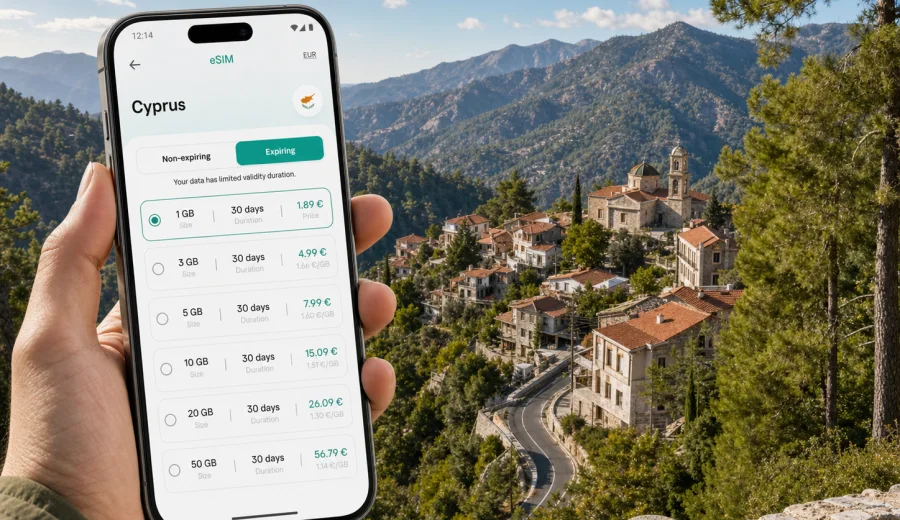
Troodos eSIM: mobile connection and internet for a mountain trip
Troodos is one of the most practical places in Cyprus to prepare mobile internet before you arrive. The region is spread across mountain roads, forest villages, monasteries, hiking routes, wineries, hotels, guesthouses and viewpoints rather than one compact city center. That makes an eSIM useful not because it changes the trip, but because it helps you handle the ordinary travel tasks that become harder when you are moving between villages and signal conditions vary.
With an eSIM, you can use mobile data on a compatible phone without looking for a physical SIM card after landing. For a Troodos trip, that can mean opening maps on the way from Larnaca or Paphos Airport, checking a hotel message in Platres, confirming a table in a mountain village, or sharing your location with friends while you drive toward Kykkos Monastery, Omodos, Kakopetria or a trailhead.
Kaspersky eSIM Store is an app and website where you can choose, arrange and activate an eSIM with a suitable plan for mobile internet during an international trip. It is not a mobile operator and does not provide network coverage itself. The practical value is in the travel workflow: you choose the destination, check the plan conditions, install the eSIM on a compatible device and use it for mobile data when the local network is available under the selected plan.
Why Troodos is different from a coastal city
In Nicosia, Limassol or Larnaca, many travel tasks are concentrated around airports, shopping streets, business districts and hotels. Troodos is more dispersed. A day can include a rental car pickup, a mountain road, a short stop in a village, a walk to a waterfall, lunch in a different district, and a hotel check-in where reception hours may be limited.
This changes how you use mobile internet. You may need data in short bursts rather than continuous streaming: directions at junctions, parking information, weather checks, calls through messengers, online reservations, route changes, translation, and photo backup when Wi-Fi is available later. An eSIM plan for Cyprus can be a calm way to keep those tasks available without making your first stop a search for a local SIM card.
Typical Troodos travel situations where mobile data helps:
- navigation from Larnaca, Paphos, Limassol or Nicosia to a mountain hotel;
- checking road time before sunset or before a winery, monastery or museum closes;
- confirming guesthouse access instructions in villages where reception is not always open late;
- using a messenger for calls when a regular phone number is not included in the data plan;
- comparing walking routes around Platres, Kakopetria, Pedoulas, Kalopanayiotis or Omodos;
- checking weather before hiking, because mountain conditions can differ from the coast;
- sharing live location with a driver, colleague or family member;
- working from a hotel, cafe or apartment when Wi-Fi quality is uncertain.
Arrival scenarios: airport, rental car and first mountain road
Most travelers reach Troodos after arriving elsewhere in Cyprus. Larnaca and Paphos are common airport choices, while Limassol and Nicosia are frequent starting points for road trips. Troodos itself does not work like a city with one main arrival terminal, so your first useful connection point may be the airport, the rental car desk, a bus station, a taxi pickup area or your first navigation stop outside the city.
If you install an eSIM before the trip, you can keep the setup separate from the busy arrival moment. After landing, you can switch mobile data to the eSIM profile when appropriate, open maps, contact the accommodation and follow the route. This is especially useful if you are arriving in the evening, when you may not want to spend time comparing physical SIM options before driving into the mountains.
For a rental car itinerary, mobile data can support the whole chain: pickup documents, deposit messages, route planning, fuel station search, hotel arrival time, and emergency contact through messenger apps. It is still worth saving key addresses offline, because mountain roads can include areas where connection quality changes. eSIM is useful travel preparation, not a promise that every remote bend or forest road will have the same signal.
What to do before you leave for Troodos
A good eSIM setup starts before you need it. Troodos rewards preparation because many of the small decisions happen while you are already on the move.
Use this checklist before departure:
- Check that your phone supports eSIM and is not locked by your current carrier.
- Choose a plan that covers Cyprus, not only a different country or region.
- Compare data allowance and validity period with the real length of the trip.
- Install the eSIM while you still have stable Wi-Fi, if the plan instructions allow it.
- Keep your primary SIM active if you need bank messages or calls from your usual number.
- Save hotel addresses, parking points and key routes for offline use.
- Note when data usage starts, because some plans begin at activation and others under different conditions.
- Keep the QR code or installation details available until setup is complete.
For a weekend in Troodos, a lighter data package may be enough if you mainly use maps, messages and bookings. For a longer stay, remote work or a route that combines Troodos with Limassol, Nicosia, Paphos or Larnaca, it is safer to choose a plan with more data and a validity period that covers the whole trip.
Choosing a data plan for Troodos
The right eSIM plan depends less on the name of the village and more on how you travel through Cyprus. Troodos trips often involve movement: airport to coast, coast to mountains, village to village, then back to the airport or onward to another city. A country plan for Cyprus is usually the relevant starting point for a Troodos article because the city or mountain region belongs to Cyprus.
Use this simple planning table:
| Trip style | Likely data use | What to look for |
|---|---|---|
| Day trip from Limassol or Nicosia | Low to moderate | Maps, messenger calls, route checks, parking searches |
| Weekend in Platres or Kakopetria | Moderate | Hotel messages, maps, restaurants, photo sharing, weather |
| Hiking and village route | Moderate | Offline maps plus mobile data for updates and location sharing |
| Remote work stay | Higher | Larger data allowance, longer validity, backup for unstable Wi-Fi |
| Cyprus road trip with Troodos stop | Moderate to higher | Plan valid across Cyprus, enough days for the full route |
Avoid choosing only by the lowest price. Look at the data allowance, validity period, destination coverage and activation rules. If your trip includes video calls, cloud files or hotspot use, check whether the selected plan and your device settings allow that scenario. If you mainly need maps and messages, you can focus on a plan that covers the dates comfortably without paying for data you will not use.
For a prepared route through Troodos, you can choose an eSIM plan for your Cyprus trip in Kaspersky eSIM Store and review the available data allowance, validity and destination details before you travel.
How much data might you need?
There is no single number that fits every traveler, but you can estimate by activity. Navigation and text messaging usually use less data than video, cloud backup and long calls. Hotel Wi-Fi can reduce mobile data use, but in mountain accommodation it is better to treat Wi-Fi as a convenience rather than the only connection you rely on.
For Troodos, think in practical categories:
- Light use: maps, chat, email checks, reservations and weather.
- Standard travel use: maps, messenger calls, restaurant searches, ride coordination and social updates.
- Heavy use: video calls, remote work, file transfers, hotspot use and frequent media upload.
If you are traveling with family or colleagues, each person should consider their own device. One phone with an eSIM can help with navigation, but it may not cover everyone’s browsing, translation and messaging needs. If you plan to share data by hotspot, check both the plan conditions and your phone settings before relying on it.
Using mobile internet around Troodos villages
Troodos is often experienced through places rather than one central district. You may stay in Platres for walking routes, visit Omodos for wine and stone lanes, stop in Kakopetria for its old quarter, continue to Pedoulas or Kalopanayiotis, then add Kykkos Monastery or Mount Olympus depending on the season. Each stop creates small connectivity needs.
In village centers, mobile data helps with walking navigation, opening booking details, checking opening hours, translating menus, and paying attention to last-minute messages from hosts. On roads between villages, it helps with route recalculation and location sharing. In nature areas, keep expectations practical: download offline maps and do not rely on a constant live connection for safety-critical navigation.
This is where an eSIM for Cyprus fits well. It is not about turning the mountains into an office network. It is about having a prepared mobile data option so routine travel decisions do not depend only on hotel Wi-Fi, public hotspots or a physical SIM purchase after arrival.
When to activate the eSIM
Travelers usually choose one of two approaches. The first is to install the eSIM before leaving home and activate mobile data after arrival in Cyprus. The second is to complete both installation and activation after landing while connected to airport Wi-Fi. The best choice depends on the plan instructions and your comfort with phone settings.
If you want to prepare before your flight, read the activation notes carefully. Some plans start counting validity only after connection to a supported local network; others may behave differently. If you are unsure, install the eSIM when the instructions say it is appropriate and avoid switching mobile data to it too early.
By the time your itinerary reaches Troodos, the setup should already be familiar. You should know which line handles mobile data, whether data roaming needs to be enabled for the eSIM profile, and how to check remaining data. That is easier to do at the airport or hotel than on a narrow mountain road.
Installation and device compatibility
Before choosing a plan, check your device to confirm that it supports eSIM and is not locked to another carrier. Device support can depend on model, region of sale and carrier restrictions, so it is better to verify this before payment rather than during arrival.
The installation flow is usually straightforward: choose the destination, select a suitable plan, complete the arrangement, then install the eSIM profile using the available instructions or QR code. If you need a device-specific guide, use the Android installation instructions or the iOS installation instructions. Keep a stable internet connection during installation, and allow a few minutes for the phone to add the eSIM profile.
After installation, check these settings:
1. Set the eSIM as the line for mobile data when you want to use it.
2. Keep your usual SIM for calls or SMS if you need your regular number.
3. Enable data roaming for the eSIM profile if the plan instructions or phone setup require it.
4. Turn off automatic cloud backup on mobile data if you want to save traffic.
5. Check remaining data in the app or profile area when available.
Remember that many travel eSIM plans are for mobile internet. A regular phone number, traditional voice calls and SMS are not included unless the selected plan conditions say otherwise. For calls, use internet-based apps when mobile data or Wi-Fi is available.
Troodos for business trips and remote work
Troodos is not only a leisure destination. It can be part of a Cyprus business trip, a quiet work retreat, a conference extension or a weekend between meetings in Nicosia, Limassol or Paphos. In those cases, mobile internet is less about sightseeing and more about continuity.
Useful business scenarios include:
- opening calendar changes while traveling from a coastal city to the mountains;
- joining a short messenger call from a hotel lobby or cafe;
- using mobile data as a backup when accommodation Wi-Fi is slow;
- confirming a driver pickup or meeting point;
- accessing boarding passes and travel documents on the return route;
- keeping colleagues updated while moving between towns.
For remote work, choose data allowance carefully. Video meetings and file sharing can use data quickly. If you expect several calls, a larger package may be more practical than relying entirely on local Wi-Fi. Also check whether you can use hotspot mode under your selected plan if you plan to connect a laptop.
Short stopovers and one-day routes
A Troodos stopover can be simple: leave Limassol after breakfast, drive through villages, stop for lunch, visit a monastery or viewpoint, and return before evening. Even on a short route, mobile data can remove friction. You can adjust the route, message the hotel, check weather near the peak, or find the next fuel station without waiting for Wi-Fi.
For a day trip, the most important preparation is not a large data package. It is reliability of the workflow: eSIM installed, destination coverage checked, offline map saved, charger packed, and the right mobile data line selected. If several people are traveling together, agree whose phone will be used for navigation so battery and data use are predictable.
Common mistakes to avoid
Many eSIM problems in travel are not caused by the destination itself. They come from setup timing, wrong expectations or skipped checks.
Avoid these mistakes:
- buying a plan for the wrong destination or dates;
- assuming every eSIM includes a phone number, calls and SMS;
- installing the profile on a phone that does not support eSIM;
- forgetting that some carrier-locked devices may reject another mobile profile;
- using video upload or cloud backup on mobile data without checking allowance;
- waiting until you are already on a mountain road to read setup instructions;
- relying only on live maps without saving offline routes.
The practical approach is simple: prepare the eSIM, keep key information offline and use mobile data for the parts of the trip where it adds the most value.
Quick answers about eSIM in Troodos
Is Troodos a separate eSIM destination?
Usually you should look for a plan that covers Cyprus, because Troodos is a mountain region within Cyprus rather than a separate mobile destination.
Can I install the eSIM before arriving in Cyprus?
Often yes, but follow the selected plan instructions. Some travelers install before departure and start using mobile data after arrival.
Will an eSIM replace hotel Wi-Fi?
It can be a useful backup, but it should not be treated as a guaranteed replacement for every work task. Large video calls and file uploads can use data quickly.
Do I need a physical SIM card as well?
Not necessarily for mobile data if your eSIM is active and your phone supports it. You may still keep your regular SIM for your usual number, bank messages or calls.
Can I use eSIM for navigation in the mountains?
Yes, mobile data can help with navigation where local network service is available. Save offline maps too, especially for hiking routes and remote roads.
Final preparation before your Troodos trip
Troodos is easiest when your phone is ready before the road begins. Confirm your accommodation address, save the route, download offline maps, charge your device, and check that your eSIM profile is installed correctly. Then use mobile data for the tasks that matter most: maps, messages, bookings, weather, translation and travel coordination.
Kaspersky eSIM Store helps you choose, arrange and activate an eSIM with a suitable plan for mobile internet in an international trip. For Troodos, the relevant destination is Cyprus, so review the plan details, check compatibility and choose a validity period that matches your itinerary.
Before you fly or drive into the mountains, choose an eSIM plan for Cyprus and prepare mobile internet for your Troodos trip without making a physical SIM card your first travel errand.