
Travel connectivity guide
Tsaghkadzor eSIM: Mobile Internet Guide
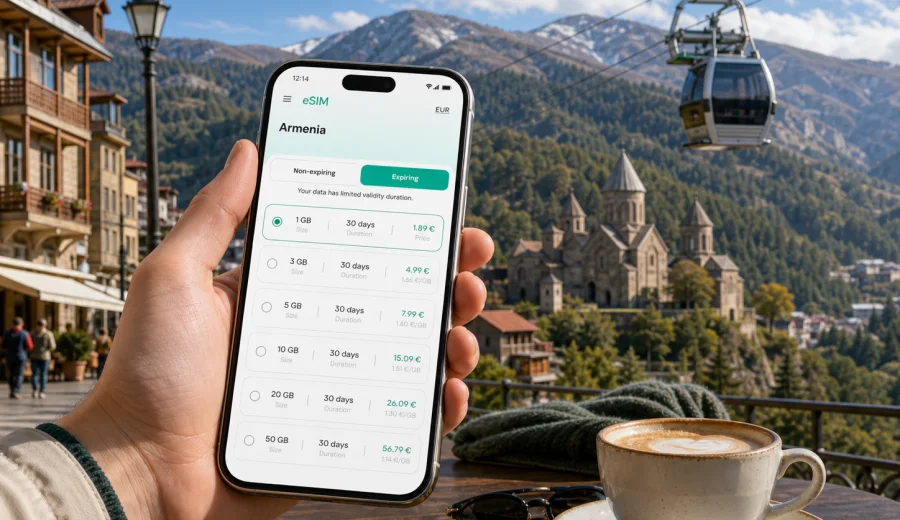
Tsaghkadzor eSIM: mobile connection and internet for a mountain trip
Tsaghkadzor is a small resort city, but a trip there can depend on mobile internet from the first hour. You may land near Yerevan, continue by road into Kotayk Province, check in at a hillside hotel, look up ski lift times, find the way to Kecharis Monastery, message a driver after dinner, or plan a side trip to Lake Sevan. An eSIM can make these moments simpler because you do not need to search for a physical SIM card before you start moving.
This guide is focused on Tsaghkadzor, not on Armenia in general. It explains how to think about eSIM, mobile connection, and internet access for arrival, local movement, hotels, winter sports, summer walks, business trips, weekend stopovers, and short routes from the city.
Why mobile internet matters in Tsaghkadzor
Tsaghkadzor is compact, green, and mountain-oriented. That does not mean your phone can stay offline. The city is often used as a resort base: travelers move between hotels, restaurants, the ropeway, ski areas, spa properties, conference venues, monasteries, and nearby roads. Mobile data helps you keep these small transitions under control.
Typical online tasks in Tsaghkadzor include:
- messaging a driver before leaving Zvartnots International Airport or Yerevan;
- checking the route to a hotel above the center;
- opening maps for Kecharis Monastery, the ropeway, cafes, pharmacies, or rental shops;
- confirming a ski lesson, equipment pickup, or spa reservation;
- sharing a live location with friends on the slopes or near the city center;
- checking weather before a cable car ride, forest walk, or road trip;
- translating short messages if you do not speak Armenian or Russian;
- using a messenger call when a regular phone number is not part of your travel data tariff;
- joining a work call from a hotel lobby, conference space, or apartment;
- planning a drive to Hrazdan, Sevan, Yerevan, Garni, or other parts of Armenia.
Hotel and cafe Wi-Fi can be useful, but it is not a full replacement for mobile data on your own device. You may need internet before check-in, while your car is approaching the resort, when you are away from the hotel, or when a shared Wi-Fi network is overloaded. A prepared eSIM gives you another way to use mobile internet, provided your device supports eSIM and the selected tariff is valid for Armenia.
Arrival: prepare data before the road into the mountains
Most international visitors reach Tsaghkadzor through Yerevan or Zvartnots International Airport, then continue by private transfer, taxi, rented car, or a route that connects through Hrazdan. The road distance is manageable, but arrival logistics still create several phone-dependent moments: finding your driver, checking the address, confirming the hotel entrance, watching the route, and telling someone when you expect to arrive.
Preparing mobile data before that drive is practical. If your eSIM is installed while you still have stable Wi-Fi, you can switch to the travel data line after landing or before leaving Yerevan. This helps if you need navigation in the car, a quick hotel message, or a weather check before deciding whether to go straight to the ropeway after check-in.
Before departure, save a few essentials:
- the hotel name, address, and phone number;
- the exact map pin for the property, especially if it is outside the center;
- transfer details and driver contact;
- offline maps for Yerevan, Hrazdan, and Tsaghkadzor;
- your eSIM installation instructions;
- a backup payment method and booking references;
- a power bank if you expect a long arrival day.
What an eSIM is for during a Tsaghkadzor trip
An eSIM is a digital SIM profile installed on a compatible phone or tablet. For a trip to Tsaghkadzor, its main role is mobile internet. You choose a tariff for the destination, install the profile, and use mobile data according to the tariff conditions.
It is important to set expectations clearly:
| Point to check | What it means for Tsaghkadzor |
|---|---|
| Main use | Travel eSIM tariffs are commonly focused on mobile data. |
| Calls and SMS | A standard phone number, voice calls, and SMS are not included unless the tariff says so. |
| Messaging apps | Internet-based calls and chats can work through mobile data. |
| Validity | The tariff has a duration, and the start rules can differ by option. |
| Local network | Connection depends on local network availability, terrain, settings, and tariff conditions. |
| Device support | Your phone must support eSIM and must not be restricted by an operator lock. |
Think of eSIM as a travel internet tool. It helps with maps, messages, search, bookings, ride coordination, email, translation, and app-based calls. If you need a local Armenian number for a specific service, check that separately before you travel.
Tsaghkadzor scenarios where eSIM is useful
Tsaghkadzor trips often combine quiet resort time with movement. One day may include a hotel breakfast, ropeway ride, lunch in town, monastery visit, spa appointment, and a late drive back to Yerevan. A winter trip may add ski rental, slope coordination, weather checks, and group messages.
| Scenario | Why mobile data helps | Practical preparation |
|---|---|---|
| Transfer from Yerevan | Driver messages, map tracking, hotel updates | Install the eSIM before the road transfer if possible |
| Ski or ropeway day | Weather checks, meeting points, equipment coordination | Keep battery and data for maps and messages |
| Resort hotel stay | Booking details, spa reservations, restaurant search | Save hotel contacts offline as a backup |
| Kecharis and city walk | Navigation, photos, translation, opening-hour checks | Download the city map before leaving the hotel |
| Business event | Email, calendar, messaging, backup hotspot | Choose more data and test settings before meetings |
| Side trip to Sevan or Yerevan | Route checks, driver coordination, family updates | Keep offline maps for the full route |
The goal is not to be online constantly. The goal is to have data when a practical decision depends on it: where to meet, which road to take, whether the weather is changing, or how to contact your hotel.
How much data to consider
Data needs vary by traveler. A weekend guest who uses maps and messages may need much less than a remote worker joining video meetings or a family sharing photos and using several navigation apps. Tsaghkadzor can also create seasonal differences: winter visitors may check weather and slope plans more often, while summer travelers may use maps for walks and day trips.
Use this simple guide:
- Light use: maps, messages, email, restaurant search, booking confirmations, and short browser sessions.
- Medium use: light use plus social media, photo sharing, weather apps, translation, and regular route checks.
- Heavy use: video calls, hotspot for a laptop, streaming, large uploads, cloud backup, or long work sessions.
Before choosing a tariff, review:
- whether Armenia is included in the destination;
- how much data is included;
- how long the tariff remains valid;
- when the validity period starts;
- whether top-up is available;
- whether hotspot use is allowed by the tariff and your device;
- whether your regular SIM can remain active for calls while eSIM handles mobile data.
If you are comparing options before a resort stay, you can use Kaspersky eSIM Store to choose an eSIM tariff for your trip to Tsaghkadzor in Armenia and review the available data amounts, validity period, destination, and cost before you travel.
Installing eSIM before or after arrival
For Tsaghkadzor, installing eSIM before arrival is usually the calmer option. You can complete setup on reliable Wi-Fi at home, in a hotel in Yerevan, or before leaving the airport area. Then you can switch mobile data to the eSIM profile when you are ready to use it. Some travelers prefer to install and activate only after landing; the right moment depends on the tariff instructions and your device.
A practical setup flow looks like this:
1. Check that your device supports eSIM and is not operator locked.
2. Choose Armenia as the destination and select a tariff that matches your trip length.
3. Complete the setup flow on the site or in the app.
4. Install the eSIM profile using the on-screen steps or QR code.
5. Give the profile a clear name, such as Armenia data.
6. Set mobile data to the eSIM profile when you want to start using it.
7. Enable data roaming for the eSIM profile if the instructions require it.
8. Open a small web page or map search to confirm that mobile data is working.
If you use Android, follow the Android eSIM installation instructions. If you use iPhone, follow the iOS eSIM installation instructions. Keep the relevant instructions accessible before the mountain transfer, especially if you arrive late, travel in winter, or continue directly to a hotel outside the center.
Device compatibility: check before you pay
Not every phone or tablet supports eSIM. Some models differ by country of sale, operator policy, hardware version, or software settings. Before selecting a tariff, check your device and confirm that it can install and use an eSIM profile.
This is worth doing before the trip, not after landing. If you discover a compatibility issue only when you are already managing luggage, transport, and hotel arrival, you may lose time solving a problem that could have been checked at home.
Use this checklist:
- your phone model supports eSIM;
- your operating system is up to date enough for eSIM setup;
- your device is not locked to a single mobile operator;
- you know where mobile data and SIM settings are located;
- you can display the QR code or setup details on another screen if needed;
- you understand which SIM profile will handle calls and which will handle mobile data.
If you keep your usual SIM active, review its roaming settings. Many travelers use their regular SIM for important incoming messages and the travel eSIM for mobile data. The exact behavior depends on the phone and home operator, so set the data line deliberately rather than assuming the phone will choose the right profile.
Getting around Tsaghkadzor with mobile data
Tsaghkadzor is easy to understand on a map, but movement inside and around the city can still require coordination. Hotels may be on slopes or away from the exact center. The ropeway, ski facilities, restaurants, monastery complex, rental points, and spa properties are not all in one line. In winter, walking routes may feel different from the map because of snow, darkness, or steep sections.
Mobile internet helps with:
- checking walking and driving routes between the city center, ropeway, and hotel area;
- coordinating pickup times with a driver or guide;
- finding restaurants, pharmacies, ATMs, or rental points;
- sharing a meeting point with friends after skiing;
- translating short service messages;
- checking weather before taking the cable car;
- confirming return transport to Yerevan or Hrazdan;
- searching for a cafe or lobby suitable for work calls.
Keep your data use intentional. Download offline maps, disable automatic app updates on mobile data, and pause cloud photo backup until Wi-Fi. This helps preserve your package for navigation, messages, and urgent checks.
Hotels, conferences, and remote work
Tsaghkadzor is not only a leisure stop. It is also used for conferences, corporate retreats, remote work breaks, training events, and short business trips from Yerevan. In those cases, mobile internet becomes a backup layer for productivity rather than only a travel convenience.
Accommodation Wi-Fi can be enough for routine browsing, but quality may vary by room, building layout, guest load, and router position. If you have a scheduled video call, presentation upload, or urgent email, an eSIM data line can be useful as a fallback. It is still wise to test the connection before the meeting and avoid promising yourself that one backup will solve every network issue.
For a work-focused stay, prepare more carefully:
| Work need | Data planning tip |
|---|---|
| Email and chat | A modest package may be enough if attachments are light. |
| Video meetings | Choose more data and keep camera use under control. |
| Laptop hotspot | Confirm hotspot rules and monitor usage closely. |
| Large files | Upload on hotel Wi-Fi when possible. |
| Calendar and maps | Keep mobile data available for movement between venues. |
Winter, summer, and side trips
The best data plan depends partly on the season and route. Winter travelers often use Tsaghkadzor for skiing, ropeway rides, warm hotel evenings, and transfers in colder road conditions. Summer visitors may focus on forest walks, monastery visits, cafes, and day trips. Both styles benefit from having mobile data ready, but the usage pattern differs.
In winter, mobile data is useful for weather, road timing, equipment coordination, and finding people in a group. Keep your phone warm enough, because cold weather can reduce battery performance. In summer, maps, restaurant search, translation, and side-trip planning may matter more.
Popular route ideas where mobile internet can help include:
- Tsaghkadzor to Hrazdan for transport connections or local errands;
- Tsaghkadzor to Lake Sevan for a day by the water;
- Tsaghkadzor to Yerevan for airport, museums, or evening plans;
- Tsaghkadzor to Garni or Geghard as part of a longer road itinerary;
- short drives to viewpoints, forest areas, and resort properties around the city.
On any side trip, combine mobile data with offline preparation. Save maps, charge the phone, keep hotel and driver contacts in notes, and avoid using your data package for large uploads while you are away from reliable Wi-Fi.
Quick planning checklist
Use this checklist before leaving home and again before starting the road transfer toward Tsaghkadzor:
- I know the dates of my Armenia trip and how many days I will spend in Tsaghkadzor.
- I have checked that my phone supports eSIM.
- I have reviewed whether my device is operator locked.
- I have chosen a tariff with enough data for maps, messages, weather, and planned work.
- I know when the tariff validity starts.
- I have installed the eSIM or saved the installation steps.
- I have downloaded offline maps for Yerevan, Hrazdan, Tsaghkadzor, and planned day trips.
- I have saved hotel, driver, and booking contacts.
- I have turned off mobile-data app updates and automatic cloud backup.
- I know which SIM profile will handle mobile data after arrival.
This is enough for most travelers. The purpose is not to make eSIM setup complicated. It is to make sure your phone is ready when you need a map, message, weather check, booking confirmation, or work backup in Tsaghkadzor.
FAQ: eSIM and mobile internet in Tsaghkadzor
Is eSIM useful if my Tsaghkadzor hotel has Wi-Fi?
Yes. Hotel Wi-Fi helps inside the property, but eSIM mobile data can help during arrival, city walks, ropeway visits, restaurant searches, transfer coordination, and side trips.
Can I use eSIM for calls and SMS in Armenia?
Many travel eSIM tariffs are focused on mobile internet and do not include a standard phone number, voice calls, or SMS unless the tariff conditions say otherwise. You can usually use internet-based messengers through mobile data.
Should I install eSIM before going to Tsaghkadzor?
It is often more convenient to install it before the road transfer, while you have stable Wi-Fi. Follow the tariff instructions carefully, especially around activation timing and data roaming settings.
Can I rely on mobile data in every mountain area near the city?
No travel connection should be treated as guaranteed in every location. Signal can depend on local network availability, terrain, weather, device settings, and the selected tariff. Keep offline maps and key contacts saved.
How much data do I need for a weekend in Tsaghkadzor?
For maps, messaging, weather, restaurant search, and light browsing, a modest package may be enough. If you plan video calls, laptop hotspot use, streaming, or heavy photo uploads, choose more data.
Can I keep my regular SIM active?
Many phones allow a regular SIM and an eSIM profile to be active together, but behavior depends on the device. Set the travel eSIM as the mobile data line if you want to use it for internet, and review roaming settings on your primary SIM.
Choose mobile internet for your Tsaghkadzor trip
Tsaghkadzor is a city where mobile internet supports the practical parts of travel: the first message after landing, the road from Yerevan, the map to your hotel, the weather check before the ropeway, the restaurant search after skiing, the driver pickup after a monastery visit, and the work message you may need to send from a mountain resort.
Kaspersky eSIM Store helps you prepare for this routine through a site and app where you can choose, arrange, and activate an eSIM tariff with suitable mobile internet for a foreign trip. Before you go, check your device, compare available data amounts and validity periods, install the eSIM on reliable Wi-Fi, and keep your mobile data settings under control.
When your route is set, prepare an eSIM tariff for travel in Armenia so your phone is ready for maps, messages, bookings, weather checks, and short trips from Tsaghkadzor.