
Travel connectivity guide
Tucker's Town eSIM for Bermuda Travel
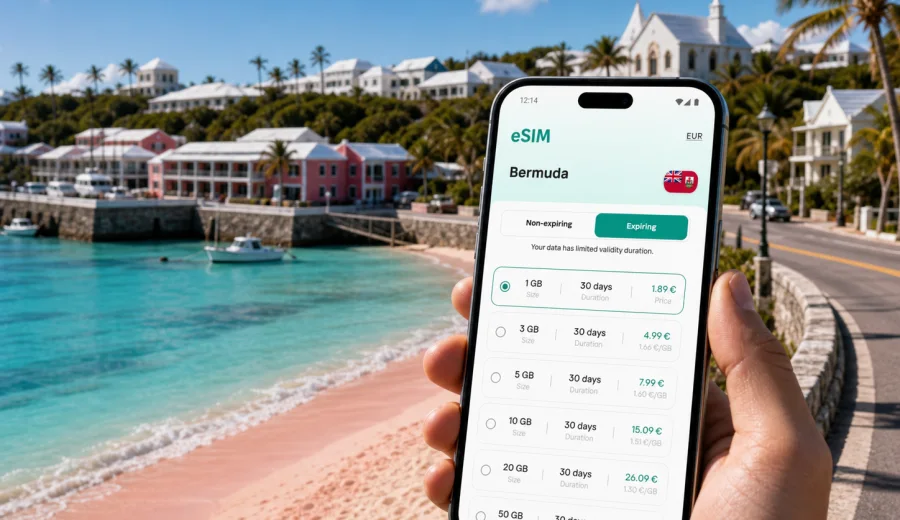
Tucker's Town eSIM: mobile connection and internet for a Bermuda trip
Tucker's Town is a compact, polished part of Bermuda where a trip often depends on small, practical details: finding the resort entrance after a flight, checking the next taxi pickup, sharing a live location near Castle Harbour, or keeping a dinner reservation visible when you move between beaches, golf courses, and hotels. A travel eSIM can make those moments easier because it lets you prepare mobile internet before you start moving around the island.
This guide is for travelers staying in Tucker's Town, arriving through Bermuda's main airport, visiting nearby beaches, working from a resort, or using the area as a quiet base for exploring St. George's, Hamilton, and the rest of Bermuda.
Why mobile internet matters in Tucker's Town
Tucker's Town is not a dense city center where every errand is a short walk past several mobile stores. It is more private, resort-oriented, and spread between coast, residential roads, golf courses, beaches, and hotel grounds. That setting is part of the appeal, but it also means that being online at the right moment can be more useful than it seems before arrival.
You may need mobile data to:
- confirm your transfer after landing;
- open a map while crossing the Causeway toward the eastern parishes;
- message a hotel, driver, host, or colleague;
- check a tee time, spa booking, restaurant table, or ferry schedule;
- navigate between Tucker's Point, Castle Harbour, Harrington Sound, St. George's, and Hamilton;
- use ride, taxi, banking, airline, weather, or messaging apps;
- share photos without depending entirely on hotel Wi-Fi.
Public Wi-Fi can be helpful at hotels, restaurants, and airport areas, but it is not always available exactly when you need directions, payment confirmation, or a message from a driver. An eSIM gives you a separate mobile data option on a compatible device, so the first practical tasks of the trip do not depend only on finding a network password.
Arrival scenarios: from the airport to Tucker's Town
Most visitors reach Tucker's Town after landing at Bermuda's main airport on St. David's Island. The transfer is usually short compared with many international resort destinations, but the first hour still has several moments where mobile internet helps: confirming pickup details, checking the route, messaging the hotel, and keeping travel documents available.
If you install an eSIM before departure, you can usually complete the technical part while you still have stable home Wi-Fi. After landing, you can switch mobile data to the eSIM profile when appropriate for the selected tariff and local network conditions. This approach is useful if you are arriving late, traveling with luggage, or heading directly to a hotel or private address in Tucker's Town.
For a short stopover or a weekend trip, you may not need a large data allowance, but you do need reliable access during the exact windows when you are moving: airport, transfer, check-in, meals, and return travel. For a longer resort stay, the focus shifts to choosing enough data for maps, messages, email, light video calls, and occasional tethering if your tariff and device settings allow it.
Choosing data for a stay in Tucker's Town
The right eSIM tariff depends on how you travel. Tucker's Town is a small area, but a trip there can include airport transfers, beach days, resort time, golf, restaurant visits, meetings, and day trips across Bermuda. Data use is shaped more by behavior than by the size of the destination.
| Trip style | Typical mobile internet needs | What to consider |
|---|---|---|
| Weekend resort break | Maps, messages, bookings, light browsing | A smaller data package may be enough if hotel Wi-Fi covers long sessions |
| Family holiday | Group chats, maps, photos, restaurant searches, kids' devices | Choose a longer validity period and check hotspot rules before relying on tethering |
| Business trip | Email, calendar, messaging, navigation, video calls | Allow extra data for calls and document access outside hotel Wi-Fi |
| Golf or spa-focused stay | Booking confirmations, weather, maps, messages | Moderate data can work if streaming stays on Wi-Fi |
| Bermuda-wide itinerary | Navigation, ferries, buses, taxis, beach research | Pick a tariff that matches the whole country route, not only Tucker's Town |
As a planning rule, separate essential data from optional data. Essential data includes maps, messaging, booking confirmations, email, and transport updates. Optional data includes cloud photo backups, long video streams, large app updates, and extended video calls. Keep optional data on hotel Wi-Fi when possible, especially on a short tariff.
Local movement: beaches, hotels, roads, and nearby towns
Tucker's Town trips often involve short but detail-sensitive movement. You may be walking between resort facilities, using a taxi, meeting someone at a beach access point, or planning a route through narrow island roads. Mobile data helps with timing and orientation, especially if you are unfamiliar with local place names and parish boundaries.
The goal is not to be online constantly. It is to avoid losing access at the exact point where a small delay becomes inconvenient: a pickup point changes, a dinner booking needs confirmation, rain alters a beach plan, or a route to St. George's, Hamilton, or the South Shore needs to be checked. An eSIM can cover those gaps while hotel Wi-Fi handles heavier browsing.
How to prepare mobile internet before the trip
Good preparation starts before you pack. Check your phone, your route, and your expected data use. This prevents a common travel problem: buying data in a hurry and discovering later that the device, tariff duration, or activation timing does not match the trip.
Use this quick preparation sequence:
1. Check that your phone or tablet supports eSIM.
2. Confirm that the device is not locked to one carrier.
3. Estimate how many days you will be in Bermuda.
4. Decide whether Tucker's Town is your only base or part of a wider island route.
5. Choose a data allowance for maps, messages, bookings, and work.
6. Install the eSIM while you still have stable Wi-Fi.
7. Keep the QR code or installation details accessible until setup is complete.
8. After arrival, make sure mobile data is assigned to the eSIM profile.
Before buying any tariff, check your device so you know that eSIM setup is possible on the phone or tablet you plan to use. Compatibility is especially important if you travel with an older device, a phone bought through a carrier, or a model that differs by region.
Choosing a Bermuda tariff for a Tucker's Town stay
For a city article, the relevant destination is the country where the city belongs. Tucker's Town is in Bermuda, so the practical choice is a Bermuda eSIM tariff or another option that clearly covers your route. In Kaspersky eSIM Store, you can review the available destination, data amount, validity period, and cost before deciding what fits your trip.
If you want to prepare before departure, you can choose an eSIM tariff for a trip to Tucker's Town and match it to your Bermuda itinerary. This is the point in the planning process where the country landing page is most useful: it lets you move from general preparation to a specific data option for the destination.
When comparing options, look at four details first:
- data volume: enough for maps, messaging, bookings, and expected work tasks;
- validity: long enough for the full stay, including arrival and departure days;
- destination coverage: suitable for Bermuda and any wider route you plan;
- activation rules: when the validity period begins and what steps are needed on your device.
Avoid choosing only by the smallest data amount if your schedule includes remote work, several day trips, or frequent photo sharing. Also avoid buying more than you can realistically use if most heavy activity will happen on hotel Wi-Fi. The best fit is usually the tariff that matches your actual movement, not the theoretical maximum.
Installing and activating eSIM for Bermuda
The installation process depends on your device and the instructions shown after purchase. In general, you choose a tariff, receive installation details, add the eSIM profile to a compatible device, and then activate mobile data for that profile when the tariff conditions allow it. You may need a Wi-Fi connection to complete installation, so it is often easier to do this before the flight or at the hotel.
For device-specific setup, follow the Android installation guide or the iOS installation guide. Keep your primary SIM active if you still need your regular number for calls, bank messages, or two-factor authentication, and assign mobile data to the eSIM profile when you want to use the travel data package.
Important setup notes:
- eSIM usually provides mobile data, not a local phone number, unless the tariff terms state otherwise;
- voice calls and SMS are not included unless they are specifically listed in the selected tariff;
- some devices require data roaming to be enabled for the eSIM profile;
- installation and activation can take a few minutes and depend on device settings and local network conditions;
- after activation, an eSIM profile may not be transferable to another device.
If something does not work immediately, check the profile selected for mobile data, roaming settings for that profile, and whether the device has completed installation. If the issue remains, contact support with the device model, tariff details, and a clear description of the step where the problem appears.
Data-saving habits for a small island trip
Bermuda trips can feel simple geographically, but data can disappear quickly if cloud backups, video apps, and system updates run on mobile data. A few settings before arrival can keep the tariff focused on travel tasks.
Use this checklist before your first full day in Tucker's Town:
- download offline map areas where possible;
- disable automatic app updates on mobile data;
- pause cloud photo and video backup until Wi-Fi;
- set messaging apps to download large media on Wi-Fi only;
- keep video streaming on hotel Wi-Fi;
- use lower data mode if your phone offers it;
- check data usage daily during a short tariff.
These settings do not make the trip less connected. They protect the data you actually need for navigation, bookings, work messages, and transport coordination.
Short stays, stopovers, and day trips
Some travelers visit Tucker's Town as part of a compact Bermuda itinerary rather than a long resort stay. You might land in the morning, attend a meeting, have dinner near the eastern end of the island, and leave the next day. In that case, the eSIM decision is mainly about convenience during transitions.
For short stays, prioritize:
- quick installation before departure;
- a validity period that covers both arrival and departure days;
- enough data for maps, messages, boarding passes, and booking apps;
- simple access to support if setup questions appear;
- avoiding unnecessary high-data activity on mobile data.
For day trips from Tucker's Town to Hamilton, St. George's, beaches, or marinas, mobile data helps with route changes and timing. Bermuda is not large, but travel plans can shift because of weather, reservations, transport availability, or group decisions. A working data connection keeps those changes easier to manage.
FAQ about eSIM in Tucker's Town
Do I need a separate city eSIM for Tucker's Town?
Usually no. For a Tucker's Town trip, look for a tariff that covers Bermuda. The city matters for planning your data use, but the destination coverage should match the country or region specified in the tariff.
Can I install eSIM before flying to Bermuda?
In many cases, yes. Installing before departure is often convenient because you can use stable Wi-Fi and avoid setup pressure after landing. Check the activation rules of the selected tariff so you understand when validity begins.
Will eSIM give me a Bermudian phone number?
Travel eSIM tariffs are usually focused on mobile data. They do not normally include a local number, calls, or SMS unless those features are explicitly included in the tariff conditions. For calls and messages, many travelers use internet-based apps.
How much data should I choose?
For light use, maps and messaging need less data than video calls and streaming. A weekend traveler can often choose a smaller package than someone working remotely or exploring Bermuda daily. Match the tariff to days, route, and habits.
Final preparation before you travel
A smooth Tucker's Town trip does not require complicated technology. It requires a few decisions made in the right order: confirm that your device supports eSIM, choose a Bermuda data tariff that fits your stay, install it while you have Wi-Fi, and keep mobile data settings clear when you arrive.
Before departure, review your itinerary one last time. Count arrival and departure days, not only nights. Think about whether you will stay mostly inside one resort area or move across Bermuda. Save hotel details, transfer contacts, and essential documents offline. Then use mobile data for the moments when being offline would slow you down: navigation, messages, bookings, transport, and work access.
For a practical start, open Kaspersky eSIM Store and prepare an eSIM tariff for your Bermuda trip. Choose the option that matches your Tucker's Town plans, install it on a compatible device, and keep your mobile internet ready for the parts of the journey that happen away from Wi-Fi.