
Travel connectivity guide
Tunisia eSIM: mobile internet for travel
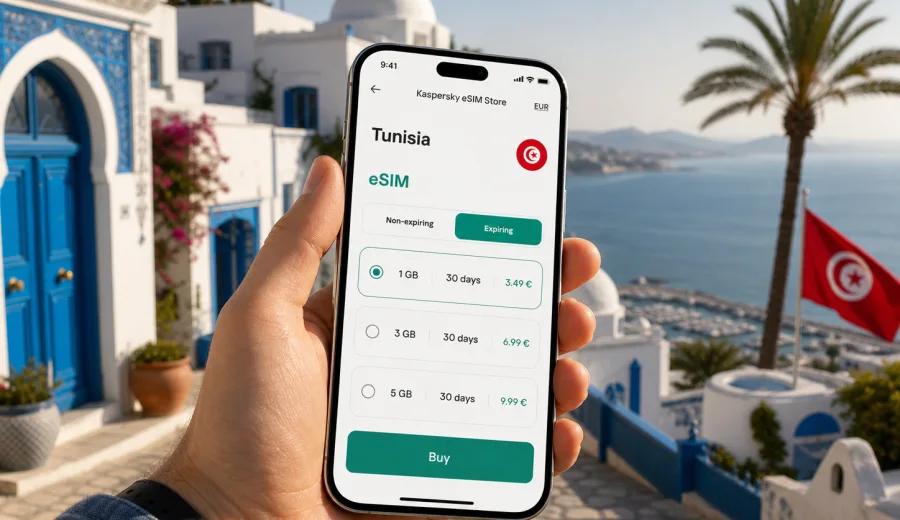
eSIM in Tunisia: mobile connection and internet for your trip
Tunisia is a compact country for travel, but your mobile internet needs can change quickly during one route. You may land in Tunis, continue to Sousse or Hammamet, take a short business visit to an exhibition center, spend several days on Djerba, or cross from coastal towns toward desert landscapes near Tozeur and Douz. In each case, the same practical question appears: how will you keep maps, hotel details, messages, ride apps, banking confirmations, and travel documents available without spending the first hour looking for a local SIM card?
An eSIM can make that preparation easier. It is a digital SIM profile installed on a compatible smartphone or tablet, so you can set up mobile internet for Tunisia without changing a plastic SIM card. For many travelers, the main advantage is control. You choose a data package before the trip or soon after arrival, keep your regular SIM in the phone if you need it, and use mobile data through the eSIM when you are in Tunisia.
This guide explains how to think about eSIM for Tunisia in a practical way: when it helps, how much data you may need, what to check before buying, how installation usually works, and which travel scenarios deserve extra attention.
Why mobile internet matters in Tunisia
Tunisia is easy to underestimate from a connectivity planning point of view. Distances are manageable, but travel situations are varied. A weekend in Tunis does not create the same data pattern as a beach stay, a road trip, or a remote-work week. Reliable mobile internet can be useful for:
- navigating from Tunis-Carthage International Airport to your hotel;
- checking ferry, train, taxi, and transfer details;
- translating menus, signs, and messages;
- calling through messengers when voice minutes are not included;
- receiving banking and booking notifications;
- sharing a hotspot with a laptop when conditions allow it;
- keeping offline maps, tickets, and addresses synchronized.
Public Wi-Fi can help in hotels, cafes, and airports, but it is not a complete travel plan. It may require registration, be slow at busy times, or be unavailable exactly when you need directions in the street. Standard roaming is convenient, but its price and data allowances depend on your home operator. A local SIM can be a good option for long stays, yet it may require time at a shop, identity checks, language support, and a phone with a spare SIM slot.
An eSIM sits between these options. It is not a guarantee of perfect coverage in every location, and it is not a replacement for checking tariff terms. It is a convenient way to prepare mobile data for a country trip with fewer physical steps.
What an eSIM gives you in Tunisia
For a Tunisia trip, an eSIM is mainly about mobile data. Unless a specific tariff says otherwise, do not expect a local phone number, classic voice calls, or SMS. Calls and messages usually work through internet apps, so your data allowance becomes the central resource.
In practical terms, a travel eSIM can help you:
| Travel need | How eSIM helps |
|---|---|
| Arrival day | Use maps, messenger calls, booking apps, and transfer details after landing. |
| City travel | Move between Tunis, La Marsa, Carthage, Sidi Bou Said, Sousse, or Hammamet with live navigation. |
| Beach stay | Keep messaging, photo backup, and local search available away from hotel Wi-Fi. |
| Business trip | Maintain email, chat, maps, and document access without relying only on venue Wi-Fi. |
| Family route | Separate mobile data planning from your main SIM and avoid passing one physical SIM between devices. |
The key is to match the eSIM tariff to your trip. A short city break may need only light browsing and navigation. A week with video calls, social media uploads, cloud documents, and hotspot use needs a larger package. Always review the data volume, validity period, destination coverage, price, and activation rules before completing the purchase.
eSIM, roaming, local SIM, and Wi-Fi: what to choose
There is no single best option for every traveler. The right setup depends on your phone, trip length, data habits, and tolerance for on-arrival tasks.
| Option | Good for | Watch out for |
|---|---|---|
| eSIM for Tunisia | Travelers who want to prepare data before arrival and keep their physical SIM installed. | Requires an eSIM-compatible, unlocked device. Terms depend on the selected tariff. |
| Standard roaming | Travelers who prefer using their existing mobile plan without extra setup. | Costs and limits may be high or unclear, especially for frequent data use. |
| Local physical SIM | Longer stays or travelers who want a local number if available with the plan. | Requires finding a shop, completing local steps, and replacing or adding a SIM card. |
| Public Wi-Fi | Light use in hotels, cafes, airports, and offices. | Not always available, may be slow, and should not be your only plan for maps or urgent messages. |
For many visitors, the most resilient setup is a combination: keep the primary SIM for essential account access, install an eSIM for mobile data in Tunisia, and use trusted Wi-Fi when it is convenient. This keeps the phone flexible without making hotel Wi-Fi or roaming the only option.
How much data do you need for Tunisia?
Data needs vary, but it helps to think by behavior rather than by country. Tunisia does not change the basic data math: maps, messages, browsing, and email are light to moderate; video, cloud backup, hotspot, and long video calls are heavier.
Use this planning table as a starting point:
| Trip style | Typical use | Data direction |
|---|---|---|
| 2-3 day city break | Maps, messages, restaurant search, ride apps, some photos. | A small package may be enough if you avoid video streaming. |
| 5-7 day holiday | Daily navigation, social apps, browsing, photo sharing, messenger calls. | A medium package is more comfortable. |
| Work trip | Email, cloud documents, messaging, maps, calls, occasional hotspot. | Choose more data and check tethering rules if you plan to connect a laptop. |
| Family or group travel | Multiple devices, children streaming, shared hotspot, frequent uploads. | Consider larger data volumes or separate plans per device. |
| Road trip | Live maps, route changes, accommodation search, messaging on the move. | More data provides a buffer outside hotel Wi-Fi. |
Two habits can protect your allowance. First, download offline maps and entertainment before leaving home or while on trusted Wi-Fi. Second, disable automatic cloud backup over mobile data unless you intentionally want to use your package for uploads.
Check device compatibility before you buy
Before choosing any eSIM tariff, confirm that your phone or tablet supports eSIM and is not locked to a specific operator. This matters more than the destination. If the device cannot install an eSIM profile, the tariff will not solve the problem.
You can check your device compatibility before purchase. Also review your device settings manually if you are unsure. On many phones, eSIM support appears under cellular, mobile network, or SIM management settings. If your phone was bought through an operator contract, check whether it is carrier-locked.
Practical compatibility checklist:
- the device supports eSIM;
- the device is unlocked for mobile network use abroad;
- the operating system is up to date enough for eSIM setup;
- you have a stable internet connection during installation;
- you can access the email or account where installation details are delivered;
- you understand that an activated eSIM profile may not be transferable to another phone.
If you are traveling with a second device, do not assume both devices support eSIM. A recent flagship phone may support it, while an older tablet or regional model may not.
When to prepare your Tunisia eSIM
The easiest time to prepare is before departure, while you still have stable home internet and enough time to fix settings calmly. You can install the eSIM profile in advance if the tariff conditions allow it, then activate or start using it according to the plan rules. Some tariffs start validity after installation, some after first connection to a supported network, and some have specific activation windows. Read the conditions carefully.
If you prefer to wait until arrival, make sure you can still get online at the airport or hotel to complete installation. This is where travelers often lose time: they need internet to install the eSIM, but they planned to install the eSIM because they need internet. Preparing before the flight avoids that loop.
After comparing your route, device, and data needs, you can use Kaspersky eSIM Store to choose an eSIM plan for your trip to Tunisia. The site and app help you select the destination, review available data packages, and prepare the eSIM for mobile internet during the trip.
How to install an eSIM for Tunisia
Installation is usually simple, but it should be done without rushing. Keep your phone charged, stay on a stable Wi-Fi connection, and avoid deleting an installed eSIM profile unless support instructions or tariff terms tell you to do so.
General steps:
1. Confirm that your device supports eSIM and is unlocked.
2. Choose Tunisia as the destination and select a suitable data package.
3. Complete the order and open the eSIM installation details.
4. Install the eSIM profile using the provided method, such as a QR code or in-app setup.
5. Name the eSIM clearly, for example "Tunisia data".
6. Set the eSIM as the mobile data line when you are ready to use it.
7. Enable data roaming for the eSIM if the installation instructions or device settings require it.
8. Keep your primary SIM active only for the services you still need, such as calls or account verification.
For device-specific guidance, follow the Android installation instructions or the iOS installation instructions. The exact menu names may vary by device model and operating system version, so read the on-screen prompts before confirming each step.
Mobile internet scenarios across Tunisia
Your route affects how you use data. A traveler who stays in one resort with strong hotel Wi-Fi may use mobile data mainly for short trips. A traveler moving between regions will rely on the phone more often.
Tunis, Carthage, and Sidi Bou Said
This is a common route for short visits. Mobile internet helps with airport arrival, ride coordination, museum opening times, restaurant search, and walking routes. If you plan to take photos and upload them throughout the day, set cloud sync to Wi-Fi only or choose a larger package.
Hammamet, Sousse, and Monastir
Beach and resort stays often include Wi-Fi, but mobile data remains useful outside the hotel: transfers, beach clubs, local restaurants, and day trips. If several people share one hotspot, check whether tethering is allowed and monitor data use carefully.
Djerba
Djerba is popular for longer relaxed stays. eSIM data can be useful for navigation between beaches, hotels, markets, and airport transfers. If you work remotely for part of the trip, test your connection before important calls and keep a backup plan such as hotel Wi-Fi.
Tozeur, Douz, and desert routes
When traveling inland or joining excursions, do not assume continuous mobile coverage. Download maps, tickets, booking confirmations, and meeting points in advance. eSIM is useful, but remote routes still require offline preparation and realistic expectations.
Data-saving settings before departure
A few settings can make a small or medium data package last much longer:
- download offline map areas for Tunis, your resort, and any road route;
- update apps before the flight;
- disable automatic app updates over mobile data;
- set photo and video backup to Wi-Fi only;
- reduce video quality in streaming apps;
- turn off background data for apps you do not need abroad;
- save hotel addresses, reservation numbers, and insurance details offline;
- keep messenger auto-download settings under control.
If you use dual SIM mode, check which line is assigned to mobile data. Many accidental roaming charges happen when the phone quietly uses the primary SIM instead of the travel eSIM. After arrival, open your cellular settings and confirm that mobile data is assigned to the Tunisia eSIM.
Practical setup for a first day in Tunisia
Arrival days create the highest risk of small mistakes. You may be tired, moving through airport procedures, and trying to coordinate transport. Prepare a simple checklist before boarding:
| Before the flight | After landing |
|---|---|
| Install the eSIM profile if tariff rules allow it. | Turn on the Tunisia eSIM for mobile data. |
| Save the QR code or setup details somewhere accessible. | Enable data roaming for the eSIM if required. |
| Download offline maps and hotel details. | Check that your primary SIM is not selected for data. |
| Update apps on Wi-Fi. | Test maps and a messenger message before leaving the airport. |
This checklist is especially useful if you arrive late in the evening, travel with children, or need to meet a driver. The goal is not to spend time configuring everything at the curb. The goal is to have the phone ready enough for the first practical tasks.
Common mistakes to avoid
The most common eSIM problems are not complicated technical failures. They are usually planning errors:
- buying a data package before checking device compatibility;
- choosing too little data for video calls, hotspot use, or social uploads;
- installing the profile on the wrong device;
- deleting the eSIM profile after installation;
- leaving mobile data assigned to the home SIM;
- forgetting that many travel eSIM tariffs do not include a phone number;
- assuming hotel Wi-Fi will be available everywhere;
- waiting until arrival without any backup internet for installation.
Avoiding these mistakes is mostly about reading the tariff conditions and checking phone settings. If you are unsure, prepare the eSIM while you are still at home and have time to review the setup.
FAQ: eSIM and internet in Tunisia
Can I use an eSIM in Tunisia for all internet tasks?
You can use eSIM mobile data for typical travel tasks such as maps, messages, browsing, email, and app-based calls, subject to the selected tariff conditions and local network availability. For heavy video, hotspot, and cloud backup, choose your data volume carefully.
Does an eSIM for Tunisia include a phone number?
Usually, travel eSIM tariffs focus on mobile data. A phone number, voice calls, and SMS are not included unless this is clearly stated in the selected tariff conditions.
Should I install the eSIM before I travel?
It is often more convenient to install it before departure using a stable internet connection, as long as the tariff activation rules allow it. Check when validity starts before installing or activating the profile.
Can I keep my regular SIM active?
In many dual SIM phones, yes. You can keep your regular SIM for calls or verification messages and assign mobile data to the Tunisia eSIM. Check your device settings carefully after arrival.
Is eSIM better than roaming?
It depends on your home operator, trip length, and data use. eSIM can be a practical alternative because you can review data volume, duration, destination, and price before the trip. Roaming may still be convenient for very light use or if your home plan includes favorable travel terms.
What if I travel beyond Tunisia?
If your trip includes other countries, review whether a country-specific or regional package is more appropriate. Do not assume that a Tunisia plan covers neighboring or connecting destinations unless the tariff terms say so.
Final checklist before choosing a Tunisia eSIM
Before you complete your setup, run through this short list:
- Your phone or tablet supports eSIM.
- The device is unlocked and ready for mobile network use abroad.
- The selected tariff covers Tunisia.
- The data volume fits your planned use.
- The validity period covers the full trip.
- You understand when the tariff starts.
- You know whether hotspot use is allowed or limited.
- You have saved installation details before departure.
- You have checked Android or iOS setup instructions if needed.
- Your primary SIM will not accidentally handle mobile data abroad.
If these points are clear, eSIM becomes a simple part of travel preparation rather than a last-minute airport task.
Choose a practical eSIM setup for Tunisia
Tunisia rewards travelers who prepare the basics: documents, transfers, offline maps, and mobile internet. An eSIM is one way to make that preparation smoother. It can help you stay connected for navigation, messaging, bookings, and everyday travel tasks without handling a physical SIM card after arrival.
Kaspersky eSIM Store is an app and website where you can quickly choose, arrange, and activate an eSIM with a suitable mobile data tariff for an international trip. Before you travel, review the available data volumes and validity periods, check your device compatibility, and prepare an eSIM plan for Tunisia that matches how you will actually use the internet during the trip.