
Travel connectivity guide
Turin eSIM: Mobile Internet and Connection
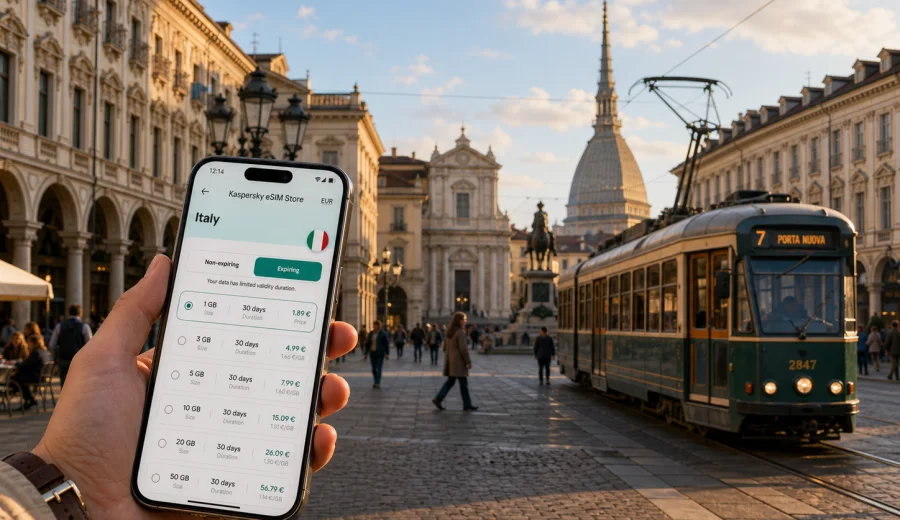
Turin eSIM: mobile connection and internet for your trip
Turin is a city where mobile internet quietly becomes part of the whole travel plan. You may land at Turin Airport in Caselle, take the train or a bus toward Porta Susa or Porta Nuova, check a hotel address near Via Roma, and still need to decide whether to cross the Po for dinner in Vanchiglia or stay around San Salvario. The city is elegant and walkable, but it is also spread along long boulevards, river routes, hillside viewpoints, business districts, museums, and rail connections to the rest of Piedmont.
An eSIM helps you prepare mobile connection before the trip without looking for a physical SIM card after arrival. It is especially useful if you plan to use maps, ride-hailing apps, train tickets, hotel messages, restaurant bookings, and translation tools from the first hour in Turin. Kaspersky eSIM Store is an app and website where you can choose, arrange, install, and activate an eSIM with a suitable data plan for mobile internet during an international trip.
This guide focuses on Turin, not on Italy in general. It covers arrival, transport, central districts, business travel, day trips, hotel routines, and practical data planning for a stay in the city.
Quick answer for travelers
For most short trips to Turin, an eSIM is useful because the city is easy to explore with live maps, public transport apps, digital tickets, and restaurant or museum bookings. You can install the eSIM before departure, then activate it according to the plan conditions when you need data in Italy. Before choosing a plan, check your phone compatibility, the data allowance, the validity period, and whether your trip also includes other Italian cities.
The main benefit is control. You can review the plan before you travel, keep your primary SIM for calls and messages if your device allows dual SIM use, and use the eSIM for mobile data while moving around Turin.
Why mobile internet matters in Turin
Turin rewards travelers who move flexibly. The historic center is compact, but many useful places sit just outside the postcard route. You might spend the morning around Piazza Castello and the Royal Museums, cross to the Mole Antonelliana, take a tram toward Porta Palazzo, and finish the day in the cafe streets near Piazza Vittorio Veneto. A data connection helps you make these decisions in real time.
Mobile internet is useful in Turin for:
- checking the fastest route between Porta Nuova, Porta Susa, Lingotto, and Caselle Airport;
- using maps inside arcaded streets where turns can look similar;
- storing and opening digital tickets for museums, trains, buses, or events;
- messaging hotels and apartment hosts about check-in times;
- translating menu notes, shop signs, parking information, or transport notices;
- confirming opening hours before crossing town;
- navigating day trips to nearby towns, vineyards, lakes, or Alpine valleys;
- joining work calls or handling urgent tasks between meetings.
Turin is not a city where you need to be online every second. The point is different: reliable mobile data reduces friction at exactly the moments when you are carrying luggage, searching for a platform, trying to find a late dinner, or moving between appointments.
Arrival in Turin: where connection helps first
Many visitors arrive through Turin Airport, also called Caselle Airport. The airport is north of the city, and the first practical decisions are usually transport, ticketing, hotel route, and timing. If your phone already has a prepared eSIM profile, you can switch to mobile data without starting your trip at a shop counter.
Typical arrival scenarios:
| Arrival moment | What you may need online | Why it matters |
|---|---|---|
| Airport terminal | Hotel address, transport route, messages | Useful before leaving arrivals |
| Train or bus to the center | Map, ticket confirmation, delay checks | Helps choose Porta Susa or Porta Nuova |
| Taxi or ride-hailing pickup | Exact location and driver messages | Reduces confusion outside the terminal |
| Late arrival | Restaurant hours, apartment check-in, codes | Important if reception is closed |
| Business arrival | Calendar, meeting address, transfer timing | Keeps the first appointment under control |
If you arrive by rail, the first connection points are usually Porta Susa or Porta Nuova. Porta Susa is convenient for business areas, high-speed trains, and some hotels north-west of the center. Porta Nuova is closer to Via Roma, San Salvario, and many central walks. Both stations are easy to use, but a working data connection makes it simpler to choose a tram, metro, taxi, or walking route without guessing.
Turin by transport: trams, metro, buses, walking
Turin has a practical local transport network, but visitors often combine several modes in one day. You may walk through the central arcades, take the metro to Lingotto, ride a tram toward the market areas, and return by bus after dinner. Mobile internet helps because each route can depend on time of day, ticket type, road works, or event traffic.
The city is also a strong walking destination. Long covered arcades make central walks comfortable in rain or summer sun. The challenge is not distance alone; it is orientation. Streets around the center are orderly, but the river, hills, rail corridors, and large squares can change the route quickly. Live navigation is useful when you want to avoid a long detour with luggage or when you are walking after dark in an unfamiliar area.
Practical data uses during local movement:
- compare walking time with tram or metro time;
- check which side of a square has the correct stop;
- follow a route from the hotel to a restaurant without stopping at every corner;
- confirm whether a museum or cafe is still open before going there;
- share a live location with travel companions;
- keep a backup route if the weather changes.
If you plan to use public Wi-Fi, treat it as occasional support rather than the main connection. Hotel and cafe Wi-Fi can be useful, but it may not help while you are crossing town, waiting on a platform, or trying to open a ticket in the street.
How much data to plan for Turin
The right amount of mobile data depends on how you travel. Navigation, messaging, email, and ticket apps usually use moderate data. Video calls, streaming, cloud backups, and large photo uploads use much more. You do not need to guess perfectly, but you should match the plan to the way you actually use your phone.
| Trip profile | Typical behavior | Planning note |
|---|---|---|
| 2-3 day city break | Maps, messaging, bookings, light browsing | A smaller data package may be enough if you use hotel Wi-Fi for uploads |
| 4-7 day cultural trip | Museums, restaurants, day walks, train checks | Choose more data if you rely on maps all day |
| Business trip | Email, calendar, documents, calls through apps | Leave a margin for work tasks and delays |
| Family trip | Shared planning, tickets, messaging, entertainment | More data may be useful, especially with children |
| Turin plus other cities | Trains, transfers, several hotels | Plan for the full Italy itinerary |
Use Wi-Fi for heavy tasks when it is convenient and trusted: operating system updates, large photo backups, long video calls, and streaming. Use mobile data for the things that matter when you are moving: route changes, tickets, messages, payments, maps, and urgent travel decisions.
Choosing an eSIM plan for Turin
Before you choose a plan, check four details: destination, data amount, validity period, and activation rules. The destination should cover Italy for a Turin trip. The data amount should match your daily use. The validity period should cover the whole stay, including arrival and departure days. Activation rules matter because some plans start when installed, while others start when connected to a supported network; always review the conditions for the specific plan.
If Turin is the first stop on a longer Italian route, think ahead. A traveler who spends two nights in Turin and then goes to Milan, Genoa, Florence, or Rome usually needs one Italy plan that covers the full trip duration. If you are connecting from Switzerland or France and continuing across borders, review whether a country plan or regional option better fits the itinerary.
Once your dates and route are clear, you can choose a mobile internet option for your trip to Turin through Kaspersky eSIM Store. Review the available eSIM data plans for Italy, compare data volume and validity, then choose the plan that fits your expected use.
Preparing your phone before the trip
Do the preparation before you leave home, especially if Turin is your first stop after a long flight or rail connection. The setup is usually easier when you have stable Wi-Fi, battery power, and time to read the plan details.
Preparation checklist:
- confirm that your smartphone or tablet supports eSIM;
- check that the device is not locked to a single mobile operator;
- choose Italy as the destination for a Turin trip;
- compare data volume, validity period, and price;
- install the eSIM while you still have a stable internet connection;
- keep your primary SIM active if you need your usual number for calls, SMS, or banking codes;
- label the eSIM clearly, for example "Italy data";
- read the activation details before turning mobile data on.
Before purchase, use the device compatibility check if you are unsure whether your phone supports eSIM: Check your device. Compatibility is important because eSIM cannot be used on every phone, and some devices may have operator restrictions.
Installing and activating the eSIM
Installation and activation are separate ideas. Installation adds the eSIM profile to your device. Activation starts using the data plan according to the conditions of that plan. Some travelers install before departure and activate after landing; others activate shortly before arrival if the plan conditions make that appropriate. Always follow the instructions shown for your selected plan.
General steps:
1. Choose the destination and data plan.
2. Complete the order.
3. Install the eSIM on a compatible device.
4. Select the eSIM for mobile data when you are ready to use it.
5. Enable data roaming for the eSIM if the device or plan instructions require it.
6. Keep your primary SIM settings separate if you want to preserve your usual number.
7. Monitor data use during the trip.
For device-specific setup, use the official installation guides: Android instructions and iOS instructions. The exact menu names can differ between device models and operating system versions, so follow the guide that matches your phone.
Practical scenarios in Turin
A weekend visitor near Piazza Castello or Piazza San Carlo usually needs mobile data for walking routes, museum tickets, restaurant searches, and the return route to Porta Nuova or Porta Susa. In San Salvario, Vanchiglia, and the Po river area, data is useful at night because routes, bridges, and transport options change quickly after dinner. Around Lingotto, Crocetta, and business hotels, the main use is more practical: calendar access, taxi coordination, email, documents, and metro timing.
For hotels and apartments, keep check-in messages, entry codes, and the local address saved before you leave the station. Hotel Wi-Fi can handle backups and large uploads, while eSIM data is better for movement: finding the building, contacting reception, opening a ticket, or changing plans after checkout.
For stopovers and one-night stays, focus on the moments that matter: airport transfer, station route, hotel check-in, dinner, and next-day departure. For trips from Turin to Superga, the Langhe, Milan, Aosta, or Alpine valleys, check return times and weather before you leave the city. If the route stays in Italy, choose an Italy destination plan that covers the full travel period.
What eSIM does and does not replace
An eSIM data plan is mainly for mobile internet. It does not automatically replace every function of a local mobile operator plan. Voice calls and SMS are not included unless the specific plan says so. Many travelers keep their regular SIM active for calls, SMS, and banking messages, then use the travel eSIM for mobile data.
Good practice:
- name each SIM clearly in phone settings;
- set the travel eSIM as the mobile data line;
- turn off data roaming on the primary SIM if you want to avoid accidental use;
- review the selected eSIM conditions before departure;
- avoid large cloud backups on mobile data.
If something does not connect immediately, check the basics first: selected data line, data roaming setting for the eSIM if required, airplane mode, network selection, and whether the plan has been activated according to its terms.
FAQ about eSIM for Turin
Do I need eSIM for Turin if my hotel has Wi-Fi?
Hotel Wi-Fi helps inside the room, but it does not cover airport transfer, station platforms, trams, walks, day trips, or late check-in messages. An eSIM is useful when you need mobile internet while moving.
Should I choose a Turin plan or an Italy plan?
For a city article, the relevant destination is the country the city belongs to. For Turin, choose an Italy destination plan and match it to your route, data use, and travel dates.
Can I install the eSIM before traveling?
In many cases, yes. Installing before travel can make arrival easier, but activation timing depends on the specific plan. Read the plan conditions before switching it on.
Will eSIM give me a local phone number?
Usually, travel eSIM data plans are for mobile internet and do not include a standard phone number, calls, or SMS unless the plan specifically says so. Use internet-based messaging and calling apps when appropriate.
Is eSIM useful for a one-day stop in Turin?
Yes, if you need maps, station information, hotel messages, or ticket access during the stop. Choose a plan that fits a short stay rather than a larger trip.
Can I use one eSIM for Turin and other Italian cities?
If the plan covers Italy and remains valid for your travel dates, it can support a route beyond Turin. Check the selected plan conditions before relying on it for multiple cities.
Final checklist before you go
Before leaving for Turin, make sure your phone setup matches the trip:
- your device supports eSIM and is not restricted by an operator lock;
- the eSIM destination is Italy;
- the data allowance fits your real use;
- the validity period covers arrival and departure days;
- installation is completed while you have stable internet;
- your primary SIM and eSIM data settings are clearly separated;
- important addresses and tickets are saved as backup;
- heavy downloads and uploads are set to Wi-Fi only.
Turin is easiest when you can move at your own pace: walk under the arcades, switch from tram to metro, check a museum time, message your hotel, or change dinner plans without searching for Wi-Fi. Before your trip, use Kaspersky eSIM Store to prepare an eSIM data plan for Italy and keep mobile internet ready for your days in Turin.