
Travel connectivity guide
eSIM for Turks and Caicos Islands travel
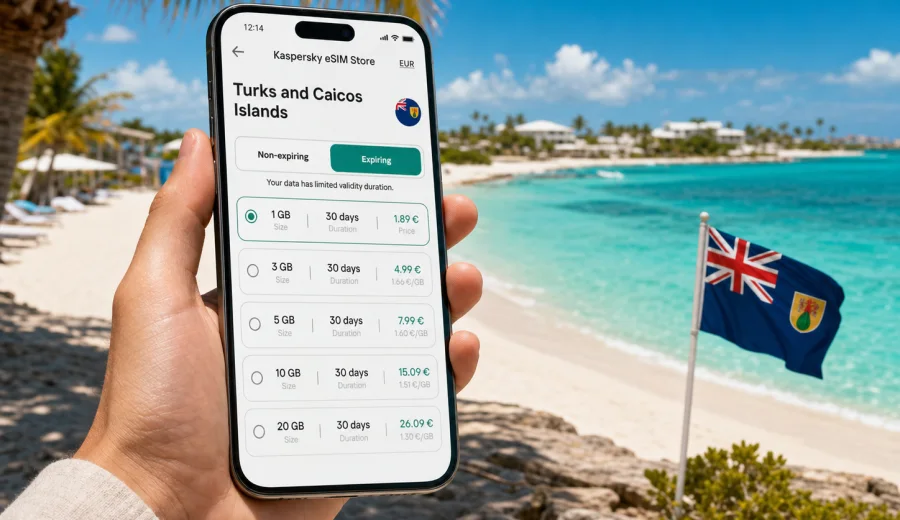
eSIM in Turks and Caicos Islands: mobile connection and internet for your trip
Turks and Caicos Islands are built around movement: a transfer from Providenciales International Airport, a boat trip to North Caicos, a beach day on Grace Bay, a hotel check-in, a restaurant booking, a taxi message, a photo upload, a map route, and a quick call through a messenger. In all of these moments, mobile connection and internet matter more than they may seem when you are still planning the trip at home.
An eSIM can help you prepare mobile internet for Turks and Caicos Islands without looking for a physical SIM card after arrival. Instead of visiting a shop, changing a plastic SIM, or relying only on hotel Wi-Fi, you can install a digital SIM profile on a compatible smartphone and use a prepaid data plan for the destination. This is especially useful if you want to be online during the first hours of the trip, when you need maps, transfer details, booking confirmations, and messages.
Kaspersky eSIM Store is an app and website where you can choose, arrange, and activate an eSIM with a suitable mobile internet plan for travel abroad. It helps you compare data volume, validity period, destination, and price before you leave, so your connection plan is not an improvised decision at the airport.
Why eSIM is useful in Turks and Caicos Islands
Turks and Caicos Islands are a compact destination, but the travel scenarios are varied. Many visitors stay on Providenciales, especially around Grace Bay, Leeward, Long Bay, Turtle Cove, and the resorts along the coast. Others add ferry rides, boat tours, diving trips, day visits to North Caicos or Middle Caicos, or domestic transfers. In these situations, a data connection is not only for entertainment. It supports the practical parts of the trip.
With mobile internet on your phone, you can:
- open hotel and villa check-in details after landing;
- contact a driver, host, tour operator, or travel companion;
- use maps while moving between beaches, restaurants, marinas, and ferry points;
- check weather updates before a boat tour or beach day;
- receive banking, airline, and booking notifications;
- use messengers for calls and messages over data;
- translate or search for local information when Wi-Fi is unavailable;
- avoid depending on public Wi-Fi in cafes, lobbies, and airports.
An eSIM does not turn your phone into a local voice line unless a specific plan says so. In most travel scenarios, eSIM plans are used for mobile data. For ordinary calls and messages, many travelers use internet-based apps. That distinction is important: when you choose a plan, look first at data volume, validity period, destination coverage, and activation rules.
What makes Turks and Caicos different from a city trip
A short city break often has dense Wi-Fi coverage, many phone shops, and predictable routes. Turks and Caicos Islands are different. The destination is spread across islands, resorts, beaches, marinas, roads, and water-based activities. Even if your hotel has good Wi-Fi, it may not help when you are arranging a pickup, checking a map from the roadside, sending a message from a marina, or confirming a dinner reservation away from the property.
This is why a travel eSIM can be useful even for a relaxing beach trip. It gives you a prepared mobile data option for the moments between fixed Wi-Fi points. You still need to consider local network conditions, your device, and the selected plan, but you do not have to make the connectivity decision from scratch after arrival.
eSIM, roaming, local SIM, and Wi-Fi: what to compare
Before choosing mobile internet for Turks and Caicos Islands, compare the main options in practical terms. The best choice depends on your phone, trip length, data habits, and how much control you want before departure.
| Option | What it is useful for | What to check before relying on it |
|---|---|---|
| Travel eSIM | Preparing data before the trip, keeping your physical SIM in the phone, avoiding a store visit | Device compatibility, plan destination, data volume, validity, activation rules |
| Standard roaming | Keeping your existing mobile plan active abroad | Daily fees, data limits, speed policy, roaming zone, bill controls |
| Local physical SIM | Longer stays or travelers who prefer an in-person local purchase | Shop availability, identification rules, opening hours, phone SIM lock |
| Public or hotel Wi-Fi | Large downloads, laptop work from a fixed place, low-data tasks | Availability outside the hotel, login limits, security, speed, reliability |
For many visitors, the most practical setup is mixed. You can use an eSIM for mobile data while moving around and keep Wi-Fi for heavier tasks such as video calls, backups, cloud photo uploads, or laptop work. This approach can reduce pressure on your mobile data allowance without leaving you offline between Wi-Fi points.
How much data you may need
There is no universal data amount for every traveler. A person who mostly uses maps and messages can use far less than someone who posts videos, joins video calls, or uses cloud storage. The better question is not “What is the perfect plan?” but “What will I actually do on mobile data in Turks and Caicos Islands?”
Use this planning table as a starting point:
| Trip style | Typical mobile data behavior | Planning note |
|---|---|---|
| Light use | Messaging, email checks, maps, booking confirmations | A smaller plan may be enough if you use hotel Wi-Fi for media |
| Standard vacation | Maps, social media, restaurant searches, occasional photo sharing | Choose a plan with room for daily use, not only emergencies |
| Active island itinerary | Navigation, boat tour coordination, frequent uploads, shared hotspot for short tasks | Consider more data and check whether hotspot use is allowed by the plan |
| Remote work add-on | Email, documents, calls, calendar, file access | Use Wi-Fi for heavy sessions and keep eSIM data as a mobile backup |
To estimate your need, write down three things: how many days you will be in the country, how often you will be away from hotel Wi-Fi, and which apps you use without thinking. Navigation, messengers, ride coordination, banking, weather, airline apps, and photo sharing can add up quickly when every day includes transfers or tours.
What to check before buying an eSIM
The most important check is device compatibility. Not every phone supports eSIM, and some phones are locked to one mobile operator. Before you buy a plan, check your device and confirm that it supports eSIM installation and can use another mobile data profile while you travel.
Also review these points:
- Destination: the plan should include Turks and Caicos Islands or the relevant region for your itinerary.
- Validity: the number of days should match the full period when you need mobile data.
- Data amount: choose enough for your expected daily use, not only for the first day.
- Activation timing: check when the validity period starts and whether you should install before departure or after arrival.
- Data roaming setting: some eSIM profiles require data roaming to be enabled for that eSIM line.
- Calls and SMS: do not assume they are included unless the plan conditions say so.
- Hotspot use: if you plan to share data with a laptop or another phone, check the plan conditions.
- Support access: keep installation information available before you travel.
This short checklist prevents most avoidable problems. It is easier to confirm compatibility, storage space, phone lock status, and activation instructions while you still have stable internet at home.
When to install and activate your eSIM
For a trip to Turks and Caicos Islands, many travelers prefer to install the eSIM before departure and activate mobile data when they arrive. This can make the first hour smoother: you can leave the airport, message your driver, and open maps without searching for Wi-Fi. However, activation rules vary by plan, so read the conditions before installing or turning on the eSIM line.
A practical sequence looks like this:
1. Confirm that your phone supports eSIM and is not locked to a single operator.
2. Choose the destination and data plan that match your trip length.
3. Install the eSIM using the instructions provided after purchase.
4. Keep your main SIM active if you need it for banking codes or ordinary calls.
5. On arrival, select the eSIM for mobile data.
6. Enable data roaming for the eSIM line if the instructions require it.
7. Test maps, messaging, and browser access before leaving the airport or hotel.
If you need installation help, follow the Android installation guide or the iOS installation guide. The exact labels in phone settings can differ by device model and operating system version, so follow the steps carefully and keep a stable connection during setup.
Choosing a plan for your Turks and Caicos itinerary
Your itinerary matters because data use changes by setting. A resort stay on Providenciales can be relatively predictable: hotel Wi-Fi covers many evenings and mornings, while eSIM data covers transfers, maps, beach days, and messaging. A more active trip with boat tours, ferry rides, snorkeling, diving, or several islands can create more mobile moments throughout the day.
When you compare plans, look at four simple questions:
- How many full days will you need mobile internet?
- Will you use mobile data mainly for essentials or for frequent media sharing?
- Do you need a regional option for a wider Caribbean route, or only Turks and Caicos Islands?
- Do you want a smaller plan for backup or a larger plan for everyday use?
If your trip is short and hotel Wi-Fi is reliable, a compact data plan may be enough. If you plan to navigate often, coordinate tours, upload photos, and use social media daily, a larger plan gives you more flexibility. For a multi-country Caribbean itinerary, compare country-specific and regional options carefully, because the right choice depends on where the plan is valid and how many days you spend in each place.
You can review current options and choose an eSIM plan for Turks and Caicos Islands before your trip. Check the data volume, validity period, destination, and price on the plan page, then select the option that fits your route and expected use.
Practical scenarios where mobile data helps
Mobile internet is most valuable when you are between planned stops. In Turks and Caicos Islands, this often happens during the ordinary parts of travel that do not appear in photos.
Arrival day. You may need to message a driver, find the right pickup point, open your hotel address, confirm check-in details, or tell family you have landed. Airport Wi-Fi may be enough, but mobile data gives you more control once you leave the terminal.
Beach and restaurant days. You may want to check opening hours, reserve a table, call a taxi through a messenger, or share your location with friends. A data plan helps when you are away from the resort network.
Boat tours and excursions. Before departure, you may need weather updates, meeting-point details, operator messages, and payment confirmations. Once you are offshore, local conditions can vary, so download key information in advance and use mobile data where available.
Work or urgent tasks. Even on vacation, you may need a bank app, document approval, calendar change, or short video call. eSIM data can act as a backup when public Wi-Fi is inconvenient or unavailable.
Family travel. Parents often need maps, messaging, bookings, and entertainment logistics at the same time. Preparing a data plan can reduce friction during airport transfers and day trips.
Tips for using data wisely
Even with a generous plan, it is worth managing data carefully. Mobile data can disappear quickly when apps refresh in the background or upload media automatically.
Before departure:
- download offline maps for the areas you expect to visit;
- save hotel, ferry, tour, and transfer details in files or screenshots;
- disable automatic cloud backups over mobile data;
- update apps on Wi-Fi before you leave;
- set messaging apps to avoid auto-downloading large media files;
- keep the QR code or installation details available in your email or account.
During the trip:
- use Wi-Fi for large uploads and video calls when possible;
- check your phone’s mobile data usage screen every day or two;
- pause background refresh for apps you do not need;
- use lower video quality if you stream on mobile data;
- keep mobile hotspot sessions short unless your plan and allowance support them.
These steps are not about using the phone less. They are about keeping data for the moments when it matters: maps, messages, confirmations, payments, and travel changes.
A quick preparation checklist
Use this checklist a few days before the trip:
- Your phone supports eSIM.
- Your phone is not locked to one mobile operator.
- Your operating system is up to date enough for eSIM setup.
- You have stable Wi-Fi for installation.
- You know whether the eSIM should be activated before departure or after arrival.
- You understand whether calls and SMS are included or whether the plan is data-only.
- You know how to switch mobile data between your main SIM and the eSIM.
- You have saved installation instructions and booking details.
- You have checked whether hotspot use is allowed if you need it.
- You have a backup way to reach support if setup questions appear.
If something on this list is unclear, solve it before you fly. The best time to troubleshoot eSIM compatibility is not while standing in an arrivals hall with luggage.
Common mistakes to avoid
The first mistake is buying a plan before checking the phone. eSIM support depends on the exact model, market version, and sometimes carrier lock status. A phone can look modern and still fail the practical compatibility test.
The second mistake is choosing a plan only by price. A smaller plan can be right for light use, but it may be frustrating if you expect daily maps, photo sharing, messaging, and hotspot sessions. Compare the price together with data volume and validity.
The third mistake is activating too early without reading the rules. Some plans begin their validity period when installed, some when connected to a supported network, and conditions can differ. Always check the plan information before setup.
The fourth mistake is assuming eSIM replaces every mobile service. Many travel eSIM plans focus on data. If you need ordinary phone calls or SMS, check the plan details and keep your primary SIM available if required.
The fifth mistake is relying only on Wi-Fi. Hotel and restaurant Wi-Fi can be useful, but it does not help during transfers, road stops, beach days, or schedule changes away from fixed locations.
FAQ about eSIM in Turks and Caicos Islands
Can I use eSIM for mobile internet in Turks and Caicos Islands?
Yes, if your device supports eSIM and the selected plan includes Turks and Caicos Islands as a destination. Check the plan details before purchase and confirm compatibility on your phone.
Does an eSIM include a local phone number?
Usually, travel eSIM plans are focused on mobile data. A phone number, voice calls, or SMS are included only if the specific plan says so. For many travel situations, messengers over mobile data are enough.
Should I install the eSIM before I travel?
Installing before departure can be convenient because you can use stable Wi-Fi and avoid setup pressure after landing. Still, check when validity starts and follow the instructions for the selected plan.
Can I keep my regular SIM active?
On many compatible phones, you can keep your regular SIM for calls or banking messages and use the eSIM for mobile data. The exact behavior depends on your device and settings.
Will eSIM work everywhere on every island?
No mobile service should be treated as guaranteed everywhere. Coverage and speed depend on local networks, geography, buildings, weather, device settings, and the selected plan. Download essential information before trips to remote beaches or boat routes.
Can I share eSIM data with a laptop?
Some plans and devices support mobile hotspot use, but you should check the plan conditions first. Hotspot sessions can use data quickly, especially with laptops.
What if installation does not work?
Check that your phone supports eSIM, that it is not carrier-locked, that you have a stable internet connection during setup, and that you are following the correct Android or iOS instructions. If questions remain, contact support through the available channels.
Final preparation before your trip
Turks and Caicos Islands are easier to enjoy when the practical details are already handled. Mobile internet supports the small but important parts of travel: opening a map, confirming a transfer, checking a booking, messaging a tour operator, looking up a restaurant, and staying reachable without depending only on public Wi-Fi.
Before you leave, check your device, choose a data amount that fits your habits, read the activation rules, and install the eSIM while you have a reliable connection. Kaspersky eSIM Store helps you choose, arrange, and activate an eSIM with a suitable travel data plan through the website or app, so your mobile internet setup is part of trip preparation rather than an arrival-day problem.
If you are planning a beach holiday, island route, diving trip, or resort stay, prepare an eSIM plan for Turks and Caicos Islands in advance and keep your connection plan ready before you fly.