
Travel connectivity guide
Turku eSIM: Mobile Internet for Your Trip
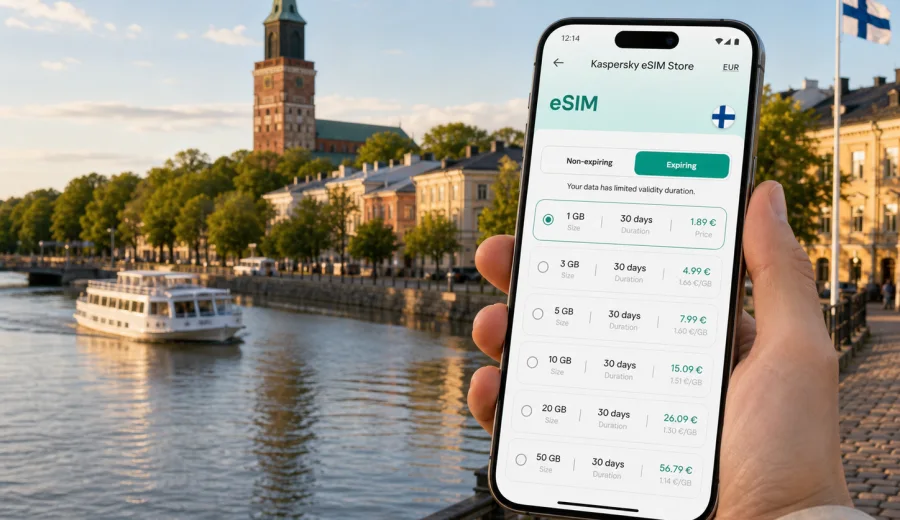
Turku eSIM guide: mobile connection and internet for your trip
Turku is easy to explore when your phone is ready before you start moving. The center is compact, the Aura River gives you a clear line through the city, and many trips begin or end at Turku Airport, the railway station, the bus station, or the Port of Turku. With an eSIM, you can prepare mobile internet for Finland without looking for a physical SIM card after arrival.
This guide is about real Turku travel moments: finding your hotel, checking buses, walking along the river, using maps around the Cathedral and Market Square, working from Kupittaa, boarding a ferry, or continuing to Naantali, Ruissalo, Helsinki, Tampere, or the archipelago. It also explains how to choose an eSIM plan, what to check before purchase, and how Kaspersky eSIM Store fits into setup.
Why mobile internet matters in Turku
Turku is not difficult to navigate, but mobile data becomes important at the exact moments when you do not want friction. You may need to open a boarding message, confirm a hotel code, compare a taxi with a bus, translate a short notice, or share your location with someone waiting near the river.
An eSIM helps because it adds a digital SIM profile to a compatible phone or tablet. You can usually keep your main SIM available for calls or messages while using the eSIM profile for mobile data, depending on your device settings and your home operator's roaming conditions. That is useful in Turku because a single day may include walking, public transport, cafe stops, museum visits, and an evening route back to the hotel.
Turku situations where eSIM is useful
| Travel moment | Why mobile data helps |
|---|---|
| Arrival at Turku Airport | Check bus routes, taxi details, hotel address, and arrival messages before leaving the terminal. |
| Train or bus arrival | Navigate from the station to Market Square, the river, Kupittaa, or your accommodation. |
| Ferry travel | Confirm terminal details, boarding times, onward transport, and messages from other travelers. |
| Aura River walks | Use maps, restaurant bookings, opening hours, and route changes without relying only on Wi-Fi. |
| Business trip | Keep email, calendar, documents, ride options, and meeting details available between venues. |
| Day trips | Plan routes to Ruissalo, Naantali, Helsinki, Tampere, or archipelago connections. |
The main benefit is continuity. Hotel Wi-Fi is useful once you are inside the hotel. Mobile internet is useful while you are between places.
Arrival: airport, station, port, and car
Turku Airport is close to the city, but the first hour can still set the tone for the trip. If mobile data is ready, you can check your route, message the hotel, find a taxi pickup point, and open the booking confirmation without connecting to unfamiliar public Wi-Fi.
If you arrive by train or bus, your first route may lead to the riverfront, Market Square, the Cathedral area, a hotel near the center, or a workplace in Kupittaa. Ferry passengers also benefit from data for boarding information, terminal navigation, taxi arrangements, and onward travel into the city. Drivers use it for parking, hotel access instructions, route changes, and trips beyond Turku.
Getting around Turku with mobile data
Turku is walkable around the Aura River, Market Square, museums, restaurants, and central hotels. Still, a working data connection is helpful because travel plans in Finland often depend on weather, daylight, event schedules, and local transport timing.
Use mobile data for:
- walking directions along the Aura River and between bridges;
- public transport checks before going to Ruissalo, Kupittaa, or the port;
- taxi or ride arrangements after dinner or a late ferry arrival;
- hotel entry codes, apartment check-in messages, and booking apps;
- restaurant reservations, museum times, tickets, messages, and short translations;
- mobile banking and travel confirmations when Wi-Fi is not available.
For a light weekend, maps and messages may use only modest data. For a business trip, remote work day, or family route with multiple phones, usage can grow through cloud files, calls, uploads, and hotspot sharing.
How to choose an eSIM plan for Turku
For a Turku-focused trip, start with coverage. Turku is in Finland, so a Finland plan is the natural choice when your route stays within the country. If the same journey includes Sweden, Estonia, or several European countries, compare a regional plan with a single-country plan.
Then review the plan details:
- data allowance: match it to maps, messages, uploads, work, and media use;
- validity period: cover the full travel window, including arrival and departure days;
- activation terms: check when the validity period starts;
- top-up rules: useful if you may extend the trip or use more data;
- hotspot permission: important if you plan to share data with a laptop;
- device requirements: your phone must support eSIM and must not be restricted by an operator lock.
Light travelers usually need less data for navigation, messaging, and booking checks. Business travelers should allow more, especially if they open cloud files, join video calls, or use a hotspot where the selected plan permits it. Families may prefer separate eSIM profiles for each compatible phone instead of one shared connection.
Data planning by trip type
| Trip style | Typical use | Plan logic |
|---|---|---|
| One-day stopover | Maps, messages, ferry or train details | A small package may be enough. |
| Weekend in Turku | Navigation, restaurant searches, photos, light social media | Choose enough data for the whole stay, not only arrival. |
| Business visit | Email, calendar, files, rides, possible video calls | Choose more data and check hotspot rules. |
| Family trip | Several maps, tickets, messaging, photo sharing | Plan for more total use across devices. |
| Finland route | Turku plus Naantali, Helsinki, Tampere, or the archipelago | Make sure validity covers every travel day. |
| Multi-country route | Finland plus another European country | Compare regional coverage before purchase. |
The best estimate is your heaviest day. A day with navigation, uploads, video meetings, and evening media use needs a different plan from a quiet day of walking and messaging.
Where Kaspersky eSIM Store fits
Kaspersky eSIM Store is an app and website where you can choose, set up, and activate an eSIM with a suitable mobile data plan for a trip abroad. For Turku, the task is to select Finland as the destination, compare conditions, and prepare the eSIM on a compatible device before you need mobile internet in the city.
If your itinerary is based around Turku and other Finnish destinations, you can choose an eSIM plan for your trip to Turku and Finland before departure. Review the data amount, validity period, and destination coverage, then install the eSIM according to your device instructions.
This keeps the process simple: choose the destination, check the plan conditions, install the eSIM profile, and manage the plan through the site or app. It does not replace reading the terms of the selected plan, especially if you need hotspot use, a longer validity period, or coverage beyond Finland.
Device checklist before buying
Before preparing an eSIM for Turku, check the basics. Most setup problems come from device compatibility, operator locks, or plan timing.
- Confirm that your smartphone or tablet supports eSIM.
- Check that the device is not locked in a way that blocks another eSIM profile.
- Update the operating system before travel if you normally delay updates.
- Keep stable internet available for installation, such as home Wi-Fi before departure.
- Read the selected plan conditions: data amount, validity, coverage area, activation timing, and top-up rules.
- Decide which SIM line will handle mobile data and which line will handle calls or SMS.
- Keep the QR code or in-app installation instructions available.
If you are not sure whether your phone supports eSIM, use the compatibility check first: check your device. This is especially important for older phones, carrier-branded phones, and models that vary by market.
Installing eSIM before or after arrival
Many travelers prefer to install the eSIM before departure because home Wi-Fi is stable and there is time to review settings. Activation timing depends on the chosen plan, so read the conditions before you start using mobile data.
A simple setup flow:
1. Check eSIM support and operator lock status.
2. Choose Finland, or a regional option if the route crosses borders.
3. Select data allowance and validity period.
4. Complete the purchase and open the eSIM details in your profile or app.
5. Install the eSIM using the on-screen process or QR code.
6. Set the eSIM profile as the mobile data line when you are ready.
7. Enable data roaming for the eSIM profile if the plan or device instructions require it.
8. Keep your primary SIM from using roaming data unless you intend to use it.
Device steps vary, so use the Android installation guide or the iOS installation guide when setting up the profile. Avoid deleting an installed eSIM unless the plan terms say it can be reinstalled.
First-day Turku checklist
Use this sequence if you want fewer connection decisions after arrival:
1. Install the eSIM before travel while you have stable internet.
2. Save your hotel address, first route, and booking details offline.
3. On arrival, switch mobile data to the eSIM profile when the plan instructions tell you to use it.
4. Confirm transport, check-in details, and messages before leaving the airport, station, port, or parking area.
This is especially helpful for late arrivals, ferry connections, and business trips where you need to move quickly between the hotel and a meeting.
Business trips, hotels, and work days
Turku receives visitors for university work, healthcare, maritime business, technology projects, conferences, and meetings across Southwest Finland. For work travel, choose enough data for email, calendar changes, map searches, authentication prompts, and cloud documents between the hotel and meeting venue. If you plan to connect a laptop, check whether hotspot use is allowed by the selected plan.
Short stays and stopovers
A short stay can be more sensitive to connection problems than a long holiday. If you have one evening in Turku, a ferry transfer, or a same-day meeting, install the eSIM before travel when possible, choose coverage for the full route, and keep hotel details and tickets available offline. A smaller package may cover maps, tickets, messages, and a few searches; choose more if the phone is also your work connection.
Trips from Turku
Turku works well as a base for nearby travel. Naantali is a common short trip, Ruissalo is close to the city, and Helsinki or Tampere can fit into a wider Finland route. Ferry and archipelago travel may add timing and coverage considerations.
Before leaving Turku for another destination, check plan coverage, remaining validity, remaining data, and whether a regional plan is better if you cross into another country.
For travel only within Finland, a Finland plan is usually the clear option. For routes that continue to Sweden, Estonia, or several countries, compare regional coverage before purchase.
How to make your data last longer
- Download offline maps for central Turku, Naantali, and any onward city.
- Turn off cloud photo backup on mobile data.
- Update apps before departure.
- Use trusted hotel Wi-Fi for large downloads.
- Keep maps, messaging, transport, banking, and travel apps enabled for mobile data.
- Check usage after the first active day and spend mobile data on travel tasks that matter: navigation, messages, tickets, bookings, and route changes.
Common mistakes to avoid
Avoid these issues before and during your Turku trip:
- buying before checking eSIM compatibility;
- choosing Finland coverage when the route crosses borders;
- deleting the eSIM profile without checking reinstallation rules;
- leaving mobile data on your primary SIM by mistake;
- forgetting to enable data roaming for the eSIM profile when required;
- assuming the plan includes a local phone number, voice calls, or SMS;
- choosing too little data for hotspot sharing or business use.
Travel eSIM plans are mainly for mobile data. Voice calls, SMS, and a local phone number are included only if the selected tariff says so. Many travelers use messaging and calling apps over mobile data instead.
Turku eSIM FAQ
Do I need a Turku eSIM or a Finland eSIM?
For a city trip, you usually choose the country destination rather than a separate city product. Turku is in Finland, so choose Finland coverage unless your route needs a regional plan.
Can I use an eSIM as soon as I arrive?
You can use it when the eSIM is installed, the correct mobile data line is selected, the plan is active according to its terms, and the device connects to a supported local network. Setup may take a few minutes.
Will an eSIM give me a Finnish phone number?
Usually no. Travel eSIM plans are often focused on mobile data. Calls, SMS, and a local number are included only if the selected plan clearly states that they are.
Prepare your mobile internet for Turku
Turku is easier to enjoy when your phone is ready from the start. Prepare your mobile internet before arrival, keep the plan terms clear, and use the eSIM profile for the moments that matter most: airport transfer, maps, hotel check-in, business messages, ferry timing, and day trips.
Before you travel, choose an eSIM plan for Finland in Kaspersky eSIM Store and set it up on a compatible device for your trip to Turku.