
Travel connectivity guide
Tuzla eSIM for mobile internet travel
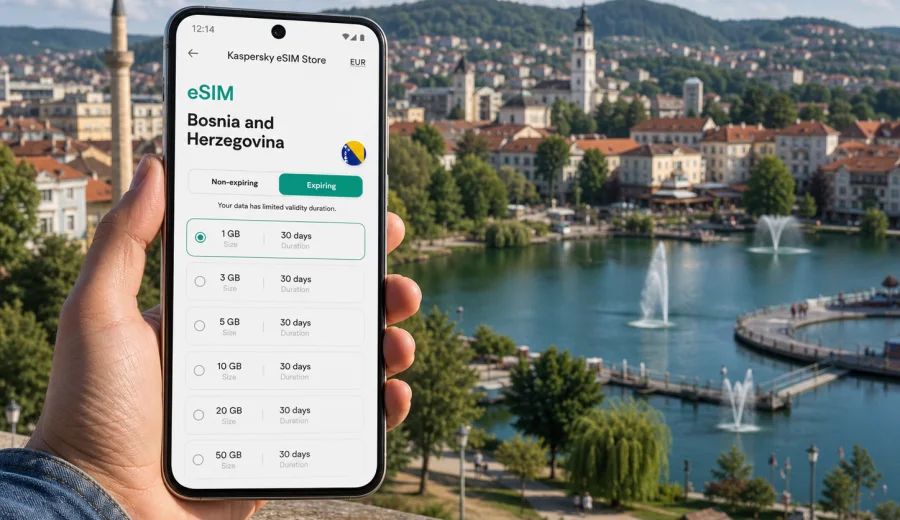
Tuzla eSIM: mobile connection and internet for your trip
Tuzla is a city where mobile internet matters from the first hour of the trip. You may land at Tuzla International Airport, confirm a transfer from Dubrave, open the hotel address, walk through Korzo, visit the Pannonian Lakes, or continue across Bosnia and Herzegovina. An eSIM helps you prepare this connection before arrival, without looking for a physical SIM card after a flight.
This guide is about Tuzla, not a general country overview. Bosnia and Herzegovina is important because the data plan is chosen for the destination country, but the daily use case is local: airport arrival, navigation, taxis, hotels, business meetings, family visits, lake walks, short stopovers, and trips onward from Tuzla.
Kaspersky eSIM Store is an app and website where you can choose, arrange, install, and activate an eSIM with a suitable mobile data plan for an international trip. The useful part for a Tuzla visit is preparation: you can check the plan conditions, install the eSIM on a compatible device, and set mobile data for the travel profile when the trip starts according to the selected plan.
Why mobile internet is useful in Tuzla
Tuzla is compact enough for walking, but travel days still depend on online services. You may need maps while leaving the airport, a message from your host, a taxi pickup point, a booking confirmation, a banking notification, or a translation app. Public Wi-Fi can help in a hotel or cafe, but it is not always available when you are outside with luggage or moving between addresses.
An eSIM can be useful in Tuzla when you need to:
- open maps after landing at Tuzla International Airport;
- message a driver, hotel, host, colleague, or family member;
- check the route from Dubrave to the city center;
- use translation, banking, ride, booking, or weather apps;
- keep boarding passes and hotel vouchers accessible;
- coordinate meetings around Korzo, Trg Slobode, or the Pannonian Lakes;
- continue using mobile data on a wider route through Bosnia and Herzegovina.
Arrival: airport, transfer, and first route
Many visitors reach the region through Tuzla International Airport near Dubrave. Because the airport is outside the city, the first online task is often practical rather than tourist-focused. You may need to confirm a pickup, compare a taxi route, tell reception that you are delayed, or check whether the accommodation address is in the center or a surrounding neighborhood.
| Moment | What you may need online for | Why preparation helps |
|---|---|---|
| Baggage claim | Messages and arrival updates | You can avoid searching for airport Wi-Fi |
| Airport exit | Pickup point and driver contact | You can coordinate while moving |
| Transfer to Tuzla | Maps and address checks | You can follow the route in real time |
| Hotel arrival | Check-in instructions and payments | You stay online before hotel Wi-Fi is available |
If Tuzla is only a stopover, mobile data still has value. A few hours may include a walk in the center, a short visit to the Pannonian Lakes area, a meal near Korzo, or a quick connection to another city. For that kind of visit, maps and messages may matter more than a large data allowance.
Around the city: where data is used
Tuzla travel is often a sequence of small decisions. You may leave a hotel, walk through the pedestrian center, meet someone at a cafe, check the lake area, and return by taxi. Mobile data makes each step easier because you are not tied to the last Wi-Fi network.
Common Tuzla data scenarios include:
- walking routes through the center and nearby streets;
- opening restaurant, museum, lake, or shop information before you go;
- translating menus, signs, short messages, or transport details;
- finding ATMs, pharmacies, coworking spaces, or meeting locations;
- sending live locations in messengers;
- checking weather before spending time around the lakes;
- confirming onward bus, car, or flight plans.
For a short leisure trip, the heaviest data use is often photo upload, video, and social apps. For a business trip, the heavier use may be email attachments, document links, calendar changes, and video calls. The city is the same, but the plan should match the behavior.
Tuzla areas and travel patterns
You do not need to study every district to plan mobile data, but it helps to know how the city is usually used by visitors.
City center and Korzo. This is the easiest area to explore on foot. Mobile data supports walking routes, restaurant searches, translations, and messages. If your hotel is nearby and you use Wi-Fi for uploads, a moderate data allowance may be enough.
Pannonian Lakes. The lakes are one of Tuzla's strongest local reasons to stay online. You may check opening information, find the entrance, share a location, message friends, or order transport afterward. Save large photo backups for Wi-Fi if your data allowance is limited.
Airport and Dubrave route. This is the route where mobile data feels most practical. You may be outside the center, carrying bags, and trying to coordinate transport. Having data ready reduces dependence on public networks at the airport.
Business and university visits. Tuzla can be a business, education, medical, or regional work destination. If you travel for meetings, plan for email, calendars, maps, documents, and possible hotspot use. A plan that works for a tourist weekend may be too small for work.
Trips from Tuzla. Some travelers continue toward Sarajevo, Banja Luka, Mostar, Srebrenik, Gracanica, Bijeljina, or other places in Bosnia and Herzegovina. Choose a plan that covers the full country route and the full validity period, not only the first day in Tuzla.
How much data to choose
Data needs depend on habits more than on the city. Navigation and messaging are light. Video calls, streaming, hotspot use, cloud backup, and large file transfer are heavy. A good plan starts with your itinerary and then adds room for changes.
| Traveler type | Typical use in Tuzla | Planning note |
|---|---|---|
| Stopover visitor | Maps, messages, taxi or transfer | A smaller plan may work if you avoid video |
| Weekend traveler | Maps, restaurant searches, photos, booking apps | Allow for daily navigation and some uploads |
| Family visitor | Messaging, app calls, shared photos | Video calls can increase data use quickly |
| Business traveler | Email, documents, hotspot, calendar updates | Choose more room than a leisure trip needs |
| Multi-city traveler | Tuzla plus other cities in the country | Match the plan to the whole route |
Separate essential use from optional use before the trip. Essential use includes maps, messaging, travel documents, booking apps, banking confirmations, and email. Optional use includes streaming, automatic backups, app updates, and large media uploads. If your allowance is limited, keep optional use for trusted Wi-Fi and reserve mobile data for movement.
Choosing an eSIM plan for Tuzla
For a city article, the right destination is the country where the city belongs. For Tuzla, choose an eSIM plan for Bosnia and Herzegovina and check that the selected plan conditions match your stay, route, and device.
Before you decide, compare:
1. Destination coverage. Bosnia and Herzegovina should be included for the route you need.
2. Validity period. Cover arrival, the stay, and departure, not only full hotel nights.
3. Data allowance. Estimate maps, messages, work apps, calling apps, uploads, and hotspot use.
4. Activation rules. Check when the plan starts and what action activates it.
5. Device support. Your phone or tablet must support eSIM and be able to add another mobile plan.
6. Plan details. Travel eSIM plans for data usually do not include a regular phone number, voice calls, or SMS unless the specific plan says otherwise.
If you want to prepare mobile data before the trip, you can choose a mobile internet plan for Bosnia and Herzegovina and use it for Tuzla if the selected conditions fit your route.
Device compatibility checklist
Check compatibility before payment and before your travel day. Some phones support eSIM only in certain regional versions, and some devices may be locked by a carrier or managed by an employer. An eSIM profile also cannot always be moved freely to another device after activation.
Before you travel:
- confirm that your exact device model supports eSIM;
- check that the phone is not carrier-locked;
- update the operating system if your device recommends it;
- keep your usual SIM active if you need calls or SMS on your regular number;
- make sure you have internet access during installation;
- save the plan details and installation information somewhere you can access offline.
If you are unsure, check your device before choosing a plan. This is especially important for older devices, phones bought in another region, and work phones with management restrictions.
How to install and activate an eSIM
Install the eSIM when you have a stable internet connection, ideally before departure or while connected to trusted Wi-Fi. Activation timing depends on the plan conditions, so read the details before switching the eSIM profile on for mobile data.
A practical setup sequence:
1. Check that your device supports eSIM.
2. Choose Bosnia and Herzegovina as the destination.
3. Select a data allowance and validity period for your Tuzla itinerary.
4. Complete the plan arrangement in Kaspersky eSIM Store.
5. Add the eSIM by following the instructions shown after purchase or by using the QR code if provided.
6. Name the profile clearly, for example "Bosnia data".
7. Set the eSIM as the mobile data line when you are ready to use it.
8. If the device or plan instructions require it, enable data roaming for the eSIM profile.
9. Test maps and a messenger before leaving the airport or hotel.
For detailed setup steps, use the Android installation instructions or the iOS installation instructions. Exact screen names may vary by device model and operating system version.
Keeping data use under control
Before arrival, set your phone so the travel data plan is used for the tasks you actually need while moving.
Useful settings:
- download offline maps for Tuzla and onward routes;
- disable automatic cloud backup over mobile data;
- turn off app updates over mobile data;
- set messengers to download large media only on Wi-Fi if your plan is small;
- save hotel addresses, reservation codes, and emergency contacts offline;
- check that the eSIM is selected for mobile data, not for your usual calls unless that is your intent;
- review which apps can use background data.
Common mistakes to avoid
- Choosing a plan before checking eSIM support on the exact device.
- Activating the plan too early if validity starts at activation.
- Assuming a data eSIM includes a local phone number.
- Letting cloud backup or app updates use mobile data.
- Depending only on public Wi-Fi for airport transfer coordination.
- Forgetting to set the eSIM as the mobile data line.
- Deleting the eSIM profile before the trip is finished.
- Choosing for Tuzla arrival only when the route continues across the country.
If mobile data does not work immediately, check the basic settings first: mobile data line, data roaming for the eSIM profile if required, signal availability, APN instructions if provided, and whether the plan is active. If the issue continues, contact support with your device model, plan details, and the steps already tried.
FAQ
Is there a separate Tuzla eSIM plan?
For a city trip, you usually choose a plan for Bosnia and Herzegovina and use it during your stay in Tuzla. Check the destination, data allowance, validity period, and activation rules.
Can I use eSIM from Tuzla International Airport to the city center?
You can use mobile data after the eSIM is installed, activated according to plan conditions, and connected through your compatible device. This is useful for maps, transfer messages, and hotel check-in details.
Will the eSIM give me a Bosnian phone number?
Travel eSIM plans for mobile data usually do not include a regular phone number, voice calls, or SMS unless the selected plan conditions say otherwise. Many travelers use messengers and calling apps over mobile internet.
Should I activate the eSIM before leaving home?
Install it before travel if possible, but read the plan conditions before activation. Some plans start validity when activated, while others may have different rules.
Is hotel Wi-Fi enough in Tuzla?
Hotel Wi-Fi helps with uploads, streaming, and long calls. Mobile data is still useful for airport transfer, maps, messages, banking confirmations, and changes while you are outside.
Prepare mobile internet for Tuzla
Before you leave, treat mobile internet like transport and accommodation: check it early. Confirm device compatibility, choose a data allowance for your route, install the eSIM with a stable connection, and keep your usual SIM settings clear.
Think in real situations: landing at Tuzla International Airport, reaching the city center, walking around Korzo, visiting the Pannonian Lakes, messaging during meetings or family visits, and continuing through Bosnia and Herzegovina. That makes it easier to choose a plan that fits the trip instead of guessing.
When you are ready to prepare travel data, select an eSIM plan for Bosnia and Herzegovina in Kaspersky eSIM Store, install it on a compatible device, and keep your Tuzla arrival day simpler.