
Travel connectivity guide
Ubud eSIM: mobile internet for Bali travel
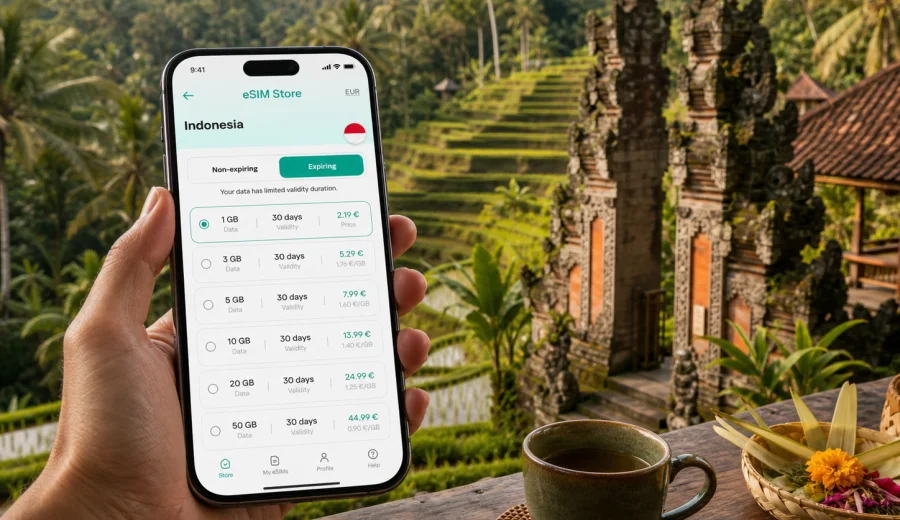
Ubud eSIM: mobile connection and internet for your trip
Ubud is a city where travel plans often depend on small, moving details: a driver waiting outside the airport, a villa entrance hidden on a narrow lane, a cafe booking, a rice terrace route, a sudden rain shower, or a work message that cannot wait until you return to the hotel. For these moments, mobile connection and internet access are practical travel tools, not just extras.
An eSIM helps you prepare mobile internet for Indonesia without looking for a physical SIM card after arrival. You can choose a suitable tariff before the trip, install the eSIM on a compatible phone, and use it for maps, transport chats, hotel messages, translation, bookings, and daily navigation around Ubud.
This article is about Ubud rather than a general Indonesia trip. The country matters because the tariff must cover Indonesia, but the real use cases are local: landing in Bali, riding inland to Ubud, moving between districts, staying in villas, visiting temples and rice terraces, working from cafes, and making day trips from the city.
Why eSIM is useful in Ubud
Ubud is compact in some places and spread out in others. The center around Ubud Palace, Ubud Art Market, Jalan Raya Ubud, and Jalan Monkey Forest is busy and walkable in parts. Many hotels, villas, retreats, galleries, yoga studios, restaurants, and viewpoints sit outside that central area in Penestanan, Sayan, Nyuh Kuning, Peliatan, Mas, Tegallalang, and nearby villages.
That geography makes mobile data useful because written addresses are not always enough. A driver may ask for a live location. A villa host may send a map pin. A tour pickup point may change because of traffic or rain. A restaurant entrance may be easier to find by navigation than by street number.
| Ubud travel moment | How mobile internet helps |
|---|---|
| Airport transfer | Share the villa address, track the route, and message the driver. |
| First walk in the center | Use maps, find ATMs, check opening hours, and avoid wrong turns. |
| Staying outside town | Send location pins and arrange pickup after dinner or a class. |
| Rice terrace or temple visit | Open booking details, translate short messages, and adjust pickup time. |
| Remote work | Keep a backup connection for messages and short calls if Wi-Fi is unstable. |
| Family or group travel | Coordinate when people split up for different plans. |
eSIM is especially helpful when you arrive tired. Instead of making mobile setup your first errand in Bali, you can prepare the data connection while still on reliable Wi-Fi at home, then switch the eSIM line on when you are ready to use it.
Arrival from Bali airport to Ubud
Most international travelers reach Ubud after landing at Bali's main airport near Denpasar. The road trip to Ubud often takes around one and a half to two and a half hours, depending on traffic, weather, time of day, and the exact location of your accommodation. That first transfer is one of the clearest reasons to prepare mobile internet in advance.
Before leaving the terminal, you may need to:
1. Confirm your driver, shuttle, or ride-hailing pickup.
2. Send the full hotel or villa name exactly as it appears in the booking.
3. Share your live location if the pickup area is crowded.
4. Tell the host if immigration, baggage claim, or traffic delays your arrival.
5. Check the route if your accommodation is outside central Ubud.
If you install eSIM before departure, read the selected tariff terms carefully. Some tariffs can be installed in advance, while activation timing and validity depend on the tariff conditions. If you prefer to install after landing, make sure you have stable Wi-Fi available and enough time before the transfer.
Before choosing any eSIM tariff, check whether your device supports eSIM. The phone also needs to be free of restrictions that would prevent adding another mobile data profile.
Ubud districts and local movement
Your data needs depend on where you stay. Central Ubud is convenient for walking, restaurants, shops, and cultural stops, but traffic and footpath conditions still make maps useful. Penestanan and Sayan are popular for villas and retreats, so messaging drivers and sending pins can be more important. Nyuh Kuning and Monkey Forest areas combine guesthouses, cafes, and busy pickup points. Tegallalang, Mas, and nearby villages are common for rice terraces, craft routes, and day trips.
Mobile internet helps most when plans shift:
- the driver cannot find the small villa entrance;
- a road through the center is slow and you need another route;
- your group separates between a market, a cafe, and a gallery;
- rain changes the walking plan;
- a tour guide sends a new pickup point;
- your hotel asks for arrival time or passport details through a secure check-in flow.
Ubud feels calm, but its logistics are active. Keeping mobile data ready gives you more control over those small changes.
How much data to plan for Ubud
There is no universal data amount for every traveler. A short visitor who mostly uses maps and messages needs less than a remote worker, a family sharing photos, or someone using video calls. Think about how you will actually use the phone each day.
| Traveler type | Typical Ubud use | Planning tip |
|---|---|---|
| Light visitor | Maps, messages, restaurant searches | A smaller package may fit a short stay. |
| Active tourist | Navigation, bookings, translation, photo sharing | Choose more data if you move around daily. |
| Remote worker | Email, documents, calls, hotspot backup | Use Wi-Fi for heavy tasks and keep eSIM as backup. |
| Family traveler | Several phones, transport, shared plans | Consider whether each traveler needs separate data. |
| Long-stay guest | Regular transport, banking, coworking, calls | Match both data volume and validity to the full stay. |
To make a tariff last longer, download offline maps for central Ubud and your accommodation area, pause cloud photo backup on mobile data, turn off automatic app updates, and limit video autoplay. Use hotel or cafe Wi-Fi for large uploads and streaming when it is reliable.
Choosing an eSIM tariff for Ubud
For Ubud, choose a tariff that covers Indonesia. If your route is only Bali, an Indonesia tariff is the natural option to check. If the same journey includes Singapore, Malaysia, Thailand, Australia, or another country, compare whether a country tariff or a regional option better matches the whole route.
When comparing tariffs, focus on four points:
1. Destination: Indonesia must be included for Ubud and Bali.
2. Data volume: match it to maps, messaging, calls, work, and sharing habits.
3. Validity: cover arrival, departure, and any extra days in Bali.
4. Activation terms: understand when the validity period and data use begin.
Kaspersky eSIM Store is an app and website where you can choose, arrange, and activate an eSIM with a suitable mobile data tariff for an international trip. It helps you compare the destination, data volume, validity period, and price before you decide. For Ubud, you can review mobile internet options for Indonesia and choose the tariff that fits your dates and route.
This is useful even if your hotel has Wi-Fi. The most important data moments often happen away from the hotel: in the car from the airport, on a side street, near a rice terrace, outside a restaurant, or while coordinating with someone who is already waiting.
Installing eSIM before departure or after arrival
Installing eSIM before departure is often the most comfortable option because you can use stable home Wi-Fi and avoid airport pressure. After choosing a tariff, follow the installation flow for your device. If you need device-specific steps, use the Android eSIM installation guide or the iOS eSIM installation guide.
Preparation checklist:
- Confirm that your smartphone supports eSIM.
- Check that the phone is not locked to one mobile operator.
- Keep your regular SIM active if you need calls or SMS on your usual number.
- Install the eSIM profile on Wi-Fi if the tariff terms allow it.
- Name the lines clearly, for example Home SIM and Indonesia eSIM.
- After arrival, select the eSIM as the mobile data line when you are ready.
- If the setup instructions require data roaming for the eSIM profile, enable it only for that profile.
Travel eSIM tariffs usually focus on mobile data. A local phone number, voice calls, and SMS are not included unless the selected tariff clearly states otherwise. For calls and messages, many travelers use internet-based apps after mobile data is active.
Transport, hotels, and work scenarios
Ubud transport can include private drivers, hotel shuttles, scooters, walking routes, tour pickups, and ride-hailing in areas where pickup is available. Mobile internet helps because plans often change in small ways during the day. You may need to send a live location, compare routes through traffic, translate a short message, or confirm that a driver has the correct entrance.
Accommodation is another reason to keep mobile data ready. Many Ubud hotels, villas, and retreats offer Wi-Fi, but quality can vary by room location, router load, weather, and the number of guests online. eSIM mobile data is not a full replacement for every hotel connection, but it can be a useful backup for check-in messages, maps, banking prompts, transport chats, and short work tasks.
If you are working from Ubud, treat connectivity as a plan rather than a hope:
| Need | Practical preparation |
|---|---|
| Video meetings | Use fixed Wi-Fi first and keep mobile data as backup. |
| Two-factor authentication | Test app-based codes before travel and keep your main SIM if needed. |
| Client messages | Make sure key messengers work over mobile data. |
| Large files | Download before travel and avoid cloud sync over mobile data. |
| Venue changes | Save addresses, driver contacts, and meeting points offline too. |
For work trips, eSIM value is often continuity. You may not use it for every large task, but it can keep you reachable between a villa, coworking space, restaurant, and transfer.
Day trips and short stays from Ubud
Ubud is a common base for rice terraces, temple routes, craft villages, waterfalls, viewpoints, and transfers across Bali. Mobile data becomes more valuable once you leave the most familiar streets and depend on pickup times, map pins, and route changes.
Useful Ubud-based scenarios include:
- Tegallalang rice terraces and cafes north of town;
- Tirta Empul and routes toward Tampaksiring;
- craft stops around Mas and nearby villages;
- transfers toward Kintamani, Sidemen, Sanur, Canggu, or the airport;
- a one- or two-night stay between coastal hotels and inland day trips.
For a short stopover, prepare mobile internet before the first transfer. A compressed schedule leaves little time to solve setup issues later. Save booking confirmations, hotel contacts, and offline maps in advance, then use mobile data for the parts of the trip that change in real time.
Data-saving tips for Ubud
Use these habits to keep mobile internet predictable:
1. Download offline maps before long day trips.
2. Save your hotel name, address, and nearby landmark in notes.
3. Turn off automatic app updates on mobile data.
4. Pause cloud photo and video backup until Wi-Fi is available.
5. Send compressed images in messengers when possible.
6. Use Wi-Fi for large uploads, streaming, and software updates.
7. Carry a power bank on full-day routes because navigation drains battery.
8. Check remaining data in the app or profile area when available.
If several people travel together, decide whether one connected phone is enough. For a quick walk, it may be. For separate plans, different transport, or independent bookings, each traveler having their own mobile data can be more practical.
FAQ: eSIM and mobile internet in Ubud
Do I need an Indonesia eSIM for Ubud?
Yes. Ubud is in Bali, Indonesia, so the tariff should include Indonesia. If your trip includes other countries, compare country and regional options.
Can I rely only on hotel Wi-Fi?
Hotel Wi-Fi may be enough for some tasks, but mobile data is useful during transfers, walks, day trips, pickups, and any moment when you need maps or messages away from the property.
Does travel eSIM include calls and SMS?
Usually it focuses on mobile data. A phone number, calls, and SMS are included only if the selected tariff clearly says so. Internet-based calling and messaging apps can work over mobile data.
Can I use eSIM as a hotspot?
Hotspot use depends on your device settings and tariff conditions. If you plan to share data with a laptop or another phone, choose data volume carefully.
Prepare mobile internet for Ubud before you travel
Ubud rewards flexible travel. You may change plans because of traffic, rain, a late pickup, a cafe recommendation, or a longer stop at a terrace. A prepared eSIM helps keep those changes manageable.
Before the trip, check device compatibility, compare the data volume and validity period, install the eSIM on Wi-Fi if appropriate, and keep the Indonesia tariff ready for arrival. When your dates and route are clear, choose an eSIM tariff for your trip to Ubud in Indonesia and set up mobile internet before your transfer, hotel check-in, or first day trip depends on it.