Travel connectivity guide
Udaipur eSIM: Mobile Internet for Your Trip
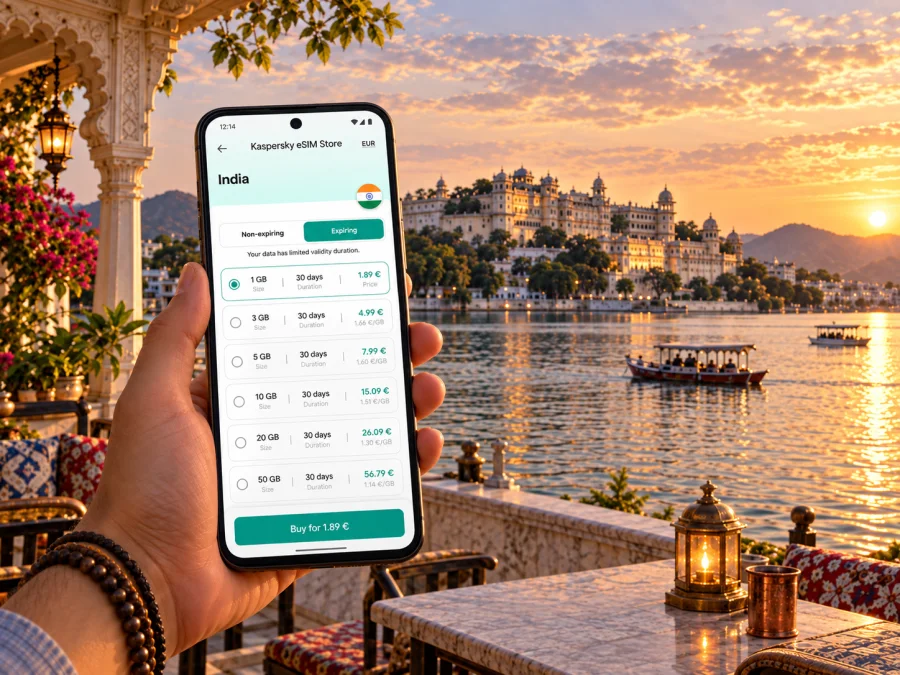
Udaipur eSIM: Mobile Connection and Internet for Your Trip
Udaipur is a city best explored in stages. The first view may be Lake Pichola and the palaces along its edge; the next could be a lane in the old city, a café near a ghat, or the open stretch around Fateh Sagar. Between those places, you may need to confirm a hotel address, coordinate a pickup, check a route, or message someone that your plans have changed. Mobile internet makes these everyday transitions easier to manage.
An eSIM can be useful if your phone supports it and you want to arrange mobile data before travelling. It is a digital SIM profile installed on a compatible device, so there is no physical card to collect or insert. Kaspersky eSIM Store is an app and website where you can choose, purchase and activate an eSIM with a suitable plan for mobile internet on an international trip. Data allowance, validity, destination and activation conditions depend on the specific offer, so review its details before you travel.
Why mobile data helps in Udaipur
Udaipur’s main sights are spread across distinct areas rather than one straight corridor. Lake Pichola, the City Palace and the compact old-city lanes form one cluster; Fateh Sagar, Saheliyon-ki-Bari and Shilpgram sit in other parts of the city. A day may involve walking within one area and taking a vehicle to another. Maps, booking details and messages help connect those parts of the itinerary.
Mobile data is useful for practical tasks between stops:
- opening a saved map when you are unsure which lane leads back to your hotel;
- confirming a pickup point or sharing your location with a driver or companion;
- checking a reservation, check-in time or meeting address;
- translating a short message or viewing information sent by a venue;
- checking onward travel details away from your accommodation;
- using internet messaging or calls when your services support them.
A travel eSIM is commonly intended for mobile data; do not assume it includes a regular phone number, voice calls or SMS unless the offer explicitly says so. Keep your usual SIM available if you need its number and check how your phone handles data and roaming before departure.
Arriving in Udaipur
Maharana Pratap Airport serves Udaipur and is outside the central lake area. You will still need to travel into the city, with journey time depending on your destination, traffic and conditions. Before leaving the terminal, confirm your accommodation’s address and entrance. Some old-city properties are reached through narrow lanes or pedestrian areas, meaning a vehicle may only reach a nearby drop-off point. Ask the property where to meet a driver or unload luggage.
If you arrive by train, save the hotel’s full address and contact details in advance. A nearby landmark can help if a driver needs clarification. A map pin is useful, but a written address helps if GPS places you on the wrong side of a building or road.
Arrival checklist
- Save your hotel address, reservation and check-in details for offline access.
- Confirm whether the property has a recommended pickup point, especially in the old city.
- Keep pickup instructions in a note or screenshot.
- When you have data, check that the map pin matches the property name and entrance.
- Message the property if your arrival time changes.
If you arrive late or with several bags, reach a clear drop-off point first and ask the accommodation for the simplest final approach. A map cannot confirm local access arrangements.
Getting around: plan by neighbourhood
The old city around Lake Pichola is rewarding to explore on foot, but its lanes can be narrow, busy and winding. The shortest line on a map may lead to steps, a restricted entrance or a lane unsuitable for vehicles. Use navigation for orientation, look for signs and landmarks, and confirm the final approach with your hotel or host.
For farther points, visitors commonly arrange a taxi, auto-rickshaw or other local transport. The best choice depends on distance, weather, luggage and time of day. Agree on the destination and fare or booking terms before setting off where applicable. If you use a ride-booking app, check its availability and make sure the pickup pin is accessible from the street. A car may not reach a pin placed inside a pedestrian lane.
| Part of the visit | Navigation tip | Preparation |
|---|---|---|
| Old city and Lake Pichola | Save map pins and a nearby landmark | Ask the property for a practical vehicle drop-off point |
| City Palace and nearby sights | Confirm the entrance and meeting point | Save tour details if you have booked one |
| Fateh Sagar | Set a destination and return point | Confirm where your driver will wait or collect you |
| Saheliyon-ki-Bari | Save a separate pin for each stop | Group nearby places to reduce backtracking |
| Shilpgram and the outskirts | Arrange onward transport | Confirm a return pickup before leaving the centre |
Download an offline map of the central area before you leave, particularly if you expect to walk through the old city or spend time beyond the centre. Keep your hotel address written down as well; a battery, signal or map service can fail at an inconvenient moment.
Choosing accommodation and planning data use
Where you stay affects how often you need transport. A base near the old city can put you close to Lake Pichola and the City Palace; a stay farther away may offer easier vehicle access but require more journeys. Check the exact entrance road and ask the property about gates, pickup points and the final walk with luggage.
Estimate data from your routine:
- Light use: messaging, occasional maps and booking details.
- Regular use: frequent navigation, browsing and photo sharing.
- High use: video calls, streaming, cloud uploads or hotspot use.
These are planning prompts, not a guarantee. App settings and background activity affect consumption. Review data use on your phone, download large files over Wi-Fi and ask your accommodation about Wi-Fi if you expect to work remotely.
Choosing an eSIM plan for the trip
An eSIM may help with data after landing, a late check-in, navigation between the lakefront and a meeting, or reducing reliance on public Wi-Fi. Before choosing an offer for India, compare its stated destination coverage, data allowance, validity, price and activation conditions. If Udaipur is one stop on a longer route, check whether the plan suits all your destinations. Review the country destination and offer terms rather than expecting a city-specific plan.
You can compare eSIM options for a trip to India in Kaspersky eSIM Store and choose an offer based on your expected usage. Read the conditions and setup instructions. The app and website help you choose, purchase and activate an eSIM plan; the mobile service is provided through the arrangements described in the selected offer.
Estimate usage from a typical day: maps for several rides, photo uploads, video meetings, or hotel Wi-Fi for larger tasks? Compare the allowance and validity, and check any fair-use limit, speed condition or activation window. There is no allowance that suits every visitor. Keep purchase and installation details accessible offline.
| Travel pattern | Check before selecting |
|---|---|
| Short break | How often will you use maps or upload photos? |
| Multi-city trip | Does the offer cover each destination? |
| Work trip | Can confirmed hotel Wi-Fi handle video meetings? |
| Stopover | When does validity begin and how long will you stay? |
Set up before your flight
Follow the setup instructions for your device and selected offer; screens vary by phone and operating system. Check whether installation and activation are separate, and when validity begins.
- Check your phone. Confirm eSIM support and that the device is not carrier-locked. Check whether your device supports eSIM before purchasing.
- Choose an offer. Confirm India is included and review allowance, validity and activation terms.
- Install over a stable connection. Follow the offer instructions and keep confirmation details.
- Label your lines. Use a clear name such as “Travel data” to distinguish the eSIM from your regular SIM.
- Review settings. Choose the line for mobile data and check roaming settings against the instructions.
- Test after arrival. Activate as directed and confirm mobile data uses the travel eSIM.
Use the Android eSIM installation guide or the iPhone eSIM installation guide for device steps. Many travel eSIM offers are data-focused and do not include a regular number, voice calls or SMS. Keep your usual line for calls or verification if needed, and check your carrier’s terms for using it abroad.
Staying online while exploring
Save your accommodation, a nearby landmark, the next stop and a practical return point in your maps. Around Lake Pichola, the last few hundred metres can be confusing: a map may direct a vehicle to a street while the entrance lies down a narrow lane. Ask your accommodation to confirm the final turn and share a nearby landmark if a driver cannot reach the pin.
Before leaving Fateh Sagar, Shilpgram or another stop away from your hotel, agree on how you will return and save the pickup details. Download maps and reservations over Wi-Fi, limit automatic photo backups if needed, and keep the hotel address in a note as well as a map app. Carry a charged phone or small power bank for a full day out.
Business trips and short stopovers
For a work itinerary, save the office, hotel, venue entrance and meeting contact before travelling. If a conference or event venue is outside the central area, confirm its exact gate and pickup arrangement; large properties can have more than one entrance. Allow a buffer for the journey and share your estimated arrival time if it changes.
For a one-night stopover, keep the plan simple. Choose one or two places that fit the time available, check the route before leaving the hotel, and do not assume a destination will be quick to reach because it looks close on the map. Mobile data helps with live coordination, but leave room for traffic, queues and the final walk.
If you need to join a video meeting, test your setup before relying on mobile data. Ask about your accommodation’s Wi-Fi, check whether your eSIM offer suits your intended use, and identify a quieter backup location. Do not assume hotspot use or a particular speed is included; check the plan terms and device settings.
Day trips from Udaipur
Udaipur can be a base for visiting places elsewhere in the region. A travel day may involve an early departure, a long road journey or a return after dark, depending on the destination and arrangements. Confirm transport and timing with your provider, save pickup details, and download maps or tickets before setting out. Check the eSIM offer’s stated coverage if your route leaves the city.
Rajasthan Tourism places Shilpgram around seven kilometres west of Udaipur near Fateh Sagar and lists regional destinations such as Kumbhalgarh, Ranakpur, Nathdwara and Chittorgarh. Distances and journey times vary by route, traffic and starting point, so check current directions before planning. For a trip beyond Udaipur, a country-level India plan may be relevant; confirm the selected offer’s coverage rather than assuming it.
Before a day trip
- Confirm the departure point and return time with your driver, tour or transport provider.
- Save the destination and hotel pins, plus an offline map for the route.
- Keep tickets and key contact details available offline.
- Check the eSIM’s destination terms if travelling beyond Udaipur.
- Bring a charging cable or power bank.
Common questions
Will an eSIM work everywhere in Udaipur?
Coverage depends on the offer, associated networks, device and local conditions. Do not assume service at every indoor location, lane or route. Review the offer and keep essential information offline.
Can I use an eSIM for maps and messaging?
A data-focused plan can support internet services such as maps, browsing and messaging, subject to its terms and your phone settings. Check that India is included and review the allowance.
Does an eSIM include a local phone number?
Not necessarily. Many travel offers provide data without a regular number, calls or SMS. Check the offer description and your existing carrier’s terms if you need your usual number abroad.
Should I install before travelling?
You can prepare it in advance if the instructions allow. Check whether installation starts validity or activation happens later, and keep the instructions accessible.
What if my hotel is in a narrow lane?
Ask for a vehicle drop-off point and a landmark for the final walk. Save directions offline; a map pin does not show whether a vehicle can reach the entrance.
How much data should I choose?
Estimate from your use. Maps and messaging generally need less data than frequent video calls, streaming or cloud uploads. Compare the offer’s allowance and validity, then monitor usage.
Prepare for your Udaipur visit
Before travelling, save your accommodation details, check the route from your arrival point, and decide how you will move between the old city, Lake Pichola and other stops. Confirm eSIM support on your phone and review the offer conditions, including data and validity. Keep essential maps and addresses offline, use data for coordination, and confirm pickup points.
When you are ready, use Kaspersky eSIM Store to compare, purchase and activate an eSIM plan that fits your travel needs. Choose an eSIM plan for your trip to India and review its allowance, validity and activation instructions before you leave. Preparation leaves more time to enjoy Udaipur’s lakeside walks and old-city lanes.


