
Travel connectivity guide
Uganda eSIM for mobile internet
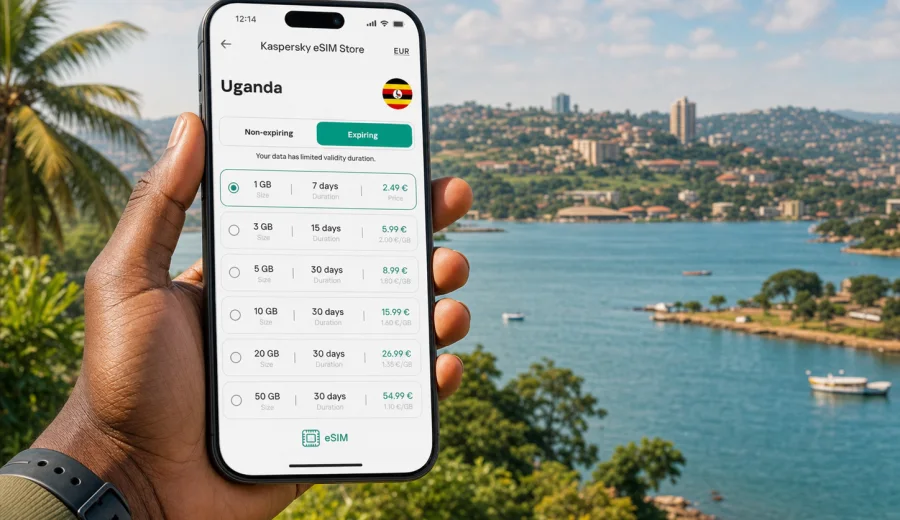
eSIM for Uganda: mobile connection and internet for your trip
Uganda is a country where mobile internet quickly becomes part of the journey, not just a convenience. You may need maps in Kampala, ride-hailing at Entebbe International Airport, messaging on the way to Jinja, hotel confirmations near Lake Victoria, or a stable data connection before an early transfer to a national park. A physical SIM card can work for some travellers, but it also means looking for a shop, comparing unfamiliar offers, and setting up mobile data after arrival. An eSIM gives you another route: prepare a digital SIM profile before the trip and use it for mobile internet on a compatible device.
This guide explains how to think about eSIM for Uganda in practical terms: when it is useful, what to check before buying a tariff, how to estimate your data needs, and how to install and activate eSIM without turning the first day of travel into a technical task. The focus is the whole country, not one city, because mobile internet habits change as you move between Kampala, Entebbe, Jinja, Mbarara, Fort Portal, Gulu, lake areas, business districts, and rural routes.
Why eSIM is useful in Uganda
For many travellers, the first connection matters most. You land, open your phone, and need transport, messages, a booking reference, or a map. If you already have an eSIM profile prepared, you can avoid depending only on airport Wi-Fi or on finding a local SIM counter immediately.
An eSIM is a digital SIM profile built into a compatible smartphone or tablet. It can be installed without inserting a physical card. In the context of travel, it is mainly used for mobile data. Unless the conditions of a specific tariff say otherwise, you should not treat it as a replacement for a local phone number, regular voice calls, or SMS. For calls and messages, many travellers use internet-based apps through the data connection.
An eSIM can be especially useful in Uganda if you:
- want mobile data ready before leaving the airport;
- plan to move between several regions and do not want to spend time searching for SIM shops;
- need internet for maps, transfers, email, messaging, and bookings;
- prefer to keep your home SIM active for banking codes or incoming messages;
- want to see data volume, validity period, destination, and price before choosing a tariff;
- travel for work and need a predictable setup process.
It is still important to stay realistic. Mobile coverage and speed depend on the local network, location, terrain, device, and the selected tariff conditions. A prepared eSIM reduces setup friction, but it does not turn every remote area into a high-speed zone.
Uganda travel scenarios where mobile data helps
Uganda trips often combine city time, road transfers, nature routes, and days with early starts. That makes mobile data planning more important than simply asking whether you will have internet in a hotel.
| Travel situation | Why data matters | Practical note |
|---|---|---|
| Arrival in Entebbe | Transport apps, messages, hotel address, flight updates | Install eSIM before departure so setup is not the first task after landing |
| Kampala meetings | Maps, email, calendars, document access | Choose a data volume that supports work apps and navigation |
| Jinja and Nile activities | Messaging, location sharing, booking updates | Download key addresses offline in case signal changes by area |
| Safari or park transfers | Communication with drivers and lodges | Expect uneven signal on rural roads and keep essential details saved offline |
| Lake Victoria routes | Maps, photos, messaging | Use Wi-Fi for large uploads when available |
| Longer multi-region trip | Repeated navigation and planning | Consider a larger data package or a validity period that covers the whole stay |
The point is not to stay online every minute. The goal is to have enough mobile internet for the moments when it removes friction: confirming a pickup, checking a route, sending an update, or opening a booking when Wi-Fi is not available.
Before you choose an eSIM tariff for Uganda
The most useful eSIM is the one that fits your actual itinerary. A short stopover in Entebbe does not need the same setup as a two-week route through Kampala, Jinja, western Uganda, and several lodges.
Check these points before you buy:
1. Confirm that the tariff includes Uganda or the correct regional destination.
2. Check the data volume in GB and compare it with your normal travel usage.
3. Review the validity period and make sure it covers your arrival and departure dates.
4. Read when the validity period starts: at installation, activation, or first network connection, depending on the tariff conditions.
5. Check whether top-up is available if you use the data faster than expected.
6. Make sure your device supports eSIM and is not locked to one mobile operator.
7. Keep installation details available before travel, especially if you will be offline during transit.
Quick data estimate
Data use varies, but these ranges can help you choose more calmly:
- Light use: messaging, maps, email, web search, occasional ride-hailing. A smaller package may be enough for a short stay.
- Standard travel use: maps every day, photos shared in messaging apps, bookings, restaurant searches, and some social media. A medium package is usually more comfortable.
- Work or heavy use: video calls, cloud documents, frequent uploads, hotspot use, or long days outside Wi-Fi. Consider a larger package and watch your balance.
Video streaming, cloud backup, app updates, and high-resolution photo or video uploads can use data quickly. If you want the eSIM to last for the full trip, set your phone to update apps only on Wi-Fi and disable automatic media downloads in messaging apps.
Device compatibility comes first
Before buying any eSIM tariff, check that your phone or tablet can use eSIM. Support depends on the model, region of sale, and carrier lock status. Some devices with similar names may differ by market, so it is better to check the exact model rather than assume.
Use the internal compatibility check before purchase: check your device. Also confirm that your device is not locked to a single operator. If it is locked, adding a travel eSIM may not work even if the hardware supports eSIM.
The most common compatibility checks are:
- your device supports eSIM in its technical specifications;
- the eSIM function is enabled for the device variant sold in your region;
- the phone is not carrier-locked;
- the operating system is up to date enough to add a mobile plan;
- you have a stable internet connection for installation.
Do this before the trip, not in the arrival hall. If something needs an operating system update or account verification, it is easier to solve at home.
How to prepare mobile internet before your flight
Good eSIM preparation is mostly a checklist. You do not need to be technical; you just need to complete the steps in the right order.
1. Check that your device supports eSIM and is unlocked.
2. Choose Uganda as the destination and review available tariff conditions.
3. Select a data volume and validity period that fit your itinerary.
4. Complete the order and keep the eSIM details available.
5. Install the eSIM while you still have reliable Wi-Fi.
6. Label the eSIM in your phone settings, for example "Uganda data".
7. Keep your home SIM selected for calls or SMS if you need it.
8. Set the travel eSIM as the mobile data line when you are ready to use it.
Kaspersky eSIM Store is an app and website where you can quickly choose, arrange, and activate an eSIM with a suitable tariff for mobile internet in an international trip. It helps you compare the practical details that matter before travel: destination, data amount, validity period, and price.
For a Uganda trip, you can choose an eSIM tariff for Uganda before departure and keep the setup ready for arrival. This is especially useful if your first day includes a transfer from Entebbe, a late hotel check-in, or a route where you do not want to search for Wi-Fi before contacting someone.
Installing eSIM on Android or iOS
The installation flow depends on your device, but the general idea is the same: add an eSIM profile, confirm it in mobile settings, and choose when to use it for data. You usually need an internet connection to install the profile, so do this on Wi-Fi before travel if possible.
For detailed steps, use the official instructions for your device type: Android installation guide and iOS installation guide.
A typical installation process looks like this:
1. Open the eSIM details after completing your order.
2. Add the eSIM by QR code or manual details, depending on the available method.
3. Confirm the new mobile plan in your phone settings.
4. Give the line a clear name so you do not confuse it with your home SIM.
5. Keep your primary SIM for calls and messages if needed.
6. Select the eSIM for mobile data when you want to start using it.
7. Enable data roaming for the eSIM if the tariff instructions require it.
8. Wait a few minutes for the phone to register on the local network after arrival.
Do not delete the eSIM profile after installation unless you are sure you no longer need it. In many cases, a used or removed eSIM profile cannot simply be moved to another device.
When should you activate eSIM for Uganda?
Installation and activation are not always the same thing. You may be able to install the profile before the trip and start using data later, but the exact start of validity depends on the selected tariff conditions. Read the instructions before you scan the QR code or add the profile.
There are three common timing models:
- validity starts when the eSIM connects to a supported network;
- validity starts when you install or activate the profile;
- validity is tied to a fixed period described in the tariff conditions.
If your trip is short, timing matters. You do not want to start a 7-day validity period too early if you are still at home or in transit. If your trip is long, choose a validity period that covers not only the first day but also the return journey, especially if you need data for airport transfers.
How much data to choose for Uganda
The right data volume depends less on the country and more on your habits. Uganda routes can include long road transfers, navigation, photo sharing, and coordination with drivers or lodges, so it is worth choosing with some margin.
| Trip style | Typical online activity | What to consider |
|---|---|---|
| Short business visit | Email, maps, messaging, ride-hailing | A smaller or medium package may work if hotel Wi-Fi covers heavy tasks |
| Weekend or stopover | Airport transfer, maps, chat, bookings | Prioritise easy setup and enough data for arrival and departure |
| One-week holiday | Daily maps, searches, messaging, photo sharing | Medium data volume gives more room for normal travel use |
| Multi-region itinerary | Routes, lodge coordination, weather checks, calls through apps | Larger volume and longer validity are usually more comfortable |
| Remote work | Video calls, cloud files, hotspot | Estimate carefully and use Wi-Fi for heavy sessions when possible |
To control usage, turn off automatic backups, app updates, and video autoplay on mobile data. Download offline maps and important documents before leaving. If you use hotspot mode, remember that laptops can consume data much faster than phones.
eSIM compared with roaming, Wi-Fi, and a local SIM
There is no single best option for every traveller. The right choice depends on how much time you have, how predictable you want the setup to be, and how much mobile data you need.
| Option | Advantages | Trade-offs |
|---|---|---|
| Travel eSIM | Can be prepared before travel, no physical SIM swap, clear data and validity terms | Requires a compatible unlocked device and careful reading of tariff conditions |
| Home operator roaming | Uses your existing number and settings | Pricing and data limits may be less suitable for longer trips |
| Public Wi-Fi | Useful for large downloads and hotel work | Availability and quality vary; not ideal as your only connection |
| Local physical SIM | Can suit longer stays or local number needs | Requires buying and setting up a physical card after arrival |
Many travellers combine options: eSIM for arrival, maps, and daily movement; hotel Wi-Fi for large uploads; home SIM for incoming SMS when needed. That mix often gives more control than relying on one connection method for every situation.
Practical tips for staying online in Uganda
Small settings can make a big difference to how long your data lasts and how smoothly the eSIM works.
- Save your hotel address, driver contact, and booking numbers offline.
- Download offline maps for Kampala, Entebbe, Jinja, and any longer road route.
- Turn off automatic photo and video backup on mobile data.
- Disable app updates on mobile data before the trip.
- Keep the eSIM QR code or installation details available in a secure place.
- Label your eSIM line clearly in mobile settings.
- Check which SIM is selected for mobile data before you leave Wi-Fi.
- Restart the phone if the eSIM does not register after arrival.
- Keep a small data reserve for the return transfer and airport day.
If you travel with another person, do not assume one phone can cover everyone through hotspot for the whole trip. Hotspot use drains battery and data quickly. For work trips or group travel, each key traveller should have a clear plan for mobile data.
Uganda eSIM FAQ
Can I use eSIM in Uganda for mobile internet?
Yes, if your device supports eSIM, is unlocked, and you choose a tariff that includes Uganda. Always read the tariff conditions before purchase because data volume, validity, activation timing, and availability depend on the selected option.
Does travel eSIM include a Ugandan phone number?
Usually no. Travel eSIM tariffs for mobile internet normally focus on data. Regular voice calls and SMS are not included unless this is clearly stated in the tariff conditions. You can use messaging and calling apps over mobile data.
Should I install eSIM before flying to Uganda?
In most cases, yes. Installing the profile on reliable Wi-Fi before travel makes arrival easier. Just check when the validity period starts so you do not activate the tariff earlier than intended.
Can I keep my home SIM active?
Yes, many dual-SIM phones let you keep your home SIM for calls or SMS and use the eSIM for mobile data. Review the settings before travel so you know which line handles data, calls, and messages.
What if I visit several countries in East Africa?
Check whether a country-specific tariff is enough or whether a regional option better fits your route. The correct choice depends on the countries included, validity period, data volume, and your itinerary.
Is eSIM better than airport Wi-Fi?
It solves a different problem. Airport or hotel Wi-Fi can be useful, but eSIM gives you mobile data when you are away from a Wi-Fi network, such as during transfers, city movement, and schedule changes.
Final checklist before departure
Use this checklist a day or two before your flight:
- Device supports eSIM and is unlocked.
- Uganda is included in the selected tariff.
- Validity period covers the real travel dates.
- Installation details are available offline or in email.
- eSIM is installed or ready to install on reliable Wi-Fi.
- Home SIM and travel eSIM roles are clear in settings.
- Offline maps and key documents are downloaded.
- Automatic updates and cloud backups are limited on mobile data.
- Important contacts are saved outside messaging apps as well.
Good preparation keeps the technology in the background. When you arrive in Uganda, your phone should already be close to ready: choose the correct data line, follow the activation instructions, and give the device a few minutes to connect to the local network.
Choose an eSIM tariff for your Uganda trip
If Uganda is on your travel plan, prepare mobile internet before the first transfer, meeting, or route change. Kaspersky eSIM Store helps you choose, arrange, and activate an eSIM with a suitable tariff for mobile internet in an international trip, while you stay in control of the destination, data volume, validity period, and setup steps.
Before you travel, review eSIM options for Uganda, check device compatibility, and install the profile while you have a stable connection. A few minutes of preparation can make the arrival day simpler: maps open when you need them, messages go through, and your mobile connection is ready for the parts of the journey where Wi-Fi is not enough.