
Travel connectivity guide
Ukraine eSIM: mobile internet for travel
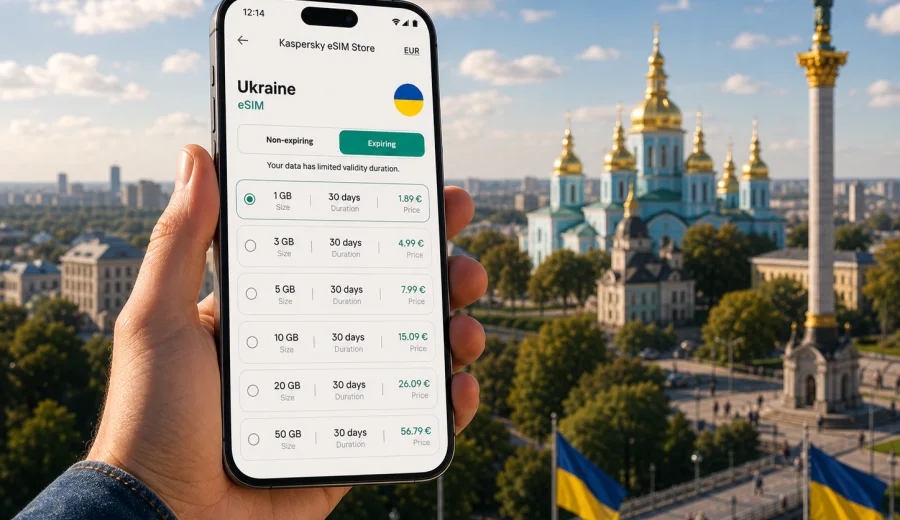
eSIM in Ukraine: mobile connection and internet for your trip
Planning mobile connection in Ukraine is easier when you decide before arrival how your phone will get online. An eSIM can help you use mobile internet in Ukraine without looking for a physical SIM card after a flight, train journey, border crossing, or transfer between cities. Instead of searching for a store, comparing unfamiliar local offers on the spot, or relying only on hotel Wi-Fi, you can prepare a digital SIM profile for your trip and manage it from a compatible smartphone.
Ukraine trips can include large cities such as Kyiv, Lviv, Odesa, Dnipro, and Kharkiv, smaller regional centers, railway stations, hotels, coworking spaces, and family visits outside the main tourist routes. In these situations, mobile internet supports maps, messaging, ride-hailing, translation, banking notifications, tickets, work calls, and updates to people waiting for you.
Why eSIM is practical for Ukraine
The main advantage of an eSIM for Ukraine is preparation. You can choose a tariff for the country before the trip, install the eSIM profile on a compatible phone, and be ready to connect to mobile data when the plan becomes active according to its conditions. This can be especially helpful if you arrive late, transfer quickly, or do not want to spend the first part of the journey solving connectivity tasks.
Mobile internet in Ukraine can be relevant in very different travel scenarios:
- airport or railway arrival, when you need maps, messages, transport apps, or hotel details;
- business travel, when you need email, cloud documents, calendars, and video calls;
- family visits, when you need reliable messaging and navigation between addresses;
- regional routes, when you move between several cities and want one prepared data setup;
- longer stays, when you want to control data volume and validity period more carefully;
- backup connectivity, when public Wi-Fi is slow, unstable, or not suitable for sensitive tasks.
An eSIM does not replace all communication services. Most travel eSIM tariffs focus on mobile data. They usually do not include a local phone number, traditional voice calls, or SMS unless this is clearly stated in the terms of the selected tariff. For calls and messages, many travelers use internet-based messengers over mobile data.
Ukraine travel situations where mobile internet matters
Ukraine trips are often practical rather than purely tourist. A person may travel for work, family reasons, volunteering, study, events, transit, or a multi-city route. In each case, a prepared mobile internet option reduces small but repeated points of friction.
| Situation | Why mobile data helps | What to consider |
|---|---|---|
| Arrival in Kyiv, Lviv, Odesa, or another major city | Maps, address search, transport, hotel messages, banking alerts | Install the eSIM before travel if your tariff allows it, then activate mobile data when appropriate |
| Train or bus travel inside the country | Tickets, route updates, messaging, translation | Data use may vary by coverage and movement between areas |
| Work trip | Email, calls in messengers, documents, calendars | Estimate data for calls and file sharing, not only browsing |
| Family visit | Messaging, photos, maps, shared locations | Choose validity long enough for the full stay |
| Short stopover | Basic navigation and communication | A smaller data package may be enough if you mostly use Wi-Fi indoors |
| Longer stay | Daily apps, banking, work, maps, media | Check whether top-up or a larger tariff is more convenient |
The right plan depends on your habits. Someone who only needs maps and messages may use much less data than someone who joins video meetings, uploads photos, or uses a laptop through hotspot mode. A good starting point is to list the apps you expect to use every day and separate essential tasks from optional entertainment.
How much data you may need in Ukraine
There is no universal amount of travel data that fits every person. Still, you can estimate a practical range before choosing an eSIM tariff. The goal is not to guess perfectly, but to avoid buying too little for a work-heavy trip or too much for a short stay where hotel Wi-Fi covers most evening use.
For light use, mobile data usually covers maps, messengers, email headers, ride-hailing, web search, and occasional photo messages. For moderate use, add regular social media, more browsing, cloud documents, and audio calls in messengers. For heavy use, include video calls, frequent photo or video uploads, hotspot for a laptop, streaming, or large file downloads.
Use this quick planning table:
| Travel style | Typical tasks | Practical choice logic |
|---|---|---|
| Light | Maps, messages, booking details, basic web search | Choose a smaller package and keep heavy downloads on trusted Wi-Fi |
| Balanced | Daily browsing, navigation, messengers, email, social apps | Choose a medium data allowance with validity matching the trip |
| Work-focused | Calls, cloud files, hotspot, calendar, documents | Prioritize more data and check hotspot conditions in the tariff |
| Long stay | Daily communication, maps, banking, work or study | Compare a larger package with the option to top up if available |
Before you travel, update offline maps, download tickets, save accommodation details, and update key apps while you are still on home Wi-Fi. This reduces the amount of data you need immediately after arrival and helps you stay organized if the first connection takes a few minutes.
How to choose an eSIM tariff for Ukraine
When you compare eSIM options, look beyond the country name. The important details are the destination, data allowance, validity period, price, activation rules, top-up availability, and any notes about tethering or hotspot use. Also check whether the tariff is country-specific, regional, or global. For a trip only to Ukraine, a Ukraine-focused tariff may be the most direct choice. For a route that also includes nearby countries, a regional option may be worth comparing.
Kaspersky eSIM Store is an app and website where you can choose, arrange, and activate an eSIM with a suitable tariff for mobile internet during an international trip. For Ukraine, you can review the available conditions and choose an eSIM tariff for Ukraine before you travel once you know your route, dates, and expected data use.
When comparing tariffs, ask five practical questions:
1. Does the tariff include Ukraine as the destination?
2. Is the data allowance enough for maps, messages, work, and other planned tasks?
3. Does the validity period cover the full trip, including arrival and departure days?
4. When does the validity period start: after purchase, after installation, or after first connection to a supported network?
5. Are hotspot, top-up, and refund conditions clear for the selected tariff?
This approach is more reliable than choosing only by price. A very small package may look attractive, but it can become inconvenient if you use video calls or need hotspot for work. A larger package may be unnecessary for a short trip if you mainly need messaging and navigation. The best option is the tariff that matches your real usage and travel duration.
How to install and activate an eSIM
The installation process depends on your device and operating system, but the general flow is similar. You choose the destination and tariff, complete the purchase, receive the eSIM details in your profile or by email, install the eSIM profile on your compatible device, and select it for mobile data when you are ready to use it.
Follow these steps before or during your trip:
1. Check that your smartphone or tablet supports eSIM and is not locked to another carrier.
2. Choose Ukraine as the destination and select a tariff based on data volume and validity.
3. Make sure you have a stable internet connection before installing the eSIM profile.
4. Install the eSIM using the instructions for your operating system.
5. Name the eSIM profile clearly, for example "Ukraine data", so it is easy to identify.
6. Set the eSIM as the mobile data line when you want to use the travel tariff.
7. Keep your primary SIM active or inactive according to your roaming and call preferences.
If you need platform-specific help, use the Android eSIM installation guide or the iOS eSIM installation guide. The exact screens can vary by device model and software version, so follow the instructions shown on your phone as well.
In some cases, the eSIM may require data roaming to be enabled for the eSIM line. This does not mean you should enable roaming for your home SIM if you want to avoid home operator charges. Check the SIM labels in your phone settings carefully and make sure mobile data is assigned to the travel eSIM.
What to check before purchase
The most important step is device compatibility. Not every phone that looks modern supports eSIM, and support can vary by region, model number, or carrier lock status. Before buying a tariff, check your device and confirm that it can install and use an eSIM profile.
Also review these points:
- your phone is unlocked and can use mobile data with another SIM profile;
- the selected tariff covers Ukraine and the dates of your trip;
- the validity period is long enough for arrival delays and departure day;
- the plan conditions explain when data use or validity starts;
- the phone has an internet connection during installation;
- you understand whether calls and SMS are included or not;
- you know how to contact support if activation questions appear.
Do not delete an installed eSIM profile unless the instructions or support team tell you to do so. In many cases, an eSIM profile cannot simply be moved to another phone after activation. If you change devices during a trip, you may need a different setup, depending on the tariff conditions.
Practical checklist for Ukraine
Use this checklist a few days before departure:
- Confirm that your passport, tickets, accommodation details, and addresses are saved offline.
- Update your phone system and important apps while on Wi-Fi.
- Download offline maps for cities and regions you expect to visit.
- Check whether your bank and messaging apps work with your current phone number.
- Confirm that your device supports eSIM and is unlocked.
- Choose a tariff with enough data and validity for the full route.
- Install the eSIM profile while you still have a stable connection, if the tariff terms allow it.
- Label your SIM lines clearly in phone settings.
- Turn off mobile data for your home SIM if you want to avoid unintended roaming.
- Keep the installation email or profile details available until the eSIM works.
For a short city trip, the most important items are compatibility, installation, maps, and messaging. For a work trip, add hotspot conditions, video call data, and a backup plan for critical meetings. For a long stay, monitor data balance regularly and check top-up options before you run low.
FAQ about eSIM and mobile internet in Ukraine
Can I use eSIM in Ukraine without removing my physical SIM card?
Yes, on compatible dual SIM devices you can usually keep your physical SIM card in the phone and add an eSIM profile for mobile data. Check your phone settings to decide which line handles mobile data, calls, and messages.
Does an eSIM for Ukraine include a local phone number?
Many travel eSIM tariffs are data-only and do not include a local phone number, traditional calls, or SMS. If these services are important, read the selected tariff conditions before purchase. For most trip tasks, internet-based messengers can handle calls and messages over mobile data.
What if the eSIM does not connect immediately?
Connection can take a few minutes and depends on the device, settings, selected tariff, and local network conditions. Check that mobile data is assigned to the eSIM line, data roaming is enabled for that line if required, airplane mode is off, and the phone has restarted if the instructions recommend it.
Can I share eSIM data with a laptop?
Some tariffs and devices allow hotspot use, while others may limit it. If you plan to work from a laptop, check hotspot conditions before choosing the tariff and select enough data for calls, documents, and uploads.
Is eSIM always cheaper than roaming?
Not always. Costs depend on your home operator, trip length, data use, and the selected eSIM tariff. The advantage is that you can compare data volume, validity, and price before the trip and choose a predictable prepaid option.
Can I delete the eSIM after the trip?
After the trip, you can remove an eSIM profile from the phone if you no longer need it. Do not delete it while troubleshooting or before the trip ends unless the instructions or support team recommend doing so, because reinstallation may not always be available.
Choose a data setup before your trip
The best time to solve mobile internet for Ukraine is before you need it. Check device compatibility, estimate your data use, compare validity periods, and install the eSIM profile with a stable connection. This gives you a clearer start to the trip and reduces dependence on public Wi-Fi, physical SIM card shops, and last-minute decisions after arrival.
Kaspersky eSIM Store helps you prepare a travel eSIM setup through its app and website: choose the destination, review the tariff details, install the eSIM on a compatible device, and manage the profile during the trip. When your route and dates are clear, you can choose an eSIM tariff for your trip to Ukraine and keep mobile internet planning simple.