Travel connectivity guide
Ulaanbaatar eSIM: Mobile Internet for Your Trip
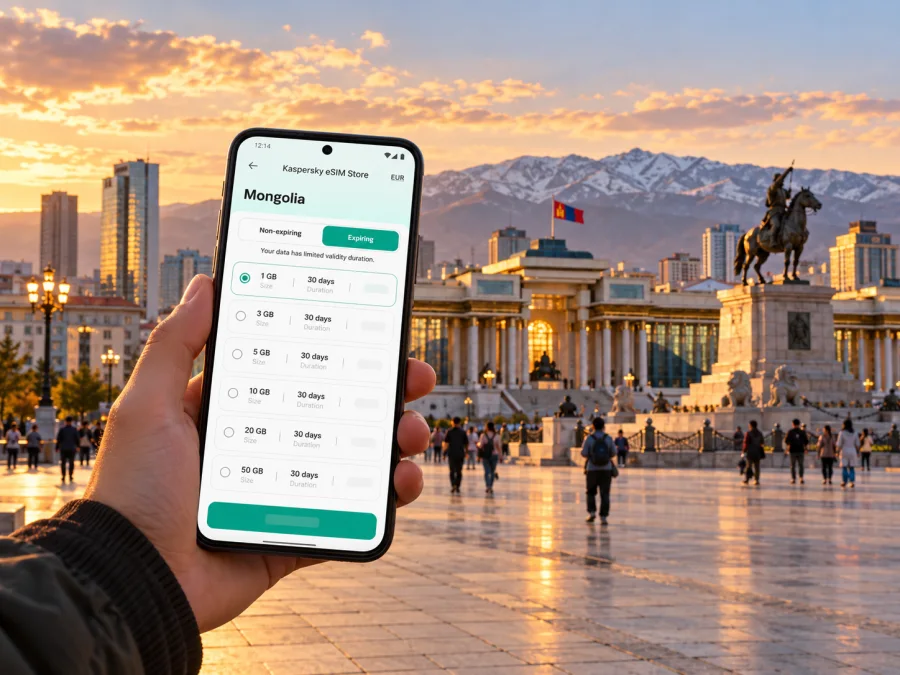
Ulaanbaatar eSIM: Mobile Connection and Internet for Your Trip
Updated: 18 October 2026.
Ulaanbaatar is a city where the first useful online moment may come before sightseeing: finding your hotel, checking a transfer, translating an address or messaging someone that you have landed. An eSIM can keep those tasks on mobile data without swapping out your home SIM, provided your phone supports eSIM and the selected Mongolia plan fits your route and dates. Kaspersky eSIM Store is an app and website where you can choose, purchase and activate an eSIM plan for mobile internet while travelling abroad.
The city is commonly called Ulaanbaatar, and its main international gateway is Chinggis Khaan International Airport. One geographic detail matters when planning arrival: the airport is outside the capital, in Sergelen soum, Tuv aimag. The airport operator’s corporate listing gives that location; its passenger information page describes public transport between the airport and Ulaanbaatar. Keep the city and airport distinct in your map search, transfer booking and pickup instructions.
Why mobile data helps in Ulaanbaatar
The capital is a practical starting point for Mongolia, but visitors still need to solve small, time-sensitive tasks in a large unfamiliar city. Data can help you compare a hotel pin with its written address, check a route before leaving a café, contact a driver, confirm a reservation or share a change of plan. It is also useful when a restaurant, guesthouse or meeting location sends a map pin rather than a street description.
A travel eSIM is most useful when you want mobile data soon after arrival and prefer not to rely on airport Wi-Fi, a hotel network or a physical SIM counter. It does not make every journey effortless: service depends on the plan, supported local network, device, settings and location. Save key details offline and keep another way to contact your accommodation in case your phone cannot connect immediately.
Arrival at Chinggis Khaan International Airport
The airport is a substantial distance from central Ulaanbaatar, so plan the transfer as a separate leg rather than assuming you are already in the city. The airport operator’s English public-transport page, checked on 18 October 2026, says the Public Transport Policy Department operates 24-hour bus service between Chinggis Khaan International Airport and Ulaanbaatar. It directs passengers to a self-service ticket kiosk on the west side of the terminal’s first floor or to staff at the bus and taxi counter. The same page lists an additional night service on route ШҮ:4 between the airport and Sukhbaatar Square, operating from 20 August 2025.
Schedules, route names and ticket arrangements can change. Before departure, check the airport’s current transport notice and flight arrival details; do not rely on an old screenshot or assume every bus stops beside your accommodation. If you use a taxi or arranged transfer, confirm the pickup point, destination spelling and fare method before getting into the vehicle. A working map and messaging app are useful for coordinating these details, but have your hotel name and address saved offline as a backup.
At the terminal, an eSIM installed in advance may let you check a route or message your host as soon as the plan can connect. If you have not installed it yet, use airport Wi-Fi or ask the airport counter for help with the transfer first; the eSIM does not replace a ticket, a taxi booking or airport staff instructions. Allow for road conditions and traffic when estimating time to central districts, and avoid promising yourself a fixed arrival time based only on distance.
Moving between neighborhoods
Ulaanbaatar’s destinations are spread across a city shaped by valleys, hills and expanding residential areas. A short-looking trip on a map can take longer than expected, depending on the time, road conditions and where the route crosses the city. Use a map app to compare options shortly before leaving, then check the final destination name and entrance with your host or venue. Pin the entrance rather than only the building’s approximate center when you are meeting at a hotel, office or large complex.
Mobile data is particularly useful for adapting a plan during the day. You might check whether a museum is open, send a revised arrival time, find a nearby cash machine or restaurant, or switch the order of stops if travel takes longer. Keep directions visible before you start moving; staring at a phone while crossing streets or navigating busy traffic is neither comfortable nor safe. Download an offline map area before departure and screenshot essential booking details.
| Trip situation | Useful preparation |
|---|---|
| Airport to hotel | Save the hotel’s name, address and map pin; check current airport transport information. |
| Hotel to a meeting | Confirm the building entrance and allow time for changing road conditions. |
| Walking around central sights | Load the map before leaving and keep the next destination saved. |
| Restaurant or guesthouse pickup | Share a pin and written place name, not only a spoken description. |
| Day trip outside the center | Check the full route and plan for weaker or unavailable mobile service beyond urban areas. |
A data plan is one part of this preparation. It can support navigation and communication where the selected plan has service, but it cannot guarantee a signal in every building, road corridor or rural destination. If your itinerary includes travel beyond Ulaanbaatar, confirm the plan’s country coverage and terms for that route, and ask your tour company how it communicates when mobile service is limited.
Choosing an eSIM plan for Ulaanbaatar
Choose for your actual Mongolia itinerary, not only the first city on the booking. Start with four checks: the destination included, the period of use, the amount of data you expect to consume and whether the plan’s validity begins at purchase, installation or first connection. Read the offer details before checkout because plan sizes, prices, validity and activation rules can change.
Think about how you use your phone. Frequent video calls, cloud photo uploads and streaming can use data quickly; map searches, messaging, email and occasional browsing usually require less. If you are unsure, reduce background app updates and automatic photo backup while travelling, then monitor usage in your phone settings and in the service account. Avoid choosing a plan solely because its data allowance looks large; validity and route matter too.
The Mongolia destination page in Kaspersky eSIM Store, checked on 18 October 2026, identifies Unitel and Mobicom under local telecommunications providers. That is country-level information, not a promise that every plan uses both networks in every part of Ulaanbaatar, or that every listed provider is available at a particular address. Check the selected offer’s displayed provider and terms at purchase. Network choice and service availability may differ by plan and location, and no citywide or nationwide coverage claim should be inferred from a provider name alone.
For a single-city stay, a Mongolia-specific offer may be easier to assess against the trip dates. For a journey that continues to another country, compare a regional or global option only if the destination list explicitly includes every country on your route. A plan labelled for Mongolia does not automatically cover a border crossing, and a regional plan’s country list should be checked rather than assumed.
Before you buy, answer these questions:
- Is Mongolia included, and does the offer suit your travel dates?
- Is the plan data-only, or does it explicitly include voice and SMS? Do not assume a travel eSIM comes with a local number.
- When does validity begin, and what happens to unused data at expiry?
- Does the offer have a data limit, speed policy, hotspot restriction or other condition that affects your use?
- Is the phone unlocked and compatible with eSIM in its exact model and regional variant?
- Can you complete setup while connected to reliable Wi-Fi before departure?
You can review current Mongolia eSIM options for your trip and compare the conditions shown for each plan. The page is a country destination, not a city-specific coverage map or a fixed quotation. Use the offer information visible when you make your decision, and check again if your dates or route change.
Preparing your phone before departure
eSIM capability depends on the exact device model and, in some cases, its regional variant or carrier lock status. Do not rely on a family member’s experience with a similarly named phone. Check the manufacturer’s information and the eSIM settings on your own handset, then check whether your device is compatible before purchase. If the phone was bought through a carrier, confirm it is unlocked for travel eSIM use.
A simple preparation sequence reduces last-minute troubleshooting:
- Connect to Wi-Fi and confirm the phone can add an eSIM profile.
- Review the Mongolia plan’s destination, data amount, validity and activation conditions.
- Buy and install the eSIM while you have stable internet, following the instructions shown in Kaspersky eSIM Store.
- Label the new line clearly, such as “Mongolia data,” so you can distinguish it from your home SIM.
- Keep your home line available for calls or texts if needed, and set the eSIM as the mobile-data line only when appropriate.
- Read whether data roaming must be enabled for that eSIM. Follow the plan instructions; do not assume the same toggle applies to every provider.
- Save the QR or installation details securely and do not delete the eSIM profile after setup unless support instructs you to do so.
For step-by-step setup, use the Android eSIM installation instructions or the iPhone and iOS eSIM installation instructions. Menu names vary across operating system versions. Install while connected to Wi-Fi and follow the device prompts; an eSIM profile generally cannot be installed repeatedly by scanning the same one-time activation code. Keep your original SIM active if you depend on it for calls, bank verification messages or account recovery.
When you arrive
After landing, select the travel eSIM for mobile data if the plan is ready to use. Keep your home line’s data roaming setting under control to avoid unexpected charges from your home operator. If the eSIM does not connect, check the selected data line, airplane mode, network selection and any plan-specific roaming instruction. Restarting the device can help it register again, but first compare the phone’s settings with the instructions for that plan.
Do not remove and reinstall the eSIM repeatedly. If the profile appears installed but data does not work, capture the error message, note the location and time, and contact support through the service account. In the meantime, use Wi-Fi where available, keep your saved address accessible offline and ask your hotel or transport provider for help if the task is time-sensitive.
Practical Ulaanbaatar scenarios
A late arrival and a hotel transfer
Before boarding, save the hotel name in both Latin and Mongolian script if your host provides it, plus its map pin and phone number. Check the airport page for current transport options and confirm how you will reach the city if the flight is delayed. Once connected, message the host with your arrival time and pickup location. If data has not started, use the airport’s posted information and Wi-Fi; do not wait in an unfamiliar place while repeatedly changing eSIM settings.
Meetings across town
Send your meeting contact the venue name, map pin and estimated arrival time. Check the route near departure because conditions can shift. If you have several appointments, leave room between them and avoid scheduling a connection across town too tightly. For a last-minute change, a short message with a clear landmark often works better than a long explanation over a voice call.
An onward trip into Mongolia
A city plan may suit your time in the capital while a longer route requires separate consideration. Ask the tour operator which places have service and how they handle check-ins, convoy changes or emergencies where the mobile signal is limited. Download offline maps and keep accommodation and transport details available without internet. Do not interpret a country-level provider listing as proof of continuous service on remote roads.
What a travel eSIM does and does not do
A travel eSIM is a digital SIM profile that lets a compatible device use the mobile-data plan selected for the trip. It can help you access maps, websites and internet messaging without replacing your physical SIM. Many travel data plans do not include a regular phone number, standard cellular calls or SMS. Check the offer details; use an internet messaging app for calls only if your account is already set up and the other person can reach you there.
Kaspersky eSIM Store is the app and website for choosing, purchasing and activating a travel eSIM plan. The mobile service is supplied by telecommunications providers listed in the selected plan’s terms. Kaspersky is not the local mobile operator and does not control signal, congestion, building reception, local network availability or service in remote areas. A familiar app interface cannot remove those real-world differences.
An eSIM also does not replace local emergency instructions, a taxi reservation, a transit ticket or an offline contingency. Keep your passport and travel documents secure, note the address of your accommodation and make sure at least one companion knows your plans. For a remote excursion, follow the guide’s communications plan rather than assuming your city data connection will continue outside the capital.
Quick checklist before you go
- [ ] Confirm that your phone supports eSIM and is not carrier-locked.
- [ ] Check the precise Mongolia offer, data allowance, validity and activation terms.
- [ ] Install the profile over Wi-Fi and name it clearly.
- [ ] Save your accommodation address, map pin, transfer details and flight data offline.
- [ ] Check current airport bus and taxi information before you land.
- [ ] Set mobile data to the travel eSIM only when you want to use it, and review roaming settings for both lines.
- [ ] Keep a backup connection plan for setup issues or areas without service.
- [ ] If leaving Ulaanbaatar, verify the route and communications arrangements separately.
Frequently asked questions
Is the airport in Ulaanbaatar?
Chinggis Khaan International Airport serves Ulaanbaatar, but it is outside the city in Sergelen soum, Tuv aimag. The airport operator lists the location in its corporate information and provides separate passenger guidance for transfers into the city. Use the airport name as the pickup destination and confirm your onward transfer before travel.
Is there a bus from the airport to the city at night?
The airport operator’s English public-transport page, checked on 18 October 2026, describes 24-hour bus service between the airport and Ulaanbaatar and lists a night service on route ШҮ:4 to Sukhbaatar Square, introduced on 20 August 2025. Check the current timetable and ticket information before relying on a specific departure.
Will one Mongolia eSIM work throughout Ulaanbaatar?
No plan should be treated as a guarantee of service in every place. Check the provider and restrictions shown for the selected offer, and understand that indoor reception, congestion and local availability can vary. The Mongolia destination page currently lists Unitel and Mobicom under local telecommunications providers; this does not establish which network an individual plan uses at every location.
Can I keep my normal SIM active?
In many dual-SIM devices, you can keep a physical SIM active for calls or SMS while choosing the eSIM for mobile data. The exact controls vary by phone. Check the line selection carefully and review your home operator’s roaming terms to avoid using its data unintentionally.
Does a data eSIM provide a Mongolian phone number?
Do not assume so. Travel eSIM plans are commonly data-only, and the Kaspersky eSIM Store Mongolia page describes data packages. Check the specific plan before buying. You can use internet-based messaging and calling apps if your account is configured and your contacts are reachable there.
What if I have no service after installation?
Confirm that the profile is enabled and selected for mobile data, review the eSIM’s network and roaming instructions, and restart the phone if appropriate. If it still does not connect, contact the service support team and use Wi-Fi or your backup arrangements while you troubleshoot. Avoid deleting the eSIM profile unless support asks you to.
Should I install the eSIM before flying?
Installing over reliable Wi-Fi before departure is usually easier than troubleshooting after landing. Check the plan’s activation timing first: some plans begin validity at purchase, while others start on first connection or offer scheduled activation. Follow the terms displayed for your chosen plan.
Choose your plan for Ulaanbaatar
Prepare your route, confirm that your device can use eSIM, and review the Mongolia plan’s data, validity and activation conditions before you travel. In Kaspersky eSIM Store, you can choose, purchase and activate an eSIM for mobile internet abroad, then follow the setup guidance for your phone. Review the current Mongolia options and select a plan that matches your dates and onward itinerary.


