
Travel connectivity guide
United Kingdom eSIM: mobile internet
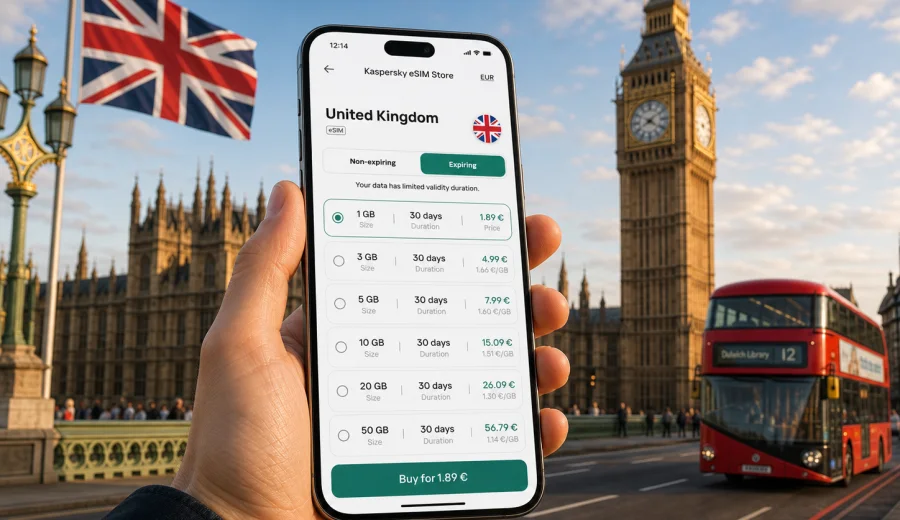
United Kingdom eSIM: mobile connection and internet for travel
If you are planning a trip to mobile internet for a trip to United Kingdom, mobile internet is one of the practical things to prepare before you arrive. A connected phone helps from the first minutes of the journey: airport transfers, train platforms, hotel messages, digital tickets, maps, ride apps, banking checks and family updates all depend on reliable access to data.
An eSIM can help you arrange mobile connection in the United Kingdom without looking for a physical SIM card after arrival. You choose a suitable data plan for the destination, install a digital SIM profile on a compatible device, and use mobile data according to the conditions of the selected plan. Kaspersky eSIM Store is an app and website where you can quickly choose, arrange and activate an eSIM with a suitable data plan for international travel.
This guide explains how to prepare internet for a trip to the United Kingdom, how to estimate data needs, what to check before payment, and how to avoid common setup mistakes.
Why mobile internet matters in the United Kingdom
The United Kingdom is easy to travel with a connected phone, but it can be frustrating when you depend only on hotel Wi-Fi. Airports are busy, rail services can change platforms, city transport can require live route checks, and many bookings are managed through apps or email.
Mobile data is especially useful for:
- navigating from Heathrow, Gatwick, Stansted, Luton, Manchester, Edinburgh, Glasgow or Belfast airports;
- checking live train, underground, tram, bus and coach updates;
- opening mobile tickets for transport, museums, theatre, football matches and events;
- using maps in London, Edinburgh, Manchester, Birmingham, Liverpool, Glasgow, Cardiff, Belfast, Oxford and Cambridge;
- confirming hotel check-in details or short-term rental messages;
- finding pharmacies, supermarkets, restaurants, luggage storage and taxi pickup points;
- receiving banking alerts and one-time codes if your home SIM stays active;
- keeping messengers available when you leave public Wi-Fi.
Public Wi-Fi is common in airports, stations, hotels and cafes, but it is not always convenient. It may require registration, repeat logins, weak signal, or time-limited sessions. A travel eSIM helps reduce dependence on public Wi-Fi and keeps important services available while you move between terminals, stations, hotels and meeting places.
What an eSIM does during a UK trip
An eSIM is a digital SIM profile installed on a compatible smartphone or tablet. Instead of inserting a plastic SIM card, you add the profile in device settings and use it for mobile data.
For a United Kingdom trip, an eSIM is mainly about internet access. It usually does not include a local phone number, standard voice calls or SMS unless the selected plan clearly states otherwise. For calls and messages, many travelers use internet-based apps over mobile data.
The basic travel flow is simple:
1. Check that your device supports eSIM and is not locked by a mobile operator.
2. Choose the United Kingdom as the destination.
3. Select a data plan by volume, validity period and trip style.
4. Install the eSIM while you still have stable internet access.
5. Use the eSIM as your mobile data line when the plan is ready to activate.
6. Track remaining data and top up if the selected plan supports it.
The exact experience depends on your phone model, the selected plan, local network conditions and how actively you use data during the trip.
When eSIM is especially convenient
eSIM is useful for short visits and longer stays, but it becomes especially convenient when your route includes several cities, a tight schedule, or work tasks.
| Travel scenario | Why mobile data helps | What to plan |
|---|---|---|
| First visit to London | Airport transfers, underground routes, walking directions and mobile tickets are easier with live data | Keep enough data for maps, transport apps, tickets and messaging |
| England and Scotland route | Rail and coach connections can change, and weather can affect plans | Match plan validity to the whole route, not only the first city |
| Business trip | Email, calendars, maps, messengers and document access may be needed between meetings | Estimate work data use and avoid automatic cloud sync on mobile data |
| University or language course visit | Longer stays need regular access to maps, portals and daily services | Compare plan duration and top-up options before choosing |
| Family travel | Several people may need directions, tickets and messages at once | Each device needs its own compatible setup unless hotspot is allowed and practical |
| Countryside or road trip | Rural routes can have less predictable signal than city centers | Download offline maps and booking details as a backup |
An eSIM is not a promise that every tunnel, basement, rural valley, island route or remote road will have the same signal quality as central London. Coverage and speed depend on local network conditions. Treat eSIM as a flexible way to prepare mobile data for travel, while still keeping offline copies of important information.
How to choose an eSIM plan for the United Kingdom
Choose a plan by trip length, route and data habits. A weekend in London, a two-week rail route, a conference visit and a family holiday can all need different amounts of data.
Start with four questions:
- How many days will you be in the United Kingdom?
- Will you use mostly maps and messages, or also video calls, streaming, hotspot and cloud services?
- Will you stay in major cities, or travel through smaller towns and rural areas?
- Do you need data immediately after landing, or can you finish setup at your accommodation?
Use this simple estimate:
| Data use style | Typical activities | Practical approach |
|---|---|---|
| Light | Maps, messaging, email, tickets, web search | Choose a smaller package and keep hotel Wi-Fi for downloads |
| Moderate | Maps, social apps, photo sharing, browsing, transport updates | Choose a mid-size package for the full stay |
| Heavy | Video calls, streaming, hotspot, cloud backup, large file transfers | Choose a larger package and check hotspot and top-up rules |
Before choosing, read the plan details carefully: data volume, validity period, covered destination, price, when validity starts, and whether top-up is available. If your route also includes Ireland, France, the Netherlands, Germany or other European countries, compare a United Kingdom plan with a regional option where available. For a UK-focused trip, a country plan is usually the clearest choice.
You can choose an eSIM plan for the United Kingdom in Kaspersky eSIM Store once you know your travel dates, route and expected data use.
Device compatibility: check this before payment
Before you arrange an eSIM plan, confirm that your device supports eSIM and is not operator-locked. This is one of the most important checks because an eSIM profile can only be installed on compatible devices.
Check your device before choosing a plan. It is also worth checking the device settings and model information, especially if the phone was bought through a mobile operator, imported from another region, used with a corporate plan, or repaired with changed parts.
Compatibility checklist:
- your phone or tablet supports eSIM;
- the device is unlocked for mobile networks;
- the operating system is updated enough to add an eSIM profile;
- you have stable Wi-Fi or mobile data for installation;
- you can access the email or profile where the QR code or installation details appear;
- you know which SIM line should be used for mobile data after setup.
If you use dual SIM, you can often keep your home SIM active for calls or SMS and use the eSIM for data. Check the phone settings carefully so calls, messages and mobile data use the lines you expect.
How to install and activate eSIM
The installation process depends on the device, but the overall idea is similar: add the eSIM profile, label it clearly, choose it for mobile data, and activate it according to the selected plan's instructions.
General setup steps:
1. Connect to stable Wi-Fi before installation.
2. Open the eSIM details in Kaspersky eSIM Store or in the email with the QR code.
3. Add the eSIM profile in your phone's mobile network settings.
4. Give the profile a clear label, such as UK Data.
5. Keep your home SIM as the line for calls and SMS if you still need it.
6. Select the eSIM as the mobile data line when you are ready to use it.
7. Enable data roaming for the eSIM line if the instructions require it.
8. Wait a few minutes for network registration after setup changes.
For detailed setup, use the Android installation guide or the iOS installation guide. Do not delete the eSIM profile unless you are sure you no longer need it, because some profiles cannot be reinstalled after removal.
eSIM, roaming and local SIM: practical comparison
Different connection options suit different travelers. The right choice depends on your phone, trip length, budget and need for convenience.
| Option | Strengths | Trade-offs |
|---|---|---|
| Travel eSIM | Can be prepared before travel, no plastic SIM, clear data package, useful on arrival | Requires compatible unlocked device and correct setup |
| Home operator roaming | Keeps your existing SIM and number active | Costs and data limits depend on your home operator's roaming terms |
| Local physical SIM | Can be useful for long stays or local call needs | Requires finding a shop, queueing, changing SIM cards and checking local conditions |
| Public Wi-Fi | Useful for large downloads at hotels or offices | Not always available, may require login, and is less convenient on the move |
For many visitors, eSIM is a practical middle ground: prepare mobile data before or shortly after arrival, keep the original SIM available if needed, and avoid spending the first hour of the trip searching for a physical SIM card.
UK travel situations where data is easy to underestimate
Data use can rise quickly when the trip includes many small app actions. The United Kingdom has many digital travel touchpoints, and each one can use a little data.
Watch your allowance in these situations:
- live navigation through large rail stations and airport terminals;
- repeated transport searches during service changes;
- uploading photos and videos from tourist areas;
- video calls with family or colleagues;
- hotspot for a laptop during business travel;
- streaming music or video on long train journeys;
- cloud backup from a full day of photos;
- app updates that start automatically on mobile data.
A short city break can work with a modest data package if you rely on Wi-Fi for heavy tasks. A longer route through England, Scotland, Wales and Northern Ireland may need more data, especially if you share location, use maps often, or manage work from the phone.
Before departure: quick preparation checklist
Complete these steps before you leave home or while you still have reliable Wi-Fi:
- confirm your device supports eSIM and is not operator-locked;
- choose a plan that covers the United Kingdom and your full travel dates;
- read the activation and validity rules for the selected plan;
- install the eSIM profile if the instructions allow pre-installation;
- save the QR code or setup details where you can access them offline;
- download offline maps for the first city and airport area;
- save hotel, rail, flight and event confirmations;
- turn off mobile-data cloud backup if your data package is limited;
- decide whether your home SIM stays active for calls and SMS;
- check whether data roaming should be enabled for the eSIM line.
The goal is not to configure everything in a rush at passport control, a taxi stand or a train platform. If the eSIM is prepared in advance, the first online tasks after arrival are much easier.
Data-saving habits during the trip
Good settings can make a smaller data package last longer. The main risk is usually background activity, not maps or messages.
Data-saving checklist:
- turn off automatic app updates on mobile data;
- pause automatic photo and video backup;
- download music, films, documents and maps over Wi-Fi;
- reduce video quality in streaming apps;
- close navigation after arrival instead of leaving it running all day;
- use Wi-Fi for operating system updates;
- check whether hotspot is allowed and monitor connected devices;
- review data usage by app in your phone settings.
If you travel with a laptop, hotspot can consume data quickly. A laptop may start cloud sync, software updates or large downloads as soon as it sees a connection. If you use hotspot, set limits on the connected device and monitor usage during the day.
Common mistakes to avoid
Most eSIM issues come from preventable setup or expectation mistakes. Use this list before departure and again if mobile data does not work as expected.
Avoid these mistakes:
- choosing a validity period shorter than your stay;
- installing the eSIM only after leaving reliable Wi-Fi;
- forgetting to set the eSIM as the mobile data line;
- leaving data roaming off when the eSIM instructions require it;
- deleting the eSIM profile too early;
- assuming that data service includes a local phone number, calls or SMS;
- using hotspot for laptops without checking data use;
- keeping automatic cloud backup enabled on mobile data;
- expecting the same signal quality in tunnels, rural areas and city centers.
If mobile data does not start immediately, check the line selected for mobile data, the roaming setting for the eSIM line, any APN or profile instructions provided, and whether the plan has started according to its conditions. Restarting the device can also help after setup changes.
FAQ about eSIM and internet in the United Kingdom
Can I install the eSIM before I travel?
In many cases, yes. It is usually better to install the eSIM while you have stable Wi-Fi and time to check settings. Follow the selected plan's instructions because activation timing and validity rules can vary.
Does an eSIM include a UK phone number?
Usually, travel eSIM plans are focused on mobile data. Voice calls, SMS and a local phone number are not normally included unless the specific plan conditions clearly say so. You can use internet-based calling and messaging apps over mobile data.
Can I keep my home SIM active?
If your device supports dual SIM, you can often keep your home SIM active for calls or SMS and use the eSIM for mobile data. Check your phone settings carefully so you know which line is used for data, calls and messages.
Is eSIM useful only in London?
No. eSIM can be useful across the United Kingdom, including city breaks, rail trips, business visits, university travel and countryside routes. Local network conditions still vary, so offline maps and saved booking details are sensible backups.
What should I do if I run out of data?
Check whether top-up is available for your selected plan in Kaspersky eSIM Store. If top-up is not available or does not fit your plans, choose another suitable plan before you need mobile data again. Use Wi-Fi for heavy downloads whenever possible.
Can I use Kaspersky eSIM Store as a VPN?
No. Kaspersky eSIM Store is not a VPN. It helps you choose, arrange and activate an eSIM for mobile internet in an international trip.
Short planning summary
For a smoother mobile internet setup in the United Kingdom:
- choose the plan by trip length, data volume and route;
- check device compatibility before payment;
- install the eSIM on stable Wi-Fi;
- keep your home SIM if you need calls, SMS or banking messages;
- use the eSIM as your mobile data line when ready;
- keep offline copies of tickets, maps and accommodation details;
- control background data use during the trip.
The most reliable approach is to prepare before arrival, understand what the selected plan includes, and keep a simple backup for moments when any mobile connection may be weaker than expected.
Choose an eSIM plan for the United Kingdom
Kaspersky eSIM Store helps you quickly choose, arrange and activate an eSIM with a suitable data plan for international travel. For a trip to the United Kingdom, select a plan that matches your route, stay length and expected data use, then install it on a compatible device before you need internet on the move.