
Travel connectivity guide
United States eSIM: mobile internet guide
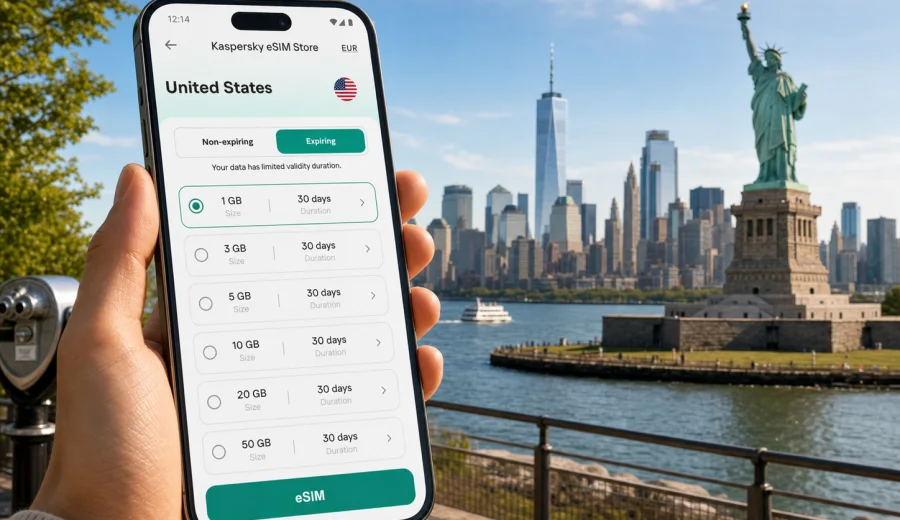
eSIM in United States: mobile connection and internet for your trip
Traveling across the United States often means moving between long flights, airport transfers, ride-hailing apps, hotel check-ins, navigation, restaurant bookings and cashless services. A stable mobile connection is not a luxury in this scenario. It is the tool that helps you land, orient yourself, contact people, confirm reservations and keep your route under control.
An eSIM is one of the most practical ways to prepare mobile internet for a trip to the United States. Instead of looking for a physical SIM card after arrival, you can choose a data tariff in advance, install a digital SIM profile on a compatible phone and activate mobile data when it is time to use it. Kaspersky eSIM Store is an app and website where you can quickly choose, arrange and activate an eSIM with a suitable data tariff for international travel.
Why mobile internet matters in the United States
The United States is a large country with very different travel patterns. A weekend in New York is not the same as a road trip through California, a business visit to Texas or a national parks itinerary in Arizona and Utah. Your mobile internet needs can change depending on where you stay, how often you move and how much you rely on apps.
Common online tasks during a US trip include:
- map navigation in cities and on highways;
- ride-hailing, taxi and public transport apps;
- airline apps, mobile boarding passes and flight updates;
- hotel, apartment and car rental confirmations;
- restaurant reservations and delivery services;
- messaging and video calls through internet-based apps;
- payment confirmations and banking checks;
- translation, search, weather and local recommendations;
- uploading photos and short videos.
Public Wi-Fi can help in hotels, cafes and airports, but it is not always available at the moment you need it. It can also be inconvenient when you are between locations, standing outside an airport terminal, waiting for a ride or trying to find the correct entrance to a venue. A prepared eSIM tariff gives you another option: mobile data on your own compatible device.
What an eSIM does for a US trip
An eSIM is a digital SIM profile built into supported smartphones and tablets. For travel, it is usually used as a data connection for the destination country or region. You do not need to remove your regular SIM card, and on many devices you can keep your usual number active for calls or messages while using the travel eSIM for mobile data.
For the United States, an eSIM can be useful when you want to:
- get online soon after landing;
- avoid searching for a physical SIM card store;
- choose a data package before the trip;
- keep your primary SIM in the device;
- separate travel data from your home mobile plan;
- manage data usage and tariff validity in a predictable way.
Important limitation: travel eSIM tariffs are usually focused on mobile data. They normally do not include a regular phone number, voice calls or SMS unless this is clearly stated in the conditions of the selected tariff. For calls and messages, you can usually use internet-based communication apps over mobile data.
Quick answer
For most visitors to the United States, an eSIM is a practical way to prepare mobile internet before arrival. Check that your device supports eSIM and is not locked to a single operator, choose a data volume and validity period that matches your itinerary, install the eSIM while you have a stable connection, and activate data when you are ready to use it. Kaspersky eSIM Store helps you choose, arrange and activate an eSIM tariff for travel through its website or app.
Who benefits most from an eSIM in the United States
Different travelers use mobile data in different ways. The right tariff depends less on the country name and more on your behavior.
| Travel scenario | Typical data needs | Practical eSIM approach |
|---|---|---|
| Short city break | Maps, messengers, tickets, restaurant searches | Smaller data package with enough validity for the full stay |
| Business trip | Email, calendar, ride-hailing, hotspot backup | More data and a validity period that covers delays |
| Family vacation | Navigation, photos, messaging, bookings | Medium or larger package, especially if Wi-Fi is unreliable |
| Road trip | Navigation, route checks, weather, lodging apps | Larger data allowance and offline maps as backup |
| Long stay | Frequent app use, calls over messengers, work tools | Higher data package or a tariff that can be topped up if available |
If your route includes several countries, compare a US country tariff with a regional or global option when available. For a trip focused only on the United States, a country-specific tariff is often the most straightforward choice.
How much data to plan for
There is no universal number because data usage depends on app settings, video quality and how much Wi-Fi you use. Still, you can estimate your needs before choosing a tariff.
Typical travel usage looks like this:
- light use: messaging, maps, check-ins and occasional searches;
- moderate use: daily navigation, social media, email and photo uploads;
- heavy use: video calls, streaming, frequent hotspot use and cloud backups.
As a practical starting point, a light traveler may be comfortable with a small package for a short trip. A traveler who uses maps several times a day, uploads media and makes internet calls should choose more data. If you plan to use your phone as a hotspot for a laptop, treat that as heavy usage. Laptop apps, cloud sync and system updates can consume data quickly.
Before departure, reduce avoidable data use:
- download offline maps for your main cities or driving routes;
- disable automatic cloud photo and video uploads on mobile data;
- update apps while on Wi-Fi;
- set streaming apps to lower quality or Wi-Fi only;
- check whether your navigation app can avoid downloading large areas repeatedly;
- turn off mobile data for apps you do not need during the trip.
When to arrange your eSIM
The best time to arrange an eSIM is before you need it. You can choose a tariff, read the conditions and install the eSIM while connected to reliable Wi-Fi at home, in the office or at the hotel. This reduces stress at the airport.
When you are ready to compare options, open mobile internet for a trip to United States and choose a tariff that matches your route, data needs and trip duration. Check the data volume, validity period, destination and any activation notes before you confirm the purchase.
Installing before travel does not always mean you should start using the tariff immediately. Some tariffs begin validity at installation, others at first connection to the supported network or according to the specific conditions shown before purchase. Read the tariff details carefully so you know when the validity period starts.
Device compatibility comes first
Before buying any eSIM tariff, confirm that your phone or tablet supports eSIM and is not restricted by a mobile operator lock. This step is important because eSIM installation depends on the device, operating system and regional model.
Check your device before purchase if you are not sure. You should also check your device settings: many phones show eSIM support under cellular, mobile data or SIM settings. If the device was bought through an operator contract, make sure it can use another mobile data profile for travel.
Compatibility checklist:
- your device supports eSIM;
- your device is not locked to one operator;
- the operating system is up to date enough for eSIM installation;
- you have a stable internet connection during installation;
- you can access the email, app or account where the installation details are provided;
- you understand whether the eSIM can be reinstalled after removal.
Do not delete an installed travel eSIM unless you are sure you no longer need it. In many cases, an eSIM profile cannot simply be moved to another phone after activation.
Once your route and approximate data needs are clear, you can choose a suitable eSIM data plan for the trip and compare data volume, validity period, and activation conditions before installation.
Installation basics for Android and iOS
The installation process depends on the device. In general, you add a mobile plan or eSIM profile in your phone settings, follow the QR code or manual entry instructions, label the line clearly and choose when it should be used for mobile data.
For step-by-step setup, use the official installation guides: Android installation guide and iOS installation guide. Keep Wi-Fi on during installation and avoid closing the settings process until the phone confirms that the eSIM profile has been added.
After installation, check these settings:
- name the eSIM line clearly, for example "US travel";
- keep your primary line for calls and messages if needed;
- select the eSIM line for mobile data when you want to use the travel tariff;
- enable data roaming for the eSIM if the tariff instructions require it;
- disable mobile data switching if you want to avoid accidental use of your primary SIM abroad.
If mobile data does not start immediately after arrival, restart the phone, check that the eSIM line is turned on, confirm the correct line is selected for mobile data and review the instructions for any APN or roaming setting notes.
United States travel scenarios and data planning
Arrival at a major airport
Airports such as JFK, Newark, LAX, Miami, Chicago O'Hare, Dallas Fort Worth, San Francisco and Seattle can be busy and spread out. Mobile data helps with ride-hailing pickup zones, terminal maps, hotel messages and airline notifications. If you arrive after a long flight, setting up mobile internet in advance can make the first hour easier.
City trips
In cities like New York, Los Angeles, San Francisco, Chicago, Boston and Washington, DC, you may switch between walking routes, public transport, restaurant searches and ticket apps several times a day. A moderate data package is often more comfortable than trying to save every megabyte.
Road trips
The United States is well suited to long drives, but distances are large. Navigation, gas station searches, weather updates and hotel bookings all use data. Download offline maps before leaving major cities. Mobile coverage conditions can vary by area and route, especially in remote regions, mountain roads, deserts and national parks.
Business travel
Business travelers often need email, calendar access, ride-hailing, messaging and occasional hotspot backup. If you use a laptop through your phone, choose a larger data allowance and set system updates, cloud sync and large file transfers to Wi-Fi only.
Family travel
A family trip can use more data than expected: shared navigation, messaging groups, entertainment, photo uploads and booking changes. If several people need internet, consider separate eSIM tariffs for compatible devices or be careful with hotspot use so one device does not consume the whole package early.
eSIM compared with roaming, Wi-Fi and physical SIM cards
Each option has its place. The right choice depends on convenience, cost predictability, device support and how much control you want.
| Option | Strengths | Points to check |
|---|---|---|
| Travel eSIM | No physical SIM swap, can be arranged before travel, clear data package | Device compatibility, tariff validity, data-only conditions |
| Home roaming | Uses your existing SIM and number | Price, daily fees, data limits, speed policies |
| Public Wi-Fi | Useful in hotels, airports and cafes | Availability, login pages, security expectations, no coverage between places |
| Physical SIM | Familiar option for some travelers | Store availability, ID or registration process where applicable, time after arrival |
An eSIM is especially convenient when you want to prepare before the trip and avoid making mobile internet your first errand after landing.
What to check before choosing a tariff
Use this checklist before you confirm a US eSIM tariff:
- destination: the tariff includes the United States;
- data volume: enough for your expected usage;
- validity: covers your full stay, including possible delays;
- activation rule: you know when the validity period starts;
- device compatibility: your phone or tablet supports eSIM;
- operator lock: your device can use another data profile;
- hotspot: allowed if you plan to share data, subject to tariff conditions;
- top-up: available or not available for the selected tariff;
- calls and SMS: included only if explicitly stated;
- installation: you can install while connected to stable Wi-Fi.
The safest approach is to choose a tariff based on your actual itinerary, not only on price. A very small package can be fine for a light user, but it can become inconvenient if you rely on maps, ride-hailing, video calls or hotspot data every day.
Practical setup plan before departure
1. Confirm that your device supports eSIM and is not locked.
2. Estimate your data needs based on trip length and app habits.
3. Choose a United States tariff with enough data and validity.
4. Install the eSIM while connected to reliable Wi-Fi.
5. Label the eSIM line clearly in your phone settings.
6. Keep your primary SIM for calls or messages if you need it.
7. Download offline maps and important travel documents.
8. Turn off unnecessary background data use.
9. On arrival, select the eSIM for mobile data and test a simple webpage or map search.
This plan keeps the process simple and reduces the number of decisions you need to make while tired, in transit or under time pressure.
Tips for using mobile data efficiently in the United States
Data can disappear quickly if your phone is set up for normal home use. Travel mode should be more deliberate.
Good habits:
- use Wi-Fi for large downloads when you trust the network;
- save video streaming for Wi-Fi or lower the quality;
- pause automatic app updates on mobile data;
- disable cloud backup for photos and videos until you are on Wi-Fi;
- download tickets, hotel addresses and maps in advance;
- use messaging apps for calls instead of regular international voice calls if your tariff is data-only;
- monitor data usage in your phone settings and in the app where available.
If you are traveling with children or colleagues, be careful with hotspot sharing. One tablet streaming video can consume more data than a full day of maps and messaging.
Common mistakes to avoid
- Buying before checking eSIM compatibility.
- Removing the eSIM profile too early.
- Assuming every eSIM tariff includes calls and SMS.
- Forgetting to select the travel eSIM for mobile data.
- Leaving your primary SIM on data roaming unintentionally.
- Starting a short-validity tariff too early.
- Using hotspot with a laptop without disabling updates and cloud sync.
- Depending only on public Wi-Fi for arrival, transfers and navigation.
Most problems are preventable if you check device support, read the tariff conditions and install the eSIM before you are in a hurry.
FAQ
Can I use a United States eSIM immediately after landing?
Often you can start using mobile data soon after arrival if the eSIM is installed correctly, the tariff is active, the device is compatible and the phone settings are correct. Connection time and network behavior can vary, so it is useful to install the eSIM before travel and test settings calmly.
Does an eSIM replace my regular SIM card?
Not necessarily. On many compatible phones, you can keep your regular SIM or eSIM active for calls and messages and use the travel eSIM for mobile data. The exact options depend on your device.
Will I get a US phone number?
Usually, travel eSIM tariffs are data-only. A regular phone number, voice calls and SMS are included only if the selected tariff clearly says so. For many trips, internet-based calls and messaging apps are enough.
Should I install the eSIM before or after arrival?
Installing before departure is often more convenient because you can use stable Wi-Fi and avoid setup pressure at the airport. Before activating data, check the tariff conditions so you understand when validity begins.
Can I use hotspot with a travel eSIM?
Hotspot availability depends on the selected tariff and device settings. If hotspot use is important for your laptop or another phone, check the tariff details before purchase and monitor data usage carefully.
What if I travel from the United States to Canada or Mexico?
A United States country tariff is intended for the specified destination shown in its conditions. If your route includes other countries, compare it with regional options where available and choose the tariff that matches the full itinerary.
Final checklist for your US trip
Before you leave, make sure you have:
- a compatible, unlocked eSIM device;
- an eSIM tariff that includes the United States;
- enough data for your travel style;
- validity that covers the full trip;
- installation completed over stable Wi-Fi;
- offline maps for key routes;
- mobile data settings checked;
- primary SIM roaming settings reviewed;
- important travel documents saved offline.
With these basics ready, mobile internet becomes part of your travel preparation rather than a problem to solve after landing.
Choose an eSIM tariff for the United States
Kaspersky eSIM Store helps you quickly choose, arrange and activate an eSIM with a suitable mobile data tariff for travel. Before purchase, check your device compatibility, review the data volume and validity period, then install the eSIM using a stable internet connection.
Choose a tariff for your trip here: review mobile internet options for your destination.