
Travel connectivity guide
Utulei eSIM for Mobile Internet Travel
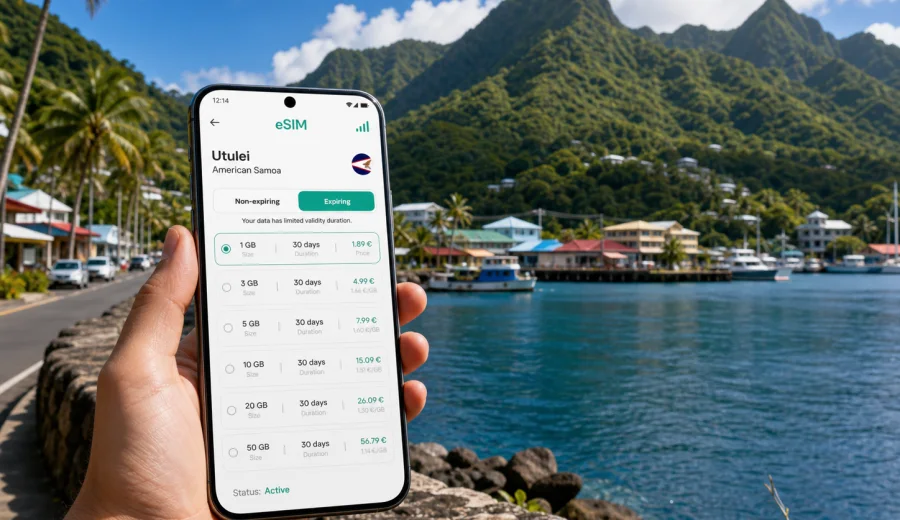
Utulei eSIM: mobile connection and internet for your trip to American Samoa
Utulei is a compact coastal village on Pago Pago Harbor, but a trip here can still depend heavily on mobile internet. You may land at Pago Pago International Airport in Tafuna, ride east along the shore, check in near the harbor, visit government offices, meet local partners, or use Utulei as a base for short trips around Tutuila. In each of these moments, a working data connection helps with maps, messages, bookings, translation, weather checks, and simple coordination.
An eSIM can be useful because it lets you prepare mobile data without looking for a physical SIM card after arrival. Instead of spending your first hour comparing local options or relying on public Wi-Fi, you can choose a data plan for American Samoa before the trip, install the eSIM on a compatible phone, and use mobile data when the selected plan is active and local network conditions allow it.
Why mobile internet matters in Utulei
Utulei is close to Pago Pago, Fagatogo, the harbor, government buildings, and several practical stops that travelers often combine in one day. Distances may look short on a map, but mobile internet still helps because the terrain, coastal road layout, weather, and transport timing can shape how you move.
You may need data for:
- checking the route from Tafuna airport to Utulei after your flight lands;
- messaging your hotel, host, driver, or local contact;
- using maps along the harbor road and nearby villages;
- confirming opening hours for offices, shops, restaurants, or ferry-related errands;
- keeping booking references, travel documents, and email available;
- using internet-based calls when ordinary voice service is not part of your data plan;
- checking weather before mountain viewpoints, coastal walks, or drives around Tutuila.
Utulei is not a city where you need a complex public transport app every few minutes. The need is more practical: you want a connection that is ready when you are coordinating a ride, finding an address, checking a meeting time, or moving between small coastal districts.
Arrival: from Tafuna airport to Utulei
Most visitors reach Utulei after arriving at Pago Pago International Airport in Tafuna. The airport is west of the Pago Pago harbor area, and the drive toward Utulei usually follows the main coastal road. Mobile data is useful during this first leg because you may be tired, carrying luggage, and trying to confirm exactly where your hotel or meeting point is.
Before you leave the airport area, use mobile internet to:
1. Confirm the address of your accommodation or host.
2. Share your estimated arrival time with the person waiting for you.
3. Save the route for offline backup in case coverage changes along the road.
4. Check whether your booking confirmation includes a phone number, entrance note, or landmark.
5. Keep your payment, email, and messaging apps available without relying on airport Wi-Fi.
If you plan to activate an eSIM only after arrival, remember that the first setup step usually requires an internet connection. That can be airport Wi-Fi, hotel Wi-Fi, or another active mobile connection. A smoother option is to install the eSIM before departure, then activate or switch to the eSIM data line when the plan terms allow and you are ready to use it.
Local movement around Utulei and Pago Pago Harbor
Utulei sits on a harbor-side corridor where visitors often move between nearby districts rather than staying in one spot all day. A typical day may include breakfast near your accommodation, a meeting in the government area, a stop in Fagatogo, a waterfront walk, and a ride back along the same road after sunset.
Mobile internet helps most when plans change. A driver may ask for a clearer pickup point. A meeting may move by 30 minutes. Weather may affect a viewpoint or coastal stop. A restaurant may be easier to find by a nearby landmark than by a formal street address. With data on your phone, you can adjust without hunting for a cafe or lobby Wi-Fi network.
For simple city movement, keep these apps and files ready:
| Travel task in Utulei | Why data helps | Sensible backup |
|---|---|---|
| Airport transfer | Share live location and confirm pickup | Save hotel address offline |
| Harbor-side navigation | Follow the road and nearby landmarks | Download the map area |
| Hotel check-in | Open booking emails and message reception | Save reservation screenshots |
| Business meetings | Receive schedule changes and documents | Keep key PDFs offline |
| Short trips around Tutuila | Check weather, route time, and return plan | Carry a written address |
This combination is important because eSIM is a data solution, not a full replacement for every local communication method. If your selected plan does not include voice calls or SMS, use internet-based messaging and calling apps for most coordination.
Choosing an eSIM data plan for Utulei
For a trip to Utulei, choose the plan by the country and the real pattern of your stay. The relevant destination is American Samoa, even if most of your time is in Utulei, Pago Pago, Fagatogo, Tafuna, or other parts of Tutuila. A city article can help with local use cases, but the plan itself is normally selected by country, region, validity period, and data allowance.
Start with three questions:
- How long will you stay in American Samoa?
- Will you use data only in Utulei, or also around Tafuna, Pago Pago, the National Park area, and other villages?
- Will you mostly send messages and use maps, or will you work with video calls, cloud files, and frequent photo uploads?
For a short stopover or a two-day business visit, a smaller data allowance may be enough if you mainly use maps, email, and messaging. For a longer stay or a trip with remote work, consider a larger allowance and a validity period that covers the full route, not just the first few days.
Data planning for common Utulei travel scenarios
The best data allowance depends on behavior, not only trip length. Navigation and text messages use relatively little data. Video calls, cloud backups, social video, and hotspot use can consume much more.
| Scenario | Typical mobile data needs | What to check before choosing |
|---|---|---|
| One-day stop near the harbor | Maps, messages, booking details, ride coordination | Validity start rules and enough data for arrival |
| Weekend in Utulei | Navigation, restaurants, weather, photos, chats | Data allowance for two to three active days |
| Business visit | Email, document access, meeting messages, occasional calls over data | Larger allowance if video calls are likely |
| Family trip around Tutuila | Maps, shared locations, hotel messages, photo sharing | Whether several travelers need separate plans |
| Remote work from a hotel | Email, cloud tools, calls, backup connection if Wi-Fi is weak | Hotspot rules and data volume in plan terms |
Do not choose only by the lowest price. The more useful comparison is the amount of data, duration, destination coverage, activation rules, top-up options, and whether your phone supports eSIM. A plan that runs out halfway through a business day or coastal drive can be more inconvenient than choosing a slightly larger package before the trip.
Where Kaspersky eSIM Store fits into the trip
Kaspersky eSIM Store is an app and website where you can choose, arrange, and activate an eSIM with a suitable data plan for mobile internet during an international trip. For Utulei, that means you prepare a plan for American Samoa, install it on a compatible device, and use it as your travel data line according to the plan conditions.
If you want to prepare before your flight, you can choose an eSIM data plan for American Samoa and compare the available data amounts and validity periods. This is the point in trip planning where it makes sense to decide whether you need a light plan for navigation and messages or a larger plan for work, uploads, and longer movement around Tutuila.
Kaspersky eSIM Store should be understood as a practical way to prepare mobile internet for travel, not as a mobile operator or network owner. Coverage, speed, availability, and connection behavior depend on the selected plan, the device, local network conditions, and the place where you are using the phone.
Check device compatibility before you rely on eSIM
Before buying a plan for Utulei, confirm that your phone or tablet supports eSIM and is not locked to another carrier. This is especially important if you plan to land late, travel for work, or depend on the phone for your hotel address and contacts.
Check your device before the trip, then review these points:
- your device model supports eSIM;
- your device is not carrier-locked in a way that blocks another mobile data profile;
- you know which SIM line will handle mobile data after arrival;
- you understand whether data roaming must be enabled for the eSIM profile;
- your main number can remain available for calls or messages if your device supports dual SIM behavior;
- you have saved the installation details or can access them from your profile.
If you are traveling with more than one person, check each device separately. One compatible phone in the group does not automatically solve mobile internet for everyone, especially if hotspot use is limited by the selected plan or the device settings.
How to install and activate an eSIM for a Utulei trip
The exact flow depends on your device and the selected plan, but the preparation logic is usually straightforward. Install the eSIM while you still have a stable internet connection, then activate or switch data to the eSIM when the plan conditions and your travel timing make sense.
Use this practical sequence:
1. Choose American Samoa as the destination for your Utulei trip.
2. Select a data amount and validity period that match your stay.
3. Complete the purchase and open the eSIM details in your account or app.
4. Install the eSIM on the device that you will carry in Utulei.
5. Keep your primary SIM active if you still need your usual number.
6. On arrival, select the eSIM profile for mobile data when you are ready to use the plan.
7. Test maps and messaging before leaving the airport or hotel.
For device-specific setup, use the Android installation guide or the iOS installation guide. Read the instructions before departure if you are not used to managing SIM profiles, because the terms "primary line", "mobile data", and "data roaming" can look slightly different across phone models.
Hotels, meetings, and remote work in Utulei
Utulei is often practical for travelers who need to be near Pago Pago Harbor, government offices, business contacts, or local services. Hotel Wi-Fi can be useful, but mobile data gives you a backup when you are between buildings, waiting for a ride, or stepping out for a call.
For business travel, save meeting addresses, contact names, calendar invites, and key documents offline before you leave. If you use your phone as a hotspot for a laptop, check the terms of the selected plan and your device settings. Hotspot use can drain data and battery faster than normal phone use, so test the connection before an important call and keep hotel Wi-Fi as a backup when available.
Short trips from Utulei
Many Utulei stays include movement beyond the village. You might go toward Fagatogo for errands, Tafuna for airport logistics, Pago Pago for harbor-side stops, or farther around Tutuila for viewpoints, beaches, and National Park scenery. Mobile data helps you make these trips more flexible, but it is still wise to prepare offline backups.
Before leaving Utulei for a half-day trip:
1. Save your route and return point.
2. Check the weather before viewpoints or coastal walks.
3. Confirm pickup time and transport details.
4. Charge the phone and pause data-heavy uploads until Wi-Fi is available.
If the route goes through areas where signal may vary, do not wait until the last minute to load maps or messages. Open the route while you are still in a reliable connection area, then keep the phone screen available for navigation.
FAQ: eSIM and mobile internet in Utulei
Is an eSIM useful if I stay only in Utulei?
Yes, it can still be useful. Even a compact harbor-side stay involves airport transfer, hotel messages, maps, email, bookings, and transport coordination. The smaller the trip, the more convenient it is to avoid spending arrival time looking for a physical SIM card.
Can I make calls with an eSIM data plan?
Many travel eSIM plans are data-only. If ordinary voice calls and SMS are not included in the selected plan, use internet-based calling and messaging apps over mobile data.
Should I install the eSIM before or after arrival?
Installing before departure is often more convenient because you can use a stable connection. Activation timing depends on the selected plan terms, so read when validity starts.
Prepare mobile internet for Utulei before you travel
A trip to Utulei is easier when your phone is ready before the first transfer from Tafuna, the first meeting near Pago Pago Harbor, or the first walk along the waterfront. Choose a data allowance that fits your real itinerary, check device compatibility, install the eSIM while you have a stable connection, and keep offline backups for essential details.
When you are ready to prepare the mobile internet side of the trip, use Kaspersky eSIM Store to choose an eSIM data plan for your trip to American Samoa. It gives you a practical way to arrange eSIM data for Utulei and the wider Tutuila route before you need it on the road.