
Travel connectivity guide
Uyuni eSIM for Mobile Internet in Bolivia
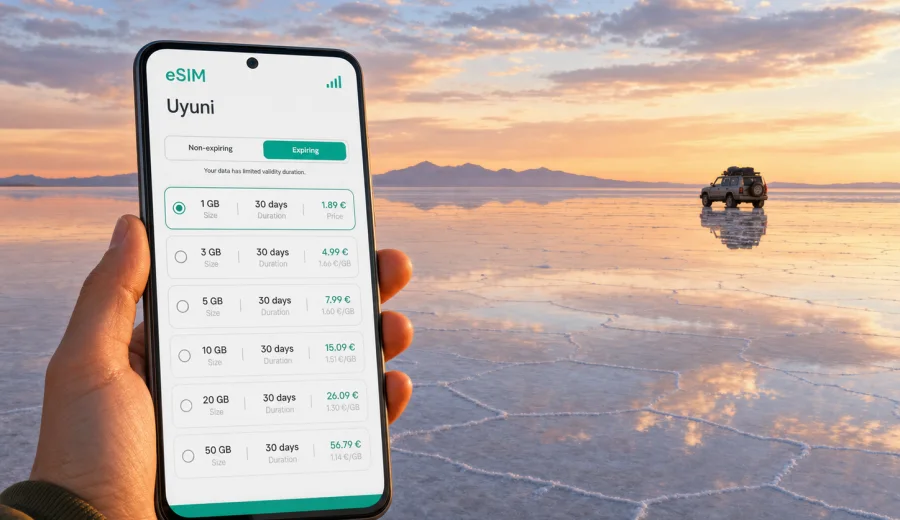
Uyuni eSIM: mobile connection and internet for a trip to Bolivia's salt flats
Uyuni is a compact city with an outsized role in Bolivian travel. For many visitors it is the gateway to Salar de Uyuni, the high-altitude salt flat, multi-day 4x4 routes, train arrivals, desert hotels, and onward journeys toward Potosi, La Paz, Sucre, or the Chilean border. A working mobile connection matters here because the trip often starts and ends in practical details: meeting a tour driver, finding a hotel after a late arrival, checking weather before crossing the salt flat, sending your location to a group, or using maps when streets are quiet at night.
An eSIM is useful for Uyuni because it lets you prepare mobile internet before you reach the city, without looking for a physical SIM card immediately after a flight, bus, or train. Uyuni is not a large urban hub where every travel task can be solved by walking into a shopping mall. Shops may close early, tours may leave before sunrise, and routes outside the city can quickly move into areas where you should not rely on public Wi-Fi.
This guide explains how to plan mobile internet for Uyuni, how to use an eSIM on arrival, what to check before a salt flat tour, and how much data different travel styles usually need. The focus is the city and its travel routes, not a general Bolivia overview.
Why mobile internet in Uyuni needs planning
Uyuni travel is shaped by distance, altitude, and timing. The city itself is easy to understand, but the trips that begin there can be remote. Even if your hotel has Wi-Fi, you may need mobile data before check-in, between tour stops, or when plans change.
Common reasons to stay online in Uyuni include:
- confirming pickup time with a tour agency or driver;
- using maps between the bus terminal, train station, hotel, restaurants, and agency offices;
- checking messages if your transport arrives late;
- translating Spanish phrases when arranging a tour or buying supplies;
- sharing your location with companions before a sunrise departure;
- checking cloud, wind, and road updates before a salt flat route;
- managing boarding passes, hotel reservations, and payment notifications;
- using ride, taxi, or local contact details when you arrive after dark.
Arrival in Uyuni: when connectivity matters most
Many travelers reach Uyuni after a long journey by bus, train, domestic flight, or land transfer from another part of Bolivia. Arrival conditions are not always ideal: high altitude can make you tired, streets may be quiet late in the evening, and agency offices or small shops may not be open when you need them.
The first hour in Uyuni is usually when mobile data is most valuable. You may need to:
1. Open your hotel address and route.
2. Message the hotel if your arrival time changed.
3. Confirm where your salt flat tour begins.
4. Check whether the agency wants passport details, payment confirmation, or an early meeting.
5. Use translation for taxi, luggage, or check-in questions.
6. Tell family or colleagues that you arrived.
If you activate your eSIM only after landing or arriving at the terminal, make sure you have the QR code or installation details available offline. If your phone supports eSIM and the profile is already installed, switching it on can be faster than searching for a local SIM shop while tired or carrying luggage.
How an eSIM helps during a Uyuni city stay
Uyuni is small enough to walk across central areas, but mobile internet still saves time. Hotels, tour offices, cafes, laundries, markets, bus offices, and small restaurants may be close to each other, yet not always obvious to a first-time visitor. Live data helps you confirm addresses, retrieve booking details, translate short questions, message a driver, and keep maps open after dark.
Salt flat tours: what to expect from mobile data
Salar de Uyuni is the main reason many people come to the city. Day tours usually visit the train cemetery, the salt flat, Incahuasi Island when conditions allow, and sunset viewpoints. Multi-day tours can continue through lagoons, desert landscapes, geysers, and remote accommodations toward southwest Bolivia or the Chilean border.
Mobile coverage can vary once you leave the city and move across remote areas. An eSIM can help you prepare and stay connected where service is available, but no travel SIM or eSIM should be described as a guarantee of connectivity across every remote stretch. Plan as if some sections will be offline.
Before leaving Uyuni for the salt flats, do this:
- download offline maps for Uyuni, Salar de Uyuni, and your onward route;
- save your tour agency name, phone number, address, and pickup point;
- keep your hotel address available offline;
- download booking confirmations and border documents if relevant;
- charge your phone and carry a power bank;
- tell someone your route and expected return time;
- check whether your eSIM data roaming setting must be enabled for the profile;
- keep a physical or offline copy of essential travel details.
Choosing a data plan for Uyuni and Bolivia
Your data needs depend on how you travel. Uyuni can be a one-night stop, a three-day salt flat base, or part of a longer Bolivia route. Travelers should choose a Bolivia eSIM plan rather than looking for a separate Uyuni-only plan.
As a practical rule, estimate your data by trip behavior:
| Traveler profile | Typical Uyuni use | Data planning note |
|---|---|---|
| Short stopover traveler | Messaging, maps, hotel check-in, tour confirmation | A smaller data package may be enough if you avoid video |
| Salt flat day tour traveler | Maps, messaging, photos sent to friends, weather checks | Leave spare data for pickup changes and onward transport |
| Multi-day route traveler | Messaging when available, translation, offline planning, limited uploads | Choose enough validity for the whole Bolivia route |
| Remote worker | Email, calls, documents, hotspot use | Consider a larger package and keep hotel Wi-Fi as backup |
| Photographer or creator | Location sharing, selective uploads, cloud previews | Use mobile data carefully and postpone large transfers |
Before departure, you can choose a data plan for Bolivia in Kaspersky eSIM Store and check the available options for your trip length. Kaspersky eSIM Store is an app and website where you can choose, purchase, install, and activate an eSIM with a suitable mobile data plan for international travel. Check the data volume, validity period, destination, price, and conditions before you buy.
How much data do you need in Uyuni?
There is no single perfect amount, but you can make a realistic estimate. Messaging and maps use far less data than video calls, streaming, and cloud backup.
Approximate data use by activity:
| Activity | Data use pattern |
|---|---|
| Text messaging | Low |
| Sending several photos | Low to medium |
| Navigation and map searches | Low to medium |
| Translation apps | Low if language packs are downloaded, higher if always online |
| Email with attachments | Medium |
| Video calls | High |
| Social media video | High |
| Cloud photo backup | High to very high |
| Laptop hotspot | Medium to very high depending on work |
For a short Uyuni visit, focus on messaging, maps, bookings, and transport. For a multi-day itinerary, leave data for unexpected changes: a delayed bus, a different pickup point, an extra hotel night, or a route adjustment caused by weather or road conditions.
Device compatibility comes first
Before buying any eSIM plan, check that your phone or tablet supports eSIM and is not locked to one operator. Solving a compatibility problem after arrival can be inconvenient, especially if a tour starts soon.
Check your device before purchase. Also confirm that your device software is up to date, that you know where the eSIM settings are, and that you can access your email or account where installation details are stored.
Device checklist:
- your device supports eSIM;
- your device is unlocked for mobile network use;
- you have stable Wi-Fi for installation before travel or at your hotel;
- you know which SIM line is used for mobile data;
- you know whether data roaming must be enabled for the eSIM profile;
- your regular SIM can remain available for calls or SMS if needed;
- your battery is charged before leaving for the salt flat.
An eSIM usually provides mobile data. It may not include a regular phone number, voice calls, or SMS unless this is stated in the selected plan. For calls and messages, many travelers use internet-based apps.
Installing an eSIM before a trip to Uyuni
The simplest approach is to install the eSIM before you leave home, while you have reliable Wi-Fi and time to read the setup steps. You can then activate the data line according to the plan instructions.
Basic setup flow:
1. Choose Bolivia as the destination.
2. Select a plan by data volume and validity period.
3. Complete the purchase.
4. Install the eSIM profile on a compatible device.
5. Name the line clearly, for example "Bolivia travel".
6. Keep your main SIM for calls or SMS if you need it.
7. When ready, set the eSIM as the mobile data line.
8. Enable data roaming for the eSIM if the plan instructions require it.
For step-by-step setup, use the Android installation guide or the iOS installation guide. It is better to read the instructions before the travel day, not while standing outside a terminal with low battery.
Practical Uyuni scenarios
Different Uyuni itineraries create different connectivity needs:
| Scenario | Mobile internet priority |
|---|---|
| Overnight bus arrival | Find the hotel, confirm luggage storage, and message the tour agency |
| One-day salt flat tour | Use data before departure and after return, with offline maps ready for the remote route |
| Three-day southwest Bolivia route | Save contacts and documents offline, then use mobile data where service is available |
| Business or field visit | Keep email, documents, and local contact coordination available outside hotel Wi-Fi |
| Family or group travel | Share locations and keep a fixed meeting point in case one phone goes offline |
Uyuni transport often combines bus, train, domestic flight, 4x4 tour, private transfer, and onward routes to Potosi, La Paz, Sucre, Oruro, or San Pedro de Atacama in Chile. Mobile data helps you confirm pickup streets, store digital tickets, translate questions, and check whether a tour returns before an onward departure. For large photo backups, app updates, long calls, or laptop work, use hotel Wi-Fi when it is stable and keep eSIM data for movement around the city.
Data-saving tips for Uyuni
Use these settings before your tour:
- download offline maps on Wi-Fi;
- download language packs if your translation app supports it;
- pause automatic cloud photo backup on mobile data;
- disable app auto-updates on mobile data;
- reduce video autoplay in social apps;
- limit hotspot use to essential tasks;
- send compressed photos in messaging apps when quality is not critical;
- check data usage after the first day.
If you travel with two SIM lines, label them clearly. Keep your regular SIM available for calls or SMS if needed, but set mobile data to the eSIM line when using the Bolivia plan.
Short answers for common questions
Is an eSIM useful for Uyuni if I only stay one night?
Yes, especially if you arrive late, leave early for a tour, or need maps and messages before hotel check-in.
Can I rely on mobile internet across Salar de Uyuni?
Do not rely on continuous coverage across remote routes. Prepare offline maps and save important details. Use mobile data where service is available.
Should I install the eSIM before reaching Bolivia?
That is usually easier. Install it while you have stable Wi-Fi, then activate the data line according to the plan instructions when appropriate.
Can I use a hotspot from my phone in Uyuni?
Hotspot availability can depend on the device and plan conditions. If you use it for a laptop, monitor data use carefully.
What should I do before a multi-day tour?
Download maps, save contacts, charge your phone, carry a power bank, confirm your route, and keep essential documents accessible offline.
A practical Uyuni eSIM checklist
Use this checklist the day before you travel to Uyuni:
- Choose Bolivia as the eSIM destination.
- Select a plan with enough data and validity for Uyuni plus onward travel.
- Confirm device compatibility and operator unlock status.
- Install the eSIM using stable Wi-Fi.
- Save installation details offline.
- Set the eSIM as the data line when ready.
- Keep your main SIM available if you need calls or SMS.
- Download offline maps for Uyuni and the salt flat route.
- Save hotel, agency, and transport contacts.
- Pause data-heavy app behavior before the tour.
Prepare mobile internet for Uyuni before you go
Uyuni rewards preparation. The city may be small, but the travel routes around it are wide, remote, and time-sensitive. An eSIM can make arrival, hotel check-in, tour coordination, navigation, and onward travel easier.
Before your trip, check your device, compare plan conditions, install the eSIM on reliable Wi-Fi, and keep offline backups for remote sections. When you are ready to plan mobile internet for your Uyuni route, you can choose an eSIM data plan for Bolivia in Kaspersky eSIM Store and prepare your connection before the salt flat journey begins.