
Travel connectivity guide
eSIM Uzbekistan: mobile internet travel guide
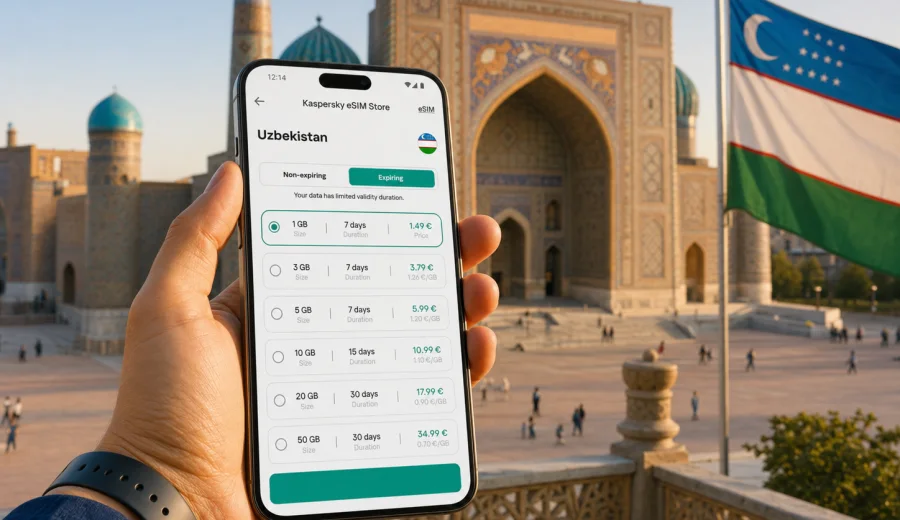
eSIM in Uzbekistan: mobile connection and internet for your trip
Uzbekistan is a country where mobile internet quickly becomes part of the travel plan. You may need a map in Tashkent, a ride-hailing app after landing, train tickets for Samarkand, a translation tool in a bazaar, or a messenger call from Bukhara. A stable mobile connection helps you move between cities, check hotel details, pay attention to schedule changes, and stay in touch without building every route around Wi-Fi.
An eSIM is a practical way to prepare mobile internet before a trip to Uzbekistan. Instead of looking for a physical SIM card after arrival, you install a digital SIM profile on a compatible phone and choose a data plan for the destination. For many travelers, this is simpler than relying only on roaming or public Wi-Fi, especially if the itinerary includes several cities or late arrivals.
This guide explains how to use eSIM for Uzbekistan, what to check before buying a data plan, how much traffic different travel scenarios may require, and how to avoid common connectivity mistakes. The focus is the whole country, not only one city: Tashkent, Samarkand, Bukhara, Khiva, Fergana Valley, mountain trips, train routes, airports, hotels, and everyday travel situations.
Why mobile internet matters in Uzbekistan
Uzbekistan is easy to explore when you can stay online at the right moments. The country has famous historical centers, fast rail routes, urban traffic, desert landscapes, and long-distance transfers. Even if you prefer to travel slowly, internet access can save time in small practical situations.
Common online tasks include:
- checking arrival details at Tashkent International Airport;
- opening hotel bookings and apartment instructions;
- using maps in Tashkent, Samarkand, Bukhara, Khiva, and regional towns;
- translating menus, signs, and short conversations;
- confirming train times or domestic travel plans;
- messaging a guide, driver, hotel, or family member;
- finding opening hours for museums, markets, and restaurants;
- using mobile banking notifications and two-factor authentication where available;
- sharing documents or location details with travel companions.
Public Wi-Fi can be useful in hotels, cafes, airports, and some public spaces, but it is not something to plan around for the whole trip. Speeds, login pages, availability, and stability vary. A personal mobile data connection gives you more control, particularly during transfers, walking routes, and check-in moments.
What an eSIM does for a trip to Uzbekistan
An eSIM is a digital profile installed on a compatible smartphone or tablet. It lets your device connect to mobile data without inserting a plastic SIM card. For travel, the most common use is a prepaid data plan for a specific country or region.
For Uzbekistan, an eSIM can be useful because you can:
- prepare mobile internet before departure;
- keep your physical SIM in the phone for your main number if your device supports dual SIM use;
- avoid searching for a SIM shop immediately after landing;
- choose a traffic amount and validity period before paying;
- manage the eSIM in your phone settings;
- use messengers, maps, email, browsers, and travel apps through mobile data.
An eSIM data plan is usually focused on internet access. It normally does not include a regular local phone number, standard voice calls, or SMS unless the plan conditions say otherwise. For calls and messages, many travelers use internet-based apps.
eSIM, roaming, local SIM, and Wi-Fi: what to compare
There is no single best option for every traveler. The right choice depends on your device, length of stay, data needs, budget, and how much time you want to spend arranging connectivity after arrival.
| Option | Best for | What to check |
|---|---|---|
| eSIM | Travelers who want to prepare mobile internet before or during the trip | Device compatibility, data amount, validity, activation rules |
| Standard roaming | Short trips when your home plan has acceptable travel terms | Daily fees, data limits, speed restrictions, extra charges |
| Local physical SIM | Longer stays or travelers who need a local number | Store availability, registration process, language, device SIM slot |
| Public Wi-Fi | Occasional browsing in hotels or cafes | Availability, login steps, privacy, stability |
An eSIM is especially convenient if your arrival schedule is tight. For example, if you land late in Tashkent and go directly to a hotel, it may be easier to activate mobile data on your phone than to search for a shop. If you travel by train from Tashkent to Samarkand and then to Bukhara, having your own data plan helps with tickets, transfers, and messages between stops.
Before you buy: compatibility and device checks
The most important step is to confirm that your device supports eSIM. Not every smartphone does, and support can vary by model, region, and carrier lock status. Before choosing a plan, check your device and make sure it can add an eSIM profile.
Use this checklist:
- Your phone or tablet supports eSIM.
- The device is not locked to one carrier in a way that blocks another mobile profile.
- You can access the device settings needed to add a mobile plan.
- You have a stable internet connection for installation, such as home Wi-Fi before departure.
- You understand when the selected plan starts counting validity.
- You know which SIM should be used for mobile data after arrival.
- You have saved the QR code or installation details in a place you can access.
If you are not sure, check the exact model name, not just the product family. A phone line may include versions with different eSIM support in different markets.
How much data do you need in Uzbekistan?
Data use depends on habits. Maps and messaging consume much less than streaming video or cloud backup. A light traveler can often manage with a small package, while a remote worker or content-heavy user needs more headroom.
| Travel style | Typical online behavior | Data planning approach |
|---|---|---|
| Light | Maps, messengers, email, occasional browser searches | Choose a modest package and use hotel Wi-Fi for large updates |
| Standard | Daily maps, social media, tickets, photo sharing, calls in messengers | Pick a medium package with enough validity for the whole route |
| Heavy | Video calls, uploads, hotspot use, cloud apps, frequent navigation | Choose more data and monitor usage closely |
| Family or group coordinator | Route planning, bookings, multiple chats, shared location | Allow extra data because one phone often becomes the main travel hub |
The largest unexpected data consumers are video streaming, automatic photo backup, app updates, and hotspot use. Before the trip, it is sensible to disable automatic updates over mobile data and download offline maps for the cities you plan to visit.
Travel scenarios where eSIM is especially useful
Arrival in Tashkent
Tashkent is the usual entry point for many international travelers. Mobile internet helps with airport pickup messages, route checks, currency exchange information, hotel directions, and translation. If your flight arrives late, having data ready can make the first hour easier.
The classic Silk Road route
A common itinerary includes Tashkent, Samarkand, Bukhara, and Khiva. These cities are well known, but the route involves train stations, transfers, walking routes, and coordination with accommodation. eSIM data is useful for confirming schedules, navigating old towns, and contacting drivers or guides.
Work and study trips
If you travel for meetings, events, or academic work, mobile internet may be needed before you reach the hotel or conference Wi-Fi. An eSIM can help you check email, download documents, and join a short call when Wi-Fi is not available.
Regional travel
Trips to the Fergana Valley, mountain areas, desert routes, or smaller towns need more preparation. Mobile coverage and speed can vary by location and network conditions. Download key documents and maps in advance, and use mobile data as a practical travel tool rather than your only backup for every situation.
A practical way to choose an eSIM plan
Choose a plan by matching three things: length of stay, expected traffic, and route complexity. A weekend in Tashkent does not require the same data allowance as two weeks across several cities.
Ask yourself:
- How many days will I be in Uzbekistan?
- Will I use mobile data mainly for maps and messages, or also for work?
- Will I share a hotspot with a laptop or another phone?
- Will I use hotel Wi-Fi for heavy downloads?
- Do I need data immediately after landing?
- Do I travel alone, or will others rely on my phone for navigation?
If the trip includes several transfers, a little extra data can be useful. Running out of traffic during a station transfer or late arrival is inconvenient, even if it is not a serious problem.
When you are ready to compare options, you can choose an eSIM plan for Uzbekistan through Kaspersky eSIM Store. The site and app help you select the destination, review available plan conditions, and prepare an eSIM for travel mobile internet.
Installing eSIM before or during the trip
Many travelers prefer to install the eSIM before departure while they still have reliable home Wi-Fi. This reduces pressure on arrival. In some cases, you may install the eSIM first and activate data use later, but activation rules depend on the selected plan, so read the plan details carefully.
General installation flow:
1. Choose Uzbekistan as the destination.
2. Select the data amount and validity period that match your trip.
3. Complete the order.
4. Add the eSIM profile to your compatible device using the provided instructions.
5. Name the line clearly, for example “Uzbekistan data”.
6. Keep your primary SIM for calls or messages if needed.
7. On arrival, set the eSIM as the mobile data line.
8. Turn on data roaming for the eSIM if the instructions or device settings require it.
For device-specific setup, use the Android installation guide or the iOS installation guide. The exact names of settings may differ by device model and operating system version.
How to keep your main number while using travel data
Many modern phones can use a physical SIM and eSIM at the same time. This can be convenient: your regular number remains available for certain calls or verification messages, while mobile data is routed through the travel eSIM.
Before arrival, check these settings:
- Which SIM is selected for mobile data?
- Is data switching turned off if you want to avoid accidental roaming on your home line?
- Are calls and messages still assigned to your primary number if you need them?
- Is the travel eSIM named clearly so you do not confuse it with your home plan?
- Are roaming settings enabled only for the eSIM line if required?
This setup can help you reduce confusion. The key is to avoid letting the phone use your home SIM for data by mistake, especially if your regular roaming rates are high.
Data-saving tips for Uzbekistan
Good data habits make a plan last longer. This matters most on longer trips or when you use your phone heavily for photos, navigation, and communication.
Use these settings before departure:
- Download offline maps for Tashkent, Samarkand, Bukhara, Khiva, and other planned stops.
- Turn off automatic app updates over mobile data.
- Pause cloud photo backup until Wi-Fi is available.
- Reduce video streaming quality.
- Disable background refresh for apps you do not need during the trip.
- Use Wi-Fi for operating system updates and large file transfers.
- Monitor mobile data use in phone settings every few days.
For maps, offline downloads are useful even when mobile data is available. They reduce traffic use and help if signal quality changes during a route.
What to know about coverage and speed
Mobile experience depends on local network conditions, location, building materials, weather, congestion, terrain, and the selected plan. In central areas of Tashkent and major tourist cities, travelers often have more predictable connectivity than in remote areas. In old buildings, basements, mountain roads, or desert routes, signal quality can change.
Plan with realistic expectations:
- keep essential booking details available offline;
- save hotel addresses in local language if possible;
- download train tickets or confirmations before moving between cities;
- keep a backup payment method and emergency contact details;
- do not rely on mobile data as the only place where important documents are stored.
An eSIM is a convenient way to arrange mobile internet, but it does not remove the normal limits of mobile networks. Treat it as part of a good travel setup, along with offline preparation.
Uzbekistan travel internet checklist
Before you leave:
- Confirm that your device supports eSIM.
- Choose a data plan with enough validity for the full stay.
- Install the eSIM while connected to stable Wi-Fi.
- Save installation details and travel documents offline.
- Download maps for your main cities.
- Turn off heavy background data use.
- Check which SIM is assigned to mobile data.
On arrival:
- Enable the eSIM line if it is not already enabled.
- Select the eSIM for mobile data.
- Enable data roaming for the eSIM if required.
- Test a browser page or map.
- Keep your primary SIM data off if you want to avoid home roaming charges.
During the trip:
- Check data usage regularly.
- Use Wi-Fi for video uploads and large updates.
- Keep key confirmations saved offline.
- Top up or choose another suitable plan before traffic runs out if your trip changes.
Common mistakes to avoid
The most common eSIM problems are not complicated technical failures. They usually come from preparation gaps.
Avoid these situations:
- buying a plan before checking whether the phone supports eSIM;
- installing the eSIM on the wrong device;
- deleting the eSIM profile without checking whether it can be reinstalled;
- leaving your home SIM selected for mobile data;
- assuming that a data-only plan includes a phone number;
- waiting until arrival to read installation instructions for the first time;
- using mobile data for automatic backups and large updates;
- choosing a package that is too small for a multi-city trip.
If you are traveling with someone else, decide who will manage bookings, maps, and transport apps. That person may need more data than the rest of the group.
FAQ about eSIM and internet in Uzbekistan
Can I install an eSIM before flying to Uzbekistan?
In many cases, yes. Installing before departure is often convenient because you can use stable Wi-Fi and avoid setup pressure at the airport. Check the plan conditions so you understand when validity begins.
Does an eSIM give me a local phone number?
Most travel eSIM plans are for mobile data. They usually do not include a standard phone number, calls, or SMS unless this is stated in the plan conditions. You can use internet-based calling and messaging apps with mobile data.
Should I remove my physical SIM card?
Usually, no. If your phone supports dual SIM use, you can keep your regular SIM installed and use the eSIM for mobile data. Check settings carefully so the correct line is used for data.
Is eSIM better than airport Wi-Fi?
They solve different problems. Airport Wi-Fi may help for a quick message, but eSIM mobile data can continue with you after you leave the terminal, enter a taxi, or move to another city.
What if I use all my data?
Options depend on the plan and service flow. Monitor usage during the trip and prepare more data before you run out if your route changes or your usage is higher than expected.
Can I use hotspot mode?
Some plans and devices allow hotspot mode, but conditions may vary. If you plan to share data with a laptop or another traveler, check the plan details and expect faster data consumption.
Short practical summary
For a trip to Uzbekistan, eSIM is useful when you want mobile internet without depending only on roaming, public Wi-Fi, or a physical SIM card purchase after arrival. It is especially practical for routes that include Tashkent, Samarkand, Bukhara, Khiva, and regional transfers.
The best preparation is simple: check device compatibility, choose a data amount that matches your itinerary, install the eSIM on stable Wi-Fi, save important documents offline, and set the eSIM as the mobile data line when you arrive.
Prepare your eSIM for Uzbekistan
Kaspersky eSIM Store is an app and website where you can choose, arrange, and activate an eSIM with a suitable data plan for mobile internet in an international trip. For Uzbekistan, this can help you land with a clearer connectivity plan and spend less time sorting out mobile data during the first day.
Before you travel, review the available options, check your device, and prepare an eSIM plan for your Uzbekistan trip. Choose the data amount and validity period that fit your route, install the eSIM on a compatible device, and keep your mobile connection ready for maps, messages, bookings, and everyday travel tasks.