
Travel connectivity guide
Vagar eSIM for Mobile Internet in Faroe Islands
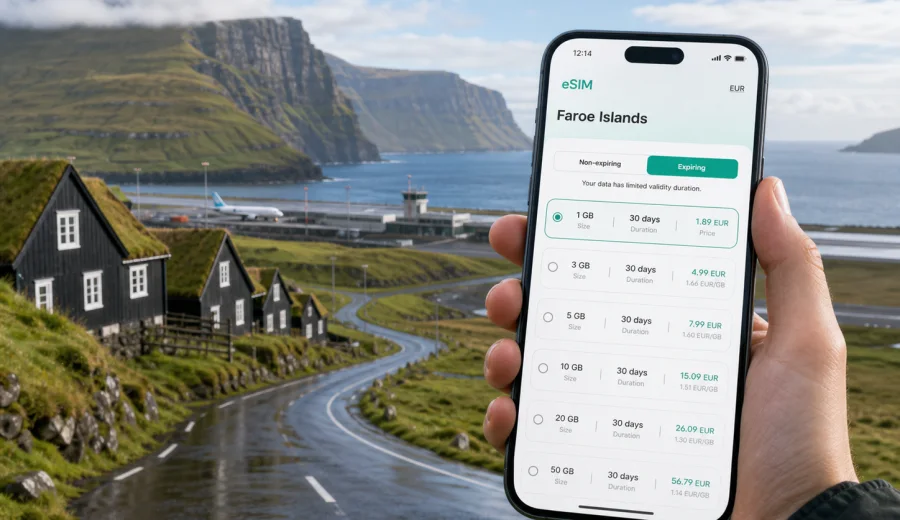
Vagar eSIM: mobile connection and internet for a Faroe Islands trip
Vagar is often the first place travelers see in the Faroe Islands. The airport is here, the road to Torshavn starts here, and many of the routes to famous viewpoints, villages, lakes, and ferry connections begin with a few practical decisions made soon after landing. A reliable mobile connection matters from the first minutes: you may need to check a bus timetable, confirm a car rental desk, message a hotel, open a map, or adjust your route because the weather has changed.
An eSIM can make that first hour easier. Instead of looking for a physical SIM card after arrival, you can prepare mobile internet before the trip and activate it on a compatible device when you are ready to use data. For Vagar, this is especially useful because travel is spread across small settlements, coastal roads, tunnels, viewpoints, and onward routes rather than one compact urban center.
This guide explains how to plan mobile internet for Vagar, what to check before flying, how much data different travel styles may need, and where an eSIM is most useful during a Faroe Islands itinerary that starts on the island.
Why Vagar is a connectivity-first destination
Vagar is not a large city in the usual sense. For travelers, it works as an arrival hub and a base for movement around the western part of the Faroe Islands. You may land at Vagar Airport, collect luggage, pick up a rental car, and continue toward Sorvagur, Sandavagur, Midvagur, Gasadalur, Bour, or Torshavn. Even a short stopover can include several quick decisions that depend on mobile internet.
Common online tasks in Vagar include:
- opening a map from the airport to your hotel or guesthouse;
- checking road conditions and travel time before crossing tunnels;
- using messaging apps to coordinate pickup or self check-in;
- translating short notices, menus, or rental instructions;
- booking or confirming a boat trip, ferry, or guided hike;
- checking weather windows before walking near cliffs or lakes;
- sending documents or boarding information during a business trip;
- using mobile payment or banking apps when a card verification step appears.
Public Wi-Fi can help in airports, hotels, and some cafes, but it is not a complete travel plan. You may need data between those points, especially on roads, at viewpoints, at small harbors, or while moving between islands. An eSIM gives you a prepared data option on your own phone, so you are not dependent on finding Wi-Fi at exactly the right moment.
Arrival at Vagar Airport: what mobile internet solves first
Vagar Airport is compact, but arrivals can still be busy when flights land close together or when weather affects schedules. Mobile internet is useful before you even leave the terminal.
The first practical uses are usually simple:
1. Check whether your flight delay changed a transfer or hotel arrival time.
2. Message your host, driver, colleague, or travel group.
3. Open directions to Sorvagur, Midvagur, Sandavagur, or Torshavn.
4. Confirm rental car details and save the route before leaving the airport area.
5. Check the weather forecast for your first stop.
If you plan to activate an eSIM only after landing, do it while you still have time to stand still and follow the setup steps calmly. If your phone supports dual SIM use, you can keep your primary SIM active for calls or messages and use the eSIM for travel data, subject to your device settings and the conditions of your home plan.
Before you fly: device and setup checklist
The most important preparation is not the country selection. It is your phone. Before buying or activating any eSIM plan, confirm that your device supports eSIM and is not locked in a way that prevents using another mobile profile. You can check your device before choosing a plan.
Use this checklist before your Vagar trip:
- confirm that your phone or tablet supports eSIM;
- check that the device is not carrier-locked;
- update the operating system if you have postponed updates for a long time;
- keep enough battery before the flight, especially if you plan to scan a QR code or install a profile after landing;
- save hotel, rental car, ferry, and tour confirmations offline;
- install your map area for offline use as a backup;
- decide whether your eSIM data should be active immediately on landing or only after you leave airport Wi-Fi;
- keep your primary SIM settings under control so you do not accidentally use expensive roaming data.
An eSIM is mainly for mobile internet. It usually does not include a standard phone number, voice calls, or SMS unless the selected plan states that separately. For everyday travel communication in Vagar, many visitors use internet-based messaging, email, maps, and booking apps.
How much data is practical for Vagar
Data needs depend more on behavior than on distance. Vagar is not huge, but travelers often use data frequently because plans change with weather, roads, viewpoints, and ferry timing.
| Travel scenario in Vagar | Typical online activity | Practical data approach |
|---|---|---|
| Short airport stop or overnight | messaging, maps, hotel check-in, flight updates | a small data package may be enough |
| Weekend around Vagar | maps, weather, restaurant search, photo sharing, tour messages | choose a plan with room for daily navigation and light media |
| Road trip across the Faroe Islands | navigation, bookings, cloud photo backup, ferry checks | consider a larger package or top-up option |
| Business trip | email, documents, video calls on Wi-Fi, maps between meetings | keep mobile data for reliability and use hotel Wi-Fi for heavy calls |
| Photography-focused travel | weather apps, maps, uploads, backup, social posts | avoid automatic cloud uploads unless your plan has enough data |
Streaming video, large app updates, cloud backups, and long video calls can consume data quickly. If you want to keep a smaller plan under control, turn off automatic updates, limit cloud sync, download playlists and maps before travel, and use Wi-Fi for large files when it is available.
Vagar routes where an eSIM is especially useful
Mobile internet is most valuable when you are between fixed Wi-Fi points. In Vagar, that often means the scenic parts of the trip.
For airport-to-hotel movement, data helps you compare travel time, find the exact entrance to a guesthouse, and tell the host if your arrival changes. For village stops, it helps you move between Sorvagur, Bour, Gasadalur, Midvagur, and Sandavagur without searching for directions at every turn. For viewpoints and walks, mobile internet is useful for weather checks and communication, but it should not replace local safety guidance, signs, or common sense near cliffs and exposed roads.
If Vagar is the start of a wider Faroe Islands route, it is practical to prepare an eSIM plan for the Faroe Islands before the trip, then use the same data plan logic for onward movement to Torshavn, Streymoy, Eysturoy, or ferry-connected islands.
Choosing an eSIM plan for a Vagar itinerary
Kaspersky eSIM Store is an app and website where you can choose, arrange, and activate an eSIM with a suitable mobile internet plan for international travel. The useful part for a Vagar trip is that you can check data amount, validity period, destination, and price before you travel, then keep the plan ready for arrival.
When comparing plans, look at four details:
- Destination: choose a plan that covers the Faroe Islands for your route.
- Data amount: match it to navigation, messaging, work, and media habits.
- Validity period: make sure the plan lasts for the whole stay, including arrival and departure days.
- Activation rules: read when validity starts and whether data roaming must be enabled for the eSIM.
For a one-night stop in Vagar, the smallest suitable data package may be enough if you mostly use maps and messages. For a multi-day trip, add extra room for weather checks, travel research, restaurant searches, and photo sharing. For a full Faroe Islands route that starts in Vagar and continues across several islands, a larger data allowance can be more comfortable.
Local movement: airport, villages, tunnels, and transfers
Vagar trips often combine several types of movement in one day. A traveler may land, drive to a village, stop for a viewpoint, cross toward another island, and return after dinner. That makes mobile internet a practical layer across the whole day.
Use mobile data for turn-by-turn navigation, hotel or tour messages, parking searches, bus or ferry checks, opening hours, shared location, and return flight status. Keep offline copies of addresses, booking confirmations, map areas, emergency contacts, QR codes, reservation numbers, and check-in instructions. eSIM data keeps live tools available, while offline files protect you if the battery is low or the phone temporarily loses signal.
Hotels, guesthouses, and self check-in
Vagar accommodation is often practical, personal, and spread across small settlements. Some stays use self check-in instructions, door codes, parking notes, or messages sent shortly before arrival. Mobile internet helps if you reach a guesthouse outside staffed hours or if your host needs to update directions.
Before leaving the airport or your previous stop, make sure you can access:
- the full accommodation address;
- the check-in time and door instructions;
- the host's preferred messaging channel;
- parking guidance;
- Wi-Fi details if they were provided before arrival;
- the backup phone number or email from your reservation.
If your plan includes work calls or remote check-ins, use hotel Wi-Fi for heavy video sessions when possible. Keep eSIM data for movement, backup, urgent messages, and tasks that need to happen away from the room.
Installing and activating your eSIM
Installation is easiest when you are not rushing. If you can, install the eSIM profile before the flight while you have stable Wi-Fi. Activation and data use depend on the selected plan, so read the plan instructions before switching it on.
Basic setup flow:
1. Choose the Faroe Islands as the destination and select a suitable data amount and validity period.
2. Complete the order in the app or on the website.
3. Install the eSIM profile on your compatible device.
4. Label the line clearly, for example "Travel eSIM" or "Faroe Islands data".
5. Before landing or after arrival, select the eSIM for mobile data when you are ready.
6. If the plan instructions require it, enable data roaming for the eSIM line.
7. Keep your primary SIM from using roaming data unless you intentionally need it.
For device-specific setup, follow the Android installation guide or the iOS installation guide. The exact menu names can vary by device model and operating system version, so follow the steps that match your phone.
Practical data-saving settings for Vagar
The Faroe Islands encourage frequent photo stops. That is good for memories, but it can be heavy for mobile data if your phone uploads everything automatically.
Before the trip, adjust these settings:
- download offline maps for Vagar and the wider route;
- disable automatic app updates on mobile data;
- pause cloud photo and video backup until Wi-Fi;
- download music, podcasts, and boarding documents before flying;
- reduce video autoplay in social apps;
- set messaging apps to avoid downloading large media on mobile data.
During the trip, check data use once a day if you are on a small plan. If your route changes and you start using maps, photo uploads, and messaging more than expected, review whether a top-up or a larger plan is available for your needs.
Stopovers, work tasks, and one-day Vagar plans
Vagar is well suited to short stays because several memorable places are close to the airport. For an overnight stop, mobile internet helps you decide whether weather allows a viewpoint stop, check the return time to the airport, message accommodation if a flight is delayed, and find food without spending time driving aimlessly.
For business travel, keep mobile data for movement and urgent work: email, meeting updates, small documents, taxi or pickup coordination, and security code confirmations. Use hotel or office Wi-Fi for long video calls, large uploads, and laptop backups. If you use phone tethering, check whether it is allowed by the selected plan and remember that laptops can consume data quickly.
Trips from Vagar to the rest of the Faroe Islands
Many travelers leave Vagar soon after arrival, but the island remains the practical starting point. From here, routes commonly continue toward Torshavn, Streymoy, Eysturoy, or ferry points for other islands. Mobile internet remains useful because plans may change with weather, daylight, and transport timing.
If you are driving, check directions before entering longer road sections and tunnels. If you are using buses or ferries, keep schedules and booking details accessible. If you are photographing landscapes, review weather and light conditions before committing to a long detour.
For a multi-island trip, treat your eSIM as part of the wider travel kit alongside documents, payment cards, waterproof clothing, a power bank, offline maps, and saved confirmations. It supports the online parts of the route while your offline preparation covers the basics.
Quick recommendations by traveler type
| Traveler type | Prioritize | Control |
|---|---|---|
| First-time visitor | maps, weather, hotel messages | video streaming |
| Photographer | weather windows, location planning | automatic uploads |
| Family traveler | group messaging, shared location | children's video apps |
| Business traveler | email, meeting updates | laptop tethering |
| Stopover traveler | airport updates, check-in messages | app updates |
| Road trip traveler | navigation, ferry timing | cloud backup |
FAQ: eSIM and mobile internet in Vagar
Is an eSIM useful if I only stay in Vagar for one night?
Yes. It can cover airport arrival, maps, hotel messages, weather checks, and return flight updates without looking for a physical SIM card.
Will an eSIM replace my regular phone number?
No. For travel use, an eSIM is usually a mobile data option. Voice calls and SMS are not included unless the selected plan clearly says so.
Should I keep offline maps even with an eSIM?
Yes. Offline maps are a sensible backup in Vagar and across the Faroe Islands. Use eSIM data for live updates, messages, and route changes.
Can I use the eSIM for a laptop hotspot?
That depends on the selected plan and your device settings. If tethering is allowed, use it carefully because laptops can consume data quickly.
Prepare mobile internet for Vagar before you travel
A Vagar trip often starts with a simple need: land, get oriented, and move confidently to the next stop. An eSIM helps by giving you a prepared mobile internet option for maps, messages, bookings, weather checks, and route changes from the first part of the journey.
Before departure, check that your device supports eSIM, choose a data amount and validity period that match your route, and install the profile while you have stable Wi-Fi. When you are ready to plan the connection for your arrival and onward travel, you can choose an eSIM plan for a Faroe Islands trip through Kaspersky eSIM Store and keep the setup ready for Vagar.