
Travel connectivity guide
eSIM for Vanuatu: mobile internet guide
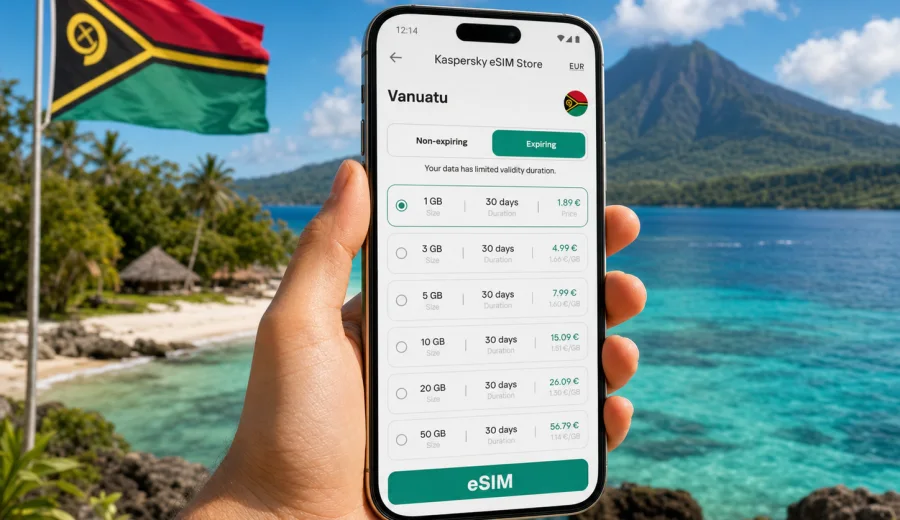
eSIM in Vanuatu: mobile connection and internet for your trip
Vanuatu is a country where a good mobile connection changes the rhythm of the trip. You may land in Port Vila, continue to Espiritu Santo for blue holes and beaches, fly to Tanna to see Mount Yasur, or move between smaller islands where schedules, transfers, hotel check-ins, and weather updates matter. Internet access is not only about posting photos. It helps you confirm domestic flights, message a driver, find a guesthouse, check ferry details, use maps, translate short phrases, and keep your bank or travel apps working.
An eSIM can make this preparation simpler. Instead of searching for a physical SIM card after arrival, you install a digital SIM profile on a compatible phone and use a selected data plan for mobile internet during the trip. For Vanuatu, this is especially useful because many routes combine several islands, and the most stressful moments often happen when you are tired, in transit, or trying to solve a small problem quickly.
This guide explains how to plan mobile internet for Vanuatu with eSIM, what to check before departure, how much data different travel styles may need, and how Kaspersky eSIM Store fits into the process as an app and website where you can choose, arrange, and activate an eSIM with a suitable data plan for international travel.
Why mobile internet matters in Vanuatu
Vanuatu is spread across many islands in the South Pacific. The trip often feels calm and unhurried once you are settled, but the logistics can be more detailed than they look from a map. You may need to coordinate airport transfers, confirm a tour pickup, check whether a local flight is delayed, or message your accommodation when the ferry timetable changes.
Mobile internet is useful in several everyday situations:
- arrival at Bauerfield International Airport in Port Vila;
- booking or confirming transport to a hotel, resort, bungalow, or guesthouse;
- using maps in Efate, Santo, Tanna, and other islands;
- checking domestic flight, ferry, and tour updates;
- keeping in touch with family, colleagues, banks, and travel support;
- translating practical travel phrases in English, French, or Bislama contexts;
- using messaging apps when ordinary calls and SMS are not included in your data plan.
Public Wi-Fi can help at hotels, cafes, and airports, but it is not a complete plan for a country trip. It may be slow, limited to a lobby, protected by a voucher, or unavailable exactly when you need to move. Standard roaming can be convenient, but the cost and conditions depend on your home operator. A travel eSIM gives you another option: prepare mobile data in advance and use it on your own phone when the device supports eSIM.
What an eSIM gives you for a Vanuatu trip
An eSIM is a digital SIM profile built into many modern smartphones and tablets. You do not insert a plastic SIM card. You add the eSIM profile to the device, select it for mobile data, and use the plan according to its terms.
For travelers, the main value is control. Before you pay, you can compare the data allowance, validity period, supported destination, and price. This is important for Vanuatu because travel patterns vary widely. A person staying in one resort for five days has a different internet need from someone visiting Port Vila, Champagne Beach, Luganville, and Tanna in the same trip.
An eSIM for travel is usually focused on mobile data. It normally does not include a regular phone number, voice calls, or SMS unless the selected plan clearly states otherwise. For calls and messages, you can use internet-based apps while mobile data is available. Keep your primary SIM active if you need to receive bank texts or calls from your home number, and check possible roaming charges for that separate use.
Vanuatu travel scenarios and data needs
There is no universal data amount that fits every traveler. The best choice depends on trip length, Wi-Fi availability, work habits, and how much you rely on video, maps, cloud backup, and social media.
| Travel scenario | Typical internet use | Practical data approach |
|---|---|---|
| Short stay in Port Vila | Maps, messaging, bookings, light browsing | A small plan may be enough if hotel Wi-Fi is reliable |
| Island-hopping holiday | Maps, transport updates, tour messages, photo sharing | Choose more data and a validity period that covers the full route |
| Diving or beach trip in Santo | Messaging, photos, transfers, weather checks | Medium data is safer if you upload many images |
| Volcano visit on Tanna | Maps, hotel contact, tour coordination | Keep enough data for logistics, not only entertainment |
| Remote work add-on | Email, documents, video calls, hotspot use | Pick a larger package and avoid relying only on public Wi-Fi |
As a simple planning rule, light users should think about messaging, maps, booking apps, and occasional browsing. Medium users should add social media, photo uploads, and frequent navigation. Heavy users should include video calls, cloud sync, streaming, and laptop hotspot use. If you plan to use your phone as a modem, check whether tethering is allowed in the selected plan and remember that laptops can consume data quickly.
Before you choose an eSIM plan
Do a short check before buying any travel eSIM for Vanuatu. It takes a few minutes and prevents most avoidable issues.
- Confirm that your phone supports eSIM.
- Make sure the device is not locked to one mobile operator.
- Check that the plan destination includes Vanuatu.
- Compare the data amount with your real travel style.
- Match the validity period with your arrival and departure dates.
- Read when the validity period starts: at installation, at first network connection, or by another rule in the plan details.
- Save installation instructions before the flight, because airport Wi-Fi is not always the best place to solve setup questions.
If you are unsure whether your phone can use eSIM, use the compatibility check before purchase: check your device. It is better to verify this at home than after arrival, when you may already be juggling luggage, transport, and local plans.
Where eSIM fits in your Vanuatu route
Vanuatu rewards flexible travel, but flexibility depends on information. In Port Vila, mobile data helps with taxis, restaurant reservations, hotel messages, and maps. Around Efate, it helps you coordinate day trips, beaches, waterfalls, cultural visits, and return transfers. On Espiritu Santo, it helps with Luganville logistics, dive centers, Million Dollar Point, blue holes, and beach routes. On Tanna, it helps with accommodation contact and tour coordination around Mount Yasur.
The key point is not that you will use the internet every minute. The value is having access when a small practical question appears. Which pickup point did the guide mention? Did the domestic flight time change? How far is the guesthouse from the airstrip? Is the bank card transaction asking for confirmation? Can you message home before going offline for the afternoon?
For this kind of travel, an eSIM is best treated as a preparation tool. You arrange the digital SIM before the trip, keep your main SIM in the phone, and switch mobile data to the travel eSIM when you need it. This keeps the setup clean and reduces the need to visit a store immediately after landing.
How to choose a Vanuatu eSIM data plan
Start with the trip length, then adjust for behavior. A seven-day stay with hotel Wi-Fi and light messaging needs less data than a two-week route with video calls and daily uploads. Do not choose only by the largest number. Choose by the combination of data, validity, destination, and how you will use the phone.
For a practical middle step, you can prepare an eSIM plan for Vanuatu before departure through Kaspersky eSIM Store. The app and website help you choose the destination, review available data plan conditions, arrange the eSIM, and activate it on a compatible device for mobile internet during the trip.
Use this checklist while comparing options:
1. Open your travel dates and count full days in Vanuatu, including arrival and departure.
2. Mark days with heavier data use: transfers, navigation, remote work, uploads, or video calls.
3. Decide whether hotel Wi-Fi is dependable enough for large updates and backups.
4. Check whether you need one country plan or a broader regional plan for a route that includes nearby destinations.
5. Read the plan terms before payment, especially data amount, validity, activation timing, and supported destination.
6. Install the eSIM while you have stable Wi-Fi, then activate mobile data according to the plan instructions.
Data planning by activity
Some activities are predictable. Messaging and map checks use modest amounts of data. Video calls, streaming, and automatic cloud backup can use much more. The table below is a planning aid, not a promise of exact usage, because apps, settings, image quality, and background updates differ.
| Activity | Data impact | Tip for Vanuatu |
|---|---|---|
| Text messaging | Low | Good for daily coordination with hotels and tours |
| Online maps | Low to medium | Download offline areas before moving between islands |
| Photo sharing | Medium | Upload on Wi-Fi if you take many high-resolution photos |
| Video calls | High | Keep calls short or schedule them when Wi-Fi is available |
| Streaming video | High | Avoid using travel data for long entertainment sessions |
| Hotspot for laptop | Medium to very high | Disable cloud sync and system updates before tethering |
The easiest way to save data is to prepare offline maps, disable automatic photo and video backup on mobile data, download music or documents before the flight, and keep app updates on Wi-Fi only. These small settings can make a modest plan last much longer.
Installing an eSIM before the trip
The exact installation flow depends on your device and operating system, but the logic is similar. You add the eSIM profile, keep it stored on the phone, and select it for mobile data when you are ready to use it. Many travelers install the eSIM at home on stable Wi-Fi, then switch it on after arrival or shortly before departure, depending on the plan conditions.
For step-by-step setup, use the official installation pages for your device: Android installation guide and iOS installation guide. Read the plan details before activation, because some validity periods start only when the eSIM first connects to a supported network, while others may follow different rules.
A safe installation sequence looks like this:
1. Check eSIM compatibility and operator lock status.
2. Choose the Vanuatu plan and complete the purchase flow.
3. Connect to stable Wi-Fi.
4. Add the eSIM profile to your phone.
5. Label it clearly, for example "Vanuatu data".
6. Keep your primary SIM for calls or bank messages if needed.
7. Set the travel eSIM as the mobile data line when you are ready.
8. Turn on data roaming for the eSIM if the plan instructions require it.
9. Test messaging, maps, and browsing before leaving the airport area.
Do not delete the eSIM profile unless you are sure it is no longer needed. Some eSIM profiles cannot be reinstalled on another device or restored after deletion, depending on the specific conditions.
Vanuatu airport and arrival tips
Arrival is the moment when mobile data feels most useful. You may need to contact the hotel, check a pickup message, load a map, or confirm the next step of your journey. If your eSIM profile is already installed, you can focus on selecting the correct mobile data line and following the activation rules.
Before landing, make sure:
- your phone battery is charged;
- the eSIM profile is installed or the installation details are saved offline;
- your primary SIM settings are understood, especially if you want to avoid roaming charges;
- important addresses are saved in your maps app;
- your hotel, tour operator, and transport contacts are available outside email if possible.
If the phone does not connect immediately, stay calm and check the basics: mobile data line, data roaming setting for the eSIM, airplane mode, manual network selection if needed, and whether the plan is active for Vanuatu. Connection behavior can depend on local network conditions, device settings, and the selected plan.
eSIM, roaming, local SIM, and Wi-Fi
Each option has a place. The best choice is the one that matches how you travel.
| Option | Strength | Limitation |
|---|---|---|
| Travel eSIM | Prepared in advance, no plastic SIM, clear data package | Requires eSIM-compatible unlocked device |
| Standard roaming | Uses your existing number and SIM | Conditions and cost depend on your home operator |
| Local physical SIM | Familiar option for some longer stays | Requires finding a point of sale and handling setup locally |
| Public Wi-Fi | Useful for large downloads and backups | Not always available when you are moving |
For many visitors, the strongest setup is a combination: travel eSIM for mobile data, hotel Wi-Fi for heavier uploads, and the primary SIM kept for essential calls or verification messages. This gives you options without depending on one channel for everything.
Practical settings to control data use
Before leaving for Vanuatu, spend five minutes on phone settings. This is often more useful than buying a larger plan than you really need.
- Turn off mobile data for apps you do not need during the trip.
- Disable automatic app updates on mobile data.
- Pause cloud photo backup unless you are on Wi-Fi.
- Download offline maps for Port Vila, Efate, Santo, and any planned island route.
- Save hotel addresses, booking confirmations, and domestic flight details offline.
- Lower video quality in streaming and meeting apps.
- Check whether personal hotspot is allowed and use it only when necessary.
- Track remaining data in your phone settings and in the app or profile area when available.
This is especially helpful in island travel because a day can change quickly. You may leave a Wi-Fi area in the morning and return late in the evening. If background apps are quiet, your travel data remains available for the tasks that matter.
Common mistakes to avoid
The most common eSIM problems are not complicated. They usually come from skipping a compatibility check, misunderstanding activation timing, or leaving the wrong line selected for mobile data.
Avoid these mistakes:
- buying a plan before checking device compatibility;
- assuming every phone model supports eSIM in every market version;
- installing the profile and then deleting it to "try again";
- forgetting to select the eSIM as the data line;
- leaving data roaming off when the plan instructions require it;
- using video streaming or cloud backup on a small travel data package;
- expecting a data-only eSIM to include a regular phone number;
- waiting until a busy airport moment to read the setup guide for the first time.
The calmer approach is to prepare the eSIM at home, save the instructions, and understand which settings you will change after landing.
Short answers for travelers
Is an eSIM useful for Vanuatu?
Yes, if your device supports eSIM and you want mobile data without searching for a physical SIM card immediately after arrival. It is especially practical for maps, messaging, bookings, and travel coordination.
Will an eSIM replace my normal phone number?
Usually no. Travel eSIM plans are commonly focused on mobile data. Voice calls and SMS are not included unless the plan terms say so. Keep your main SIM available if you need your regular number.
Can I install the eSIM before I fly?
In many cases, yes. Install it on stable Wi-Fi and follow the activation rules for the selected plan. Check when the validity period starts before activating.
Should I choose a small or large data package?
Choose based on trip length and behavior. Maps and messages need less data. Video calls, hotspot use, streaming, and cloud backup need much more.
Can I use eSIM on several islands in Vanuatu?
The plan must support the destination, and actual service depends on local network availability and conditions. Review plan details and keep offline essentials ready for remote areas.
Final preparation checklist
Before you leave, confirm the essentials:
- your phone supports eSIM and is not operator locked;
- your Vanuatu eSIM plan matches your dates and data needs;
- installation instructions are saved;
- important maps and travel documents are available offline;
- your primary SIM settings are clear;
- data-heavy app settings are controlled;
- you know how to switch the mobile data line on your phone.
When these points are handled, mobile internet becomes one less thing to solve on arrival. You can land, message your accommodation, check your route, and keep moving through Vanuatu with a clearer plan.
For a trip that starts smoothly, choose an eSIM data plan for Vanuatu in Kaspersky eSIM Store before departure, install it on a compatible device, and keep mobile internet ready for the moments when travel details need quick attention.