
Travel connectivity guide
Varna eSIM guide for mobile internet
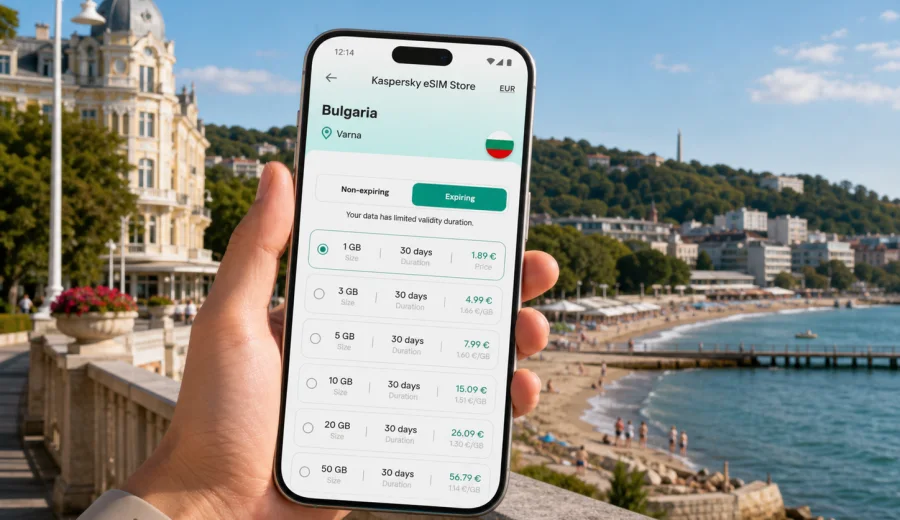
Varna eSIM guide: mobile connection and internet for a smoother city trip
Varna is a practical city to visit with mobile internet ready before you land. The airport is close to the city, the Black Sea coast is easy to explore on foot, and many trips mix several small movements: airport transfer, hotel check-in, Sea Garden walks, beach time, restaurant bookings, taxi rides, and short journeys to nearby resorts. In that rhythm, an eSIM can make the first hours simpler because you do not need to look for a local SIM counter before opening maps, calling a ride, or messaging your hotel.
This guide is about using eSIM for Varna specifically. Bulgaria matters for the plan selection, but the travel problem is local: you arrive in Varna, move between the airport, the center, the sea promenade, business areas, and coastal day-trip points, and you need predictable mobile internet for navigation, bookings, and communication.
An eSIM is a digital SIM profile installed on a compatible phone or tablet. For most travelers, it is useful as a data connection for maps, messengers, hotel apps, email, tickets, ride-hailing, and translation. It usually does not replace a regular phone number for voice calls or SMS unless a selected plan clearly states otherwise. Treat it as a mobile internet setup for travel, and keep your main SIM available for banking codes or important calls if you need them.
Why mobile internet matters in Varna
Varna is compact enough to feel easy, but it is not a single-street destination. Your route may include the airport west of the center, a hotel near the Sea Garden, meetings in the business districts, beach areas north of the city, and restaurants around the pedestrian center. Public Wi-Fi can help in some cafes and hotels, but it does not cover the exact moments when travelers usually need internet most.
Typical Varna moments where a working data connection helps:
- checking the correct terminal, pickup point, or taxi location after landing;
- sending your arrival time to a hotel or apartment host;
- navigating from the Cathedral area to the Sea Garden, beach, port, or pedestrian streets;
- comparing transport options when the weather changes near the coast;
- opening digital tickets, reservation emails, or conference details;
- using translation for menus, signs, pharmacies, or local services;
- staying reachable during a day trip to Golden Sands, Balchik, or another coastal stop.
The main benefit is not only speed. It is control. When your phone already has a travel data plan installed, you can make decisions in the street, at the airport curb, on the bus, or in a taxi without waiting for Wi-Fi.
Varna arrival scenarios
Many trips to Varna start with a quick practical question: how do I get online before I need my first address? An eSIM helps most when it is installed before departure or while you still have stable Wi-Fi. You can then activate mobile data on arrival and use the phone for the first route into the city.
| Arrival moment | What you may need online | Why eSIM helps |
|---|---|---|
| Airport landing | maps, ride pickup, hotel address, messages | You can move straight to transport without searching for a SIM shop |
| Late evening arrival | taxi, apartment check-in, door codes | Mobile data is available when fewer services are open |
| Train or bus arrival | onward navigation, local transport, restaurant search | You can orient yourself from the station area immediately |
| Cruise or port stop | walking route, return time, translation | You can plan a short city visit without relying on public Wi-Fi |
For a first visit, save your hotel address offline as a backup, but do not depend only on offline maps. Live traffic, changed pickup points, late check-in messages, and updated opening hours are the details that usually require a connection.
Choosing the right data volume for Varna
The right eSIM plan depends on how you use your phone. A traveler who mainly checks maps and messages needs far less data than someone who works from a laptop through a hotspot or uploads video from the beach.
Use these practical ranges as a planning guide:
| Trip style in Varna | Typical use | Data approach |
|---|---|---|
| Weekend city break | maps, chat, restaurant search, tickets | small or medium data package |
| Beach holiday | navigation, social apps, photos, music streaming | medium package, more if you upload video |
| Business trip | email, documents, video calls, taxi apps | medium to larger package depending on meetings |
| Family trip | several devices, route planning, entertainment | larger package or careful hotspot use |
| Stopover | maps, messaging, one walking route | smaller package may be enough |
Video calls, cloud photo backup, software updates, and streaming can use data quickly. Before traveling, disable automatic app updates and cloud sync over mobile data. Download maps, playlists, boarding passes, hotel confirmations, and tickets over home Wi-Fi where possible. Then keep the eSIM data for the tasks that actually need live connectivity in Varna.
Device checks before you buy a plan
Before selecting a data package, confirm that your phone or tablet supports eSIM and is not locked to a single operator. This step is easy to skip, but it matters because an eSIM profile cannot be used on every device. If you are unsure, check your device before you prepare the plan.
Also check these points:
- your device has a recent operating system update;
- you know where the mobile data and SIM settings are;
- your main SIM can remain active if you need calls or SMS;
- your phone has enough battery for arrival and navigation;
- you have Wi-Fi available during installation, especially before departure.
If you travel with two phones, install the eSIM on the device you will actually use for maps and messages. Moving an activated eSIM to another device may not be possible under the conditions of the selected profile, so choose carefully before installation.
Where mobile data is useful around the city
Varna has several travel zones with different mobile internet needs. The city center is good for walking, but a beach holiday or work trip often moves beyond the most obvious streets.
In the pedestrian center, mobile data helps with walking routes, restaurant reservations, payment confirmations, and meeting points. Around the Cathedral and main squares, it is useful for orienting yourself when streets curve or when you want to connect several sights without backtracking.
Along the Sea Garden and the beach, mobile internet becomes more practical than public Wi-Fi. You may want to find the next entrance, check the weather, coordinate with friends, or call transport after sunset. If you are moving between beach areas, hotels, and restaurants, a working data connection saves time.
Near the port, station areas, and transport stops, eSIM data helps with onward movement. These are the places where you may not want to pause and search for Wi-Fi, especially with luggage or on a tight schedule.
For hotels and apartments, mobile data is still useful even if the room has Wi-Fi. You may need it before check-in, during self-check-in, in the elevator, at the building entrance, or while contacting the host from the street.
Transport, taxis, and local movement
Varna is not difficult to navigate, but travel days can involve small uncertainties. The route from the airport, changes in traffic near the center, coastal roads during holiday season, and evening restaurant plans all become easier when your phone is online.
For transport, use mobile internet to:
1. Open the hotel address before leaving the airport.
2. Compare route options instead of relying on memory.
3. Share your live location with a travel companion.
4. Confirm taxi or ride pickup points.
5. Check walking time from a stop to your final address.
6. Translate address details if a driver or host needs clarification.
If you plan to use public transport, save key routes in advance. If you plan to rely on taxis, make sure the app, payment method, and phone number verification are ready before arrival. An eSIM provides mobile data, but app account setup may still require your main number for SMS or account confirmation.
When to prepare your Varna eSIM
The most comfortable setup is to choose the plan before the trip, install it while connected to reliable Wi-Fi, and activate data when you arrive or when the plan conditions say it should be activated. Conditions can differ by plan, so read the data volume, validity period, supported destination, and activation details before payment.
For Varna travel, it is usually better to prepare in this order:
- choose Bulgaria as the destination;
- compare data volume and validity period against the length of your stay;
- check whether your device supports eSIM;
- install the eSIM profile over Wi-Fi;
- keep the installation details available until the connection works;
- turn on the eSIM for mobile data when appropriate for your plan.
If you want to prepare before departure, you can choose a data plan for your trip to Varna through Kaspersky eSIM Store, then follow the setup steps for your device. Kaspersky eSIM Store is an app and website where you can quickly choose, arrange, and activate an eSIM with a suitable mobile internet plan for travel abroad.
How to install and activate an eSIM for Varna
Install the eSIM while you have stable Wi-Fi. Do not wait until you are standing outside the terminal with low battery unless you have no other option. The exact steps depend on the device, operating system, and selected plan, but the general flow is similar.
1. Open the plan details and confirm Bulgaria is the right destination for your Varna trip.
2. Check the data volume, validity period, and activation rules.
3. Add the eSIM profile to your compatible device.
4. Label it clearly, for example "Travel Bulgaria" or "Varna data".
5. Keep your main SIM for calls or SMS if needed.
6. Set the eSIM as the line for mobile data.
7. Enable data roaming for the eSIM if the plan instructions require it.
8. Test the connection after arrival.
For device-specific setup, use the Android installation guide or the iOS installation guide. These instructions are useful before the trip because they let you check where the key settings are before you need them.
If the connection does not work immediately, first check that the correct eSIM is selected for mobile data, airplane mode is off, data roaming is set according to the plan instructions, and the phone has restarted after installation. Avoid deleting the eSIM profile unless the support instructions tell you to do so.
Business trips to Varna
For business travelers, eSIM planning is less about browsing and more about continuity. You may need email at the airport, calendar updates on the way to a meeting, a map to the office or hotel, and a backup connection when venue Wi-Fi is crowded.
A Varna business trip usually benefits from:
- a plan with enough data for maps, email, documents, and calls through internet apps;
- a phone battery strategy, especially if you use navigation all day;
- offline copies of meeting addresses and hotel confirmations;
- a hotspot plan only if the selected eSIM conditions and your device allow it;
- clear separation between your main SIM for calls and your travel eSIM for data.
If you expect video calls, do not size your plan only for messaging. Video meetings can use a large amount of data, and quality may vary by location, building, and network conditions. When possible, use trusted hotel or office Wi-Fi for long calls and keep mobile data for movement, urgent messages, and backup access.
Beach holidays and coastal day trips
Varna is often a base for the wider Black Sea coast. Travelers may move between the city beach, the Sea Garden, Golden Sands, Saints Constantine and Helena, Balchik, or other nearby stops. In this style of trip, the eSIM is useful because you are not always inside a hotel or cafe.
Before leaving the city for a day trip, open your route, save the return address, and check the battery level. If you travel with children or a group, agree on a meeting point and keep messaging apps available. Mobile internet is also helpful for checking restaurant hours, beach facilities, weather changes, and the route back after sunset.
For coastal routes, a few habits protect your data allowance:
- download maps for the area before leaving Wi-Fi;
- reduce automatic photo backup on mobile data;
- avoid long video streaming over the eSIM if the package is small;
- use messaging apps for calls when voice service is not included;
- keep screenshots of addresses, tickets, and reservation numbers.
This is especially useful if your day trip includes several stops. Mobile data lets you change plans without returning to the hotel just to check directions.
Stopovers and short visits
Not every Varna trip is a full holiday. Some travelers arrive for a conference, a port call, a family visit, or a short stop before continuing along the coast. For a short visit, the goal is not a large plan but a connection that works during the exact window when you are moving.
A stopover eSIM setup should focus on:
| Short-visit task | Why it matters |
|---|---|
| Opening maps immediately | You may have only a few hours in the city |
| Staying reachable | Hotel, driver, host, or colleague may send updates |
| Checking return transport | Timings and pickup points can change |
| Translating simple details | Menus, signs, and addresses are easier online |
| Avoiding Wi-Fi searches | Short visits leave little time for setup |
If your stopover is only one day, choose validity and data volume carefully. A large package may be unnecessary, while too little data can be frustrating if you use navigation, photos, and messaging heavily.
Practical checklist before you leave for Varna
Use this checklist a day or two before departure:
- Confirm your device supports eSIM and is not operator-locked.
- Choose Bulgaria as the destination for your Varna trip.
- Match data volume to your itinerary, not just the number of days.
- Install the eSIM profile while connected to Wi-Fi.
- Save the Android or iOS setup instructions in case you need them.
- Download offline maps for Varna and your hotel area.
- Save your hotel address, booking number, and check-in instructions.
- Turn off automatic app updates and cloud backup over mobile data.
- Pack a power bank if you expect long beach days or full-day meetings.
- Keep your main SIM available for SMS codes if your bank or travel apps need them.
The point is to avoid doing technical setup at the moment when you are tired, carrying luggage, or trying to find transport.
Common questions about eSIM in Varna
Is eSIM useful if my hotel has Wi-Fi?
Yes, because hotel Wi-Fi helps only when you are inside or near the property. In Varna, the most useful moments for mobile data often happen outside: arrival, transport, walking routes, beach plans, restaurant searches, and day trips.
Does an eSIM give me a Bulgarian phone number?
Usually no. Travel eSIM plans are commonly focused on mobile data. Voice calls and SMS are not included unless the selected plan explicitly says so. For calls, you can use internet-based messaging apps, and you can keep your regular SIM active if you need your usual number.
Should I activate the plan before departure?
Read the activation rules for the selected plan. Some plans start validity at installation, while others start when they connect in the destination. Install over Wi-Fi when possible, but activate according to the plan conditions so you do not lose useful validity time.
Can I use one eSIM for Varna and other places in Bulgaria?
If the selected destination is Bulgaria and the plan conditions support use in the country, the same plan is intended for travel within Bulgaria, not only inside Varna. Check the details before payment, especially if you plan to continue to Sofia, Plovdiv, Burgas, or mountain areas.
Can I share eSIM data with a laptop?
It depends on the selected plan and your device settings. If hotspot use is important for work, check the plan terms before relying on it. Also remember that laptops can use data quickly through cloud sync, updates, and video meetings.
What should I do if mobile data does not start?
Check the basics first: correct eSIM selected for mobile data, roaming settings configured according to the plan instructions, airplane mode off, and the device restarted. If the issue continues, use support guidance and avoid deleting the eSIM profile without instruction.
Final preparation for mobile internet in Varna
Varna rewards simple preparation. If your mobile internet is ready before arrival, you can leave the airport with your route open, reach the hotel without waiting for Wi-Fi, move between the Sea Garden and the center, and adjust beach or business plans as the day changes.
Before your trip, check device compatibility, choose a data package that matches your stay, install the eSIM over Wi-Fi, and keep your main SIM available for calls or SMS if you need it. For a practical start, prepare an eSIM plan for Bulgaria before traveling to Varna through Kaspersky eSIM Store and use it as your mobile data option during the trip.