
Travel connectivity guide
Vestmanna eSIM Guide for Travelers
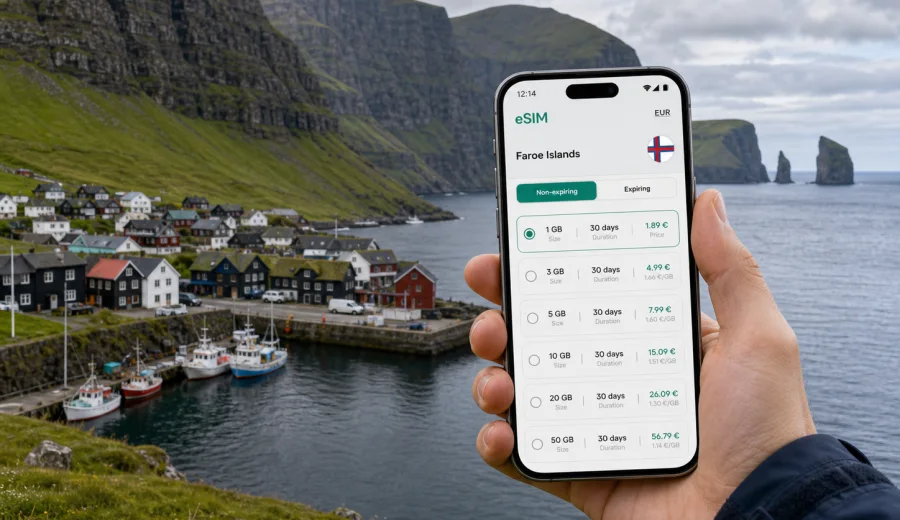
Vestmanna eSIM: mobile connection and internet for your Faroe Islands trip
Vestmanna is one of the easiest places in the Faroe Islands to understand why mobile internet matters on a trip. The town sits on the west coast of Streymoy, facing narrow sounds, green slopes, harbor views and boat routes toward the famous sea cliffs north of the village. A day here can move quickly: you may arrive from Vagar Airport, stop in Torshavn first, check in near the harbor, join a boat tour and continue across Streymoy before evening.
For that kind of trip, an eSIM is less about being constantly online and more about keeping small travel decisions under control. You need maps, guesthouse or tour messages, ferry and bus information, payment confirmations, weather updates and location sharing. Vestmanna is compact, but the landscape makes planning, navigation and timing more important than in a large grid-based city.
This guide focuses on how to use mobile connection and internet in Vestmanna: arrival, local movement, boat trips, hotels, short business stays, stopovers and routes from the town. It also explains where an eSIM helps and how to choose a sensible data allowance for the Faroe Islands.
Why Vestmanna is a city where mobile internet is useful
Vestmanna is not a destination where you spend the whole day surrounded by dense urban Wi-Fi. The town is practical, scenic and spread around the harbor and surrounding roads. Many of the best moments happen outdoors: walking near the waterfront, finding the correct boat departure point, checking conditions before a cliff tour, or driving through valleys where the road looks very different in mist, wind or low cloud.
Mobile internet helps most in these ordinary travel moments:
- checking your route from Vagar Airport, Torshavn or another village;
- confirming the meeting point for a boat trip from Vestmanna harbor;
- messaging a hotel, apartment host or tour operator if arrival time changes;
- using maps when road signs are sparse or visibility is poor;
- comparing bus, rental car and taxi options before leaving town;
- storing boarding passes, booking confirmations and payment receipts;
- translating short messages or local information when needed;
- using internet calling or messaging apps when a normal phone number is not included in your data plan.
Vestmanna rewards flexible planning. A calm morning may be ideal for a boat tour, while a windy afternoon may be better for a cafe, a short walk, or a drive to another part of Streymoy. If your mobile internet is ready, you can adjust without searching for public Wi-Fi.
Arrival scenarios: airport, Torshavn and road transfer
Most international visitors reach the Faroe Islands through Vagar Airport. From there, Vestmanna is usually reached by road, often with a rental car, arranged transfer or a combination of public transport and local connections. Some travelers first spend time in Torshavn and visit Vestmanna as a day trip. Others use Vestmanna as a quieter base for exploring Streymoy and nearby routes.
Your first connection decisions usually happen before you see the town:
| Arrival route | What you may need mobile data for | Why it matters |
|---|---|---|
| Vagar Airport to Vestmanna | maps, transfer messages, weather, check-in details | The drive crosses open landscapes where timing and visibility can change. |
| Torshavn to Vestmanna | navigation, bus planning, parking search, tour confirmation | Many visitors combine the capital with a half-day or full-day visit. |
| Rental car pickup | route planning, fuel stops, digital documents | You may need to access booking details and insurance information. |
| Group transfer | messaging apps, location sharing, pickup coordination | Small delays are easier to handle when everyone can communicate. |
| Late arrival | hotel instructions, door codes, local directions | Reception hours and self check-in details should be available offline or online. |
If you activate mobile data only after reaching the accommodation, you may miss the moment when it is most useful. A better approach is to install your eSIM before departure, keep the activation instructions available, and switch to the travel data line when you are ready to use it in the Faroe Islands. Exact activation timing depends on the selected plan, so check the plan conditions before you travel.
Moving around Vestmanna
Vestmanna is small enough to explore on foot around the harbor area, but many practical journeys extend beyond the immediate center. You may walk from accommodation to the boat pier, drive to a viewpoint, continue toward Torshavn, or connect to another village. The distances are not overwhelming, but weather, daylight and limited transport frequency can make mobile internet useful.
For walking in town, use mobile data to:
- finding the correct pier or tour office without guessing;
- checking whether a restaurant, shop or attraction is open that day;
- saving your accommodation location before a walk;
- using weather radar and wind forecasts before waterfront plans;
- checking where you parked if you stop near the harbor;
- contacting your host if you arrive outside normal check-in hours.
For driving, mobile internet supports:
- live routing between Vestmanna, Torshavn, Vagar and northern Streymoy;
- checking road conditions when the weather looks unsettled;
- downloading offline maps as backup before remote routes;
- comparing route time before committing to a detour;
- using messaging apps without relying on public Wi-Fi.
The key point is not that Vestmanna is difficult to navigate. It is that travel in the Faroe Islands often depends on small pieces of timely information. A prepared eSIM helps you make those decisions from the car, the harbor, the hotel lobby or the side of the road.
Boat tours, cliffs and harbor timing
Vestmanna is strongly associated with boat trips to the nearby bird cliffs and sea caves. This is where mobile internet can be especially useful, but also where expectations should stay realistic. Weather and sea conditions affect operations. Meeting points can be close together but still confusing if you arrive in a hurry. Travelers often need to confirm departure time, check messages, show a booking, or coordinate with someone who is parking the car.
Before a boat trip, use this checklist:
- save the booking confirmation where it is available offline;
- check your exact meeting point in Vestmanna, not just the town name;
- confirm whether you need to arrive early for boarding;
- keep your phone charged before leaving the car or hotel;
- download a local map area in case signal quality changes near cliffs or on water;
- bring a power bank if you plan to film, photograph and navigate all day.
During the trip, your phone may be used mostly for photos and short messages. Mobile signal can vary in coastal areas, on water and close to cliffs. Treat an eSIM as a practical travel data tool, not as a guarantee that every remote viewpoint or boat route will have the same connection quality as a town center.
How much data you may need in Vestmanna
The right data allowance depends on the shape of your trip. Vestmanna can be a short stop, a boat-tour base, a quiet overnight stay, or part of a longer Faroe Islands itinerary. Most travelers use mobile data for maps, messages, browser searches, weather and booking apps. Heavy usage comes from cloud photo backup, video calls, streaming and uploading large files.
| Trip style | Typical online behavior | Practical data approach |
|---|---|---|
| Half-day stop in Vestmanna | maps, messages, tour confirmation, a few searches | A small data package can be enough if you avoid video and cloud backup. |
| One overnight stay | navigation, check-in, restaurant search, weather, photo sharing | Choose more data if you plan to upload photos from the harbor or cliffs. |
| Weekend in the Faroe Islands | maps across islands, messaging, research, payments, weather | A mid-size package gives more room for changing plans. |
| Remote-work stop | email, calls, file access, hotspot use | Estimate work data separately and do not rely only on public Wi-Fi. |
| Photo and video trip | uploads, backup, social posting, cloud storage | Use Wi-Fi for large backups when available and keep mobile data for travel tasks. |
For Vestmanna specifically, many travelers underestimate weather and map usage. You may check the forecast, compare routes, message hosts and search for practical details more often than expected. If one person becomes the default navigator, that phone will use more data.
Choosing an eSIM plan for Vestmanna and the Faroe Islands
For a city article, the plan selection should still be based on the country where the city is located. Vestmanna is in the Faroe Islands, so choose a plan that covers the Faroe Islands rather than searching for a separate city product. Look at the amount of data, validity period, destination coverage and activation rules before checkout.
If Vestmanna is part of your Faroe Islands route, you can prepare an eSIM plan for your trip to the Faroe Islands in Kaspersky eSIM Store before you arrive, then install it on a compatible device and activate it according to the selected plan conditions.
When comparing options, focus on your actual itinerary:
- length of stay in Vestmanna and the Faroe Islands;
- whether you will drive, use buses or depend on transfers;
- how often you expect to use maps outside towns;
- whether your accommodation has reliable Wi-Fi;
- whether you need data for work, video calls or hotspot use;
- whether the plan is valid for the whole trip or only part of it;
- whether top-up or another package may be needed later.
Kaspersky eSIM Store should be described accurately: it is an app and website where you can quickly choose, arrange and activate an eSIM with a suitable mobile internet plan for international travel. It is not a mobile network operator, and the eSIM data plan does not automatically include a regular phone number, voice calls or SMS unless the selected plan states otherwise. For calls and messages, many travelers use internet-based apps over mobile data.
Device preparation before you leave
The best time to prepare your eSIM is before the day becomes busy. In Vestmanna, you may want to spend arrival time looking at the harbor, checking into your accommodation or finding the boat pier, not troubleshooting phone settings in a car park.
Before buying or installing an eSIM, confirm that your phone or tablet supports eSIM and is not locked in a way that prevents using another mobile data line. You can check your device before you choose a plan.
Then prepare in this order:
1. Choose the Faroe Islands as the destination for your trip.
2. Compare available data amounts and validity periods.
3. Review the plan conditions, including when validity starts.
4. Install the eSIM while you have stable internet.
5. Keep the installation details available in case you need them later.
6. Set your primary SIM and eSIM roles clearly on your phone.
7. Turn on mobile data for the travel eSIM when you are ready to use it.
If you are installing on Android, follow the Android eSIM installation guide. If you are installing on an iPhone, use the iOS eSIM installation guide. The exact names of settings can vary by device model and operating system version, so check the screen prompts carefully.
Practical phone settings for a Vestmanna trip
Once your eSIM is installed, spend a few minutes checking settings before you leave the airport, hotel or a place with stable Wi-Fi. This is especially useful in the Faroe Islands, where you may move quickly from town to open road.
Recommended setup:
- give the travel eSIM a clear label, such as "Faroe data";
- keep your home SIM available for calls or banking messages if you need it;
- select the eSIM as the mobile data line when you are ready to use the plan;
- disable automatic cloud backup over mobile data unless you have a large allowance;
- allow maps, messaging, banking, hotel and transport apps to use mobile data;
- restrict background data for streaming or large social apps;
- download offline maps for Vestmanna, Torshavn, Vagar and your next route;
- save important addresses, booking codes and phone numbers offline.
Some plans may require data roaming to be enabled for the eSIM line. This does not mean you are using your home operator's roaming for all traffic; it can be a required setting for the travel eSIM profile. Check the plan instructions and your phone settings before assuming something is wrong.
Hotels, stopovers and trips from Vestmanna
Accommodation in Vestmanna may be a hotel, guesthouse, apartment or small local stay. Wi-Fi is useful when available, but mobile internet covers the travel moments that happen outside the room: finding the property in poor visibility, receiving door codes, translating a short host message, checking parking details, ordering a taxi or navigating back after a waterfront walk.
Business travelers should be especially careful with data planning. A short visit can still involve email, two-factor authentication, cloud files, maps and schedule changes. Keep large uploads for trusted Wi-Fi when possible, and reserve mobile data for urgent work, messaging and route changes.
Vestmanna also works well as a day trip from Torshavn or as a stop between Vagar and other parts of Streymoy. For a short visit, prepare this sequence:
1. Install and test your eSIM before the day starts.
2. Save the boat tour confirmation and exact meeting point.
3. Download a local map area before leaving your accommodation.
4. Check weather and road conditions before the drive.
5. Keep enough battery for navigation after the boat tour.
6. Decide your next stop before you leave the harbor area.
For onward routes, mobile internet helps you compare the time back to Torshavn or Vagar Airport, confirm bus or ferry information, find fuel or food stops, and share an updated arrival time with your next accommodation. Use offline preparation as a backup: save addresses, maps and booking screenshots, then use your eSIM for live updates and messages.
eSIM, roaming, Wi-Fi and local SIM: quick comparison
| Option | Strength | Limitation in Vestmanna |
|---|---|---|
| Travel eSIM | Can be prepared before arrival and used for mobile data on a compatible device | Requires an eSIM-ready, unlocked device and careful plan selection. |
| Home roaming | Uses your existing SIM and phone number | Costs and data rules depend on your home operator. |
| Public Wi-Fi | Useful at accommodation or cafes | Not available exactly when you need maps, messages or weather outside. |
| Physical local SIM | Familiar format for some travelers | Requires finding a point of sale and handling a physical card. |
For many visitors, an eSIM is practical because it reduces the number of arrival tasks. You can keep your usual SIM for calls or banking messages and use the travel eSIM for mobile data. To make the allowance last, download maps before driving, pause automatic photo backup, avoid large app updates on mobile data and keep a small buffer for the airport return.
FAQ: eSIM and mobile internet in Vestmanna
Do I need an eSIM just for Vestmanna?
Not always. If you are visiting for a few hours and have roaming included in your home plan, you may be fine. An eSIM becomes more useful when you want a prepared mobile data option for the Faroe Islands, especially for navigation, booking messages, weather checks and routes outside town.
Is Vestmanna a separate eSIM destination?
Usually no. For a city trip to Vestmanna, choose a plan for the Faroe Islands. The city matters for your data habits and route planning, while the country determines the destination coverage you should select.
Can I use an eSIM for calls and SMS?
Many travel eSIM data plans are focused on mobile internet and do not include a regular phone number, voice calls or SMS unless the specific plan says so. You can use messaging and calling apps over mobile data.
Should I install the eSIM before arriving in the Faroe Islands?
It is usually more convenient to install it before travel while you have stable Wi-Fi. Review the plan conditions first, especially when validity starts, then activate or switch data lines according to the instructions for your selected plan.
Is public Wi-Fi enough in Vestmanna?
Public or accommodation Wi-Fi can be helpful, but it is not always available at the harbor, on the road, near viewpoints or during a boat-trip day. A travel eSIM is useful for the gaps between fixed Wi-Fi points.
What should I save offline?
Save your accommodation address, booking confirmations, boat tour details, parking location, maps for Vestmanna and onward routes, and any instructions you may need if mobile signal is weak.
Final preparation before you travel
For Vestmanna, the best mobile internet setup is simple: prepare before arrival, keep the phone settings clear, and choose enough data for maps, messages, weather and route changes. The town is compact, but the travel day around it can include airport transfer, harbor timing, road navigation, cliff tours, hotels and onward movement across the Faroe Islands.
Before you leave, make sure your device supports eSIM, install the plan while you have stable internet, save key details offline and decide which SIM line handles mobile data. Then you can arrive in Vestmanna with fewer small tasks competing for attention.
To get ready for the trip, open Kaspersky eSIM Store and choose an eSIM plan for the Faroe Islands that fits your stay in Vestmanna, your route through the islands and the amount of mobile internet you expect to use.