
Travel connectivity guide
Vienna eSIM: Mobile Internet for Travel
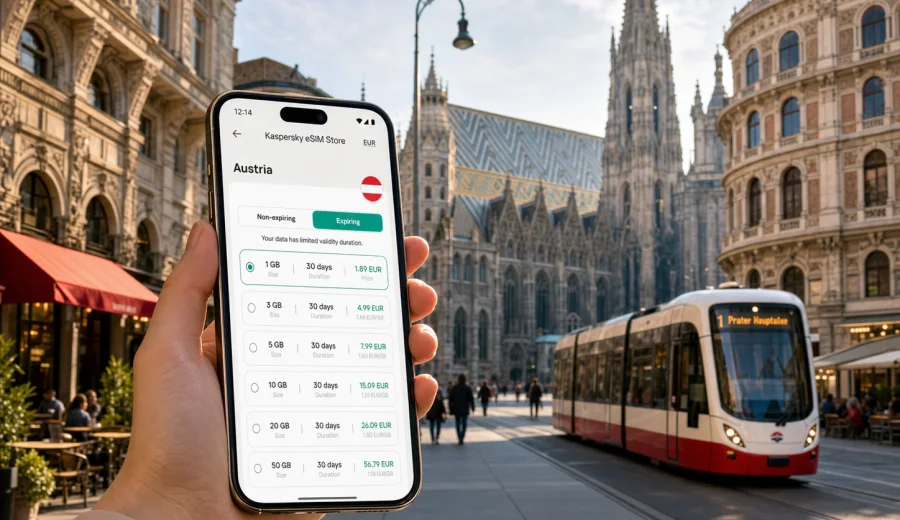
Vienna eSIM: mobile connection and internet for your trip
Vienna is easier to enjoy when your phone is ready before the first tram ride. The airport train, U-Bahn, hotel check-in, museum tickets, restaurant reservations, business meetings, and day trips all depend on mobile internet at small but important moments. This guide explains how to use an eSIM in Vienna, Austria: where data matters, how to plan traffic, when to activate your plan, and what to check before you travel.
Why mobile internet matters in Vienna
Vienna rewards travelers who can move confidently. Addresses are precise and public transport is reliable, but the city is spread across neighborhoods with different routines. You may start at Vienna International Airport, continue by City Airport Train or S-Bahn, navigate to a hotel near Schwedenplatz, and then switch to a tram route along the Ringstrasse.
Mobile internet is useful for:
- checking train and U-Bahn routes after landing;
- opening maps in compact streets around Stephansplatz;
- using messaging apps for hotel, host, or colleague updates;
- comparing walking, tram, and taxi routes in real time;
- managing museum tickets, boarding passes, and restaurant bookings;
- sharing a hotspot with a laptop if the selected eSIM tariff allows tethering.
Coffee houses, galleries, markets, parks, and concerts do not need constant scrolling. Travel logistics often do. A prepared eSIM gives you a data option before you have found dependable Wi-Fi.
Arrival scenarios: from the airport to the city
Vienna International Airport is outside the city center, so your first connectivity decision often happens before you reach your hotel. If you activate mobile data on arrival, you can compare airport train options, message your accommodation, check platform changes, or order a ride without relying on public Wi-Fi.
| Arrival point | Typical online task | Why eSIM helps |
|---|---|---|
| Airport arrivals hall | Check train, taxi, or ride route | You can make the choice before leaving the terminal |
| Wien Mitte | Switch from airport train to U-Bahn | Live maps reduce platform and exit confusion |
| Main station | Find tram, metro, or hotel route | Data helps when you arrive with luggage |
| Late-night arrival | Contact hotel or apartment host | Messaging apps work as soon as data is active |
If your flight lands in the evening, mobile internet becomes more valuable: hotel reception hours may be limited, and small navigation mistakes feel larger when you are tired.
How much data do you need in Vienna?
Your ideal data volume depends on trip length, work needs, and how much you rely on hotel Wi-Fi. Moderate data use is enough for many Vienna trips; business travel, video use, family sharing, and day trips need more margin.
| Trip style | Typical duration | Practical data approach |
|---|---|---|
| Stopover or overnight stay | 1-2 days | A small package can cover maps, messages, and tickets |
| Classic city break | 3-4 days | Choose enough data for navigation, bookings, and daily browsing |
| Business trip | 2-5 days | Add margin for email, calls over data, and document access |
| Vienna plus day trips | 5-10 days | Add data for trains, regional maps, and route changes |
Video streaming and cloud photo backup consume data quickly. Maps, messaging, ticket apps, email, and web search are lighter. To keep data predictable, download offline maps, store boarding passes in your wallet app, and pause automatic media uploads until hotel Wi-Fi is available.
Vienna neighborhoods where data is especially useful
Innere Stadt is compact, but it is also busy. Around Stephansplatz, Graben, Hofburg, and the museums, mobile maps help you choose side streets, find entrances, and avoid walking in circles. Many old-town blocks look close on a map but are separated by pedestrian zones, courtyards, or tram lines.
Leopoldstadt is useful for families and travelers staying near Prater or the Danube Canal. Landstrasse and Wien Mitte matter for airport connections and business hotels, while Neubau and Mariahilf are common for shopping, cafes, and evening plans.
For business travelers, Messe Wien, Donau City, and areas near the main station can involve fast schedule changes. If a meeting moves or a train is delayed, mobile internet helps you update the route before you are already on the wrong platform.
Public transport, walking, and taxis
Vienna's U-Bahn, trams, buses, and local trains are usually straightforward, but mobile data makes transfers easier. A phone with working data can show the next departure, walking time to the platform, and the best exit near your destination.
Practical transport uses:
- open a live route before entering a station;
- keep the hotel address saved in maps;
- check whether a tram stop is temporarily moved;
- compare walking time with tram waiting time;
- use ride-hailing or taxi apps when traveling late;
- send your location to a travel companion;
- confirm the route back after concerts or dinner.
Vienna is walkable, but around the Ringstrasse, parks, museums, and pedestrian streets, live navigation can be more useful than the shortest route.
Choosing an eSIM for Vienna through Kaspersky eSIM Store
Before you choose a tariff, match the plan to the way you will actually use your phone in Vienna. A long weekend of maps and messages differs from a consulting trip with calls and document access.
Kaspersky eSIM Store is an app and website where you can choose, order, install, and activate an eSIM with a suitable mobile internet tariff for an international trip. You can review the destination, data volume, validity period, and price before purchase. For Vienna, use the Austria destination page, because the city belongs to Austria and the country tariff is the relevant travel option: choose an eSIM tariff for your trip to Vienna.
When comparing tariffs, look at:
- data volume, especially if you plan to share a hotspot;
- validity period, so the plan covers arrival and departure days;
- destination coverage, because Vienna day trips may still remain inside Austria;
- activation rules, including when the validity period starts;
- whether calls and SMS are included, if this is important to you;
- support options if you have a question during setup.
Most travel eSIM tariffs are designed for mobile internet. They may not include a local phone number, voice calls, or SMS unless the specific tariff says so.
When to install and when to activate
Installation and activation are not always the same action. You can often install an eSIM profile before travel while you still have stable Wi-Fi, then activate mobile data when the timing makes sense for your tariff. Always read the activation details for the selected plan.
A simple preparation sequence:
1. Check that your phone supports eSIM and is not locked to another mobile operator.
2. Choose Austria as the destination for your Vienna trip.
3. Select a tariff with enough data and validity for your dates.
4. Install the eSIM while you have a stable connection.
5. Keep your primary SIM active if you still need your usual number.
6. On arrival, enable mobile data for the eSIM according to the instructions.
7. Test maps or messaging before leaving the airport or station.
If you need setup help, follow the official installation steps for your device: Android eSIM installation instructions or iOS eSIM installation instructions. The exact menu names can vary by device model and operating system version, so check the screen carefully during setup.
Device compatibility checklist
Not every smartphone supports eSIM, and some devices can be restricted by the mobile operator that sold them. Before buying a travel tariff, confirm that your device can install and use an eSIM profile. You can check your device before you rely on eSIM for the trip.
Use this checklist:
- your phone model supports eSIM;
- the device is not carrier-locked;
- the operating system is up to date enough for eSIM setup;
- you can access settings for mobile data and SIM management;
- you have stable Wi-Fi for installation before travel;
- you understand which SIM will handle mobile data after arrival;
- you know whether data roaming must be enabled for the eSIM profile.
If your phone has a physical SIM with your regular number, you can usually keep it for calls or banking messages while using the eSIM for mobile data. Check the phone settings carefully, because the wrong mobile data line can lead to roaming charges from your home operator.
Business trips, stopovers, and hotels
Vienna is a common destination for conferences, trade fairs, regional offices, and short transfers. In these trips, the most important online moments often happen between fixed points: from the airport to a meeting, from the main station to a hotel, or from a stopover walk back to the terminal.
For a business trip, choose extra data for email, calendar updates, calls over messaging apps, and document access. If you need a laptop connection, check whether the selected tariff and your phone allow hotspot sharing.
For a stopover, keep the plan simple: save the return route first, keep the boarding pass offline, and use mobile data for maps, ticket updates, and time checks. The risk on a short stay is usually not data volume but losing time while searching for a dependable connection.
Hotels and apartments create their own gaps. Wi-Fi is useful for backups and larger downloads, but mobile data helps with late check-in, apartment door codes, host messages, and the route from the nearest tram or U-Bahn stop.
Day trips from Vienna
Many Vienna trips include Salzburg, Graz, Linz, Melk, Wachau towns, or smaller places along the Danube. If your route stays within Austria, an Austria-focused tariff may be suitable, subject to the selected plan conditions. If you cross into another country, check destination coverage before leaving Vienna.
For day trips, mobile data is useful for rail tickets, platform changes, walking routes, weather checks, and the return schedule. Download tickets before departure, keep one map area offline, and save enough data for route changes. Smaller stations and regional stops are exactly where live information can matter most.
Practical data-saving tips for Vienna
You can make a moderate eSIM tariff last longer with a few settings before departure.
Quick settings to review:
- download offline maps for Vienna and your hotel district;
- disable automatic app updates on mobile data;
- pause cloud photo and video backup;
- reduce streaming quality or wait for Wi-Fi;
- monitor data use daily in your phone settings.
Navigation is usually worth the data it uses, because it saves time and reduces mistakes. Streaming, large uploads, and automatic backups are better saved for Wi-Fi.
Common mistakes to avoid
The most common eSIM problems come from preparation gaps: an incompatible phone, the wrong data line selected, unclear activation timing, or a plan that does not match the trip.
Avoid these mistakes:
- buying a tariff before checking eSIM support;
- activating too early if the validity period starts immediately;
- leaving mobile data assigned to your home SIM by mistake;
- expecting every eSIM tariff to include calls or SMS;
- relying only on public Wi-Fi for late arrivals or transfers.
If you are unsure, prepare while you still have stable Wi-Fi and time to review the instructions.
FAQ: eSIM and mobile internet in Vienna
Do I need an eSIM for Vienna if my hotel has Wi-Fi?
Hotel Wi-Fi helps at night, but it does not cover airport arrival, transport, maps, restaurant searches, or day trips.
Should I choose a city or country tariff for Vienna?
For a Vienna article, the relevant destination is Austria. Choose a tariff for Austria unless your route includes other countries and you need broader coverage.
Is eSIM useful for public transport in Vienna?
Yes. Mobile data helps with route planning, platform changes, walking directions, and late-night alternatives.
When should I activate the eSIM?
Follow the selected tariff rules. Many travelers install the eSIM before departure using Wi-Fi, then enable the eSIM data line when the plan should begin.
Final preparation before your Vienna trip
Before you leave, decide how your phone will support the trip: mobile data for maps and messages, Wi-Fi for heavy downloads, and your primary SIM for services that still require your usual number. Save key addresses offline, check device compatibility, install the eSIM on reliable Wi-Fi, and confirm which SIM is assigned to mobile data.
For Vienna, mobile internet is less about constant browsing and more about smooth movement: airport to hotel, hotel to museum, tram to dinner, meeting to station, city center to day trip. When those moments are covered, the city feels easier.
To prepare before departure, open Kaspersky eSIM Store and choose an eSIM tariff for your trip to Austria. Select the data volume and validity period that fit your Vienna itinerary, install the eSIM on a compatible device, and keep mobile internet ready for the parts of the trip where Wi-Fi is not available.